Introduction
Thank you for choosing the FreedConn R3Pro Motorcycle Intercom with 2K Camera. This device is designed to enhance your riding experience by providing seamless communication, high-definition video recording, and entertainment features. This manual provides detailed instructions on how to set up, operate, and maintain your R3Pro unit. Please read it carefully before use to ensure optimal performance and safety.
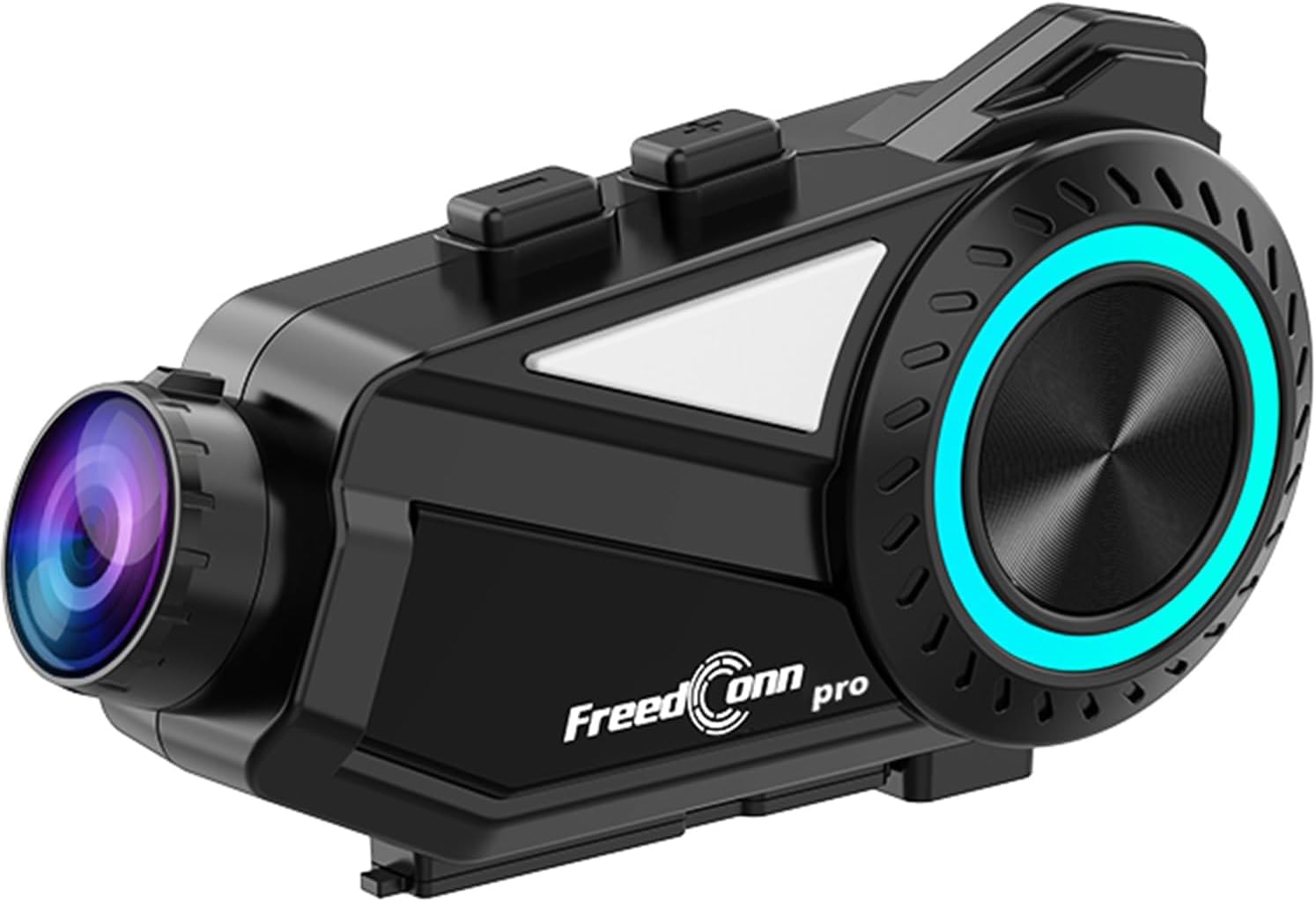
A sleek, black FreedConn R3Pro motorcycle intercom unit, featuring a camera lens on one end and a control dial with blue LED illumination on the side. It is designed to attach to a motorcycle helmet.
Продукт бүттүview
Негизги өзгөчөлүктөрү
- Bluetooth 5.1 туташуусу: High-speed chip for stable connections, supporting HFP/HSP/A2DP protocols.
- Топтук интерком: Supports up to 6 riders simultaneously with a communication range of 1.2km.
- 2K Camera & Loop Recording: Captures clear 1440p video, with adjustable lens and 360-degree unit rotation. Supports up to 512GB memory cards.
- Өркүндөтүлгөн ызы-чууну жокко чыгаруу: CVC and DSP/C technologies reduce wind and engine noise for clear audio up to 120km/h.
- Узак мөөнөттүү батарея: 2000mAh battery provides up to 45 hours of talk time and 7 hours of continuous recording.
- Dedicated Mobile App: "RoadCam" app for real-time video viewing and downloading via Wi-Fi.
- FM радиосу: Built-in FM radio function for entertainment and information.
- Үн жардамчысын колдоо: One-touch activation for hands-free control.
- IP65 Суу жана чаң өткөрбөйт: Ар кандай аба ырайынын шарттарына туруштук берүү үчүн иштелип чыккан.
- Универсалдуу жупташуу: Compatible with other intercom brands (FODSPORTS, SENA) and various Bluetooth devices.
Пакеттин мазмуну

This image displays the contents of the FreedConn R3Pro package, including the Bluetooth kit, 2-in-1 soft & hard microphones, hook clip, velcro clip, headphone velcro, USB cable, and manual. Below, a seven-step visual guide illustrates how to install the intercom unit onto a motorcycle helmet.
The FreedConn R3Pro package typically includes:
- FreedConn R3Pro Intercom Unit
- 2-in-1 Soft & Hard Microphones
- Helmet Mounting Kit (Hook Clip, Velcro Clip)
- Кулакчын үчүн липучкалар
- USB заряддоо кабели
- User Manual
Компонент диаграммасы

A detailed diagram of the FreedConn R3Pro unit, highlighting its various buttons and ports. Labels indicate the camera, WiFi button, recorder power ON/OFF, record/pause button, multi-function button, Bluetooth ON/OFF/intercom button, LED indicator, volume/next track, volume/previous track, microphone, earphone jack, reset button, TF card slot, and charging/USB port.
Familiarize yourself with the buttons and ports on your R3Pro unit:
- Камера: Integrated 2K camera lens.
- WiFi баскычы: Колдонмого туташуу үчүн Wi-Fi'ды иштетет.
- Recorder Power ON/OFF / Record/Pause Button: Controls camera recording.
- Көп функциялуу баскыч: Used for various controls including pairing and voice assistant.
- Bluetooth ON/OFF / Intercom Button: Manages Bluetooth and intercom functions.
- LED көрсөткүчү: Түзмөктүн абалын көрсөтөт.
- Volume / Next Track: Adjusts volume and skips tracks.
- Volume / Previous Track: Adjusts volume and goes to previous tracks.
- Микрофон порту: Connects the external microphone.
- Наушник джек: Connects the helmet speakers.
- Калыбына келтирүү баскычы: Түзмөктү баштапкы абалга келтирүү үчүн.
- TF карта уячасы: For inserting a microSD card for recording.
- Charging / USB Port: Заряддоо жана маалыматтарды өткөрүү үчүн.
Жайгашуу
1. Туулга орнотуу
Follow these steps to securely install the R3Pro unit on your motorcycle helmet:
- Attach the hook clip or velcro clip to the side of your helmet.
- Mount the R3Pro unit onto the attached clip.
- Insert the microphone into the helmet's interior, positioning it near your mouth.
- Attach the speakers inside the helmet using the provided velcro pads, ensuring they are aligned with your ears.
- Connect the microphone and speaker cables to the corresponding ports on the R3Pro unit.
2. Алгачкы жупташтыруу (Bluetooth)

An illustration showing the internal Bluetooth 5.1 chip of the FreedConn R3Pro, emphasizing high-speed communication, energy saving, low latency, and ultra-stability. An inset image demonstrates the multi-function button used for automatic pairing after the initial setup.
The R3Pro features automatic pairing after the first successful connection:
- Ensure your R3Pro unit is charged.
- Turn on the R3Pro unit.
- Смартфонуңузда же башка түзмөгүңүздө Bluetooth'ду иштетиңиз.
- Издөө "FreedConn R3Pro" in your device's Bluetooth settings and select it to pair.
- Once paired, the unit will automatically connect to your device when powered on.
3. App Connection (RoadCam)

This image illustrates the loop recording capability of the R3Pro and its integration with the "RoadCam" smartphone application. A motorcycle rider is shown, with the app interface on a phone displaying real-time video footage, indicating that recorded videos can be viewed and downloaded via Wi-Fi.
To connect to the dedicated "RoadCam" app:
- Смартфонуңуздун колдонмолор дүкөнүнөн "RoadCam" тиркемесин жүктөп алыңыз.
- Turn on the R3Pro unit and activate its Wi-Fi function (refer to the component diagram for the Wi-Fi button).
- Connect your smartphone to the R3Pro's Wi-Fi network (SSID and password usually found in the manual or on the device).
- Open the "RoadCam" app to view real-time video, manage recordings, and download files.
Иштөө нускамалары
Күйгүзүү/өчүрүү
- Күйгүзүү: Press and hold the Power button (refer to component diagram) until the LED indicator lights up.
- Өчүрүү: LED индикатору өчмөйүнчө Кубат баскычын басып, кармап туруңуз.
Домофондук байланыш

An image depicting multiple motorcycle riders on a road, connected wirelessly by the FreedConn R3Pro intercoms. It highlights the automatic communication reconnection feature, allowing riders to rejoin the conversation seamlessly even if they temporarily separate up to 1.2km.
- Домофонду баштоо: Press the Intercom button to start a conversation with paired units.
- Топтук интерком: The R3Pro supports up to 6 riders for simultaneous communication. Follow the specific pairing instructions in the full manual for multi-unit connections.
- Автоматтык кайра туташуу: If riders separate and exceed the 1.2km range, the units will automatically reconnect once they are back within range.
Камеранын иштеши

This image demonstrates the adjustable camera features of the FreedConn R3Pro. It shows the camera lens can be adjusted by 30 degrees and the main unit can rotate 360 degrees, allowing riders to capture various angles.
- Жазууну баштоо/Токтотуу: Press the Record/Pause button (refer to component diagram) to start or stop video recording.
- Цикл жаздыруу: Камера циклдик жаздырууну колдойт, автоматтык түрдө эң эскисинин үстүнөн жазат fileэстутум картасы толгондо.
- Камераны тууралоо: The camera lens can be adjusted by 30 degrees, and the entire unit can rotate 360 degrees for optimal viewбурчтар.
- Эстутум картасы: Insert a microSD card (up to 512GB) into the TF card slot before recording.
Музыка ойнотуу жана бөлүшүү

This image illustrates the R3Pro's universal pairing with various Bluetooth devices like smartphones, action cameras, and other Bluetooth earphones. It also shows two riders sharing music, emphasizing the ability to enjoy favorite tunes with a partner.
- Ойнотуу/тындыруу: Use the multi-function button for music control.
- Кийинки / Мурунку трек: Use the Volume/Next Track and Volume/Previous Track buttons.
- Музыка бөлүшүү: Share audio with a paired intercom unit up to 50 meters away.
FM радиосу

A motorcycle rider is shown with the R3Pro, indicating the built-in FM radio feature. The image displays a frequency range from 76-108MHz, suggesting support for Japanese frequencies, and mentions support for sports broadcasts and news.
- FM радиосун иштетүү: Press the designated FM radio button (refer to the full manual for specific button assignment).
- Каналдарды сканерлөө: The unit will automatically scan and save available FM stations.
- Каналдарды өзгөртүү: Use the Volume/Next Track and Volume/Previous Track buttons to switch between stations.
Телефон чалуулар

An image showing a motorcycle rider receiving a call, with a graphic indicating automatic answering after 15 seconds of no operation. It also states that hands-free calls are possible while riding, and music playback resumes after the call ends.
- Чакырууга жооп берүү: The R3Pro supports automatic answering after 15 seconds of no operation. You can also tap the multi-function button to answer.
- Чакырууну аяктоо: Tap the multi-function button to end a call.
- Чакырууну четке кагуу: Кирүүчү чалуудан баш тартуу үчүн көп функциялуу баскычты басып, кармап туруңуз.
- Кош телефон байланышы: The unit can connect to two smartphones simultaneously, allowing real-time switching between call, music, and navigation functions.
Үн жардамчысы

An illustration showing how to activate the voice assistant by long-pressing the multi-function button for 2 seconds. Examples of voice commands are displayed, such as "Издөө gas station," "Call Mr. Matsumoto," "What day is today?", and "How's the weather tomorrow?".
To activate your smartphone's voice assistant (e.g., Siri, Google Assistant):
- Иштетүү: Көп функциялуу баскычты 2 секунд басып туруңуз.
- Once activated, you can issue commands for navigation, calls, weather checks, and more.
Noise Cancellation

A diagram illustrating the effect of noise cancellation, showing sound waves before and after processing, with a significant reduction in noise. It also displays the internal components of the speaker, highlighting Hi-Res audio quality and an omnidirectional microphone for clear conversations up to 120km/h.
The R3Pro features advanced CVC and DSP/C noise cancellation technology, which automatically reduces ambient noise such as wind and engine sounds. This ensures clear voice communication and high-quality music playback even at speeds up to 120km/h.
Техникалык тейлөө
Батареяны заряддоо

Сүрөт шоуcasing the 2000mAh battery of the R3Pro, indicating approximately 2.5 hours for a full charge. It highlights extended usage times: 42 hours for music, 33 hours for talk, and 7-8 hours for recording, with support for up to 512GB memory cards for loop recording.
- Connect the R3Pro to a power source using the provided USB charging cable via the Charging/USB Port.
- Толук кубаттоо, адатта, болжол менен 2.5 саатты талап кылат.
- LED индикатору кубаттоо абалын көрсөтөт (мисалы, кубаттоо үчүн кызыл, толук заряддалган үчүн көк).
Тазалоо жана кам көрүү

An image showing the FreedConn R3Pro unit being splashed with water, illustrating its IP65 waterproof and dustproof rating. This indicates stable communication and recording are possible even in sudden rain or bad weather conditions.
- Аппаратты жумшак менен сүртүңүз, гamp кездеме. Катуу химиялык заттарды же абразивдүү тазалагычтарды колдонбоңуз.
- Аксессуарларды заряддоо же туташтыруудан мурун бардык порттор кургак экенин текшериңиз.
- The IP65 rating protects against water jets and dust, but avoid submerging the unit in water.
Проблемаларды чечүү
Жалпы маселелер жана чечимдер
| Маселе | Мүмкүн себеп | Чечим |
|---|---|---|
| Түзмөк күйбөйт | Low battery; Faulty power button | Charge the unit fully; Contact support if issue persists. |
| Смартфон менен жупташтыруу мүмкүн эмес | Bluetooth not enabled; Unit not in pairing mode; Interference | Ensure Bluetooth is on; Put R3Pro in pairing mode; Move away from other devices; Reset unit. |
| Домофон туташпай жатат | Units out of range; Incorrect pairing sequence; Low battery | Ensure units are within 1.2km; Re-pair units; Charge batteries. |
| Poor audio quality/noise | Microphone/speaker placement; High wind noise; Interference | Adjust microphone/speaker; Ensure CVC/DSP is active; Check for obstructions. |
| Камера жаздырбай жатат | No microSD card; Full microSD card; Card error | Insert/replace microSD card; Format card; Check card compatibility. |
| Колдонмого туташуу маселелери | Wi-Fi not enabled on R3Pro; Incorrect Wi-Fi password; App not updated | Enable R3Pro Wi-Fi; Re-enter password; Update RoadCam app. |
If you encounter issues not listed here or if the suggested solutions do not resolve the problem, please refer to the comprehensive troubleshooting section in the full user manual or contact customer support.
Техникалык шарттар
| Өзгөчөлүк | Деталь |
|---|---|
| Бренд | FreedConn |
| Модель аты | R3PRO |
| Байланыш технологиясы | Bluetooth 5.1, Wi-Fi |
| Домофон диапазону | Up to 1.2 km (multi-person) |
| Топтук интерком | Up to 6 riders simultaneously |
| Видео тартуунун резолюциясы | 1440p (2K) |
| Камеранын өзгөчөлүктөрү | 30-degree lens adjustment, 360-degree unit rotation, Loop Recording |
| Эстутум картасын колдоо | 512 ГБ чейин microSD |
| Noise Cancellation | CVC, DSP/C |
| Батарея сыйымдуулугу | 2000mAh литий-ион |
| Үзгүлтүксүз сүйлөшүү убактысы | 45 саатка чейин |
| Үзгүлтүксүз жаздыруу убактысы | Болжол менен 7 саат |
| Заряддоо убактысы | Болжол менен 2.5 саат |
| Суу өткөрбөйт рейтинги | IP65 |
| Өлчөмдөр | 14.8 x 11.5 x 6.4 см |
| Салмагы | 450 г |
Кепилдик жана колдоо
The FreedConn R3Pro comes with a 1 жылдык кепилдик сатып алынган күндөн тартып өндүрүш кемчиликтерин жабуу. Кепилдик дооматтары үчүн сатып алганыңыздын далилин сактап коюңуз.
For technical support, troubleshooting assistance, or warranty inquiries, please contact FreedConn customer service through the retailer where you purchased the product or visit the official FreedConn webбайланыш маалыматы үчүн сайт.


