1. Киришүү
Thank you for choosing the OUKITEL P1500EPLUS Portable Power Station. This device is a high-capacity, versatile power solution designed for various applications, including outdoor adventures, emergency backup, and off-grid living. Featuring a robust 1536Wh LiFePO4 battery and an 1800W (3600W peak) AC output, it provides reliable power for a wide range of electronic devices and appliances. This manual provides essential information for safe operation, setup, maintenance, and troubleshooting.

1.1-сүрөт: The OUKITEL P1500EPLUS portable power station being used in various scenarios: camping, home backup, fishing, and inside a car.
2. Коопсуздук нускамалары
Please read and understand all safety instructions before operating the OUKITEL P1500EPLUS. Failure to follow these instructions may result in electric shock, fire, or serious injury.
- Бөлүктү бөлбөөгө, оңдоп же өзгөртпөңүз.
- Аппаратты оттон, суудан жана экстремалдык температурадан алыс кармаңыз.
- Do not use the unit in environments with high humidity or corrosive substances.
- Ашыкча ысып кетүүнүн алдын алуу үчүн колдонуу учурунда туура желдетүүнү камсыз кылыңыз.
- Балдар жана үй жаныбарлары жетпеген жерде сактаңыз.
- Түпнуска же сертификатталган аксессуарларды жана кубаттоочу кабелдерди гана колдонуңуз.
- The integrated LiFePO4 battery is designed for safety and longevity, offering up to 4000 charge cycles and a 10-year lifespan. The SuperSafe BMS (Battery Management System) provides protection against short circuits, overheating, and overloads.
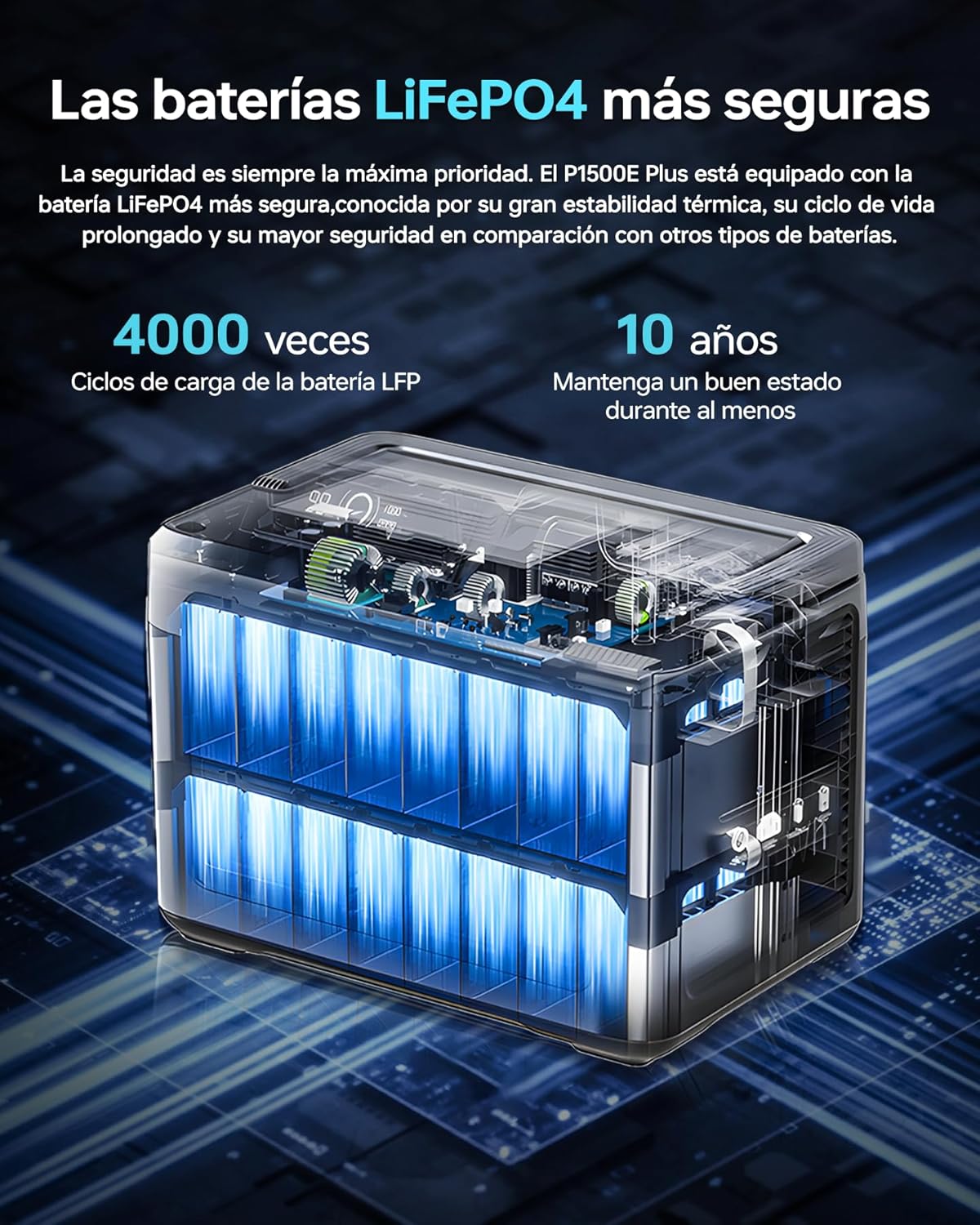
2.1-сүрөт: Diagram illustrating the internal structure of the OUKITEL P1500EPLUS LiFePO4 battery, highlighting its safety and longevity with 4000 charge cycles and 10 years lifespan.
3. Пакеттин мазмуну
Сураныч, бардык буюмдар бар экенин текшерүү үчүн пакетти текшериңиз:
- OUKITEL P1500EPLUS Portable Power Station x 1
- PV100 Solar Panel x 1
- AC Кубат кабели x 1
- MC4 to XT60 Cable x 1
- Bluetooth Pairing Pin x 1
- Кепилдик картасы x 1
- Колдонуучунун колдонмосу x 1
4. Продукт бүтүп калдыview
4.1. Физикалык өлчөмдөр жана салмак
The OUKITEL P1500EPLUS is designed to be compact and portable for its capacity.

4.1-сүрөт: OUKITEL P1500EPLUS portable power station with dimensions: 13.62in (L), 8.97in (W), 9.88in (H) and weight 31.30lb.
4.2. Control Panel and Output Ports
The front panel of the P1500EPLUS features a clear display and multiple output ports to power various devices simultaneously.

4.2-сүрөт: Жакын план view of the OUKITEL P1500EPLUS control panel, detailing all 11 output ports including AC, DC, USB-A, USB-C, and car lighter socket.
The unit provides 11 output ports:
- AC чыгаруу: 4 x 1800W AC outlets (Pure Sine Wave)
- USB-C чыгышы: 1 x USB Type-C PD100W, 1 x USB Type-C PD20W
- USB-A чыгаруу: 2 x USB QC3.0, 2 x USB-A 5V/2.4A
- DC чыгаруу: 2 x DC5521 (12V/3A)
- Унаа порту: 1 x Car Charging Port (12V/10A)

4.3-сүрөт: OUKITEL P1500EPLUS power station with 1536Wh capacity, showing 4 AC outputs, 1 USB-C 100W, 2 USB-A 5V/2.4A, 1 USB-QC3.0 20W, 2 DC 12V/3A, and 1 car port.
5. Орнотуу
5.1. Баштапкы заряддоо
Before first use, it is recommended to fully charge the OUKITEL P1500EPLUS. Connect the provided AC power cable to the AC input port on the power station and plug it into a wall outlet. The display will indicate the charging status. For optimal battery health, fully charge the unit at least once every three months if not in regular use.
5.2. Connecting the Solar Panel (PV100)
To charge using solar power, unfold the PV100 solar panel and position it in direct sunlight. Connect the MC4 connectors from the solar panel to the MC4 to XT60 cable, then connect the XT60 end to the XT60 input port on the power station. The unit will automatically detect solar input and begin charging.
6. Иштөө нускамалары
6.1. Charging the P1500EPLUS
The P1500EPLUS supports multiple charging methods:
- AC заряддоо: Connect to a standard wall outlet using the AC power cable. Supports fast charging up to 1200W, reaching 100% in approximately 1 hour and 40 minutes. Slow charging (Max 500W) is also available to extend battery lifespan.
- Күн кубаты: Connect the PV100 solar panel. Supports up to 500W solar input, charging to 100% in approximately 3 hours and 20 minutes under ideal sunlight conditions.
- Унаа заряддоо: Use a compatible car charger (not included) to charge from your vehicle's 12V/24V outlet. Charging time is approximately 12 hours (12V) or 6 hours (24V).
- AC + Күн энергиясы менен кубаттоо: Combine AC and solar input for the fastest charging, up to 1700W, achieving 100% in approximately 59 minutes.

6.1-сүрөт: OUKITEL P1500EPLUS power station being charged via AC outlet and a solar panel, showing charging times for different input methods.
6.2. Discharging Devices
To power your devices, press the corresponding output button (AC, DC, USB) on the control panel. The display will show the active outputs and power consumption. Ensure the total power draw of your devices does not exceed the unit's rated output of 1800W (3600W peak).
6.3. Үзгүлтүксүз электр менен камсыздоо (UPS) функциясы
The P1500EPLUS features an Uninterrupted Power Supply (UPS) function with a switching time of less than 10 milliseconds. When connected to an AC wall outlet and simultaneously powering devices, the unit will automatically switch to battery power in the event of a power outage, ensuring continuous operation for sensitive electronics like computers, servers, and medical equipment.

6.2-сүрөт: OUKITEL P1500EPLUS power station providing uninterrupted power supply (UPS) to a desktop computer setup during a simulated power outage.
6.4. Колдонмону башкаруу
The OUKITEL P1500EPLUS can be controlled via a dedicated mobile application. Use the provided Bluetooth pairing pin to connect your smartphone to the power station. The app allows you to monitor battery status, adjust discharge limits, control charging speed, and manage other settings remotely.

6.3-сүрөт: A person using a smartphone to control the OUKITEL P1500EPLUS portable power station via its dedicated mobile application.
7. Техникалык тейлөө
7.1. Сактоо
When storing the unit for extended periods, ensure it is charged to approximately 50-80% and stored in a cool, dry place away from direct sunlight. Recharge the unit every 3-6 months to maintain battery health.
7.2. Тазалоо
Электр станциясынын сыртын тазалоо үчүн кургак, жумшак чүпүрөктү колдонуңуз. Абразивдүү тазалоочу каражаттарды колдонбоңуз же агрегатты сууга салбаңыз.
8. Кыйынчылыктарды
If you encounter issues with your OUKITEL P1500EPLUS, please refer to the following common problems and solutions:
- Түзмөк күйбөй жатат: Ensure the power button is pressed and held for a few seconds. Check if the battery is completely depleted and try charging it.
- Порттардан чыгуу жок: Ensure the specific output button (AC, DC, USB) is activated. Check if the device you are trying to power is within the power station's output limits.
- Жай кубаттоо: Verify that the charging cable is securely connected. For solar charging, ensure the solar panel is in direct sunlight and not obstructed. Check if the slow charging mode is intentionally activated via the app or unit settings.
- Ашыкча жүктөө эскертүүсү: If an overload warning appears, disconnect some devices to reduce the total power draw. The unit will automatically resume normal operation once the load is within limits.
- Колдонмо туташуу көйгөйлөрү: Ensure Bluetooth is enabled on your smartphone and the power station. Try restarting both devices and re-pairing using the Bluetooth pairing pin.
Эгер көйгөй чечилбесе, кардарларды колдоо менен байланышыңыз.
9. Техникалык шарттар
| Өзгөчөлүк | Спецификация |
|---|---|
| Модел | P1500EPLUS |
| Батарея түрү | LiFePO4 |
| Кубаттуулугу | 1536 Втч (480000 мАч) |
| AC Output | 1800W (3600W Peak), 220-240V |
| USB-C чыгышы | 1 x PD100W, 1 x PD20W |
| USB-A чыгаруу | 2 x QC3.0, 2 x 5V/2.4A |
| DC Output | 2 x DC5521 (12V/3A) |
| Car Port Output | 1 x 12V/10A |
| AC Input (Max) | 1200 Вт |
| Күн киргизүү (макс.) | 500 Вт |
| AC + Solar Input (Max) | 1700 Вт |
| UPS которуштуруу убактысы | Ms 10 мс |
| Өлчөмдөрү (L x W x Y) | 38.6 x 22.8 x 30.5 см (13.62 x 8.97 x 9.88 дюйм) |
| Салмагы | Болжол менен 14.2 кг (31.30 фунт) |
| Батареянын иштөө мөөнөтү | 4000 циклден 80%+ кубаттуулукка чейин |
10. Кепилдик жана колдоо
The OUKITEL P1500EPLUS Portable Power Station comes with a 2 жылдык кепилдик сатып алынган күндөн тартып. Бул кепилдик өндүрүштүн кемчиликтерин жана нормалдуу колдонуудагы чеберчиликти камтыйт.
For warranty claims, technical support, or any questions regarding the use of your product, please refer to the contact information provided on your warranty card or visit the official OUKITEL website. Please have your purchase receipt and product serial number ready when contacting support.