Introduction
Welcome to the EMPIRE GAMING K243 Mechanical Gaming Keyboard user manual. This guide provides comprehensive instructions for setting up, operating, and maintaining your new keyboard. The K243 is designed for gamers and typists seeking a responsive and durable input device with customizable RGB lighting.
Featuring 111 AZERTY layout keys, MX Red mechanical switches, N-Key Rollover (NKRO) anti-ghosting, and a detachable USB-C cable, the K243 offers a premium experience across multiple platforms, including PC and gaming consoles.

Figure 1: EMPIRE GAMING K243 Mechanical Gaming Keyboard
Жайгашуу
Пакеттин мазмуну
- EMPIRE GAMING K243 Mechanical Gaming Keyboard
- Алынуучу USB-C кабели
Баскычтопту туташтыруу
- Locate the USB-C port on the back of your K243 keyboard.
- Берилген USB-C кабелинин бир учун клавиатуранын USB-C портуна туташтырыңыз.
- Connect the other end of the USB-C cable to an available USB-A port on your computer or gaming console.
- The keyboard is plug-and-play; no additional drivers are required for basic functionality.
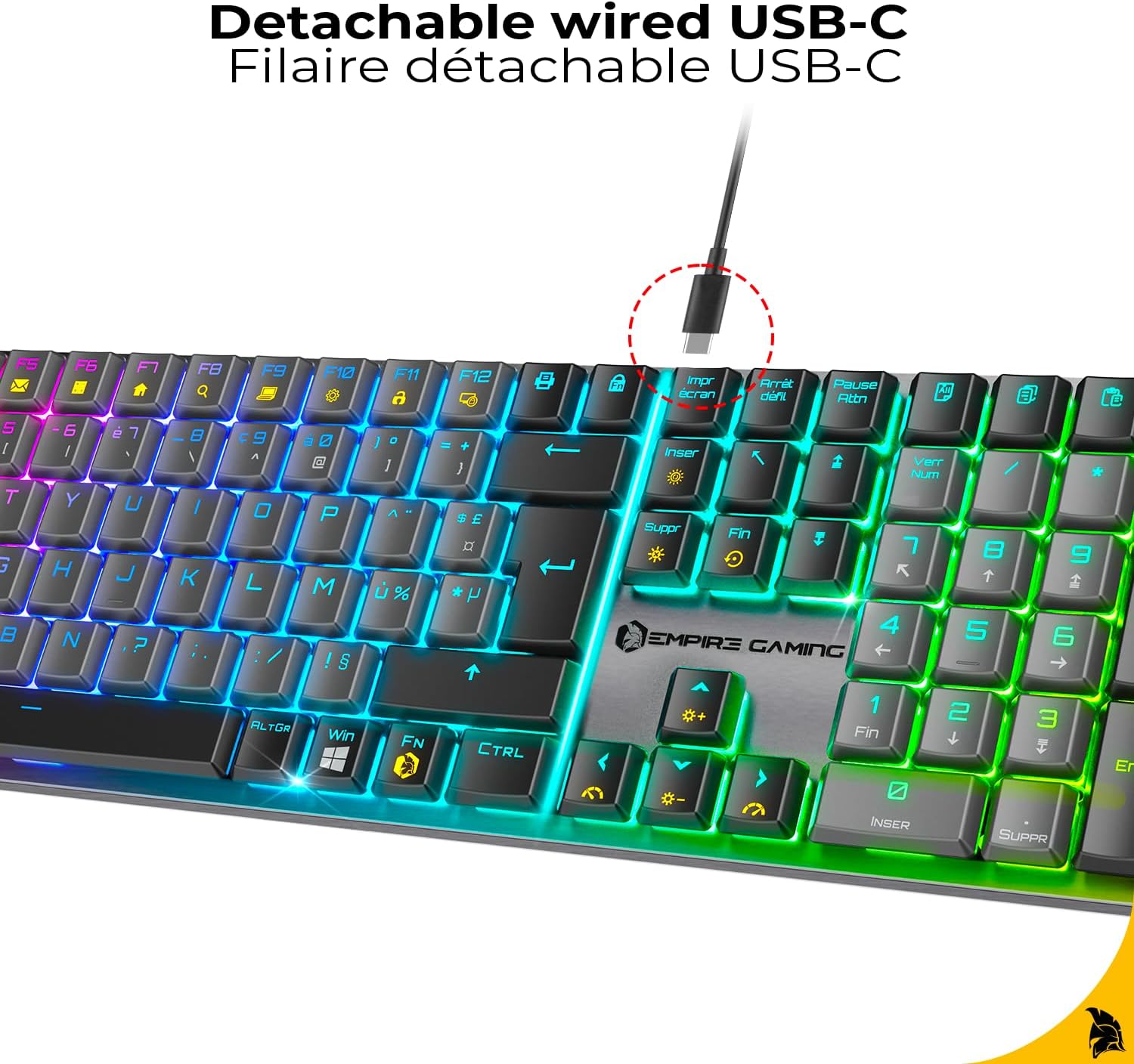
Figure 2: Detachable USB-C Cable Connection
Шайкештик
The EMPIRE GAMING K243 keyboard is compatible with:
- PC (Windows operating systems)
- PlayStation 5 (PS5)
- PlayStation 4 (PS4)
- Xbox консолдору
The keyboard features an AZERTY layout, optimized for French-speaking users.

Figure 3: AZERTY Keyboard Layout
Иштөө нускамалары
Mechanical MX Red Switches
The K243 is equipped with MX Red mechanical switches, known for their linear travel and low actuation force. This provides a smooth, precise, and responsive typing experience, ideal for both competitive gaming and extended typing sessions. The switches are designed for durability and consistent performance.

Figure 4: MX Red Mechanical Switches
N-Key Rollover (NKRO) Anti-Ghosting
The keyboard features N-Key Rollover (NKRO) technology, ensuring that every keystroke is registered accurately, even when multiple keys are pressed simultaneously. This anti-ghosting feature is crucial for fast-paced gaming, preventing missed inputs and ensuring maximum precision.

Figure 5: NKRO Anti-Ghosting
RGB жарык көзөмөлдөө
The K243 keyboard offers dynamic RGB backlighting with 24 predefined effects. All lighting adjustments are made directly on the keyboard using function key combinations, without the need for additional software.
- Жарыктандыруу режимин өзгөртүү: Басыңыз Fn + Ins to cycle through the 24 predefined RGB effects.
- Жарык түсүн өзгөртүү: Басыңыз Fn + Del to change the color within certain lighting modes.
- Жарыктыкты жөндөө: Басыңыз Fn + ↑ (Өйдө жебе) жарыктыгын жогорулатуу үчүн жана Fn + ↓ (Төмөн жебе) жарыктыгын азайтуу үчүн.
- Эффект ылдамдыгын тууралоо: Басыңыз Fn + ← (Сол жебе) таасир ылдамдыгын азайтуу үчүн жана Fn + → (Оңго жебе) эффект ылдамдыгын жогорулатуу үчүн.
- Windows ачкычын кулпулоо: Басыңыз Fn+Win to disable the Windows key, preventing accidental presses during gaming.

Figure 6: Customizable RGB Effects
Техникалык тейлөө
Клавиатураңызды тазалоо
To ensure the longevity and optimal performance of your EMPIRE GAMING K243 keyboard, regular cleaning is recommended:
- Ажыратуу: Always disconnect the keyboard from your device before cleaning.
- Чаңды тазалоо: Use a can of compressed air to blow away dust and debris from between the keycaps. Hold the can upright to prevent propellant discharge.
- Бетти тазалоо: Gently wipe the keycaps and keyboard surface with a soft, lint-free cloth lightly dampсуу же жумшак, абразивдүү эмес тазалоо эритмеси менен. Ашыкча нымдуулуктан сактаныңыз.
- Кежир тактар: For stubborn stains, a cotton swab lightly dampened with isopropyl alcohol can be used on individual keycaps.
- Кургатуу: Ensure the keyboard is completely dry before reconnecting it to your device.
Do not immerse the keyboard in water or use harsh chemicals, as this can damage the electronic components.
Проблемаларды чечүү
If you encounter issues with your EMPIRE GAMING K243 keyboard, please refer to the following common troubleshooting steps:
| Көйгөй | Мүмкүн чечим |
|---|---|
| Клавиатура жооп бербей жатат. |
|
| RGB lighting is not working or stuck. |
|
| Keys are not registering correctly (ghosting). |
|
| Windows key is not working. |
|
Техникалык шарттар
| Өзгөчөлүк | Деталь |
|---|---|
| Бренд | EMPIRE GAMING |
| Модел | K243 |
| Байланыш | Wired USB-C (Detachable) |
| Баскычтоптун түрү | Механикалык |
| Которуу түрү | MX Red |
| Ачкычтын жайгашуусу | AZERTY (FR) |
| Ачкычтардын саны | 111 |
| Anti-Ghosting | N-Key Rollover (NKRO) |
| Арткы жарыктандыруу | RGB with 24 Predefined Effects |
| Шайкеш түзмөктөр | PC, PS5, PS4, Xbox |
| Өлчөмдөрү (L x W x Y) | 42.8 x 11.9 x 2.4 см (16.85 x 4.69 x 0.94 дюйм) |
| Салмагы | 665 г (1.47 фунт) |
| Power Source | USB Power |
| Камтылган компоненттер | Keyboard, USB-C Cable |

Figure 7: Keyboard Dimensions
Кепилдик жана колдоо
Өндүрүүчүнүн Кепилдиги
The EMPIRE GAMING K243 Mechanical Gaming Keyboard comes with a 2 жылдык өндүрүүчүнүн кепилдиги сатып алынган күндөн тартып. Бул кепилдик нормалдуу колдонуудагы материалдардагы жана жасалгадагы кемчиликтерди камтыйт. Кепилдик дооматтары үчүн сатып алганыңыздын далилин сактап коюңуз.
The warranty does not cover damage caused by misuse, accident, unauthorized modification, or external causes such as power surges.
Кардарларды колдоо
For technical assistance, warranty claims, or any questions regarding your EMPIRE GAMING K243 keyboard, please contact EMPIRE GAMING customer support through their official webсайтка же продуктуну сатып алган сатуучуга.
You can typically find contact information on the brand's official webсайт: www.empire-gaming.com


