Introduction
This manual provides instructions for the RETROSUN MR25GA AKB76046603 Magic Remote Control. This remote is designed as a replacement for original LG Magic Remote controls and offers similar functionality, including AI, pointer, and voice control features. Please read this manual carefully before use to ensure proper operation and to maximize your viewтажрыйбасы.
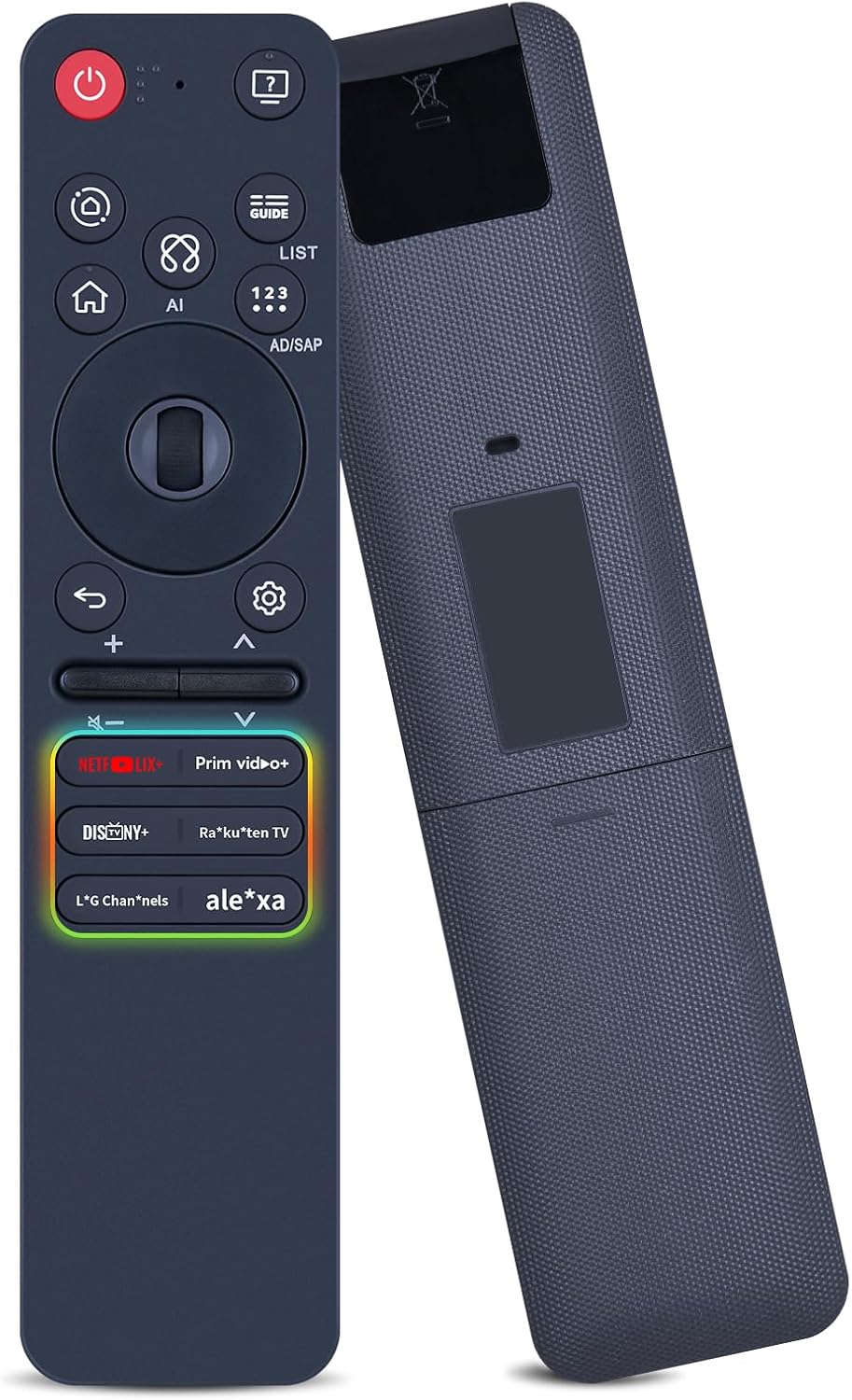
Сүрөт: алдыңкы жана арткы view of the RETROSUN MR25GA AKB76046603 Magic Remote Control, showcasing анын эргономикалык дизайны жана баскычтардын жайгашуусу.
Шайкештик
The RETROSUN MR25GA AKB76046603 Magic Remote Control is compatible with the following 2025 LG TV series:
- LG C5 Series
- LG B5 Series
- LG G5 Series
- LG M5 Series
For specific compatible TV models, please refer to the detailed list below:

Image: A visual representation of the remote control alongside various LG TV models (C5, B5, G5/M5 series) indicating compatibility.
Note: This remote is not compatible with LG Roku TVs.
Орнотуу жана жупташтыруу
1. Батареяны орнотуу
The remote control requires two (2) AA batteries (not included).
- Алыстан башкаруу пультунун артындагы батарея бөлүмүнүн капкагын ачыңыз.
- Бөлүмдүн ичинде көрсөтүлгөндөй, туура полярдуулукту (+ жана -) текшерип, эки AA батарейкасын салыңыз.
- Батарея уясынын капкагын бекем жабыңыз.

Сүрөт: Жакын план view of the remote control's battery compartment, showing where to insert two AA batteries.
2. Registering (Pairing) the Magic Remote
To enable the Magic Remote's full functionality, including the pointer and voice control, it must be paired with your LG TV.
- Сыналгыңыз күйгүзүлгөнүн текшериңиз.
- Point the Magic Remote at your TV screen.
- басыңыз [Wheel (OK)] button (the scroll wheel in the center of the directional pad) on the remote control.
The remote should now be registered with your TV. If registration fails, turn the TV off and then back on, and repeat the pairing steps.

Image: A diagram illustrating the steps to register the Magic Remote, highlighting the Wheel (OK) button.
Алыстан башкарууну иштетүү
Негизги функциялар
The RETROSUN Magic Remote provides intuitive control over your LG TV. Below are the primary functions:
- Кубат баскычы (⏻): Телевизорду күйгүзөт же өчүрөт.
- Сан баскычтары (0-9): Канал номерлерин түз киргизүү.
- Үнүн жогорулатуу/төмөндөтүү (+ / -): Adjusts the TV volume.
- Канал өйдө/төмөн (▲ / ▼): Changes TV channels.
- Үнсүз баскыч (🔇): Mutes or unmutes the TV sound.
- Башкы бет баскычы (⌂): Accesses the TV's Home screen or Smart TV menu.
- Артка баскычы (↶): Мурунку экранга же менюга кайтарат.
- Орнотуулар баскычы (⚙): Opens the TV's settings menu.
- Directional Pad & Wheel (OK): Navigate menus. The wheel also functions as an OK/Select button and for scrolling.
Magic Remote Features
- Көрсөткүч функциясы: Move the remote to control an on-screen cursor, similar to a computer mouse. This allows for quick selection of items.
- Voice Control (AI): Press the dedicated AI button to activate voice commands for searching content, controlling TV functions, or asking questions.

Image: A visual guide demonstrating the Magic/Air mouse function, showing how moving the remote translates to cursor movement on the TV screen.
Shortcut Buttons for Streaming Services
The remote includes dedicated shortcut buttons for quick access to popular streaming applications:
- Netflix
- Prime Video
- Disney+
- Rakuten TV
- LG каналдары
- Alexa (for voice assistant functionality)

Image: The remote control with six shortcut buttons prominently highlighted, each corresponding to a popular streaming service or voice assistant.
Кароо жана тейлөө
- Keep the remote control dry. Moisture can damage the internal circuits.
- Пультту өтө жогорку температурага дуушар кылбаңыз.
- Пультту түшүрүп алуудан же катуу соккуга кабылтуудан алыс болуңуз.
- Clean the remote with a soft, dry cloth. Do not use abrasive cleaners or solvents.
- Remove batteries if the remote control will not be used for an extended period to prevent battery leakage.
Проблемаларды чечүү
Алыстан жооп бербейт
- Батареяларды текшерүү: Ensure batteries are correctly inserted and not depleted. Replace with new AA batteries if necessary.
- Line of Sight: Ensure there are no obstructions between the remote and the TV's sensor.
- Re-register Remote: If the remote stops responding or the pointer function is erratic, try re-registering it (see "Registering the Magic Remote" section).
Deregistering (Unpairing) the Magic Remote
If you need to unpair the remote from your TV, follow these steps:
- басып, кармап туруңуз [ҮЙ] баскычы жана [КАЙТУУ] button simultaneously for 5 seconds. This will unpair the Magic Remote from your TV.
- To disconnect and immediately re-register the Magic Remote, press and hold the [GUIDE] баскычын 5 секунддан ашык басып туруңуз.

Image: A diagram illustrating the steps to deregister the Magic Remote, highlighting the HOME, RETURN, and GUIDE buttons.
Техникалык шарттар
| Модель номери | MR25GA AKB76046603 |
| Бренд | РЕТРОСУН |
| Шайкеш түзмөктөр | 2025 LG C5, B5, G5, M5 Series Televisions |
| Power Source | 2 x AA батарейкалар (киргизилген эмес) |
| Өзгөчөлүктөр | Ergonomic design, Voice Search (AI), Pointer Function, Dedicated Streaming Buttons |
| Түс | Кара |
| Элемент Салмагы | 2.46 унция (болжол менен 70 грамм) |
| Пакеттин өлчөмдөрү | 6.89 x 1.65 x 0.59 дюйм (болжол менен 17.5 x 4.2 x 1.5 см) |
Колдоо жана кепилдик
For any questions, technical assistance, or support regarding your RETROSUN Magic Remote Control, please contact the seller through the Amazon platform's messaging tools. The seller aims to respond to inquiries within 12 hours.
Information regarding specific warranty terms is not provided in this manual. Please refer to your purchase documentation or contact the seller for warranty details.


