1. Киришүү
This manual provides essential information for the safe and efficient operation of your Thomson 43FT2S15 FHD LED Smart TV. Please read this manual thoroughly before using the television and retain it for future reference.
2. Коопсуздук маалыматы
Өрт, электр тогуна урунуу жана жаракат алуу коркунучун азайтуу үчүн бул продуктуну колдонууда ар дайым негизги коопсуздук чараларын сактаңыз.
- Телевизорду жамгырга же нымга тийгизбеңиз.
- Желдетүүчү тешиктерди жаппаңыз.
- Электр шнурунун туура жерге туташтырылышын камсыз кылыңыз.
- Телевизорду туруксуз арабага, стендге, штативке, кронштейнге же столго койбоңуз.
- Чагылган бороондо же көпкө чейин пайдаланылбай турганда сыналгыны розеткадан ажыратыңыз.
- Бардык тейлөөлөрдү квалификациялуу тейлөө кызматкерлерине тапшырыңыз.
3. Пакеттин мазмуну
Төмөндө тизмеленген нерселердин баары пакетиңизге камтылганын текшериңиз:
- Thomson 43FT2S15 FHD LED Smart TV
- Кубаттуу адаптер
- Алыстан башкаруу
- Колдонуучунун Колдонмосу (бул документ)
- Кепилдик картасы

Сүрөт: алдыңкы view of the Thomson 43FT2S15 Smart TV.
4. Орнотуу
4.1 Физикалык орнотуу
The Thomson 43FT2S15 TV is designed for table mounting. Ensure the TV is placed on a stable, flat surface.

Image: Diagram showing the dimensions of the Thomson 43FT2S15 Smart TV. The screen size is 109 cm (43 inches) diagonally, with a width of 95 cm and height of 60 cm (including stand). The depth is 6 cm.
Өлчөмдөрү (W x Y x D): 95 cm x 60 cm x 6 cm (without stand, depth is 6 cm). The screen diagonal is 109 cm (43 inches).
4.2 Түзмөктөрдү туташтыруу
Тышкы түзмөктөрүңүздү телевизордогу тиешелүү портторго туташтырыңыз. Порттордун жайгашкан жерлерин төмөнкү диаграммадан караңыз.
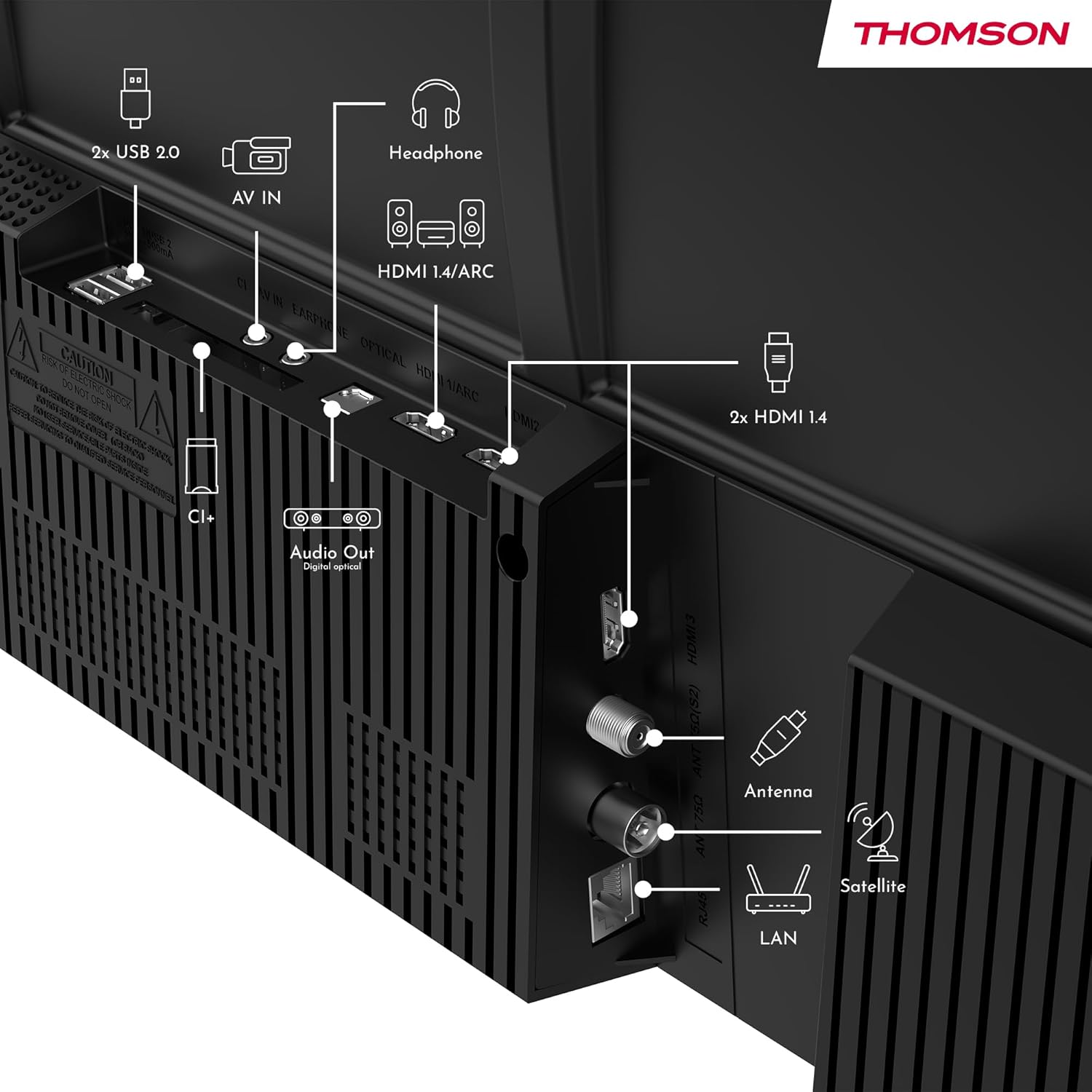
Сүрөт: Арткы view of the Thomson 43FT2S15 Smart TV showing various connection ports. These include 2x USB 2.0, AV IN, Headphone out, HDMI 1.4/ARC, Optical Audio Out, CI+, Antenna (DVB-T2/C), Satellite (DVB-S2), and LAN (Ethernet).
- HDMI: Connect external devices like Blu-ray players, game consoles, or set-top boxes. The TV has 2 HDMI 1.4 ports, one with ARC support.
- USB: For connecting USB storage devices. The TV has 2 USB 2.0 ports.
- Антенна/Спутник: Connect your terrestrial or satellite antenna for live TV.
- LAN (Ethernet): Зымдуу интернет байланышы үчүн.
- Wi-Fi: Зымсыз интернет байланышы үчүн.
- Bluetooth: For connecting compatible wireless accessories.
- Аудио чыгуу (оптикалык): Тышкы үн системасына туташуу үчүн.
- Наушник: Наушниктерди туташтыруу үчүн.
- CI+ Slot: For inserting a Conditional Access Module (CAM) for encrypted channels.
5. Иштөө нускамалары
5.1 Күйгүзүү/өчүрүү
Connect the power adapter to the TV and a power outlet. Press the power button on the remote control to turn the TV on or off.
5.2 TiVo OS and Smart Features
Your Thomson Smart TV is powered by TiVo OS, which integrates live TV, streaming applications, and on-demand services into a single, intuitive interface. Personalized recommendations help you discover new content.

Image: The Thomson Smart TV displaying the TiVo OS interface with various streaming apps like Netflix, Canal+, Prime Video, YouTube, and Disney+.
5.3 Үн менен башкаруу
Use the TiVo Voice Control feature to navigate channels, open applications, or search for content across different platforms using voice commands. The remote control includes a microphone for this function.

Image: The Thomson Smart TV remote control highlighting the voice control microphone, backlit buttons, and direct access buttons for streaming services.
5.4 Wireless Display
Mirror content from your smartphone, tablet, or laptop to the TV screen using the Wireless Display function. This allows for easy sharing of videos, photos, and applications.
5.5 Audio and Video Enhancements
- Dolby Audio: Experience enhanced sound quality with Dolby Audio, providing clear dialogue and immersive, multi-dimensional effects.

Image: A Thomson Smart TV displaying content with visual representations of sound waves, indicating the Dolby Audio feature.
- HDR10: Enjoy sharper contrast and lifelike colors with HDR10 technology, revealing details in both bright highlights and deep shadows.

Image: A split-screen comparison showing the difference between SDR (Standard Dynamic Range) and HDR10 (High Dynamic Range) image quality on a Thomson Smart TV, demonstrating improved contrast and color.
5.6 Алыстан башкаруу
The ergonomic remote control features backlit buttons for easy navigation in low light conditions. It also includes direct access buttons for popular streaming services such as Netflix, YouTube, Prime Video, Disney+, and Canal+.
6. Техникалык тейлөө
Сыналгыңыздын узак иштөөсүн жана оптималдуу иштешин камсыз кылуу үчүн төмөнкү тейлөө көрсөтмөлөрүн аткарыңыз:
- Экранды тазалоо: Экранды жумшак, түксүз чүпүрөк менен акырын сүртүңүз. Кежир издер үчүн атайын телевизорлор үчүн иштелип чыккан, экранга түздөн-түз эмес, чүпүрөккө колдонулган экран тазалагычты колдонуңуз.
- Кабинетти тазалоо: Телевизордун шкафын сүртүү үчүн жумшак, кургак чүпүрөктү колдонуңуз. Абразивдүү тазалагычтарды же эриткичтерди колдонбоңуз.
- Вентиляция: Ашыкча ысып кетүүнүн алдын алуу үчүн телевизордун артындагы желдетүү тешиктери жабылбагандыгын текшериңиз.
- Электр кабели: Электр шнурунун бузулушу бар-жоктугун дайыма текшерип туруңуз. Эгерде бузулса, алмаштыруу үчүн квалификациялуу тейлөө кызматкерлерине кайрылыңыз.
7. Кыйынчылыктарды
Телевизоруңузда көйгөйлөргө туш болсоңуз, төмөнкү жалпы көйгөйлөрдү чечүү кадамдарын караңыз:
- Кубат жок:
- Check if the power cord is securely connected to the TV and the power outlet.
- Розетка иштеп жатканын текшерүү үчүн башка түзмөктү сайыңыз.
- Жөн гана пульттун эмес, сыналгыдагы кубат баскычын басып көрүңүз.
- Сүрөт/үн жок:
- Туура киргизүү булагы тандалганын текшериңиз (мисалы, HDMI 1, Antenna).
- Сыналгы менен тышкы түзмөктөрдүн ортосундагы бардык кабелдик байланыштарды текшериңиз.
- Үнүн тууралап, сыналгынын үнү өчүп калбагандыгын текшериңиз.
- Алыстан башкаруу иштебейт:
- Пульттагы батарейкаларды алмаштырыңыз.
- Пульт менен сыналгынын IR сенсорунун ортосунда эч кандай тоскоолдуктар жок экенин текшериңиз.
- Smart TV Features Not Working (Wi-Fi/Apps):
- Интернет байланышыңызды текшериңиз. Зарыл болсо, роутерди өчүрүп-күйгүзүңүз.
- Go to the TV's network settings to ensure it's connected to Wi-Fi or Ethernet.
- Сыналгыны өчүрүп күйгүзүп көрүңүз.
For more complex issues, please contact customer support or refer to the manufacturer's webсайт.
8. Техникалык шарттар
Key technical specifications for the Thomson 43FT2S15 FHD LED Smart TV:
| Өзгөчөлүк | Спецификация |
|---|---|
| Бренд | Томсон |
| Модел | 43FT2S15 |
| Screen Size | 43 дюйм (109 см) |
| Дисплей технологиясы | LED |
| Резолюция | 1920 x 1080 (FHD) |
| Жаңыртуу ылдамдыгы | 60 Гц |
| Аспект катышы | 16:9 |
| Операция системасы | TiVo OS |
| Аудио технологиясы | Dolby Audio (Dolby Atmos encoding) |
| HDR колдоо | HDR10 |
| Байланыш | Wi-Fi, Ethernet, Bluetooth, 2x HDMI 1.4 (1x ARC), 2x USB 2.0, Optical Audio Out, AV In, Headphone, CI+ |
| Түнерлер | DVB-T2/C/S2 (Triple Tuner) |
| Колдоого алынган Интернет кызматтары | Netflix, YouTube, Prime Video, Disney+, Canal+, Browser |
| Өлчөмдөр (Продукт) | 6 x 95 x 60 см; 6.5 кг |
| Энергия эффективдүүлүгү классы | E |

Image: Energy efficiency label for the Thomson 43FT2S15 Smart TV, showing an energy class of E and energy consumption of 42 kWh/1000h (SDR) and 46 kWh/1000h (HDR).
Продукт боюнча толук маалымат алуу үчүн EPREL маалымат базасын караңыз: https://eprel.ec.europa.eu/qr/1969521
9. Кепилдик жана колдоо
Your Thomson 43FT2S15 TV comes with a warranty. Please refer to the included Warranty Card for specific terms and conditions.
For technical support or service inquiries, please contact the manufacturer:
- Өндүрүүчү: Агымview GmbH
- Webсайт: www.streamview.com
- Электрондук почта: contact@streamview.com
- Телефон: +4318900066
Please have your model number (43FT2S15) and purchase information ready when contacting support.


