1. Киришүү
Thank you for choosing the Thomson 24-inch HD LED Smart TV, model 24HT2S15. This manual provides essential information to help you set up, operate, and maintain your new television. Please read it thoroughly before use and retain it for future reference.

Сүрөт: алдыңкы view of the Thomson 24-inch HD LED Smart TV, showcasing its frameless design and key features like HD resolution and Dolby Audio.
Негизги өзгөчөлүктөрү:
- TiVo OS with Voice Control: Intuitive interface combining live TV and streaming apps, personalized recommendations, and voice commands.
- Зымсыз дисплей: Mirror your smartphone, tablet, or laptop screen to the TV.
- Dolby Audio: Enhanced sound experience with improved dialogue, detail, and surround effects.
- HDR10: Sharper contrast and realistic colors for an immersive viewтажрыйбасы.
- Арткы жарыктуу алыстан башкаруу: Easy navigation in low light with direct access buttons for popular streaming services.
- Adjustable Side Feet: Flexible positioning options for the TV.
- Үчтүк тюнер: Integrated tuners for cable, satellite, and antenna reception.
2. Кутуда эмне бар
Таңгактан чыгаргандан кийин, төмөнкү нерселердин бардыгы бар экенин текшериңиз:
- Thomson 24-inch HD LED Smart TV (Model 24HT2S15)
- Алыстан башкаруу
- Кубаттуу адаптер
- User Manual
- Кепилдик картасы
- Adjustable Side Feet (2x)
If any items are missing or damaged, please contact your retailer or Thomson customer support.
3. Орнотуу
3.1 Пакеттен чыгаруу жана жайгаштыруу
Carefully remove the TV from its packaging. It is recommended to have two people for this process. Place the TV on a stable, flat surface or mount it on a wall using a compatible VESA mount (not included).
Телевизордун айланасында жетиштүү желдетүүнү камсыз кылыңыз. Вентиляция тешиктерин жаап албаңыз.
3.2 Стендди бекитүү
If you are not wall-mounting the TV, attach the included side feet:
- Place the TV face down on a soft, clean cloth to prevent screen damage.
- Ар бир стендди телевизордун астындагы тиешелүү бурамалар тешиктери менен тууралаңыз.
- Secure the stands using the provided screws. The feet are adjustable from 30 cm to 60 cm distance.

Image: The Thomson 24-inch Smart TV showing its dimensions, including a screen diagonal of 60 cm (24 inches), width of 53 cm, and height of 37 cm with the stand. The adjustable stand feet are also illustrated.
3.3 Перифериялык түзүлүштөрдү туташтыруу
Connect your external devices to the TV's ports. Refer to the diagram below for port locations.

Сүрөт: деталдуу view of the rear connection panel of the Thomson 24-inch Smart TV, illustrating various ports including 2x USB 2.0, Antenna input, Satellite input, 3x HDMI 1.4 (one with ARC), Service port, Headphone jack, AV IN, Digital Optical Audio Out, and LAN port.
- Күч: Connect the power adapter to the TV and then to a wall outlet.
- Антенна/Спутник: Connect your antenna or satellite cable to the respective input.
- HDMI: Use HDMI cables to connect devices like Blu-ray players, game consoles, or set-top boxes. HDMI 1.4/ARC supports Audio Return Channel.
- USB: Медиа ойнотуу же программалык камсыздоо жаңыртуулары үчүн USB дисктерин салыңыз.
- LAN: Зымдуу интернет байланышы үчүн Ethernet кабелин туташтырыңыз.
- AV IN: Композиттик видео жана стерео аудиону колдонгон эски түзмөктөр үчүн.
- Наушник: Жеке угуу үчүн гарнитураны туташтырыңыз.
- Санариптик оптикалык аудио чыгышы: Connect to an external sound system for digital audio.
3.4 Алгачкы күйгүзүү жана биринчи жолу орнотуу
- Телевизорду розеткага сайыңыз.
- Пульттун же сыналгыдагы кубат баскычын басыңыз.
- Follow the on-screen instructions to select your language, country, and perform channel scanning for your triple tuner (cable/satellite/antenna).
- Connect to your Wi-Fi network by selecting it from the list and entering the password.
- Complete the TiVo OS setup, including signing in or creating an account.
4. Сыналгыңызды иштетүү
4.1 Алыстан башкаруу функциялары
The backlit remote control provides easy access to all TV functions, even in dim lighting. It includes dedicated buttons for popular streaming services.

Image: The Thomson Smart TV remote control, highlighting its backlit buttons, voice control microphone, and direct access buttons for Netflix, YouTube, Prime Video, Disney+, and Canal+.
- Кубат баскычы: Телевизорду күйгүзөт/өчөт.
- Сан баскычтары: Каналдарды түз тандаңыз.
- Навигация тактасы (өйдө/төмөн/сол/оң/ОК): Менюларды чабыттап, параметрлерди тандаңыз.
- Артка/Чыгуу: Мурунку экранга кайтуу же менюдан чыгуу.
- Үнүн жогорулатуу/төмөндөтүү: Үн деңгээлин тууралаңыз.
- Канал өйдө/төмөн: Телеканалдарды алмаштырыңыз.
- Үнсүз: Үндүн үнүн басуу же өчүрүү.
- Үй: Access the TiVo OS home screen.
- Үн менен башкаруу баскычы: Activate voice commands (microphone icon).
- Түздөн-түз кирүү баскычтары: Launch Netflix, YouTube, Prime Video, Disney+, Canal+ instantly.
4.2 TiVo OS and Smart Features
The TiVo OS provides a unified platform for live TV and streaming content. Explore personalized recommendations and access your favorite apps.

Image: The Thomson Smart TV screen showing various streaming application icons like Netflix, YouTube, Disney+, Prime Video, Plex, DAZN, Canal+, and Pluto TV, indicating integrated smart TV capabilities.
- Колдонмого мүмкүндүк алуу: Navigate to the home screen to find and launch pre-installed apps or download new ones from the app store.
- Үн менен башкаруу: Press the voice control button on your remote and speak commands to search for content, launch apps, or control TV functions.
- Зымсыз дисплей: Use the Wireless Display feature to mirror content from your compatible smartphone, tablet, or laptop directly to your TV screen.

Image: An illustration demonstrating the voice control feature of the Thomson Smart TV, showing a remote control with a microphone icon and examples of voice commands like "Open Netflix" or "Play movies with Tom Hanks."

Image: The Thomson Smart TV displaying content mirrored from a smartphone, illustrating the Wireless Display and Google Cast features for seamless content sharing.
4.3 Сүрөттү жана үндү жакшыртуу
- HDR10: Experience improved contrast, brightness, and color accuracy with HDR10 content. This technology enhances both bright and dark scenes for a more dynamic picture.
- Dolby Audio: Enjoy rich, clear, and powerful sound. Dolby Audio optimizes dialogue, enhances detail, and provides an immersive surround sound experience.

Image: A side-by-side comparison of picture quality, demonstrating the enhanced contrast and color vibrancy of HDR10 on the right compared to standard SDR on the left, with a building and landscape scene.

Image: An illustration depicting sound waves emanating from a TV screen, with the Dolby Audio logo prominently displayed, signifying enhanced audio quality for an immersive viewтажрыйбасы.
5. Техникалык тейлөө
5.1 Телевизоруңузду тазалоо
- Экран: Экранды жумшак, түксүз чүпүрөк менен акырын сүртүңүз. өжөр белгилери үчүн, бир аз гampчүпүрөккө суу же атайын экран тазалоочу каражат. Эч качан суюктукту түздөн-түз экранга чачпаңыз.
- Кабинет: Телевизордун шкафын сүртүңүз жана жумшак, кургак чүпүрөк менен туруңуз.
- Алыстан башкаруу: Clean the remote control with a soft, dry cloth.
Абайлаңыз:
- Тазалоодон мурун дайыма сыналгыдан ажыратыңыз.
- Абразивдүү тазалагычтарды, момдорду же эриткичтерди колдонбоңуз.
5.2 Программалык камсыздоо жаңыртуулары
Your Smart TV may receive software updates to improve performance and add new features. It is recommended to enable automatic updates or check for updates periodically through the TV's settings menu to ensure optimal functionality and security.
6. Кыйынчылыктарды
Телевизоруңузда көйгөйлөргө туш болсоңуз, төмөнкү жалпы көйгөйлөрдү жана аларды чечүү жолдорун караңыз:
| Көйгөй | Мүмкүн себеп | Чечим |
|---|---|---|
| Күч жок | Электр кабели ажыратылган; электр розеткасынын маселеси | Кубат кабели коопсуз туташтырылганын текшериңиз. Розетканы башка аспап менен текшериңиз. |
| Сүрөт жок, бирок үн бар | Incorrect input source; faulty cable | Check the input source (e.g., HDMI 1, Antenna). Ensure cables are connected correctly. |
| Үн жок, бирок сүрөт бар | Үнү өчүрүлгөн же өтө төмөн; тышкы аудио системасында көйгөй бар | Unmute the TV or increase volume. Check audio settings and external audio connections. |
| Пульт иштебей жатат | Өлгөн батареялар; тоскоолдук; алыстан жупташтырылган эмес | Replace batteries. Remove any obstructions. Re-pair the remote if necessary (refer to TV settings). |
| Wi-Fi'га туташпай жатат | Туура эмес сырсөз; роутер маселеси; Телевизор роутерден өтө алыс | Verify Wi-Fi password. Restart your router. Move TV closer or use a wired LAN connection. |
| Акылдуу функциялар жооп бербей жатат | Network issue; temporary software glitch | Check internet connection. Restart the TV by unplugging it for a minute and plugging it back in. |
If the problem persists after trying these solutions, please contact Thomson customer support.
7. Техникалык шарттар
Detailed technical specifications for the Thomson 24HT2S15 Smart TV:
| Өзгөчөлүк | Деталь |
|---|---|
| Бренд | Томсон |
| Модель номери | 24HT2S15 |
| Screen Size | 24 дюйм (60 см) |
| Дисплей технологиясы | LED |
| Резолюция | 768p (1366 x 768 пиксел) |
| Жаңыртуу ылдамдыгы | 60 Гц |
| Аспект катышы | 16:9 |
| Байланыш технологиясы | Ethernet, HDMI, USB, Wi-Fi |
| Өзгөчөлүктөр | Parental Controls, TiVo OS, Voice Control, HDR10, Dolby Audio |
| Продукциянын өлчөмдөрү (стенд менен) | 8P x 53l x 37H cm (approx. 8 x 53 x 37 cm) |
| Салмагы | 3.33 кг |
| Камтылган компоненттер | Power Adapter, User Manual, Warranty Card, Remote Control |
| Колдоого алынган тилдер | French, English, Italian, Spanish, German |
| Энергия эффективдүүлүгү классы | E |
| EPREL продукт маалымат | https://eprel.ec.europa.eu/qr/1969520 |
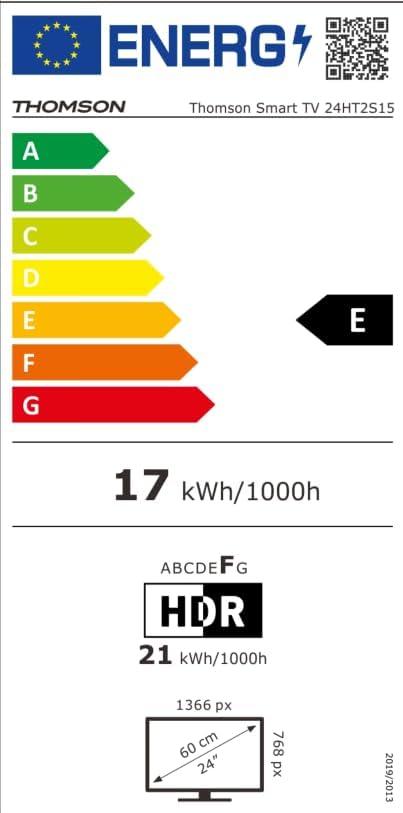
Image: The EU Energy Label for the Thomson Smart TV 24HT2S15, showing an energy efficiency class of E and energy consumption of 17 kWh/1000h for SDR and 21 kWh/1000h for HDR.
8. Кепилдик жана колдоо
8.1 Кепилдик маалыматы
Thomson products are covered by a 3-year warranty. For detailed information regarding warranty claims, returns, or defective products, please refer to the warranty card included in your package or visit the Thomson support webсайт.
For specific information on purchases made via Amazon, consult Amazon's help pages regarding returns and defective products.
8.2 Кардарларды колдоо
If you require further assistance or have questions not covered in this manual, please contact Thomson customer support:
- Өндүрүүчү: Агымview GmbH
- Электрондук почта: contact@streamview.com
- Webсайт: www.streamview.com
- Телефон: +4318900066
Please have your model number (24HT2S15) and purchase details ready when contacting support.


