1. Киришүү
This manual provides detailed instructions for the installation, operation, and maintenance of your Leadfan 9-inch Car Radio Stereo. This unit is designed to enhance your driving experience with features such as wireless Apple CarPlay, Android Auto, GPS navigation, Bluetooth connectivity, and more. Please read this manual thoroughly before installation and use to ensure proper function and safety.
2. Унаа шайкештиги
This car radio stereo is compatible with the following vehicle models:
- Subaru Forester: 2008, 2009, 2010, 2011, 2012
- Subaru Impreza WRX: 2007, 2008, 2009, 2010, 2011
Маанилүү эскертүү:
Бул аппарат унаалар үчүн иштелип чыккан without a factory large screen or ampөмүрлүү. Please verify your vehicle's dashboard configuration before installation. Refer to the image below for visual guidance on compatible and incompatible dashboard types.
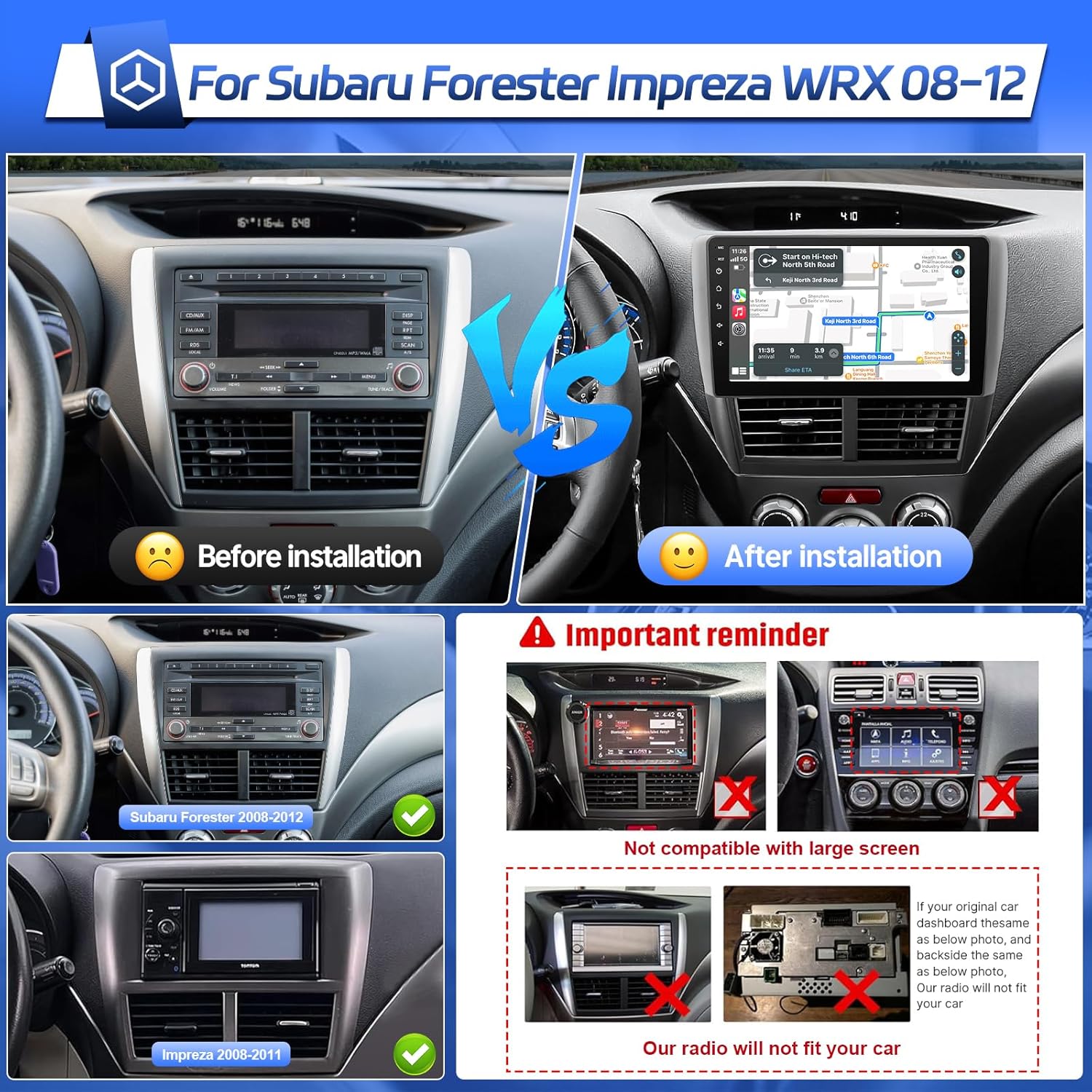
Image: Comparison of a Subaru Forester dashboard before and after the Leadfan car radio installation. It also illustrates compatible dashboards for Subaru Forester (2008-2012) and Impreza (2008-2011), and highlights incompatible dashboards with existing large screens or specific factory radio designs.
3. Пакеттин мазмуну
Сураныч, пакетте төмөнкү нерселерди текшериңиз:
- Leadfan 9-inch Car Radio Stereo Unit
- Электр кабели
- RCA кабелдери
- USB кабелдери (x2)
- GPS антеннасы
- Камера
- Микрофон (МИК)
- Унаа орнотуу
- User Manual
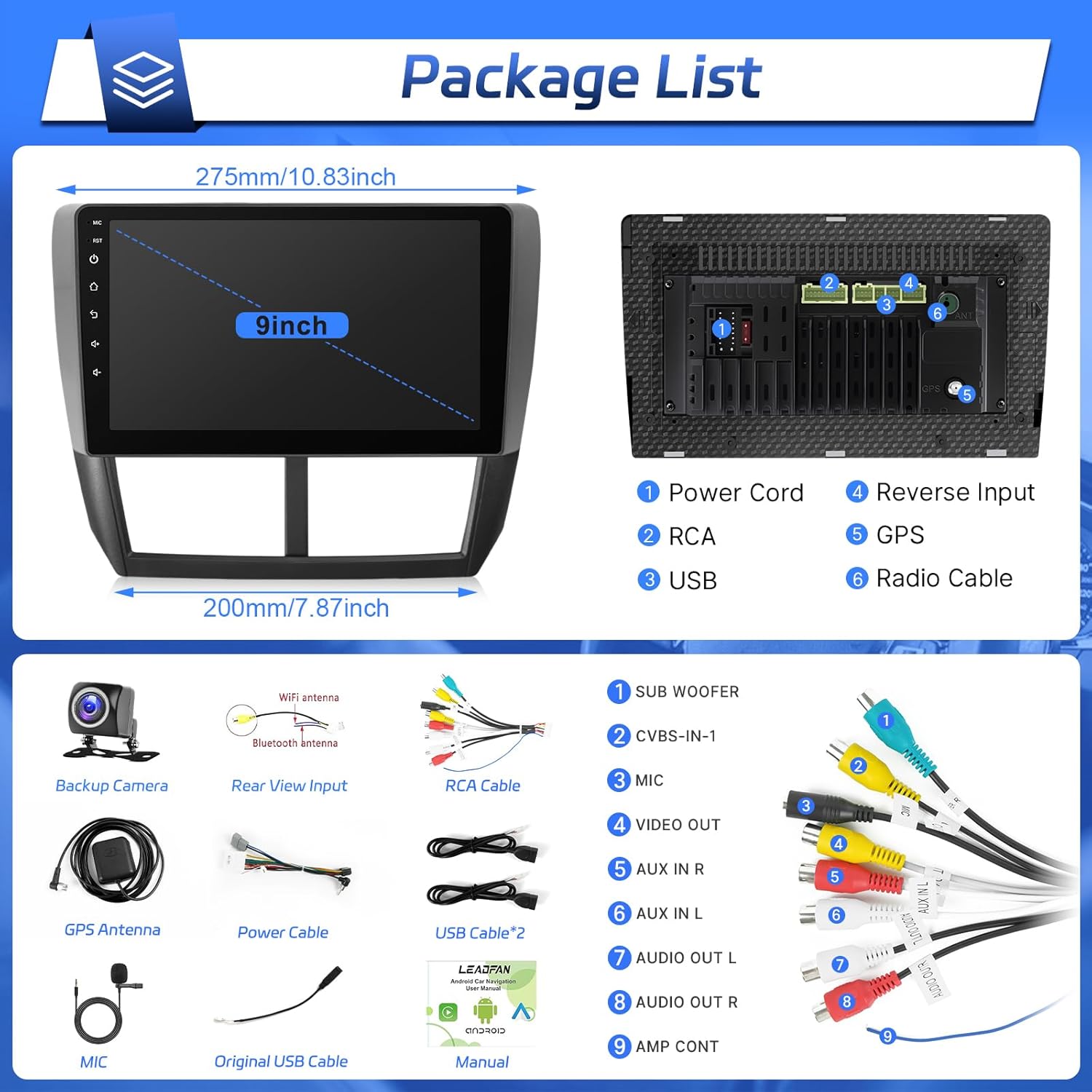
Image: A visual representation of the car radio unit's dimensions and its rear connection ports, alongside all accessories included in the package, such as various cables, antennas, and the backup camera.
4. Орнотуу жана орнотуу
Installation of this unit is designed to be plug-and-play for compatible Subaru models. However, professional installation is recommended if you are unfamiliar with car audio wiring.
4.1 Алдын ала орнотуу текшерүү тизмеси
- Ensure the vehicle's ignition is off and the battery's negative terminal is disconnected.
- Бардык пакеттин мазмуну бар экенин ырастаңыз.
- Review your vehicle's existing dashboard and wiring to ensure compatibility.
4.2 Орнотуу кадамдары
- Завод радиосун алып салуу: Carefully remove the trim panels and screws securing your existing factory radio.
- Зымдарды туташтыруу: Connect the provided power cable and RCA cables to the corresponding ports on the new Leadfan unit and your vehicle's wiring harness. Ensure all connections are secure. Refer to the wiring diagram in the 'Package Contents' section for port identification.
- GPS антеннасын орнотуу: Mount the GPS antenna on the dashboard or another location with a clear view of the sky. Route the cable to the unit and connect it to the 'GPS' port.
- Install WiFi Antenna: Connect the WiFi antenna to the designated port on the unit.
- USB кабелдерди туташтыруу: Route the USB cables to a convenient location (e.g., glove compartment) and connect them to the unit.
- Микрофонду туташтыруу: Plug in the external microphone for improved call quality and voice commands. Position it near the driver for optimal performance.
- Камдык камераны орнотуу (кошумча): If installing the included backup camera, route the video cable from the rear of the vehicle to the unit and connect it to the 'Reverse Input' port. Connect the camera's power to the vehicle's reverse light circuit.
- Агрегатты орнотуу: Secure the Leadfan unit into the dashboard opening using the provided vehicle mount and screws.
- Батареяны кайра туташтыруу: Унаанын терс батарея терминалын кайра туташтырыңыз.
- Сыноо функциясы: Turn on the ignition and test all functions of the new car radio stereo.
5. Иштөө нускамалары
This section details the primary functions and how to operate your Leadfan car radio stereo.
5.1 Зымсыз Apple CarPlay & Android Auto
Connect your smartphone wirelessly to access navigation, music, calls, and messages directly on the car's display.
- Смартфонуңузда Bluetooth жана Wi-Fi иштетилгенин текшериңиз.
- Унаа стереосунда CarPlay же Android Auto тиркемесине өтүңүз.
- Follow the on-screen prompts to pair your phone. For Apple CarPlay, select your device from the list. For Android Auto, ensure the Android Auto app is installed on your phone.
- Once connected, your phone's compatible apps will appear on the stereo screen.

Image: The user interface of the car radio displaying both Apple CarPlay and Android Auto. CarPlay shows a grid of applications including Phone, Music, Waze, and Messages. Android Auto shows a similar layout with navigation and media controls.
5.2 Bluetooth байланышы
Pair your phone via Bluetooth for hands-free calling and wireless audio streaming.
- On the car stereo, go to the Bluetooth settings.
- Смартфонуңузда Bluetooth'ду иштетип, жеткиликтүү түзмөктөрдү издеңиз.
- Select the car stereo's Bluetooth name (e.g., "Leadfan Car BT") from your phone's list and confirm pairing.
- Туташкандан кийин, сиз унаанын динамиктери аркылуу чалууларды жасай/кабыл ала жана музыка ойной аласыз.

Image: A driver interacting with the car radio's Bluetooth interface for hands-free calling. The screen displays a dial pad and call options, while a smartphone shows an active call, demonstrating the integrated Bluetooth functionality.
5.3 GPS Navigation & Wi-Fi Function
Utilize built-in GPS for navigation and connect to Wi-Fi for online features.
- GPS навигациясы: The unit comes with a built-in GPS module. You can use pre-installed offline maps or download online navigation apps via the Play Store.
- Wi-Fi туташуусу: Go to Settings > Wi-Fi. Turn on Wi-Fi and connect to an available hotspot (e.g., from your smartphone) to access online features, download apps, and get live traffic updates.

Image: The car radio screen showing a GPS navigation map with route information and various application shortcuts. Another inset image demonstrates the unit connected to Wi-Fi, displaying a web browser with YouTube content.
5.4 FM радиосу
FM тюнери менен сүйүктүү радиостанцияларыңызга кириңиз.
- Select the 'FM Radio' application from the main menu.
- Use the scan function to automatically find and save available stations, or manually tune to a specific frequency.
- Каалаган станцияларыңызды тез жетүү үчүн алдын ала орнотуулар катары сактаңыз.
5.5 Рулду башкаруу (SWC)
Унааңыздын стереосун башкаруу үчүн унааңыздын рулунун баскычтарын конфигурациялаңыз.
- Go to 'Settings' and find the 'Steering Wheel Control' or 'SWC' option.
- Follow the on-screen instructions to map each physical button on your steering wheel to a corresponding function on the stereo (e.g., volume up/down, track skip, mode).
5.6 Арткы View Камера
Бирдик арткы жагын колдойт view коопсуз унаа токтотуу жана артка кайтаруу үчүн камера.
- When the vehicle is shifted into reverse gear, the screen will automatically display the rear view камера берүү.
- Камера 170° бурчту камсыз кылат viewing angle to assist in detecting obstacles.
5.7 Эквалайзер орнотуулары
Customize your audio experience with the equalizer settings.
- "EQ" же "Үн жөндөөлөрү" тиркемесине кириңиз.
- Adjust bass, treble, balance, and fader. Choose from preset sound modes (Rock, Pop, Jazz, Classical, etc.) or create a custom profile.
5.8 Mirror Link
Смартфонуңуздун экранын түз эле унаанын стерео дисплейине чагылдырыңыз.
- Open the 'Mirror Link' application on the stereo.
- Follow the instructions to connect your Android or iOS device. This typically involves connecting via USB or Wi-Fi and enabling screen mirroring on your phone.

Image: A multi-panel image illustrating several features: the audio equalizer (EQ) settings, a smartphone screen mirrored onto the car radio display, the interface for configuring steering wheel controls, and the view from the backup camera with parking guidelines.
5.9 Бөлүнгөн экран функциясы
Экранда бир эле учурда эки тиркемени иштетүү менен бир нече тапшырманы аткарыңыз.
- Колдонгуңуз келген биринчи колдонмону ачыңыз.
- Press and hold the recent apps button or swipe from the side (depending on the interface) to activate split-screen mode.
- Select the second application to display it alongside the first.

Image: The car radio screen demonstrating the split-screen feature, with the YouTube application running on the left side and a local music player interface on the right side, allowing for simultaneous use of two apps.
6. Техникалык тейлөө
Proper care will ensure the longevity and optimal performance of your car radio stereo.
- Тазалоо: Экранды жана түзмөктү тазалоо үчүн жумшак, кургак чүпүрөктү колдонуңуз. Өжөр тактар үчүн бир азampчүпүрөккө суу же экранды тазалоочу каражат. Абразивдүү материалдардан же катуу химиялык заттардан алыс болуңуз.
- Программалык камсыздоо жаңыртуулары: Periodically check for software updates via the system settings. Connecting to Wi-Fi will allow you to download and install updates that may improve performance or add new features.
- Температура: Түзмөктү узак убакыт бою өтө жогорку температурага дуушар кылбаңыз.
7. Кыйынчылыктарды
Эгер көйгөйлөргө туш болсоңуз, төмөнкү жалпы көйгөйлөрдү жана чечимдерди караңыз:
| Көйгөй | Мүмкүн себеп | Чечим |
|---|---|---|
| Түзмөк күйбөйт. | Электр туташуусу бошоп калган, сактагыч күйүп кеткен, зымдар туура эмес туташкан. | Check power cable connections. Inspect vehicle's fuse box and the unit's fuse. Verify wiring against the diagram. |
| Динамиктерден үн жок. | Volume too low, incorrect audio source, speaker wiring issues. | Үнүн жогорулатуу. Туура аудио булагын тандаңыз. Динамик байланыштарын текшериңиз. |
| Bluetooth туташпай жатат. | Bluetooth off on phone/unit, incorrect pairing process. | Эки түзмөктө тең Bluetooth иштетилгенин текшериңиз. Мурунку жупташтырууларды өчүрүп, кайра жупташтырыңыз. Эки түзмөктү тең өчүрүп-күйгүзүңүз. |
| GPS сигналы начар же так эмес. | GPS антеннасы тыгылып калган же туура эмес жайгаштырылган. | GPS антеннасынын таза болушун текшериңиз view асмандын. Антенна байланышын текшериңиз. |
| Камдык камера көрсөтүлбөй жатат. | Incorrect wiring, camera malfunction, reverse trigger not connected. | Check camera video and power connections. Ensure reverse trigger wire is correctly connected to the vehicle's reverse light. |
| Сенсордук экран жооп бербейт. | Убактылуу программалык ката. | Perform a soft reset (refer to unit's specific reset procedure, usually a small reset button). If issue persists, contact support. |
If the problem persists after attempting these solutions, please contact Leadfan customer support.
8. Техникалык шарттар
| Өзгөчөлүк | Деталь |
|---|---|
| Модел | US02-QYY-SW340-1 |
| Дисплей өлчөмү | 9 дюйм |
| Операция системасы | Android 12 |
| Процессор | 4 Негизги |
| RAM | 2 ГБ |
| Ички сактагыч | 32 ГБ |
| Байланыш | Bluetooth, USB, Wi-Fi |
| Өзгөчөлүктөр | Wireless CarPlay, Android Auto, Touchscreen, GPS Navigation, FM Radio, Steering Wheel Control, Backup Camera Support, Mirror Link, Split Screen |
| Аудио чыгаруу режими | Стерео |
| Камтылган компоненттер | Power Cable, RCA Cables, USB Cables, GPS Antenna, Backup Camera, Microphone, Vehicle Mount |
| Продукциянын өлчөмдөрү | 5.08 x 5.08 x 5.08 см; 1.3 кг |
9. Кепилдик жана колдоо
For warranty information and technical support, please refer to the warranty card included in your package or visit the official Leadfan webсайт. Сатып алуу квитанциясын кепилдик дооматтары үчүн сатып алуунун далили катары сактаңыз.
If you require assistance with installation, troubleshooting, or have any questions about your product, please contact Leadfan customer service through the contact information provided with your purchase or on the manufacturer's webсайт.


