Introduction
Thank you for choosing the vretti PB821 Portable Thermal Printer. This compact and versatile device is designed for convenient, inkless printing from various devices, including smartphones, tablets, and laptops. Its portability makes it ideal for business, office, home, and travel use. This manual provides essential information on setting up, operating, maintaining, and troubleshooting your printer to ensure optimal performance.
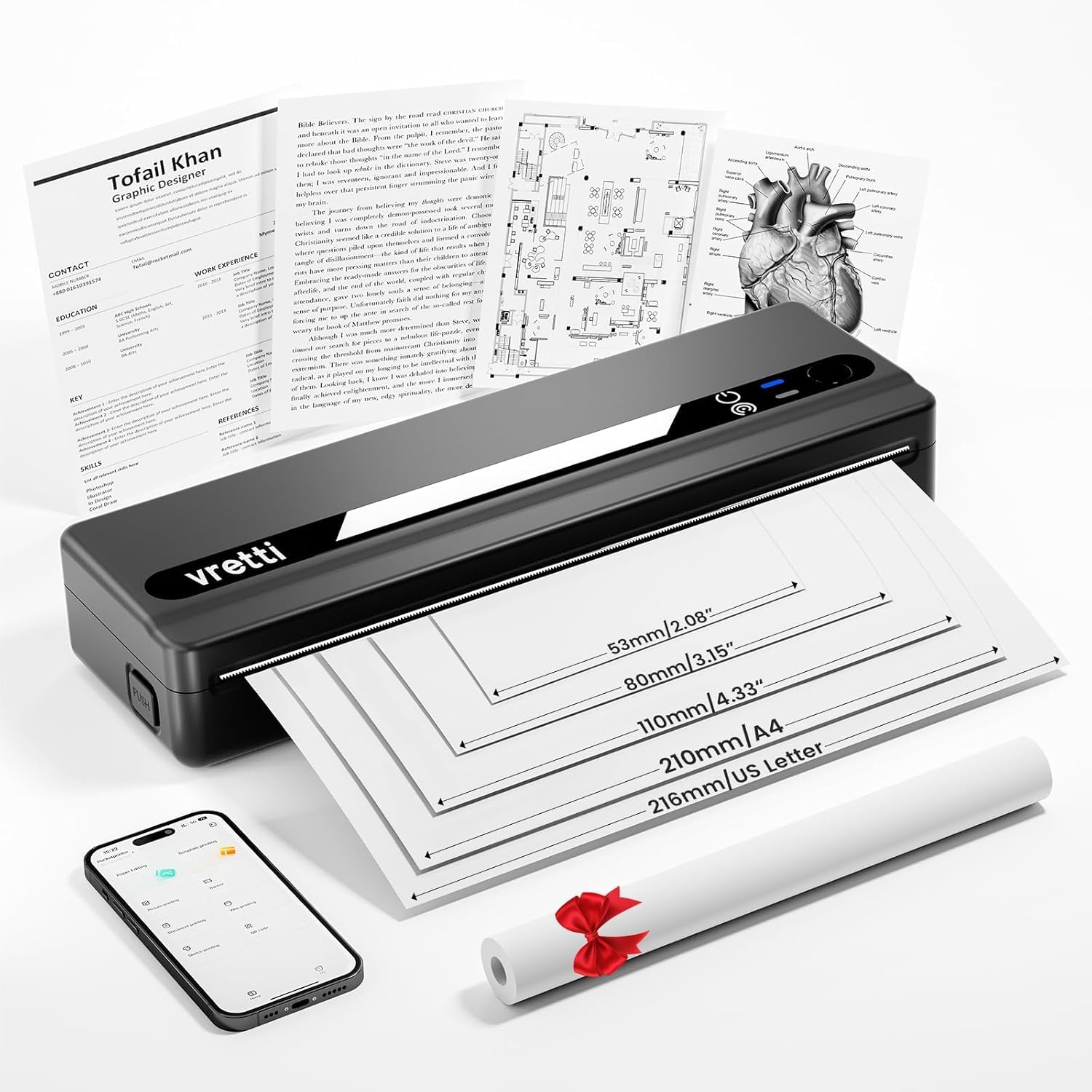
Image: The vretti PB821 Portable Thermal Printer, a sleek black device, ready for use.
Пакеттин мазмуну
Сураныч, кутудан чыгарганда пакеттин мазмунун текшерип, бардык буюмдар бар экенин текшериңиз:
- vretti PB821 Portable Thermal Printer
- 1 түрмөк термикалык кагаз
- USB-C заряддоо кабели
- User Manual
Продукт бүттүview
Негизги өзгөчөлүктөрү
- Зымсыз Bluetooth басып чыгаруу: Connects wirelessly to phones and tablets via the "XLifePro" app.
- Портативдик жана компакттуу: Small and lightweight design for easy transport.
- Cost-effective Inkless Printing: Utilizes advanced thermal printing technology, eliminating the need for ink, toner, or ribbons.
- High-quality Printing: Delivers clear prints with a 203 DPI resolution.
- Узак мөөнөттүү батарея: Built-in 1500mAh rechargeable battery supports printing up to 223 A4 sheets on a full charge.
- Multi-size Paper Support: Compatible with A5, A4, Letter, and 2-4 inch labels.
Туташуу параметрлери

Image: The vretti PB821 printer supports both Bluetooth and USB connections for versatile use with Android, iOS, iPad, Windows, Mac OS, Linux, and Chromebook devices.
The vretti PB821 printer offers flexible connectivity, allowing you to print wirelessly via Bluetooth from mobile devices or directly via USB from computers. This ensures compatibility across various operating systems and devices.
Портативдик дизайн

Image: A visual comparison highlighting the compact and portable design of the vretti PB821 printer against a larger, traditional printer, emphasizing its convenience.
The PB821 is designed for maximum portability, making it easy to carry in a backpack or bag. Its compact form factor does not compromise on functionality, offering easy setup and smooth, inkless printing.
Жайгашуу
1. Баштапкы заряддоо
Before first use, fully charge the printer using the provided USB-C cable. Connect the cable to the printer's USB-C port and a compatible power adapter (not included) or computer USB port. The charging indicator light will show the charging status.

Image: Visual representation of the printer's 1500mAh battery capacity, USB-C charging, and its ability to print up to 223 A4 sheets on a single charge.
2. Термикалык кагазды жүктөө
The vretti PB821 supports various thermal paper types. To load paper:
- Open the printer's paper cover.
- Insert the thermal paper with the printable side facing up. Ensure the paper is aligned correctly within the guides.
- Кагаз капкагын бекем жабыңыз.

Image: The vretti PB821 printer showcasing its compatibility with different thermal paper types, including folding thermal paper and roll paper, along with various paper sizes.
3. Connecting via Bluetooth (Mobile Devices)
To print wirelessly from your smartphone or tablet:
- Download the "XLifePro" app from the App Store (iOS) or Google Play Store (Android).
- Turn on the vretti PB821 printer. The Bluetooth indicator light will blink.
- Open the XLifePro app, navigate to the device connection settings, and select the PB821 printer from the list of available Bluetooth devices.
- Туташтырылгандан кийин, Bluetooth индикатору туруктуу күйөт.

Image: Step-by-step guide on connecting the vretti PB821 printer via Bluetooth, including downloading the XLifePro app and pairing the device.
4. Connecting via USB (Computers)
To print from your Windows, Mac OS, or Linux computer:
- Download the appropriate printer driver from the official vretti webсайт: vrettitech.com/pages/p83-support.
- Install the driver on your computer following the on-screen instructions.
- Connect the vretti PB821 printer to your computer using the provided USB-C cable.
- The computer should recognize the printer, and you can now select it as your printing device.

Image: Instructions for USB connection, detailing driver download from the vretti website and connecting the PB821 printer to a laptop.
Иштөө нускамалары
Printing from Mobile Devices
Bluetooth аркылуу туташкандан кийин:
- Документти, сүрөттү же file you wish to print within the XLifePro app. The app supports various formats including TXT, PDF, Excel, and Word documents.
- Колдонмонун ичинде басып чыгаруу опциясын тандаңыз.
- Confirm print settings such as paper size and quantity.
- Initiate printing.
Printing from Computers
Once connected via USB and drivers are installed:
- Документти ачуу же file компьютериңизде басып чыгаргыңыз келет.
- Колдонмоңуздан басып чыгаруу опциясын тандаңыз (мисалы, File > Басып чыгаруу).
- Choose "vretti PB821" from the list of available printers.
- Керектүү учурда басып чыгаруу жөндөөлөрүн тууралаңыз (мисалы, кагаздын өлчөмү, багыты).
- "Басып чыгаруу" баскычын чыкылдатыңыз.
Supported Paper Types and Sizes
The PB821 printer is compatible with various thermal paper types and sizes, including:
- A4 (210мм)
- Letter (8.5" x 11" / 216mm)
- A5 (148мм)
- B5 (175mm)
- 2-inch (53mm) labels
- 3-inch (80mm) labels
- 4-inch (110mm) labels

Image: The vretti PB821 printer demonstrating its support for multiple paper sizes, including standard document sizes and various label sizes.
Using the XLifePro App
The XLifePro app provides additional functionalities beyond basic printing, including:
- Access to multiple templates for creative printing.
- Options for document printing, picture printing, and more.
- Customization features for various printing needs.

Image: Screenshots of the XLifePro app interface, illustrating its diverse range of templates and printing options.
Техникалык тейлөө
Принтерди тазалоо
To maintain print quality and prolong the printer's lifespan:
- Ensure the printer is turned off and disconnected from power before cleaning.
- Бир аз жумшак, түксүз кездемени колдонуңуз dampened with water or isopropyl alcohol to gently wipe the print head and paper path.
- Абразивдүү тазалагычтарды же эриткичтерди колдонбоңуз.
- Allow the printer to dry completely before turning it on.
Батареяга кам көрүү
Батареянын иштөө мөөнөтүн оптималдаштыруу үчүн:
- Батареяны бат-баттан толук кубаттап калуудан алыс болуңуз.
- Принтерди узак убакытка колдонбогондо салкын, кургак жерде сактаңыз.
- Charge the printer regularly, even if not in frequent use, to prevent deep discharge.
Проблемаларды чечүү
| Маселе | Мүмкүн себеп | Чечим |
|---|---|---|
| Принтер күйбөй жатат | Батареянын аздыгы; Кубат баскычы туура басылган жок | Принтерди кубаттоо; Кубат баскычын бир нече секунд басып туруңуз |
| Bluetooth аркылуу туташуу мүмкүн эмес | Түзмөктө Bluetooth өчүк; Принтер жупташтыруу режиминде эмес; Колдонмодо көйгөй бар | Ensure Bluetooth is enabled; Restart printer; Reinstall XLifePro app |
| Басып чыгаруу сапаты начар | Low battery; Dirty print head; Incorrect paper type | Charge printer; Clean print head; Use recommended thermal paper |
| Кагаз тыгылышы | Кагаз туура эмес жүктөлгөн; Бузулган кагаз | Turn off printer, carefully remove jammed paper, reload correctly; Use undamaged paper |
| Принтер компьютер тарабынан таанылган жок | Missing/incorrect drivers; Faulty USB cable/port | Install/reinstall drivers from vretti website; Try a different USB cable/port |
Техникалык шарттар
| Өзгөчөлүк | Деталь |
|---|---|
| Модел | PB821 |
| Бренд | vetti |
| Басма технологиясы | Термикалык |
| Байланыш технологиясы | Bluetooth, USB |
| Максималдуу басып чыгаруу чечими | 203 DPI (Black and White) |
| Басма маалымат каражаттары | Жылуулук кагазы (жөнөкөй) |
| Колдоого алынган барак өлчөмдөрү | 2'', 3'', 4'', A4, 8.5''x 11'' US Letter |
| Максималдуу киргизүү барагынын сыйымдуулугу | 30 барак |
| Батарея сыйымдуулугу | 1500 мАч (литий-ион) |
| Продукциянын өлчөмдөрү | 25.7 x 7 x 4.7 см |
| Элемент Салмагы | 900 г |
| Эки тараптуу басып чыгаруу | Жок |
| Сыя түсү | Кара |
Кепилдик жана колдоо
The vretti PB821 Portable Thermal Printer comes with a standard manufacturer's warranty. For specific warranty details, technical support, or service inquiries, please refer to the warranty card included in your package or visit the official vretti webсайт. Сатып алуу квитанциясын кепилдик дооматтары үчүн сатып алуунун далили катары сактаңыз.
Продукт видеосу
Video: An official product video demonstrating the features and usage of the vretti PB821 Portable Thermal Printer, including its compact design, wireless connectivity, and printing capabilities.


