1. Киришүү
The TFA.me ID-06 Wireless Weather Station provides comprehensive professional weather forecasts via the wetter.com online weather service. This device offers detailed weather conditions, including temperature, humidity, and various forecast symbols, accessible via Wi-Fi. It also integrates with the TFA.me system for expanded functionalities.
2. Орнотуу
2.1 Пакеттен чыгаруу жана компоненттер
Carefully unpack all components. Ensure you have the main base station, the thermo-hygro transmitter (TFA 30.3900.02), and the power adapter.

Figure 1: Main unit, external sensor, and digital interface overview.
2.2 Негизги блокту электр менен камсыздоо
- Connect the provided AC adapter to the main base station.
- Plug the adapter into a suitable power outlet. The display will illuminate.
2.3 Installing Batteries in the External Sensor
- Open the battery compartment of the thermo-hygro transmitter.
- Insert 2 x 1.5 V AA batteries, ensuring correct polarity.
- Батарея отсегин жабыңыз.
2.4 Баштапкы синхрондоштуруу
The main unit will automatically attempt to connect to the external sensor and the Wi-Fi network upon initial power-up. Ensure both devices are within range.
2.5 Wi-Fi туташуусу
The device connects to the wetter.com online weather service via Wi-Fi. Follow the on-screen prompts or refer to the detailed manual for specific Wi-Fi setup instructions. This connection enables professional 4-day weather forecasts.
2.6 Жайгаштыруу боюнча көрсөтмөлөр
- Негизги блок: Place the main unit indoors on a flat surface or mount it on a wall. Ensure it is in a location with good Wi-Fi reception.
- Тышкы сенсор: Position the external thermo-hygro transmitter outdoors in a shaded, well-ventilated area, protected from direct sunlight and precipitation. The maximum operating range is 100 meters from the main unit.

Figure 2: Main unit and external sensor for indoor and outdoor measurements.
Video 1: Demonstrates the setup and basic operation of a TFA weather station, including sensor placement and display functions.
3. Аба ырайы станциясын иштетүү
3.1 Дисплейview
The LCD display provides a clear overview of current and forecast weather conditions. It features a backlight with four dimmer levels for optimal readability in various lighting conditions.

Figure 3: Detailed display showing time, indoor/outdoor data, and weather forecast.
3.2 Аба ырайы
The station provides professional 4-day weather forecasts from wetter.com, displayed using up to 40 different weather symbols. Forecasts include daily maximum and minimum temperatures, rain probability, expected rain quantity, hours of sunshine, UV index, wind speed, and wind direction.

Figure 4: Weather forecast display with snow conditions.

Figure 5: Weather forecast display with rain conditions.
3.3 Warning Function
An integrated warning function alerts users to distinctive or potentially dangerous weather conditions, such as storms, extreme rainfall, high heat, critical UV index values, and lightning. This feature helps ensure timely reactions to hazardous weather.
3.4 Температура жана нымдуулук дисплейи
The station measures and displays indoor temperature and humidity. It also wirelessly transmits and displays outdoor temperature and humidity from up to five external transmitters (one included, additional sold separately).
3.5 Убакыт жана дата
The time can be displayed with the date or day of the week, advertised in six different languages for international use.
3.6 TFA.me System Integration
The weather station acts as a gateway for the TFA.me system. Through the free online TFA.me portal, you can access data from up to 50 additional stations and various types of sensors (sold separately) from anywhere in the world.
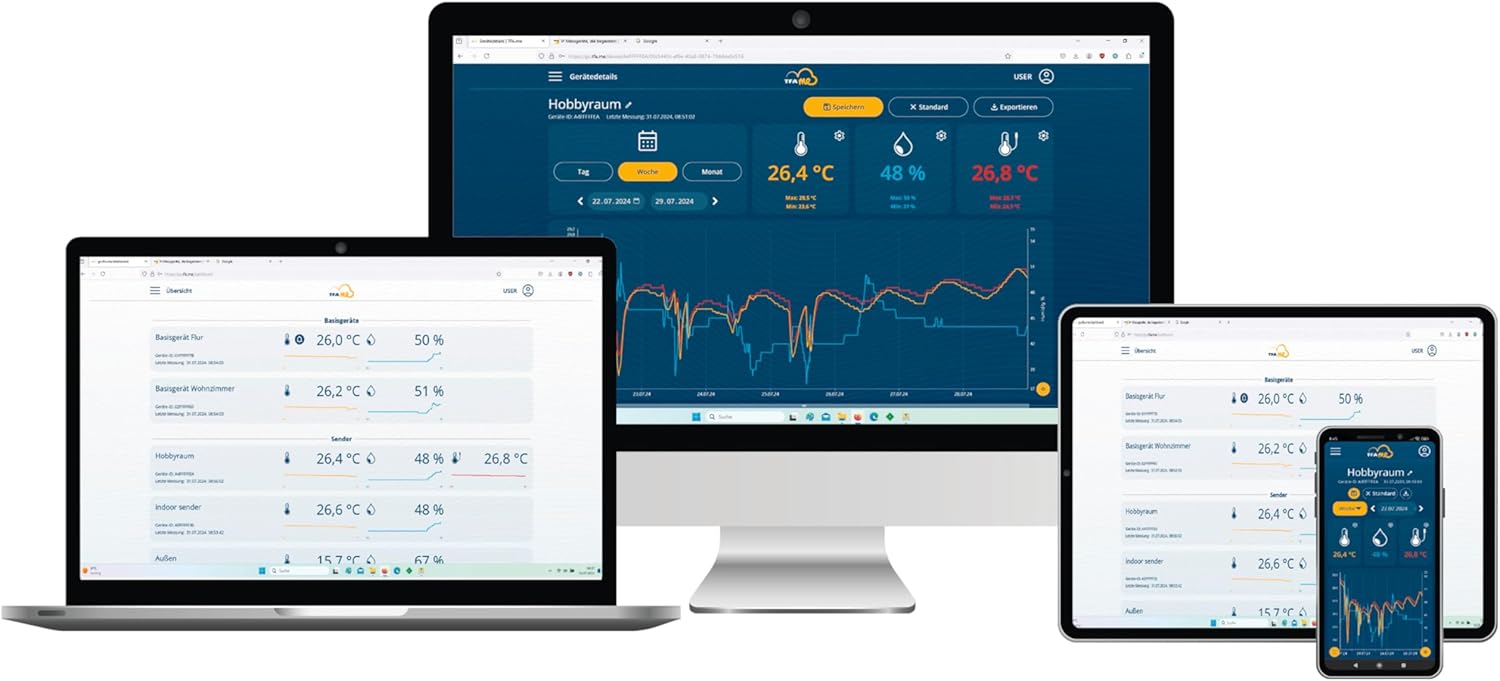
Figure 6: TFA.me online portal for remote data access.
4. Техникалык тейлөө
4.1 Батареяны алмаштыруу
Replace batteries in the external sensor when the low battery indicator appears on the main unit's display. For the main unit, use the AC adapter or replace the 3 x 1.5 V AA batteries if operating on battery power.
4.2 Тазалоо
Түзмөктү жана сенсорду жумшак, d менен тазалаңызamp кездеме. Абразивдүү тазалоочу каражаттарды же эриткичтерди колдонбоңуз, анткени алар беттерге зыян келтириши мүмкүн.
5. Кыйынчылыктарды
- Сырткы дайындар жок: Ensure the external sensor batteries are correctly installed and charged. Verify the sensor is within the 100m range of the main unit and free from obstructions. Press the 'CH' button on the main unit to manually search for the sensor signal.
- Wi-Fi туташуусу жок: Check your router and Wi-Fi settings. Ensure the weather station is within range of your Wi-Fi network. Re-enter Wi-Fi credentials if necessary.
- Incorrect Forecast: Ensure the Wi-Fi connection is stable and the device is receiving data from wetter.com.
- Дисплей маселелери: Check power supply. Adjust backlight dimmer settings if the display is too dim or bright.
6. Техникалык шарттар
| Өзгөчөлүк | Деталь |
|---|---|
| Өлчөмдөр | 228 (227) x 87 x 28 (77) mm |
| Тышкы температура диапазону | -40...+60°C |
| Жабык температура диапазону | 0...+50°C |
| нымдуулук колому | 10...99% rH |
| Температуранын тактыгы | ± 1°C (0...+50°C), otherwise ± 1.5°C |
| Нымдуулуктун тактыгы | ± 5% (at 25°C, 30...80%rH) |
| Зымсыз жыштык | 868 МГц |
| Максималдуу иштөө диапазону | 100 м |
| Материал | Пластик |
| Электр камсыздоо | 3 x 1.5 V AA batteries (optional), AC adapter (EU plug) |
| Max Transmitters | 5 (on base station), 50 (via TFA.me online portal) |
| WLAN жыштыгы | 2.4 ГГц (802.11 б/г/н) |
| Max WLAN Transmission Power | <25 мВт |
7. Кепилдик жана колдоо
7.1 Кепилдик маалыматы
For detailed warranty information, please refer to the terms and conditions provided at the point of purchase or visit the official TFA webсайт.
7.2 Кардарларды колдоо
Кошумча жардам же техникалык колдоо үчүн дарегине кайрылыңыз TFA Brand Store or the official TFA.me online portal. The TFA.me portal allows worldwide retrieval of measured values and offers additional functionalities.


