1. Киришүү
The Black Shark Wireless Gaming Headset Goblin X8 offers a versatile audio experience for gamers across multiple platforms. Featuring tri-mode connectivity (2.4GHz wireless, Bluetooth 6.0, and wired 3.5mm audio), 7.1 virtual surround sound, and a noise-canceling microphone, this headset is designed for immersive gameplay and clear communication. Its ergonomic design ensures comfort during extended use, complemented by a long-lasting battery.
2. Кутуда эмне бар
- Black Shark BS-X8 Gaming Headset
- Wireless Dongle (USB & USB-C)
- 3.5 мм аудио кабель
- USB-C заряддоо кабели
- User Manual

3. Продукциянын өзгөчөлүктөрү
3.1 Tri-Mode Connectivity & Ultra-Low Latency
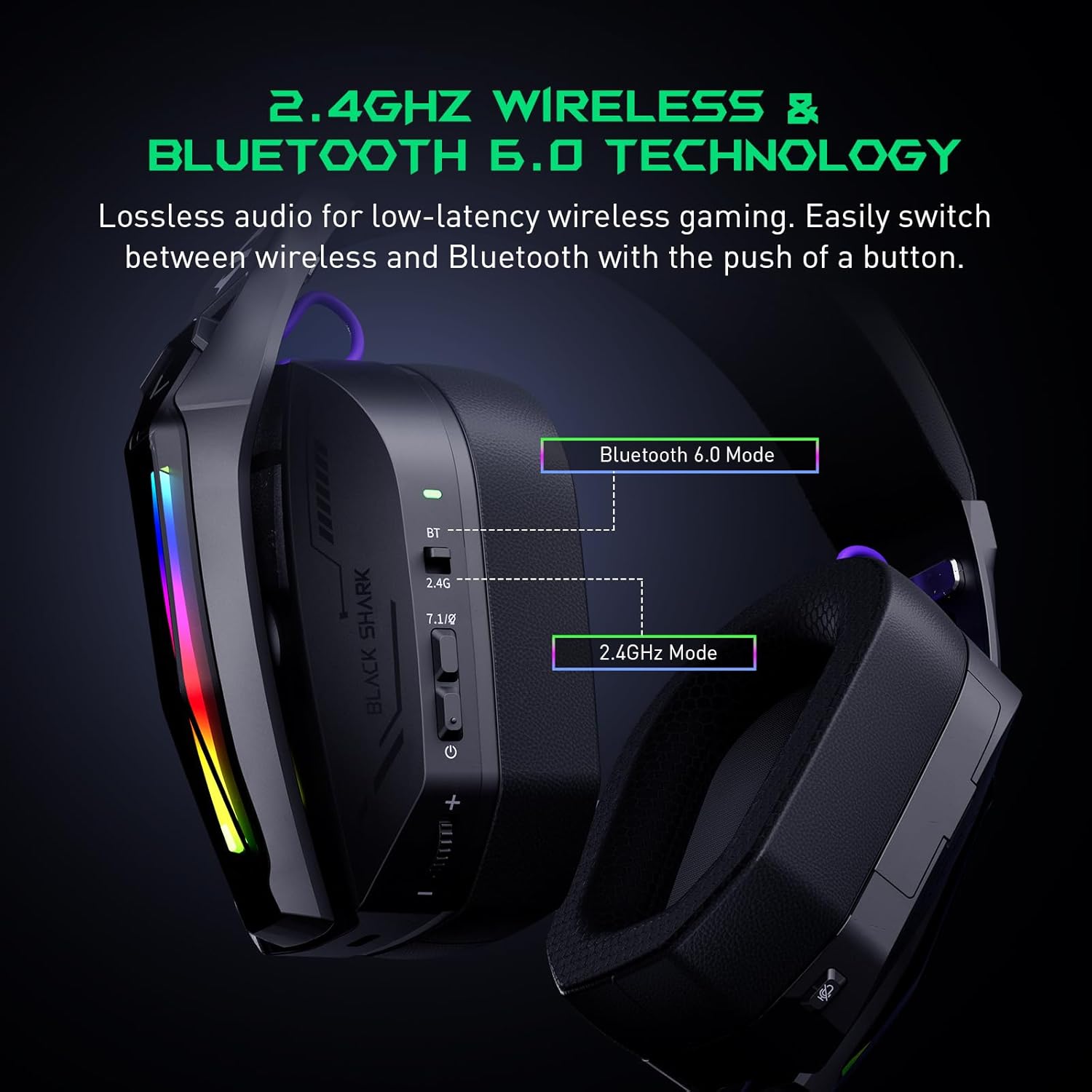
The Goblin X8 offers three connection methods: 2.4GHz wireless (via USB/Type-C dongle), Bluetooth 6.0, and a wired 3.5mm audio connection. The 2.4GHz mode provides ultra-low latency (under 20ms), ideal for competitive gaming. Bluetooth 6.0 ensures stable connectivity with under 30ms delay.


3.2 7.1 Virtual Surround Sound
Equipped with 40mm magnetic neodymium drivers and 2.4GHz lossless wireless technology, the headset delivers virtual 7.1 surround sound. This expands the audio dynamic range, providing exceptional scene reproduction and an immersive 3D sound experience in games.

3.3 ызы-чууну жокко чыгаруучу микрофон
The 120° adjustable, high-sensitivity microphone features omnidirectional noise cancellation technology. This effectively suppresses background noise, ensuring clear voice capture for communication during games or chats. It includes a one-touch mic mute switch for convenience.

3.4 Кең шайкештик
This headset is compatible with a broad range of gaming devices, including PC, PS4, PS5, Switch, Xbox, laptops, tablets, TVs, iPads, and mobile phones, thanks to its triple-mode connectivity.

3.5 Ergonomic Design & Comfort
Designed for all-day comfort, the headset features an adjustable, ergonomic headband and breathable protein leather ear cups. This design reduces pressure and heat, preventing fatigue during long gaming sessions.
3.6 Батареянын узак иштөө мөөнөтү
The gaming headphones offer up to 40 hours of battery life for continuous use without RGB lights. With RGB lights on, the battery lasts for 20 hours. A low battery alert is provided when voltage 3.2V төмөн төмөндөйт.

4. Башкаруу каражаттары жана көрсөткүчтөр
The headset features intuitive controls for easy management of audio and settings:
- Статус көрсөткүчү: Туташуу жана батареянын абалын көрсөтөт.
- 2.4G & Bluetooth Switching: Toggle between wireless modes.
- Virtual 7.1 Surround Sound On/Off: Activate or deactivate surround sound.
- Кубат баскычы: Гарнитураны күйгүзөт/өчүрөт.
- Көлөм дөңгөлөгү: Аудионун үнүн тууралайт.
- USB-C заряддоо порту: Гарнитураны заряддоо үчүн.
- Микрофондун үнүн басуу баскычы: Микрофондун үнүн өчүрөт же ачат.
- Hidden 2.4G USB Dongle: Stores the wireless dongle securely.

5. Орнотуу
5.1 2.4 ГГц зымсыз туташуу
- Locate the hidden 2.4G USB dongle on the headset.
- Plug the USB-A or USB-C end of the dongle into your PC, PS4, PS5, or Switch.
- Slide the connectivity switch on the headset to the '2.4G' position.
- Гарнитура автоматтык түрдө донглге туташат.
5.2 Bluetooth 6.0 туташуу
- Slide the connectivity switch on the headset to the 'BT' (Bluetooth) position.
- On your device (smartphone, tablet, laptop), go to Bluetooth settings and search for 'Black Shark Goblin X8'.
- Select the headset to pair and connect.
5.3 Wired 3.5mm Audio Connection
- Connect one end of the included 3.5mm audio cable to the headset's 3.5mm jack.
- Connect the other end to the 3.5mm audio port on your device (PC, PS4, PS5, Xbox controller, Switch, etc.).
- Гарнитура зымдуу режимде иштейт.
6. Иштөө нускамалары
6.1 Күйгүзүү/өчүрүү
- To power on, press and hold the Power Button until the status indicator lights up.
- To power off, press and hold the Power Button until the status indicator turns off.
6.2 Үндү тууралоо
- Rotate the Volume Wheel up to increase volume.
- Rotate the Volume Wheel down to decrease volume.
6.3 Микрофонду колдонуу
- To use the microphone, gently pull it down from its hidden position on the earcup.
- To mute the microphone, press the Mic Mute Button. Press again to unmute.
- To store the microphone, push it back into its hidden slot.
6.4 7.1 Virtual Surround Sound
- Press the Virtual 7.1 Surround Sound On/Off button to toggle the surround sound feature.
6.5 RGB жарык эффекттери
- Double-press the Virtual 7.1 Surround Sound On/Off button to turn the RGB lights on or off.
7. Техникалык тейлөө
- Гарнитураны жумшак, кургак чүпүрөк менен сүртүп, таза кармаңыз.
- Гарнитураны экстремалдык температурага, нымдуулукка же тике күн нуруна тийгизүүдөн сактаңыз.
- Гарнитураны өз алдынча чечүүгө же оңдоого аракет кылбаңыз. Жардам алуу үчүн кардарларды колдоо бөлүмүнө кайрылыңыз.
- Колдонулбаган учурда зыян келтирбөө үчүн гарнитураны коопсуз жерде сактаңыз.
8. Кыйынчылыктарды
8.1 No Sound/Poor Sound Quality
- Гарнитуранын күйгүзүлгөнүн жана туура туташтырылганын текшериңиз (2.4 ГГц түйүн, Bluetooth же 3.5 мм кабель).
- Гарнитурадагы жана туташкан түзмөгүңүздүн үнүнүн деңгээлин текшериңиз.
- If using 2.4GHz wireless, ensure the dongle is securely plugged in and the headset is in 2.4G mode.
- If using Bluetooth, ensure the headset is paired and connected in your device's Bluetooth settings.
- Түзмөккө тиешелүү маселелерди жокко чыгаруу үчүн башка аудио булагы же түзмөк менен сынап көрүңүз.
8.2 Микрофон иштебейт
- Ensure the microphone is pulled down and not muted (check the Mic Mute Button).
- Verify microphone input settings on your connected device.
- Some devices (e.g., Nintendo Switch in 2.4GHz mode) may have limitations on microphone usage. Refer to the device's manual.
8.3 Байланыш маселелери
- For 2.4GHz, ensure the dongle is within range and there are no major obstructions.
- Bluetooth үчүн, гарнитура жупташтыруу режиминде экенин жана түзмөгүңүздүн Bluetooth'у иштетилгенин текшериңиз. Жупташтырууну ажыратып, кайра жупташтырып көрүңүз.
- Гарнитура толук заряддалганын текшериңиз.
9. Техникалык шарттар
| Өзгөчөлүк | Спецификация |
|---|---|
| Модель аты | Goblin X8 (BS-X8) |
| Байланыш технологиясы | Wired, Wireless (2.4GHz, Bluetooth 6.0) |
| Аудио драйвер түрү | Динамикалык драйвер |
| Аудио драйверинин өлчөмү | 40 миллиметр |
| Аудио кечигүү | 20 миллисекунд (2.4 ГГц) |
| Bluetooth версиясы | 6.0 |
| Bluetooth диапазону | 10 метр |
| Батареянын иштөө мөөнөтү | 40 Hours (lights off), 20 Hours (lights on) |
| Заряддоо убактысы | 3 саат |
| Микрофон | Noise Cancelling, 120° Adjustable |
| Өзгөчөлүктөр | Surround Sound, Volume Control, Rechargeable Battery |
| Шайкеш түзмөктөр | PC, PS4, PS5, Switch, Xbox, Laptops, Tablets, TVs, iPads, Mobile Phones |
| Элемент Салмагы | 325 грамм (11.5 унция) |
10. Кепилдик жана колдоо
For warranty information, technical support, or service inquiries, please refer to the official Black Shark webсайтка же түздөн-түз кардарларды тейлөөгө кайрылыңыз. Кепилдик дооматтар үчүн сатып алуу дүмүрчөгүңүздү сактаңыз.


