1. Киришүү
Thank you for choosing the KAIWEETS KC200D Digital Clamp Meter. This device is a compact, high-precision instrument designed for electrical measurements in various settings, including home, commercial, and industrial environments. It features True RMS technology for accurate readings of complex waveforms, Non-Contact Voltage (NCV) detection for enhanced safety, and a clear backlit LCD for easy readability. This manual provides essential information for safe and effective use of your clamp метр.
2. Коопсуздук маалыматы
To ensure safe operation, please read and understand all safety warnings and operating instructions before using this instrument. Failure to observe these warnings can result in serious injury or death.
- Ар дайым жергиликтүү жана улуттук коопсуздук эрежелерин сактаңыз.
- Эгерде ал бузулуп калса же сыноо өткөргүчтөрүнүн изоляциясы бузулса, эсептегичти колдонбоңуз.
- Баалангандан ашык колдонбоңузtage, as marked on the meter, between terminals or between any terminal and ground. The maximum operating voltage 600 В.
- Том менен иштөөдө өтө этият болуңузtages above 60V DC or 30V AC RMS. These voltagшок коркунучун жаратат.
- Keep your fingers behind the finger guards on the test leads during use.
- Эсептегичти жарылуучу газ, буу же чаңдуу чөйрөдө иштетпеңиз.
- Функцияларды өзгөртүүдөн мурун, сыноо өткөргүчтөрүн чынжырдан алып салыңыз.
- Always turn off the power to the circuit under test before connecting or disconnecting the test leads.
- Эсептегичти иштетүүдөн мурун батареянын капкагы бекем жабылгандыгын текшериңиз.
3. Пакеттин мазмуну
Verify that all items listed below are present and undamaged:
- 1 x KAIWEETS KC200D Digital Clamp Метр
- 1 x User Manual
- 1 x сактоо баштык
- 2 x Сыноочу (Кызыл жана Кара)
- 2 x AAA 1.5V батарейкалар
4. Продукт бүтүп калдыview
The KAIWEETS KC200D is designed for ease of use and durability. Familiarize yourself with the main components:
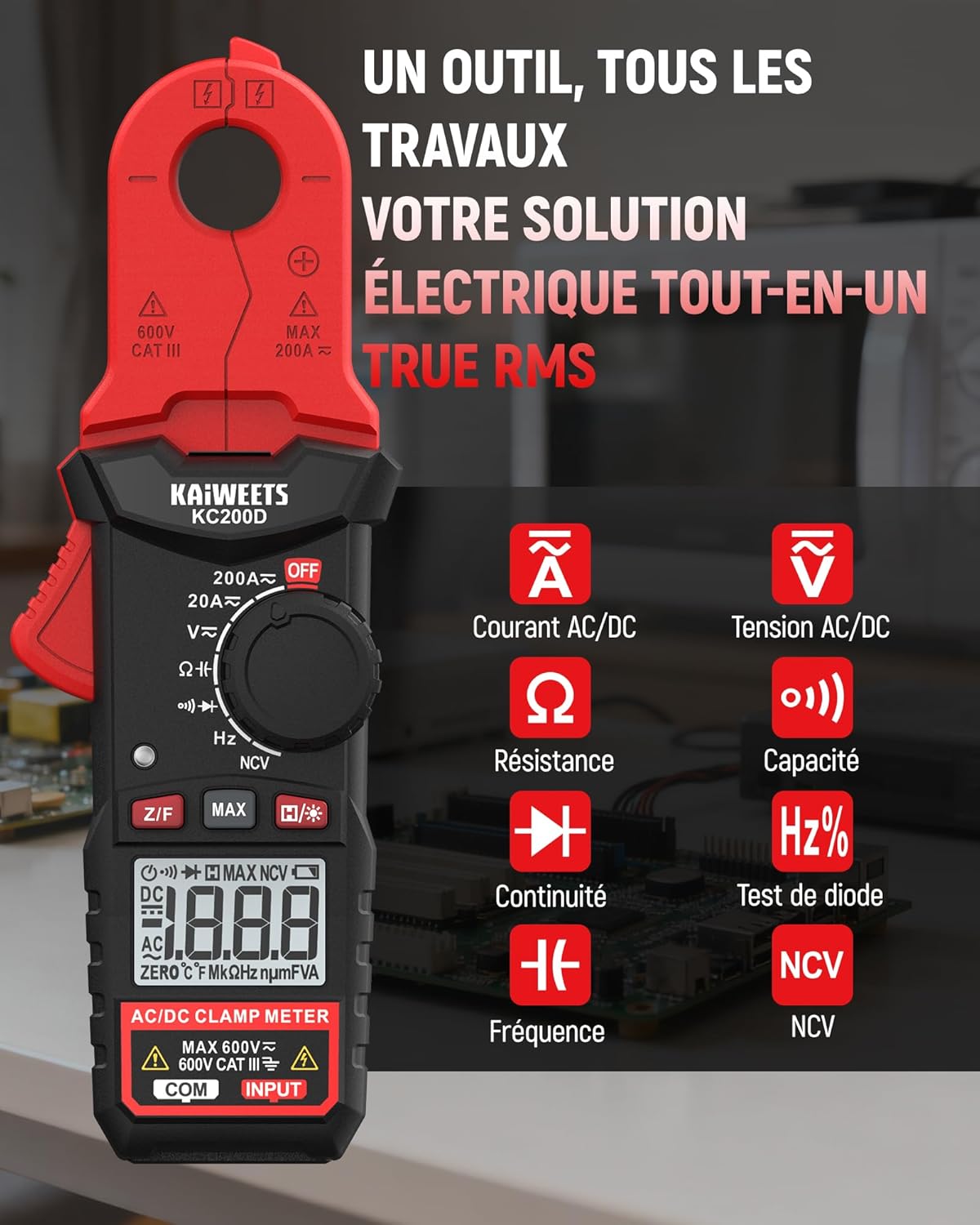
4.1-сүрөт: KAIWEETS KC200D Clamp Meter with its various measurement functions highlighted, including AC/DC Current, AC/DC Voltage, Resistance, Capacitance, Frequency, Diode Test, Continuity, and NCV.
4.1 Негизги компоненттер
- Clamp Жаак: Байланышсыз AC/DC токту өлчөө үчүн колдонулат.
- Функционалдык терүү: Өлчөө режимдерин тандоо үчүн айланма которгуч.
- LCD дисплей: Өлчөө окууларын, бирдиктерди жана көрсөткүчтөрдү көрсөтөт.
- Баскычтар: For special functions like Data Hold, MAX/MIN, DC Zero, Backlight, and NCV.
- Киргизүү терминалдары: Көлөм үчүн сыноо өткөргүчтөрүн туташтыруу үчүнtagд, каршылык, сыйымдуулук, жыштык, диод жана үзгүлтүксүздүк өлчөө.
5. Орнотуу
5.1 Батареяны орнотуу
The KC200D requires two AAA 1.5V batteries (included).
- Эсептегич өчүрүлгөнүн текшериңиз.
- Эсептегичтин артындагы батарея отсегин табыңыз.
- Батарея бөлүкчөсүнүн капкагын ачуу үчүн бурагычты колдонуңуз.
- Эки AAA батарейкасын туура полярдуулукту (+ жана -) сактап, салыңыз.
- Батарея уясынын капкагын ордуна коюңуз жана аны бурама менен бекитиңиз.
5.2 Сыноо өткөргүчтөрүн туташтыруу
Сыноо өткөргүчтөрүн талап кылган өлчөөлөр үчүн (том)tage, resistance, capacitance, frequency, diode, continuity):
- Insert the red test lead into the "INPUT" terminal.
- Кара сыноо өткөргүчтү "COM" (Жалпы) терминалына салыңыз.
6. Иштөө нускамалары
Always select the appropriate function before making any measurement. Turn the function dial to the desired measurement mode.
6.1 AC/DC Ток өлчөө (Clamp)
cl колдонуңузamp jaw for non-contact current measurement. This method is ideal for safely measuring current without breaking the circuit.

6.1-сүрөт: Clamp jaw of the KC200D measuring current on a single electrical wire, demonstrating its compact design and precision.
- Функционалдык терүүчүнү буруңуз 20A~ or 200A~ position for AC current, or 20A= or 200A= туруктуу ток үчүн.
- cl басыңызamp жаакты ачуу үчүн триггер.
- Encircle only бир conductor with the clamp жаак. Клamp around multiple wires, as this will result in an inaccurate reading.
- DC токту өлчөө үчүн, басыңыз Z/F баскычын чыкылдатуудан мурун дисплейди нөлгө түшүрүү үчүн басыңызamping.
- ЖК дисплейдеги учурдагы маанини окуңуз.
6.2 AC/DC Voltage Өлчөө
өлчөө үчүн томtage, use the test leads.
- Функционалдык терүүчүнү буруңуз V~ (AC томtagд) же V= (DC Voltagд) кызмат орду.
- Connect the red test lead to the positive side of the circuit and the black test lead to the negative side (or ground).
- Томду окуңузtage дисплейдеги e мааниси.
6.3 Каршылыкты өлчөө
Каршылыкты өлчөөдөн мурун чынжырдын токтун өчүрүлгөнүн текшериңиз.
- Функционалдык терүүчүнү буруңуз Ω позиция.
- Сыноо өткөргүчтөрүн өлчөнө турган компонентке туташтырыңыз.
- ЖК дисплейдеги каршылыктын маанисин окуңуз.
6.4 Сыйымдуулукту өлчөө
Discharge capacitors completely before measurement to avoid damage to the meter or injury.
- Функционалдык терүүчүнү буруңуз Сыйымдуулук position (often shared with Diode/Continuity, press FUNC to cycle).
- Конденсатор аркылуу сыноо өткөргүчтөрүн туташтырыңыз.
- ЖК дисплейдеги сыйымдуулуктун маанисин окуңуз.
6.5 Жыштыктарды өлчөө
Жыштыкты өлчөө үчүн:
- Функционалдык терүүчүнү буруңуз Гц% позиция.
- Connect the test leads across the circuit where frequency is to be measured.
- Жыштыктын маанисин ЖК дисплейден окуңуз.
6.6 Диоддун сыноосу
Диод чынжырдан ажыратылганын текшериңиз.
- Функционалдык терүүчүнү буруңуз Диод position (often shared with Capacitance/Continuity, press FUNC to cycle).
- Connect the red test lead to the anode and the black test lead to the cathode.
- Алга томtage drop will be displayed for a good diode. Reverse the leads; the display should show OL (Open Loop).
6.7 Үзгүлтүксүздүк тести
Схема кубаты өчүрүлгөнүн текшериңиз.
- Функционалдык терүүчүнү буруңуз Үзгүлтүксүздүк position (often shared with Diode/Capacitance, press FUNC to cycle).
- Сыноо өткөргүчтөрүн компонент же зым аркылуу туташтырыңыз.
- If there is continuity (low resistance), the meter will emit an audible beep.
6.8 Контактсыз томtage (NCV) аныктоо
The NCV function allows for quick and safe detection of live AC voltagд түз байланышсыз.

6.2-сүрөт: The KC200D performing Non-Contact Voltage (NCV) detection near an electrical outlet, showing visual indicators for low and high voltagд болушу.
- Функционалдык терүүчүнү буруңуз NCV позиция.
- Bring the top end of the meter near the conductor or outlet.
- The meter will emit an audible beep and illuminate LED indicators, with frequency increasing as voltage strength increases.
6.9 Атайын функциялар

6.3-сүрөт: The KC200D highlighting its user-friendly functions: MAX for peak value, Z/F for DC current zeroing, H for data hold, backlight for low-light conditions, and auto-off for battery saving.
- Data Hold (H/* button): Дисплейдеги учурдагы көрсөткүчтү токтотуу үчүн басыңыз. Чыгаруу үчүн кайра басыңыз.
- MAX/MIN (MAX button): Press to display the maximum or minimum measured value. Press again to cycle.
- DC Current Zero (Z/F button): For DC current measurements, press this button before clamping to zero out any residual readings.
- Backlight (H/* long press): Long press the H/* button to turn the display backlight ON or OFF for improved visibility in low-light conditions.
- Авто-өчүрүү: The meter automatically powers off after approximately 15 minutes of inactivity to conserve battery life. Press any button or rotate the function dial to wake it up.
7. Техникалык тейлөө
7.1 Тазалоо
Эсептегичти кургак, жумшак чүпүрөк менен сүртүңүз. Абразивдерди же эриткичтерди колдонбоңуз.
7.2 Батареяны алмаштыруу
When the battery indicator appears on the LCD, replace the batteries as described in the Setup section (5.1 Battery Installation).
7.3 Сактоо
If the meter is not used for an extended period, remove the batteries to prevent leakage and damage. Store the meter in its carrying bag in a cool, dry place.
8. Кыйынчылыктарды
| Көйгөй | Мүмкүн себеп | Чечим |
|---|---|---|
| Эсептегич күйбөйт | Батареялар өлүп калган; Батареяны туура эмес орнотуу | Батареяларды алмаштырыңыз; Батареянын полярдуулугун текшериңиз |
| Inaccurate current reading | Clдеги бир нече өткөргүчтөрamp jaw; DC current not zeroed | Бир гана өткөргүчтүн жабык экенин текшериңизamped; Press Z/F button for DC current |
| "OL" көрсөтүлдү (Ашыкча жүктөө) | Measurement exceeds range; Open circuit (for continuity/resistance) | Select a higher range (if available); Check circuit connections |
| NCV аныктоо жок | AC томtage present; Meter not close enough to source | Кондиционердин көлөмүн текшерүүtage presence; Move meter closer to the live conductor |
9. Техникалык шарттар
Technical specifications for the KAIWEETS KC200D Digital Clamp Метр:
| Өзгөчөлүк | Спецификация |
|---|---|
| Модель номери | KC200D |
| Дисплей | 2000 даана, арткы жарыктандырылган LCD дисплей |
| AC тогу | 20A/200A (±(2.5% + 5 digits)) |
| Туруктуу ток | 20A/200A (±(2.5% + 5 digits)) |
| AC Voltage | 2V/20V/200V/600V (±(1.0% + 5 digits)) |
| DC Voltage | 200mV/2V/20V/200V/600V (±(0.5% + 5 digits)) |
| Каршылык | 200Ω/2kΩ/20kΩ/200kΩ/2MΩ/20MΩ (±(1.0% + 5 digits)) |
| Сыйымдуулук | 2nF/20nF/200nF/2µF/20µF/200µF/2mF/20mF (±(4.0% + 5 digits)) |
| Жыштык | 2Hz/20Hz/200Hz/2kHz/20kHz/200kHz/2MHz/20MHz (±(1.0% + 3 digits)) |
| Диод сыноо | Ооба |
| Үзгүлтүксүздүк тести | Ооба |
| NCV аныктоо | Ооба |
| Электр камсыздоо | 2 x AAA 1.5V батарейкалар |
| Коопсуздук рейтинги | CAT III 600V, Pollution Level: 2 |
| Өлчөмдөр | 20.7 x 11.3 x 4.7 см (Пакет) |
| Салмагы | 308 грамм (таңгак) |
10. Кепилдик жана колдоо
KAIWEETS products are designed for reliability and performance. For warranty information, technical support, or service inquiries, please refer to the contact information provided on the KAIWEETS official website or contact your local distributor. Please retain your purchase receipt as proof of purchase for warranty claims.