Introduction
Бул колдонмодо Gamrombo зымсыз оюн контроллериңизди, RH-102A моделин орнотуу, иштетүү жана техникалык тейлөө боюнча кеңири көрсөтмөлөр берилген. Туура иштешин камсыз кылуу жана оюн тажрыйбаңызды максималдуу түрдө жогорулатуу үчүн колдонуудан мурун бул колдонмону кылдаттык менен окуп чыгыңыз. Бул контроллер Xbox One, Xbox Series X/S, PC, Android жана iOS түзмөктөрү менен колдонуу үчүн иштелип чыккан.

Сүрөт: алдыңкы view Gamrombo зымсыз оюн контроллеринин, көрсөтүүчүasinДжойстиктерде, баскычтарда жана туткаларда жандуу RGB жарыгы бар кара түстөгү дизайн.
Жайгашуу
Пакеттин мазмуну
- Gamrombo зымсыз оюн контроллери (RH-102A модели)
- USB кубаттоо/маалымат кабели (болжолдуу)
- Колдонуучунун Колдонмосу (бул документ)
Батарея орнотуу
Контроллер талап кылат эки (2) AA батарейкасы (кошулмага кирбейт) зымсыз иштөө үчүн. Контроллердин арткы бетиндеги батарея бөлүмүн таап, капкакты ачып, батареяларды полярдуулук көрсөткүчтөрүнө ылайык салып, капкакты бекем жабыңыз.
Контроллерди туташтыруу
Gamrombo контроллери бир нече туташуу ыкмаларын колдойт: зымсыз (Xbox үчүн), Bluetooth (PC, Android, iOS үчүн) жана зымдуу (PC үчүн).

Сүрөт: бүттүview контроллердин PC, Mac, Android, iOS жана Steam сыяктуу ар кандай платформалар менен шайкештигин баса белгилейт.
1. Зымсыз байланыш (Xbox консолдору)
- Xbox консолуңуздун (Xbox Series X, Xbox Series S, Xbox One S, Xbox One X) күйүп турганын текшериңиз.
- басып, кармап туруңуз Башкы бет баскычы контроллердеги LED индикатору күйүп-өчө баштаганга чейин басып туруңуз, бул жупташуу режимин көрсөтөт.
- Xbox консолуңузда баскычын басыңыз Жупташтыруу баскычы (адатта, консольдун алдыңкы же каптал жагында жайгашкан).
- Контроллердин LED жарыгы ийгиликтүү жупташтырылганда катуу болуп калат.
- Маанилүү эскертүү: Xbox системасынын жаңыртууларынан улам, үчүнчү тараптын контроллерлери шайкештикти сактоо үчүн программалык камсыздоону жаңыртууну талап кылышы мүмкүн. Эгерде сиз жупташтырууда көйгөйлөргө туш болсоңуз, Gamrombo колдоо кызматына кайрылыңыз webакыркы программалык камсыздоо жаңыртуулары жана көрсөтмөлөрү үчүн сайт.
2. Bluetooth байланышы (PC, Android, iOS)
- Контроллердин батареясы жетиштүү кубаттуулукта экенин текшериңиз.
- Түзмөгүңүздө (PC, Android, iOS) Bluetooth'ду иштетиңиз.
- басып, кармап туруңуз Bluetooth жупташтыруу баскычы (так жайгашкан жерин билүү үчүн контроллердин диаграммасын караңыз, көбүнчө жогору жагындагы кичинекей баскыч) LED индикатору тез жаркылдаганга чейин.
- Түзмөгүңүздө жаңы Bluetooth түзмөктөрүн издеп, тизмеден "Gamrombo контроллерин" (же ушул сыяктуу аталышты) тандаңыз.
- Контроллердин LED жарыгы ийгиликтүү жупташтырылганда катуу болуп калат.
3. Зымдуу туташуу (PC)
- USB кабелинин бир учун контроллердин USB портуна туташтырыңыз.
- USB кабелинин экинчи учун компьютериңиздеги жеткиликтүү USB портуна туташтырыңыз.
- Контроллер компьютериңиз тарабынан автоматтык түрдө таанылышы керек. Драйверлер автоматтык түрдө орнотулушу мүмкүн.
Иштөө нускамалары
Button Layout
Оптималдуу колдонуу үчүн контроллердин баскычтарынын жайгашуусу менен таанышып алыңыз.
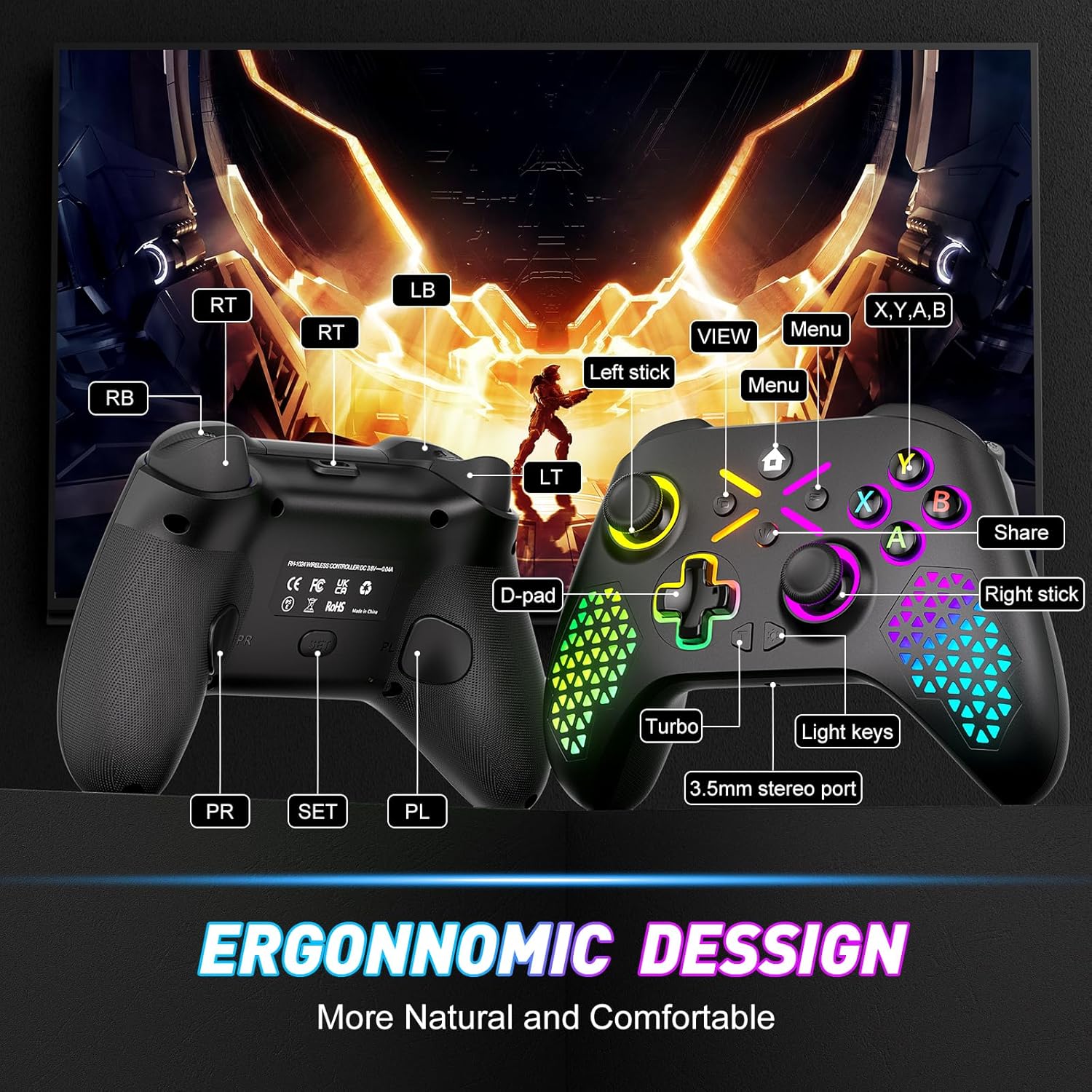
Сүрөт: Gamrombo контроллеринин алдыңкы жана арткы баскычтарынын жайгашуусун көрсөткөн диаграмма, джойстиктерди, D-padди, A/B/X/Y баскычтарын, триггерлерди, бамперлерди, Башкы бетти, белгилөө. View, Меню, Бөлүшүү, Турбо, Жарык баскычтары, 3.5 мм стерео порт жана программалануучу арткы калактар (PR/PL).
Атайын функциялар
1. ТУРБО функциясы
TURBO функциясы баскычты басып турганда кайра-кайра басуу менен тез атууга мүмкүндүк берет. Бул айрым оюндарда атаандаштык артыкчылыкты камсыздай алат.

Сүрөт: TURBO функциясын түшүндүргөн, ар кандай тез атуу ылдамдыктарын (5/сек, 12/сек, 20/сек) жана "T" баскычынын сүрөтчөсү көрсөтүлгөн контроллердин жакындан тартылган сүрөтү.
- Жандыруу үчүн: басып, кармап туруңуз ТУРБО баскычы (T), андан кийин каалаган аракет баскычын басыңыз (мисалы, A, B, X, Y, LB, RB, LT, RT). Эми баскыч TURBO функциясына ээ болот.
- Ылдамдыкты жөнгө салуу үчүн: TURBO баскычын басып туруп, жылдырыңыз Оң аналогдук таякча өйдө же ылдый ар кандай TURBO ылдамдыктары аркылуу айлануу үчүн (мисалы, 5/с, 12/с, 20/с).
- Өчүрүү үчүн: басып, кармап туруңуз ТУРБО баскычы (T), анан ошол эле аракет баскычын кайра басыңыз.
2. Макро программалоо (Арткы калактар)
Контроллерде 16га чейин баскыч киргизүү менен программалануучу эки артка картага түшүрүлүүчү баскыч (PR жана PL) бар, бул бир басуу менен татаал аракеттерди аткарууга мүмкүндүк берет.

Сүрөт: Арткы view контроллердин PR жана PL программалануучу арткы калактарын жана "SET" баскычын белгилеп, бир нече баскычты басууну бир калакка кантип байланыштырса болорун көрсөттү.
- Программалоо режимине кирүү үчүн: басыңыз SET баскычы (контроллердин артында жайгашкан). Индикатор жарыгы күйүп-өчөт.
- Программага: же басыңыз PR же PL калагы Андан кийин, картага түшүргүңүз келген 16га чейинки баскычтардын ырааттуулугун киргизиңиз.
- Сактоо: басыңыз SET баскычы программалоо режиминен чыгуу үчүн кайра басыңыз. Индикатор жарыгы күйүп-өчүп токтойт.
- Макрону тазалоо үчүн: Программалоо режимине кириңиз, PR же PL калегин басыңыз, андан кийин эч кандай ырааттуулукту киргизбестен SET баскычын кайра басыңыз.
3. RGB жарыктандырууну ыңгайлаштыруу
Контроллердин RGB жарыктандыруусун 7 түс жана бир нече жарыктандыруу режимдери менен өз каалооңузга ылайыкташтырыңыз.

Сүрөт: Дем алуучу LED режими, туруктуу LED режими, жымыңдаган LED режими жана бир зоналуу режим сыяктуу ар кандай RGB жарыктандыруу режимдеринин визуалдык чагылдырылышы, түс параметрлери менен.
- Түсүн/режимин өзгөртүү үчүн: басыңыз Жарык ачкычы (баскычтын жайгашуу схемасын караңыз) 7 ачык түс жана ар кандай жарыктандыруу режимдери (көп зоналуу, дем алуучу, бир калыптагы) аркылуу которулуу үчүн.
- Жарыкты тууралоо үчүн: кармаңыз Жарык ачкычы жана колдонуңуз Сол аналогдук таякчаны өйдө же ылдый жарыктыгын жөнгө салуу үчүн.
4. 6-октуу гироскоптук сенсор
Орнотулган 6 октуу гироскоп так соматосенсордук башкарууну камсыз кылат, кыймылды сезүүнү колдогон оюндарга тереңирээк чумкууну күчөтөт.
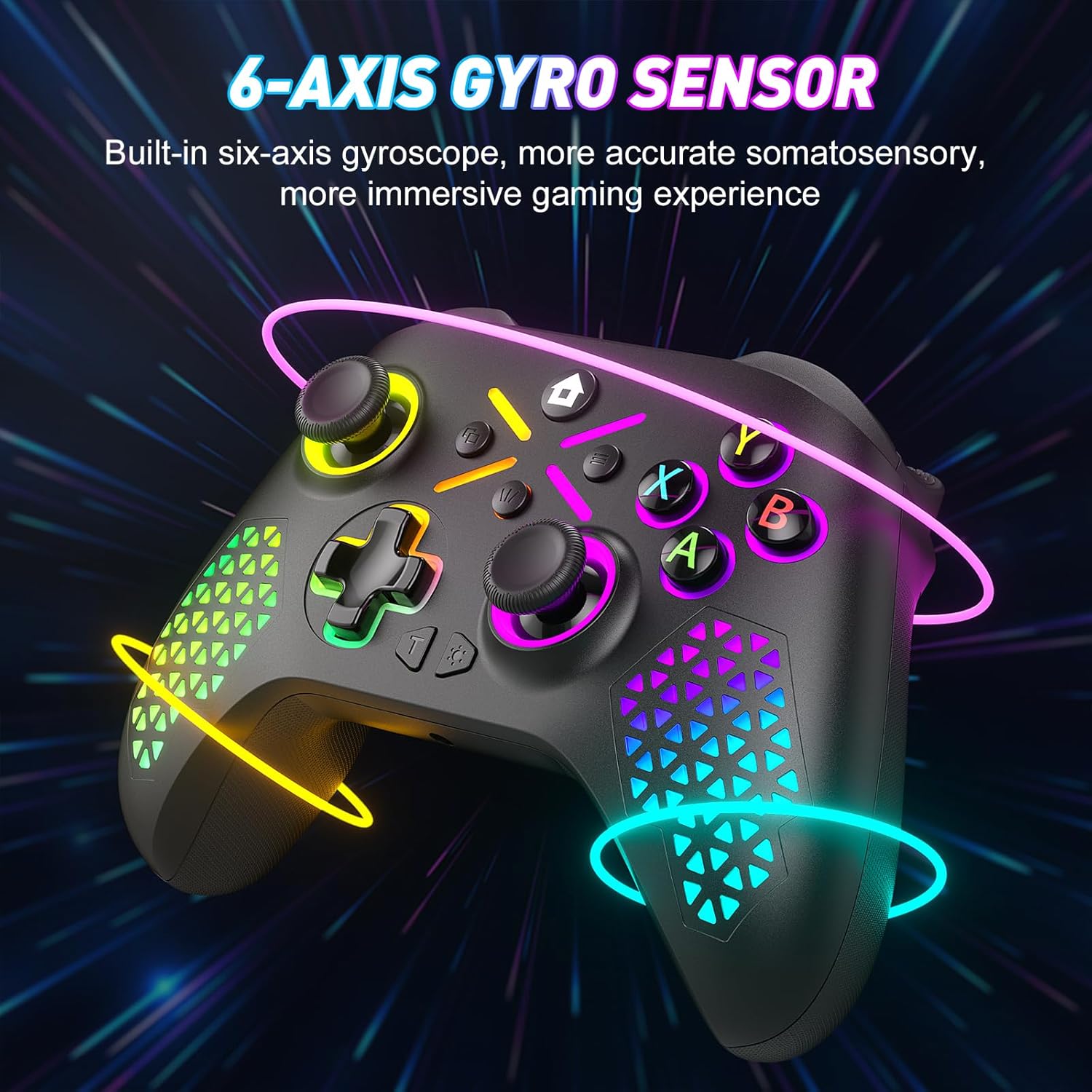
Сүрөт: Кыймылды көрсөткөн жаркыраган сызыктар менен көрсөтүлгөн контроллер, иммерсивдүү оюндар үчүн 6-октуу гироскоптук сенсордун функциясын көрсөтөт.
5. 3.5 мм аудио джек
Оюн ичиндеги аудио жана байланыш үчүн шайкеш келген гарнитураңызды 3.5 мм аудио уячага туташтырыңыз.

Сүрөт: Бир жагында 6-огу бар гироскоптук сенсор, ал эми экинчи жагында 3.5 мм аудио уячасы бар жөнгө салынуучу титирөө функциясы көрсөтүлгөн бөлүнгөн сүрөт, оюнга тереңирээк сиңүүнү баса белгилейт.
Техникалык тейлөө
Тазалоо
- Контроллердин бетин сүртүү үчүн жумшак, кургак чүпүрөктү колдонуңуз.
- өжөр кир үчүн, бир аз гampчүпүрөктү суу же жумшак тазалоо эритмеси менен жууп салыңыз. Катуу химиялык заттардан алыс болуңуз.
- Суюктуктардын контроллердин тешиктерине киришине жол бербеңиз.
Сактагыч
- Контроллерди түз күн нурунан жана экстремалдык температурадан алыс салкын, кургак жерде сактаңыз.
- Эгерде сиз көпкө сактасаңыз, агып кетүүнүн алдын алуу үчүн AA батарейкаларын алып салыңыз.
Проблемаларды чечүү
Жалпы маселелер жана чечимдер
- Контроллер Xbox менен жупташпай жатат:
Контроллердин жаңы батареялары бар экенин текшериңиз. Контроллердин программалык камсыздоосу жаңыртылганын текшериңиз. Xbox системасынын жаңыртуулары кээде үчүнчү тараптын контроллеринин шайкештигине таасир этиши мүмкүн. Gamrombo колдоо кызматына кайрылыңыз. webакыркы программалык камсыздоо жаңыртуулары жана жупташтыруунун толук көрсөтмөлөрү үчүн сайт. - Контроллер Bluetooth/Зым аркылуу туташпай жатат:
Батареянын деңгээлин текшериңиз. Зымдуу туташуу үчүн, USB кабелинин контроллерге да, компьютерге да бекем туташтырылганын текшериңиз. Bluetooth үчүн, түзмөгүңүздө Bluetooth иштетилгенин жана контроллер жупташтыруу режиминде экенин текшериңиз. Контроллерди да, түзмөктү да өчүрүп-күйгүзүп көрүңүз. - Баскычтар же джойстиктер жооп бербей жатат:
Баскычтардын же джойстиктердин айланасында кандайдыр бир физикалык тоскоолдуктар же таштандылар бар-жогун текшериңиз. Башкаргычтын кубаты жетиштүү экенине ынаныңыз. Эгерде көйгөй кулагандан кийин да улана берсе, анда ички бузулуулар болушу мүмкүн, аны оңдоого болбойт же кепилдик менен камтылбайт. - RGB чырактары иштебей жатат же туура эмес:
Башкаргычта кубат бар экенин текшериңиз. Жарык режимдерин алмаштырып, Жарык баскычын колдонуп, жарыктыгын тууралап көрүңүз. - Байланыш тез-тез үзүлөт:
10 м (32.8 фут) зымсыз байланыш диапазонунда экениңизди текшериңиз. Башка зымсыз түзмөктөрдөн келүүчү тоскоолдуктарды азайтыңыз. Контроллердин программалык камсыздоосу жаңыртылганын текшериңиз.
Техникалык шарттар
Техникалык маалыматтар
| Модель номери | RH-102A |
| ASIN | B0FWCDB6F |
| Өндүрүүчү | Gamrombo |
| Байланыш | Зымсыз (WiFi), Bluetooth, зымдуу (USB) |
| Зымсыз диапазон | 10 метрге чейин (32.8 фут) |
| Батарея түрү | 2 x AA батарейкалар (киргизилген эмес) |
| Элемент Салмагы | 10.5 унция |
| Пакеттин өлчөмдөрү | 12.68 x 9.88 x 0.55 дюйм |
| Биринчи жеткиликтүү күн | 15-октябрь, 2025-жыл |
Кепилдик жана колдоо
Кепилдик маалымат
Gamrombo зымсыз оюн контроллери үчүн кепилдиктин так чоо-жайы бул колдонмодо берилген эмес. Кепилдиктин камтылышы, шарттары жана эрежелери жөнүндө маалымат алуу үчүн, продукттун таңгагын караңыз же Gamrombo кардарларды колдоо кызматына түз кайрылыңыз.
Кардарларды колдоо
Эгерде сизде кандайдыр бир көйгөйлөр пайда болсо же бул колдонмодо каралбаган суроолоруңуз болсо, Gamrombo кардарларды тейлөө кызматына кайрылыңыз. Байланыш маалыматын, адатта, продукттун таңгагынан, расмий Gamrombo сайтынан тапса болот. webсайт, же сатып алуу пункту аркылуу.


