1. Киришүү
This manual provides essential information for the safe and efficient operation of your LEFANT M2 Robot Vacuum and Mop. Please read it thoroughly before using the device and retain it for future reference.
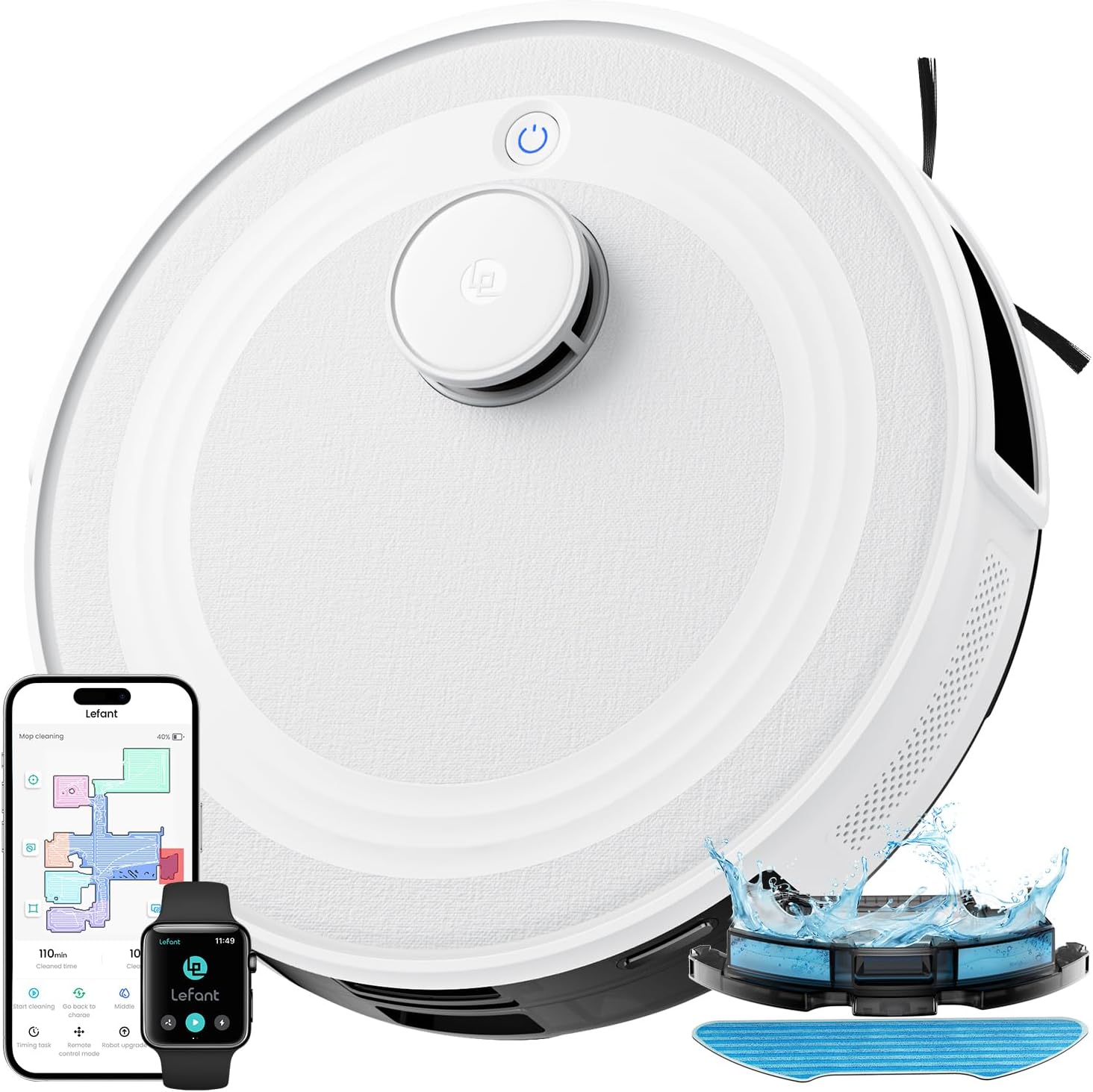
Image: The LEFANT M2 Robot Vacuum and Mop, showcasing its sleek design and accompanying app interface.
2. Коопсуздук нускамалары
Жарааттарды же зыяндарды болтурбоо үчүн төмөнкү коопсуздук чараларын сактаңыз:
- Роботту ачык оттун же тез күйүүчү материалдардын жанында иштетпеңиз.
- Чачты, кенен кийимдерди, манжаларды жана дененин бардык бөлүктөрүн тешиктерден жана кыймылдуу бөлүктөрдөн алыс кармаңыз.
- Ensure the robot is used on dry surfaces only, unless specifically in mopping mode.
- Do not allow children to operate the robot. Supervise children and pets when the robot is in use.
- Use only the manufacturer-specified power adapter and charging base.
- Before cleaning or maintenance, always turn off the robot and unplug the charging base.
- Чатылып калбашы же бузулбашы үчүн тазалоо жолунан бошоп калган кабелдерди, майда буюмдарды же морт буюмдарды алып салыңыз.
3. Пакеттин мазмуну
Пакетте бардык буюмдар бар экенин текшериңиз:

Сүрөт: жарылган view of the LEFANT M2 robot vacuum and its accessories, including the charging base, water tank, and brushes.
- M2 робот вакуум
- Суу танкы
- Заряддоо базасы
- Кубаттуу адаптер
- Тазалоочу щетка
- Моп кармагыч
- Каптал щеткалары (x2)
- жуула турган швабра
- User Manual
- Disposable Mop Pads (x5)
- HEPA чыпкасы
4. Продукт бүтүп калдыview
The LEFANT M2 is a 2-in-1 robot vacuum and mop designed for efficient floor cleaning. It features advanced dToF laser navigation, PSD obstacle avoidance, and customizable cleaning options.

Image: The LEFANT M2 demonstrating its 2-in-1 vacuuming and mopping capabilities with a detachable water tank and mop pad.
Негизги өзгөчөлүктөрү:
- dToF Laser Navigation: Так карта түзүү жана натыйжалуу тазалоо жолдору.
- PSD Obstacle Avoidance: 190° detection to prevent collisions and entanglement.
- 6000Па Соруу кубаттуулугу: Effectively removes dust, debris, and pet hair.
- 2-бирде-1 чаң соргуч жана швабра: Simultaneous cleaning with an electronically controlled water tank.
- Multi-level Mapping: Supports mapping for up to three levels of your home.
- Жекече тазалоо: Zone cleaning, spot cleaning, and virtual forbidden zones via app.
- Батареянын узак иштөө мөөнөтү: 3200 mAh battery for up to 160 minutes of continuous cleaning.
- Тынч иштөө: Designed for a peaceful home environment.
- Кош тилкелүү WiFi (2.4G/5G): Stable and fast connection for app control.
5. Орнотуу
5.1 Заряддоо базасын жайгаштыруу
Place the charging base against a wall in an open area, ensuring there are no obstacles within 1 meter (3 feet) to the sides and 2 meters (6 feet) in front of the base. Plug in the power adapter.
5.2 Алгачкы заряддоо
Place the robot on the charging base. Ensure the charging contacts on the robot align with those on the base. The robot will automatically begin charging. Fully charge the robot before its first use.
5.3 Lefant тиркемесине туташуу

Image: A step-by-step guide on connecting the LEFANT M2 robot to the Lefant mobile application.
- Download the Lefant App from your device's app store.
- Connect your phone to a 2.4GHz or 5GHz Wi-Fi network.
- Open the Lefant App and tap "Add Device."
- Select the M2 model and enter your home Wi-Fi password. Confirm the password is correct, then tap "Next."
- Press and hold the robot's power button for 3 seconds to turn it on. Once on, press and hold the robot's power button for 6 seconds until you hear two beeps, then release.
- Wait for the app to scan for the device. Select the device to connect and wait for the connection to complete.
5.4 Connecting to Alexa / Google Home

Image: A visual guide detailing the process of linking the LEFANT M2 robot vacuum with Amazon Alexa for voice control.
- Connect your Alexa device to the internet and associate it with your Amazon account.
- Open the Lefant App. Select "Me."
- Find "Third-Party Voice Services" (or similar), choose "Alexa" or "Google Assistant," and tap "One-click Bind."
- Tap "Link to Amazon account."
- Click "Link." Then click "Back."
- Alexa is now correctly associated. You can open "Amazon Alexa" to view associated devices under "Devices."
5.5 Controlling with Apple Watch

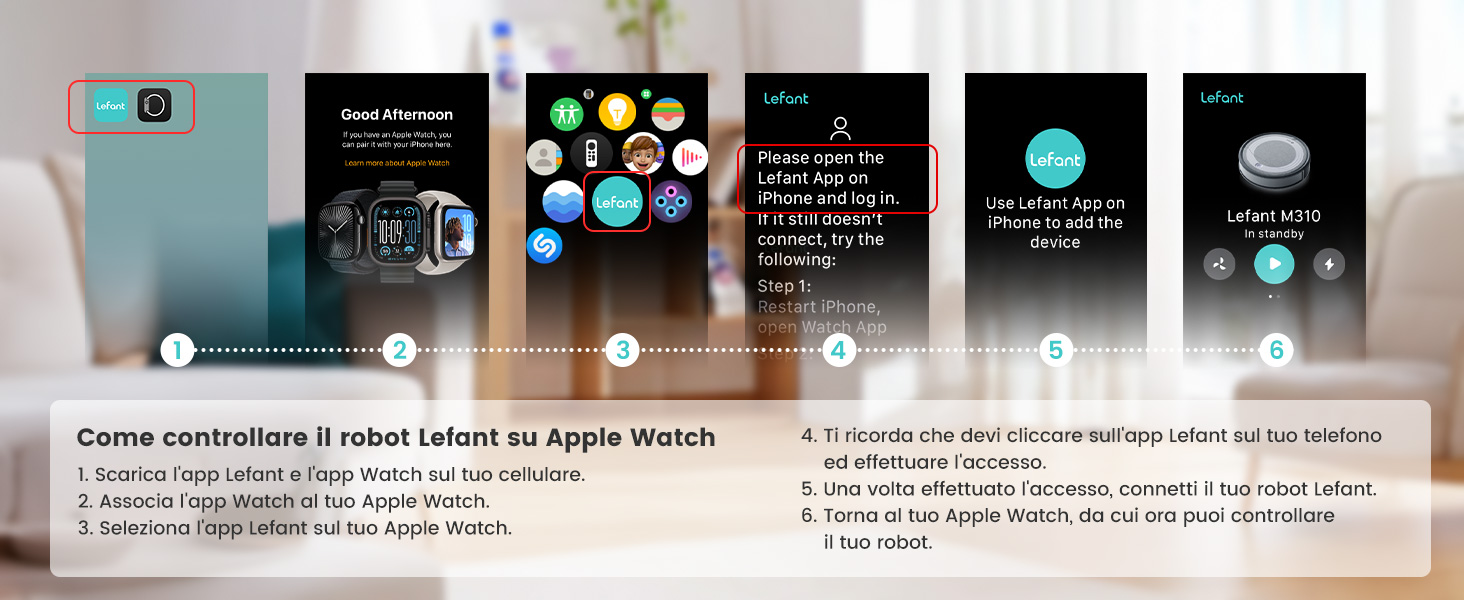
Image: Instructions for controlling the LEFANT M2 robot vacuum using an Apple Watch, showing app selection and control interface.
- Download the Lefant App and the Lefant Watch App on your mobile phone.
- Pair your Apple Watch with your iPhone.
- Select the Lefant App on your Apple Watch.
- You must click on the Lefant App on your phone and log in.
- Once logged in, connect your robot vacuum.
- Return to your Apple Watch, from which you can now control your robot.
6. Иштөө нускамалары
6.1 Тазалоону баштоо/тындыруу
Press the power button on the robot or use the Lefant App to start or pause a cleaning cycle.
6.2 Тазалоо режимдери
Сүрөт: үстүнкү view illustrating various cleaning patterns of the LEFANT M2, including casual, spot, edge, and zig-zag cleaning.
- Автоматтык тазалоо: The robot intelligently plans a path for comprehensive cleaning.
- Тазалоо: Focuses on a specific area for intensive cleaning.
- Четтерин тазалоо: Дубалдарды жана эмеректердин четтерин тазалайт.
- Зигзаг менен тазалоо: A systematic cleaning pattern for efficient coverage.
6.3 Customized Cleaning

Image: A visual representation of the LEFANT M2's customizable mapping feature, allowing users to define and schedule cleaning for specific rooms.
The Lefant App allows for personalized cleaning:
- Аймакты тазалоо: Тазалоо үчүн белгилүү бир бөлмөлөрдү же аймактарды тандаңыз.
- Тазалоо: Designate a precise point for deep cleaning.
- Пландаштыруу: Set cleaning times and frequencies for different areas.
- Map Editing: Divide or merge rooms to create custom cleaning schedules.
6.4 Setting Forbidden Zones
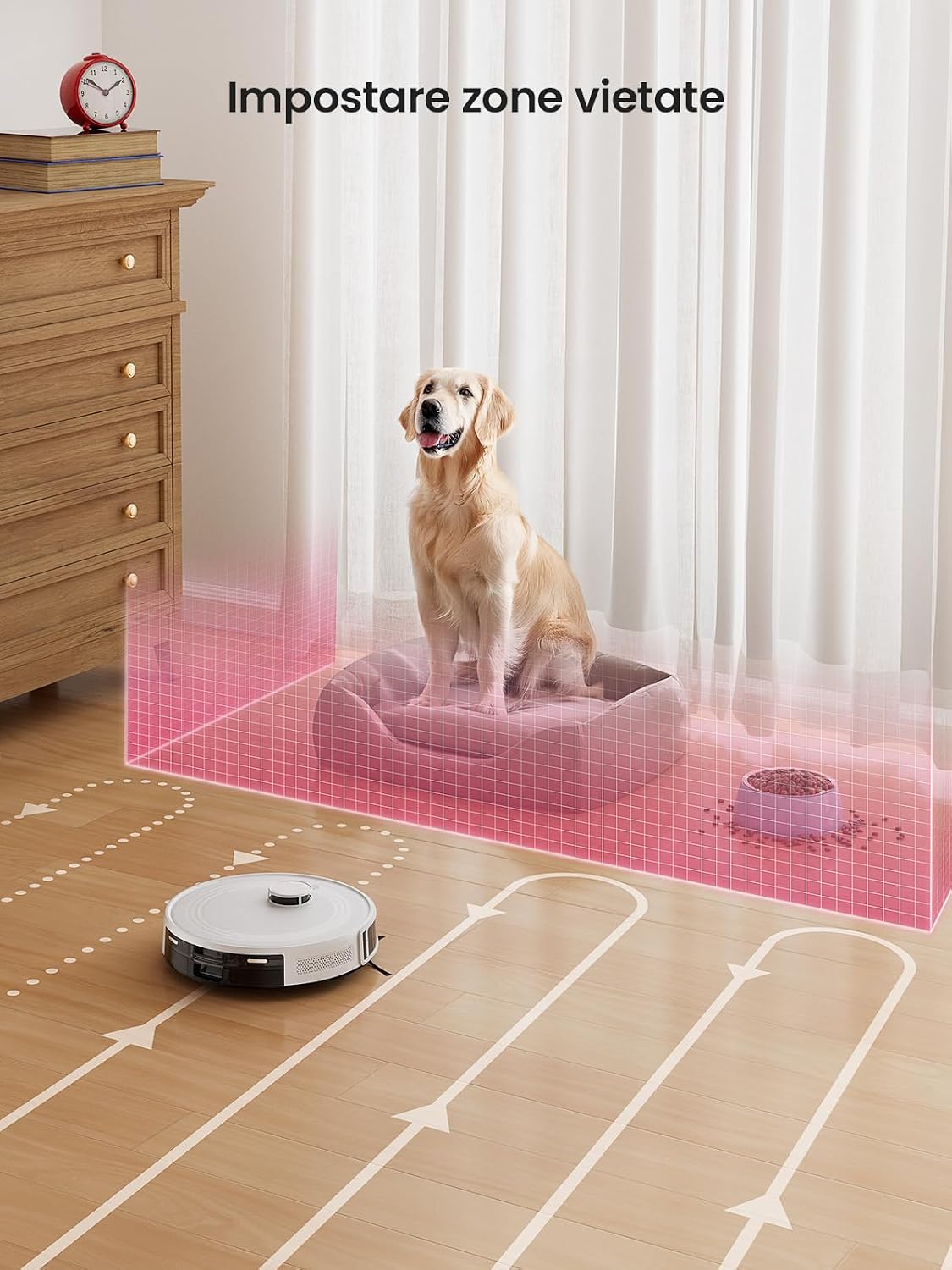
Image: The LEFANT M2 robot vacuum avoiding a virtual forbidden zone set around a pet bed and food bowls.
Use the Lefant App to set virtual boundaries, preventing the robot from entering specific areas. This is useful for protecting pet areas, play zones, or fragile furniture.
6.5 Automatic Recharge and Resume

Image: The LEFANT M2 robot vacuum returning to its charging base and then resuming cleaning, illustrating its automatic recharge and resume function.
When the battery is low or a cleaning cycle is complete, the robot will automatically return to its charging base. If cleaning is not finished, it will resume from its last position after charging to 80%.
6.6 Килемди аныктоо

Image: The LEFANT M2 robot vacuum detecting a carpeted area and adjusting its cleaning mode, highlighting its automatic carpet detection feature.
In vacuuming and mopping mode, the robot automatically detects carpets. It will avoid carpets during mopping to prevent wetting them and increase suction power when vacuuming carpets for deeper cleaning.
7. Техникалык тейлөө
Үзгүлтүксүз техникалык тейлөө оптималдуу иштешин камсыздайт жана робот чаң соргучуңуздун иштөө мөөнөтүн узартат.
7.1 Чаң челектерин жана чыпкаларды тазалоо
- Ар бир колдонуудан кийин таштанды челектерин бошотуңуз.
- Clean the HEPA filter and sponge filter regularly with the cleaning brush. Do not wash the HEPA filter with water.
7.2 Каптал щеткасын тазалоо
- Check side brushes for tangled hair or debris. Remove and clean them as needed.
- Replace side brushes every 3-6 months, or when visibly worn.
7.3 Суу куюлган бак жана швабра төшөгүчтү тазалоо
- Ар бир жуугандан кийин резервуардагы калган сууну төгүп салыңыз.
- Wash the reusable mop pad thoroughly after each use and allow it to air dry.
7.4 Сенсорду тазалоо
- Wipe the cliff sensors, anti-collision sensors, and charging contacts with a clean, dry cloth periodically to ensure proper function.
8. Кыйынчылыктарды
If you encounter issues with your LEFANT M2, refer to the following common problems and solutions:
| Көйгөй | Мүмкүн себеп | Чечим |
|---|---|---|
| Робот күйбөйт | Батареянын аздыгы; Кубат баскычы туура басылган жок | роботту заряддоо; Кубат баскычын 3 секунд басып туруңуз. |
| Робот Wi-Fi'га туташа албайт | Incorrect Wi-Fi password; Router too far; Incorrect Wi-Fi band | Verify password; Move robot closer to router; Ensure 2.4GHz or 5GHz network is used. |
| Робот бат-баттан тыгылып калат | Too many obstacles; Loose cables | Clear the cleaning area; Use virtual forbidden zones for problem areas. |
| Начар тазалоо көрсөткүчү | Толук таштанды челек; Бүктелген чыпка; Эскирген щеткалар | Таштанды челекти бошотуңуз; Фильтрди тазалаңыз/алмаштырыңыз; Щеткаларды тазалаңыз/алмаштырыңыз. |
| Robot does not return to charging base | Заряддоо базасы тосулган; Робот базадан өтө алыс | Ensure clear path to base; Manually place robot on base if needed. |
9. Техникалык шарттар
| Өзгөчөлүк | Спецификация |
|---|---|
| Бренд | СОЛ ЖЕРДЕ |
| Модель аты | M2 |
| Түс | Ак |
| Продукциянын өлчөмдөрү | 32 x 32 x 9.4 см |
| Элемент Салмагы | 3.82 килограмм |
| Таштанды кутусунун сыйымдуулугу | 450 миллилитр |
| Тtage | 19 вольт |
| Материал | Пластик |
| Ызы-чуу деңгээли | 60 децибел |
| Батарея сыйымдуулугу | 3200 мАч |
| Run Time | 160 мүнөткө чейин |
| Шайкеш түзмөктөр | Amazon Echo, Google Home, Lefant App |
| Өзгөчөлүктөр | dToF Laser Mapping, 2-in-1, 6000Pa Suction, PSD Anti-Obstacle Navigation, App/Alexa Control, Ideal for Pet Hair |
| Сунушталган беттер | Hard Floor, Carpet, Parquet, Tiles |
10. Кепилдик жана колдоо
LEFANT provides a standard warranty for this product. Please refer to the warranty card included in your package for specific terms and conditions. For technical support, troubleshooting assistance, or warranty claims, please contact LEFANT customer service through the official webсайтты же кепилдик документтериңизде көрсөтүлгөн байланыш маалыматын.
Кошумча жардам алуу үчүн, баш багыңыз LEFANT Store on Amazon.


