1. Киришүү
Сатып алганыңыз үчүн рахматasing the ThermoPro TP210B Wireless Refrigerator/Freezer Thermometer. This device is designed to help you monitor the temperature of your refrigerator and freezer wirelessly, ensuring your food is stored at optimal temperatures. With a strong 500ft/150m wireless range and customizable alarms, you can easily keep track of temperature fluctuations.
2. Пакеттин мазмуну
- 1 х кабыл алуучу бирдиги
- 1 x Transmitter Unit
- 2 x AAA батарейкалар (кабыл алгыч үчүн)
- 1 x USB Charging Cable (for Transmitter)
- 1 x User Manual
3. Негизги өзгөчөлүктөрү
- Кеңейтилген зымсыз диапазон: Up to 500ft/150m using advanced RF technology for stable connection.
- Дароо колдонуу үчүн алдын ала жупташтырылган: No complex setup required; units are pre-paired from the factory.
- Кеңири өлчөө диапазону: Accurate readings within ±0.9°F across -40°F to 158°F (-40°C to 70°C).
- Акылдуу температура эскертүүлөрү: Customizable high/low temperature limits with audio-visual alarms.
- Easy-to-Read Backlit Display: Shows fridge and freezer readings, Max/Min records, and low-battery status.
- Considerate Power Design: Receiver uses AAA batteries, transmitter features a rechargeable lithium battery.
- Ийкемдүү жайгаштыруу параметрлери: Receiver has hook, stand, or magnet; transmitter has clip or stand.
4. Орнотуу
4.1. Receiver Battery Installation
- Кабыл алгычтын арткы жагындагы батарея бөлүмүн ачыңыз.
- Туура полярдуулукту (+/-) камсыз кылуу менен 2 AAA батарейкасын салыңыз.
- Батарея отсегин бекем жабыңыз.
Note: The receiver requires 2 AAA batteries, which are included in the package.
4.2. Transmitter Charging
- Locate the charging port on the transmitter unit.
- Connect the provided USB charging cable to the transmitter and a standard USB power source (e.g., wall adapter, computer USB port).
- Allow the transmitter to charge fully before first use. The charging indicator will change when fully charged.
Note: The transmitter uses a rechargeable lithium battery designed for low-temperature environments.
4.3. Initial Pairing (Pre-Paired)
The ThermoPro TP210B units are pre-paired at the factory. Simply power on both the receiver and transmitter, and they should automatically connect. If connection issues occur, refer to the Troubleshooting section.
4.4. Жайгаштыруу
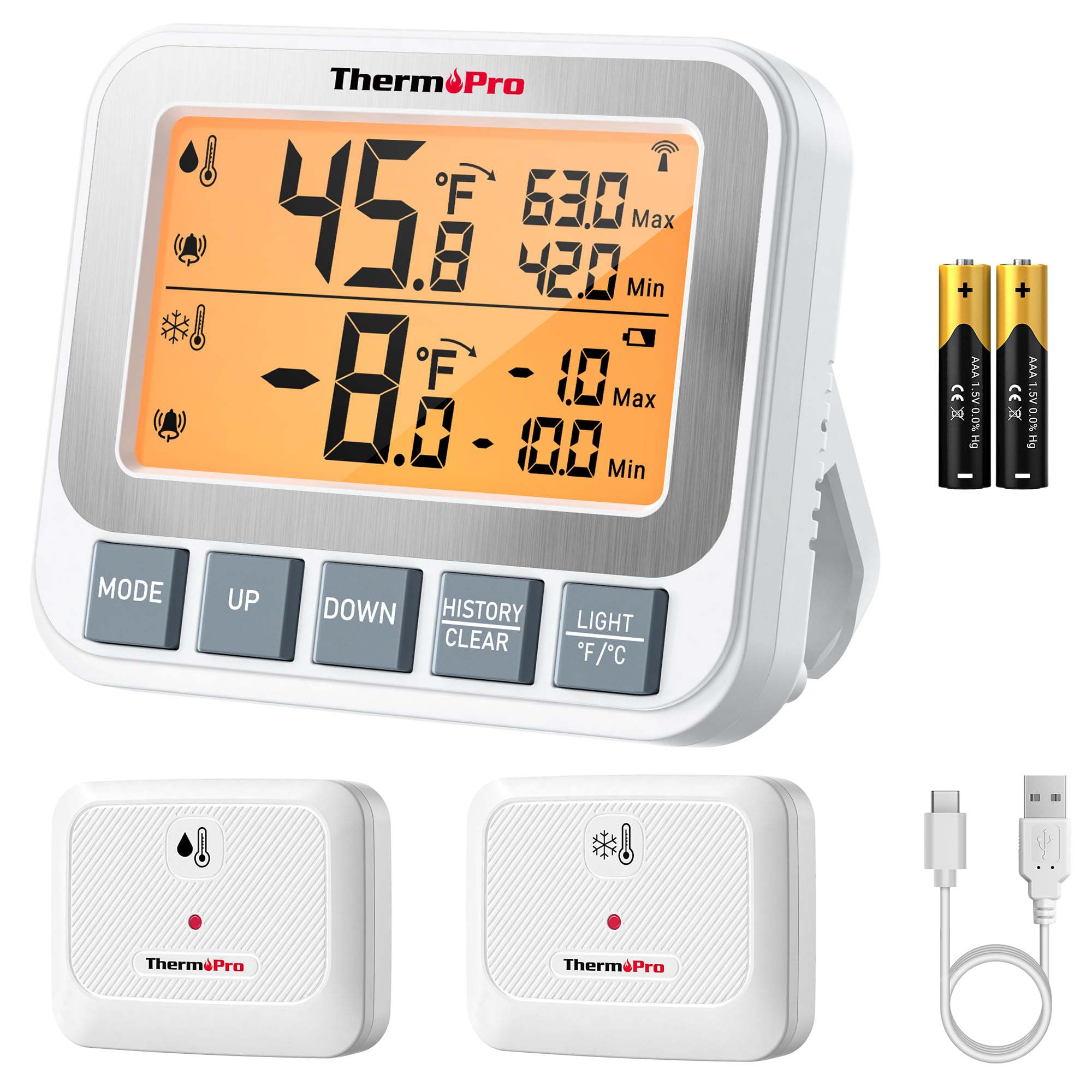
Image: ThermoPro TP210B Receiver and Transmitter. The receiver displays temperatures, while the transmitter sends data from inside the appliance.
Алуучунун жайгашуусу:
- Use the integrated stand to place it on a countertop.
- Utilize the magnetic back to attach it to a metallic surface.
- Hang it using the hook on the back.
- Place the receiver in a location where you can easily view the display and hear alarms, within the 500ft/150m range of the transmitter.
Өткөргүчтү жайгаштыруу:
- Place the transmitter inside your refrigerator or freezer.
- Use the integrated clip to attach it to a shelf or rack.
- Ensure the transmitter is not obstructed by large items that could block the wireless signal.
5. Иштөө нускамалары
5.1. Күйгүзүү/өчүрүү
- басыңыз КҮЧ button on both the receiver and transmitter to turn them on or off.
5.2. Reading Temperatures
- The receiver's backlit LCD display will show the current temperature from the transmitter.
- The display typically shows both the current temperature and the all-time Max/Min records.
5.3. Setting Temperature Alarms
The TP210B allows you to set custom high and low temperature limits for alerts.
- басыңыз ALERT button on the receiver. The high limit will flash.
- колдонуу UP or ылдый buttons to adjust the high temperature limit.
- Басыңыз ALERT again to confirm the high limit and move to the low limit setting.
- колдонуу UP or ылдый buttons to adjust the low temperature limit.
- Басыңыз ALERT a third time to confirm the low limit and exit alarm setting mode.
When the temperature exceeds the set range, the receiver will emit an audio-visual alarm.
5.4. Max/Min Temperature Records
- The receiver automatically records the maximum and minimum temperatures detected since the last reset.
- басыңыз МАКС/МИН button to cycle through current, maximum, and minimum temperature readings.
- To reset the Max/Min records, press and hold the МАКС/МИН баскычын 3 секунд басып туруңуз viewing the Max/Min display.
5.5. Арткы жарык
- The receiver features a bright backlit display for easy reading in low-light conditions.
- The backlight will activate automatically when a button is pressed and will turn off after a short period of inactivity to conserve battery.
6. Техникалык тейлөө
6.1. Тазалоо
- Бирдиктерди жарнама менен сүртүңүзamp кездеме. Сууга чөмүлүүгө болбойт.
- Абразивдүү тазалагычтарды же эриткичтерди колдонбоңуз.
6.2. Battery Replacement (Receiver)
- When the low battery indicator appears on the receiver display, replace the 2 AAA batteries.
- Жаңы батарейкаларды салууда алардын полярдуулугунун тууралыгын текшериңиз.
6.3. Transmitter Charging
- Recharge the transmitter's lithium battery when the low battery indicator appears.
- Берилген USB кубаттоо кабелин колдонуңуз.
6.4. Сактоо
- If storing the device for an extended period, remove the AAA batteries from the receiver.
- Кургак жерде катуу температурадан алыс сактаңыз.
7. Кыйынчылыктарды
| Көйгөй | Мүмкүн себеп | Чечим |
|---|---|---|
| No temperature reading / "--" displayed | Transmitter not powered on, out of range, or low battery. |
|
| Температураны туура эмес көрсөткүчтөр | Sensor obstruction, extreme environmental conditions, or sensor malfunction. |
|
| Ойготкучтар укпайт | Alarm limits not set correctly or alarm function disabled. |
|
| Transmitter battery drains quickly | Operating in extremely low temperatures or frequent signal transmission. |
|
8. Техникалык шарттар
- Температура диапазону: -40°F – 158°F (-40°C – 70°C)
- Температуранын тактыгы: ± 0.9 ° F (± 0.5 ° C)
- Зымсыз диапазон: Up to 500ft (150m) in open air
- Берүү жыштыгы: 433 МГц
- Алуучу күчү: 2 x AAA батарейкалар (киргизилген)
- Өткөргүч кубаттуулугу: Rechargeable Lithium battery (included, with USB charging cable)
- Дисплей: Арткы жарыктуу LCD
- Өлчөмдөрү (кабыл алуучу): Болжол менен 4.33 дюйм (узундугу)
- Салмагы (пункт): Болжол менен 11.2 унция
9. Кепилдик жана колдоо
ThermoPro provides a warranty for this product against defects in materials and workmanship. For detailed warranty information, product registration, or technical support, please visit the official ThermoPro webсайтка же түздөн-түз кардарларды тейлөөгө кайрылыңыз.
Официалдуу Webсайт: www.thermopro.com
Кардарларды колдоо: Refer to the contact information provided on the ThermoPro webсайт же продукт таңгак.


