1. Киришүү
This manual provides detailed instructions for the safe and effective operation, maintenance, and troubleshooting of your Ralcam Articulating Borescope Endoscope Camera. Please read this manual thoroughly before using the device to ensure optimal performance and longevity.

Image 1.1: Ralcam Articulating Borescope Endoscope Camera with its carrying case and flexible probe.
2. Коопсуздук боюнча маанилүү маалымат
Жаракат алуунун же түзмөктүн бузулушунун алдын алуу үчүн, ар дайым төмөнкү коопсуздук чараларын сактаңыз:
- Аппаратты ажыратууга же өзгөртүүгө аракет кылбаңыз.
- Аппаратты экстремалдык температурадан, тике күн нурларынан жана жегич суюктуктардан алыс кармаңыз.
- Ensure the probe is clean and dry before and after use, especially when inspecting wet environments.
- Аппаратты күйүүчү же жарылуучу газдары бар чөйрөдө колдонбоңуз.
- Балдар жетпеген жерде сактаңыз.
- The probe is designed for inspection purposes only; do not use it to manipulate objects or for medical applications.
3. Пакеттин мазмуну
Пакетте бардык буюмдар бар экенин текшериңиз:
- 1x Ralcam Articulating Borescope Unit
- 1x USB-C заряддоо кабели
- 1x Ташуу кутусу
- 1x 32GB TF Card (pre-installed or separate)
- 1x Колдонуучунун колдонмосу

Image 3.1: The complete packing list, showing the borescope, charging cable, carrying case, and 32GB TF card.
4. Продукт бүтүп калдыview
The Ralcam Articulating Borescope is designed for detailed visual inspection in hard-to-reach areas. Key features include:
- 4.3 дюймдук HD IPS дисплей: Provides clear, real-time images and videos.
- 210° Dual-Direction Articulating Probe: Allows flexible navigation and viewбурчтар.
- 6.2mm Diameter Probe: Enables access into narrow openings.
- 6 жөнгө салынуучу светодиоддор: Illuminates dark inspection areas with customizable brightness.
- IP67 суу өткөрбөй турган зонд: Suitable for use in wet or submerged conditions.
- Жогорку температурадан коргоо: Automatically shuts off if the probe exceeds 90°C.
Негизги компоненттер

Image 4.1: The 210° dual-direction bendable probe, demonstrating its ability to navigate and inspect various angles within confined spaces.

Image 4.2: The 4.3-inch 1280x720 HD IPS display, highlighting its clear and detailed image reproduction.

Image 4.3: The slim 6.2mm diameter micro camera probe, shown next to a penny to illustrate its compact size for accessing tight areas.

Image 4.4: An illustration of the 1280x720P HD pixel camera, emphasizing its capability for clear and detailed imaging.
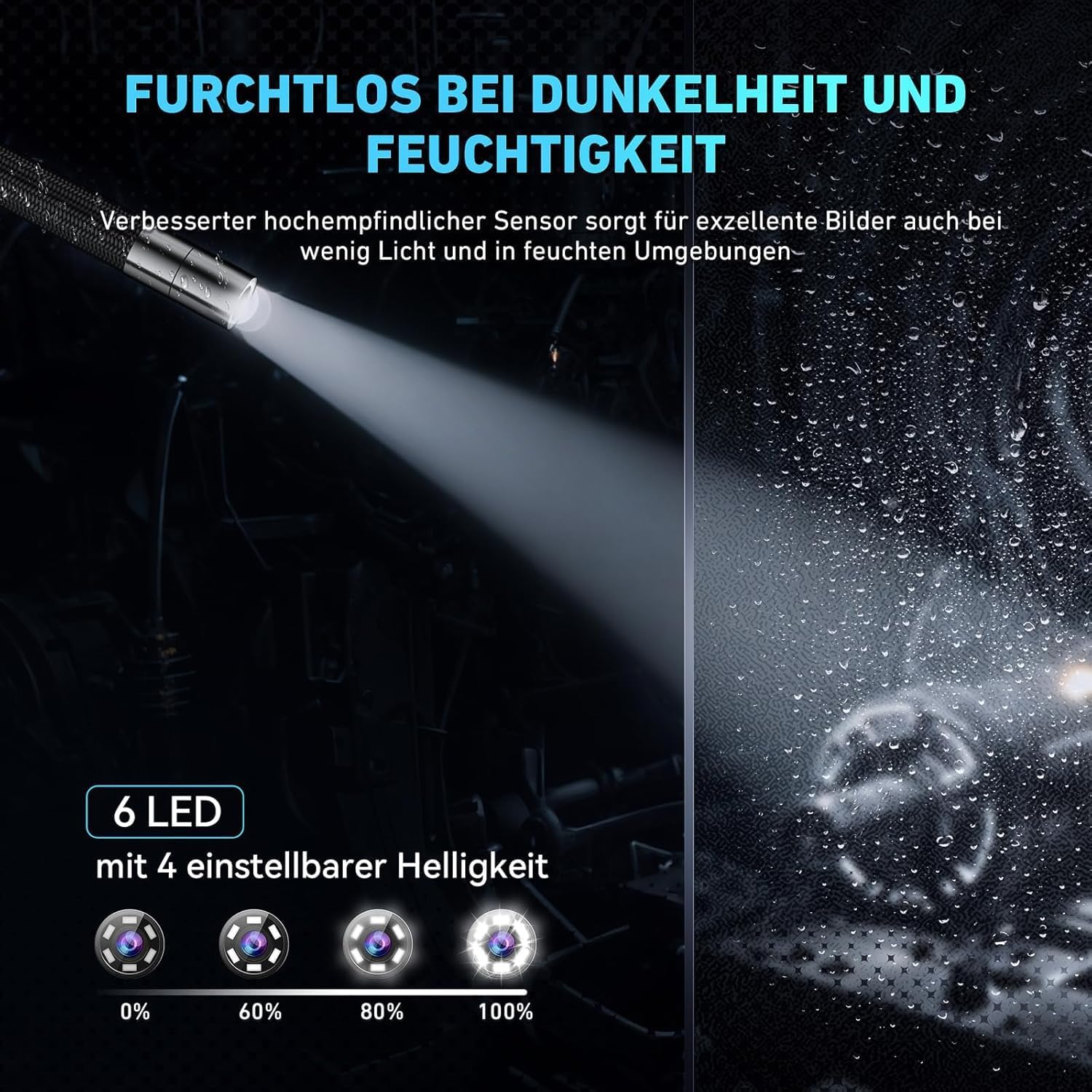
Image 4.5: The probe tip equipped with 6 adjustable LEDs, demonstrating various brightness settings for optimal visibility in dark conditions.

Image 4.6: The IP67 waterproof probe, shown in a water environment to illustrate its resistance to liquids.
5. Орнотуу
5.1 Аппаратты заряддоо
Before first use, fully charge the borescope. Connect the provided USB-C charging cable to the device's USB-C port and the other end to a standard USB power adapter (not included) or a computer's USB port. The charging indicator will show the charging status. A full charge provides up to 3 hours of continuous use.

Image 5.1: The borescope being charged via its USB-C port, also indicating its capability for data transfer to a PC.
5.2 Эстутум картасын салуу
The device comes with a 32GB TF card. Locate the TF card slot, usually on the side of the main unit. Insert the TF card with the gold contacts facing down until it clicks into place. To remove, gently push the card in until it springs out.

Image 5.2: The memory card slot and the included 32GB TF card, showing its capacity for storing images and videos.
5.3 Күйгүзүү/өчүрүү
Press and hold the power button (usually marked with a power symbol) for a few seconds to turn the device on. The screen will light up. To turn off, press and hold the power button again until the screen shuts down.
6. Иштөө нускамалары
6.1 Интерфейсте навигация
The borescope features a user-friendly interface with several buttons for control:
- Кубат баскычы: Аппаратты күйгүзөт/өчүрөт.
- OK/Тартуу баскычы: Confirms selections or captures photos/starts/stops video recording.
- Меню баскычы: Жөндөөлөргө жана параметрлерге кирет.
- Өйдө/Төмөн/Сол/Оң баскычтары: Менюларды карап чыгып, жөндөөлөрдү тууралайт.
6.2 Adjusting Probe Articulation
The 210° dual-direction articulation is controlled by a joystick or wheel on the handle. Move the control to bend the probe tip in the desired direction, allowing you to inspect various angles without repositioning the entire cable.

Image 6.1: The flexible, tungsten-braided probe demonstrating its 210° rotation capability for comprehensive inspection.
6.3 LED жарыктыгын жөндөө
Press the LED brightness button (often marked with a light bulb icon) to cycle through different brightness levels for the 6 LEDs on the probe tip. Adjust as needed for optimal illumination in various inspection environments.
6.4 Сүрөттөрдү жана видеолорду тартуу
Ал эми viewing live footage, press the OK/Capture button once to take a photo. To record a video, press and hold the OK/Capture button for a few seconds; press again to stop recording. All captured media will be saved to the inserted TF card.
6.5 Жогорку температурадан коргоо
The borescope is equipped with a high-temperature protection feature. If the probe temperature exceeds 90°C, the device will automatically shut down to prevent damage. Allow the probe to cool down before resuming operation. Normal operating temperature range is -10°C to +50°C, with a warning at 80°C.

Image 6.2: The borescope's unique temperature protection technology, showing a warning on the screen when the probe temperature approaches 90°C.
7. Техникалык тейлөө
7.1 Cleaning the Probe and Screen
- Текшерүү: After each use, especially in dirty or wet environments, gently wipe the probe tip and cable with a soft, damp cloth. For stubborn grime, use a mild, non-abrasive cleaner. Ensure the probe is completely dry before storage.
- Экран: Use a soft, lint-free cloth to clean the display screen. Do not use harsh chemicals or abrasive materials that could scratch the screen.
7.2 Сактоо
Store the borescope and its accessories in the provided carrying case in a cool, dry place, away from direct sunlight and extreme temperatures. Ensure the probe cable is coiled loosely and not kinked.
8. Кыйынчылыктарды
If you encounter issues with your Ralcam borescope, refer to the table below for common problems and solutions:
| Көйгөй | Мүмкүн себеп | Чечим |
|---|---|---|
| Түзмөк күйбөйт | Батареянын аздыгы; Кубат баскычы туура басылган жок | Charge the device fully; Press and hold the power button for several seconds |
| Экранда сүрөт жок | Probe cable not connected securely; Device malfunction | Ensure probe cable is firmly connected; Contact customer support if issue persists |
| Сүрөт бүдөмүк же караңгы | LED brightness too low; Lens dirty; Insufficient light | Adjust LED brightness; Clean the probe lens; Ensure adequate ambient light if possible |
| Сүрөттөрдү/видеолорду сактоо мүмкүн эмес | TF card full or not inserted; TF card error | Check TF card insertion; Delete old files or replace card; Format TF card (backup data first) |
| Probe articulation not working | Mechanism jammed; Damage to probe cable | Do not force articulation; Inspect cable for damage; Contact customer support |
| Түзмөк күтүлбөгөн жерден өчүп калат | High-temperature protection activated; Low battery | Allow probe to cool down; Recharge the device |
9. Техникалык шарттар
| Өзгөчөлүк | Спецификация |
|---|---|
| Модель аты | Articulating Borescope 6.2mm |
| Screen Size | 4.3 дюйм |
| Display Resolution | 1280x720 HD IPS |
| Зонддун диаметри | 6.2мм |
| Probe Articulation | 210° Dual-Direction |
| Зонд кабелинин узундугу | 1 Meter (Semi-Rigid) |
| Светодиоддор | 6 Adjustable High-Intensity LEDs |
| Суу каршылык | IP67 (Зонд) |
| Батарея | 2200mAh Rechargeable (up to 3 hours operation) |
| Иштөө температурасы | -10°C to +50°C (Warning at 80°C, Shutdown at 90°C) |
| Сактагыч | 32 ГБ TF картасын колдойт (кошулган) |
| Элемент Салмагы | 2.23 фунт |
| Пакеттин өлчөмдөрү | 12.44 x 8.66 x 3.03 дюйм |
10. Кепилдик жана Кардарларды колдоо
Ralcam offers a 12 айлык кепилдик for this Articulating Borescope Endoscope Camera. This warranty covers manufacturing defects and issues arising from normal use.
For technical assistance, warranty claims, or any questions regarding your device, please contact Ralcam customer support through the retailer's platform or the contact information provided with your purchase. Please have your model number and purchase date ready when contacting support.


