1. Киришүү
Thank you for choosing the Toputure TEB4 Folding Home Exercise Bike. This manual provides essential information for the safe assembly, operation, and maintenance of your new fitness equipment. Please read this manual thoroughly before use and keep it for future reference. This exercise bike is designed to offer a versatile and effective workout experience in the comfort of your home, featuring 5-in-1 workout modes, 16 levels of magnetic resistance, and smart app connectivity.
2. Коопсуздук боюнча маанилүү маалымат
Кандайдыр бир көнүгүү программасын баштоодон мурун, дарыгериңиз менен кеңешиңиз. Бул өзгөчө 35 жаштан ашкан же ден соолугунун абалы мурунтан эле бар адамдар үчүн маанилүү.
- Always wear appropriate exercise attire and footwear.
- Велосипед тегиз, туруктуу бетке коюлганын текшериңиз.
- Колдонуу учурунда балдарды жана үй жаныбарларын жабдуулардан алыс кармаңыз.
- Бул велосипед үчүн колдонуучунун максималдуу салмагы 140 кг (308 фунт). Бул чектен ашпаңыз.
- Inspect the bike for any loose parts or damage before each use. Do not use if damaged.
- Adjust the seat and handlebars to a comfortable and safe position before beginning your workout.
- Эгер алсырап, башыңыз айланса же ооруса, көнүгүүлөрдү дароо токтотуңуз.
3. Пакеттин мазмуну
Your Toputure TEB4 Exercise Bike package includes the following components:
- Main Frame (70% pre-assembled)
- Отургуч жана жөлөнгүч
- Туткалар
- ЖК Monitor
- Pedals with Straps
- Каршылык тилкелери
- Монтаждоо куралдарынын комплекти
- User Manual

Image: All components included in the package for the Toputure TEB4 Exercise Bike.
4. Монтаждоо боюнча нускамалар
Your Toputure TEB4 Exercise Bike arrives 70% алдын ала чогултулган to simplify the setup process. The remaining assembly can typically be completed in about 30 minutes using the included tool kit.
- Компоненттерди таңгактан чыгаруу: Carefully remove all parts from the packaging and lay them out. Check against the package contents list to ensure everything is present.
- Стабилизаторлорду тиркөө: Берилген болтторду жана шаймандарды колдонуп, алдыңкы жана арткы стабилизатор тилкелерин негизги рамага бекитиңиз.
- Педалдарды орнотуу: Attach the left and right pedals to their respective cranks. Note that pedals are often marked 'L' and 'R' and thread in opposite directions.
- Отургучту жана аркасын орнотуу: Slide the seat post into the main frame and secure it at your desired height. Attach the backrest to the seat support.
- Рулду жана мониторду бекитүү: Secure the handlebars to the main post. Connect the LCD monitor to the handlebar assembly and plug in any necessary sensor cables.
- Каршылык тилкелерин туташтырыңыз: If desired, attach the resistance bands to the designated points on the frame.
- Акыркы текшерүү: Ensure all bolts are tightened and the bike is stable before first use.
For detailed visual guidance, please refer to the online video tutorials available on the Toputure support webсайттан же продуктунун таңгагындагы QR кодун сканерлөө менен.
5. Иштөө нускамалары
5.1. Мониторду күйгүзүү
The LCD monitor will automatically power on when you begin pedaling or press any button. It is powered by batteries (not included, typically AAA). To conserve battery life, the monitor will automatically shut off after a period of inactivity.
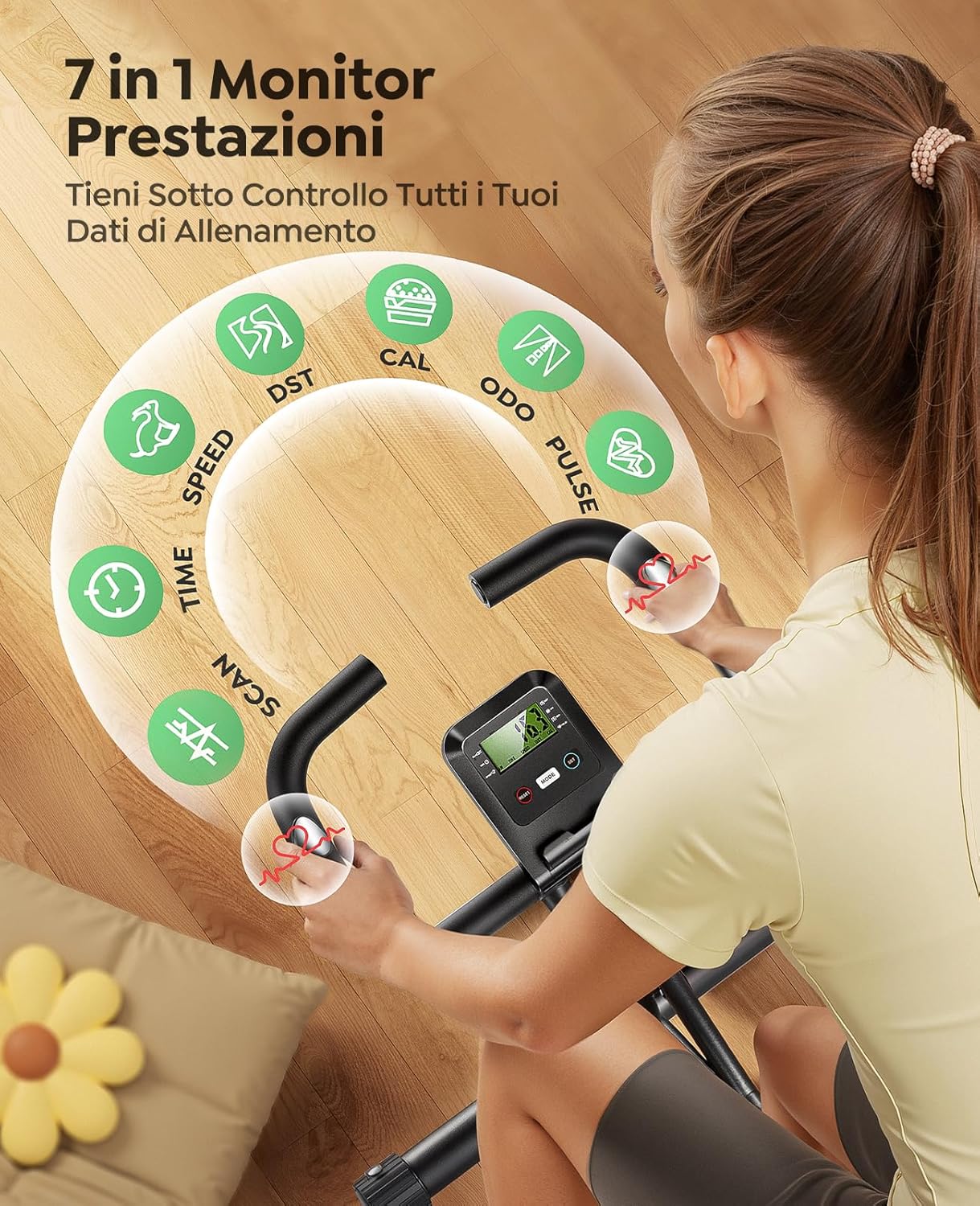
Image: LCD Monitor displaying workout data.
5.2. Каршылыкты жөнгө салуу
The Toputure TEB4 features Магниттик каршылыктын 16 деңгээли. To adjust the intensity of your workout, simply turn the resistance knob located on the main frame. Turn clockwise for higher resistance and counter-clockwise for lower resistance.
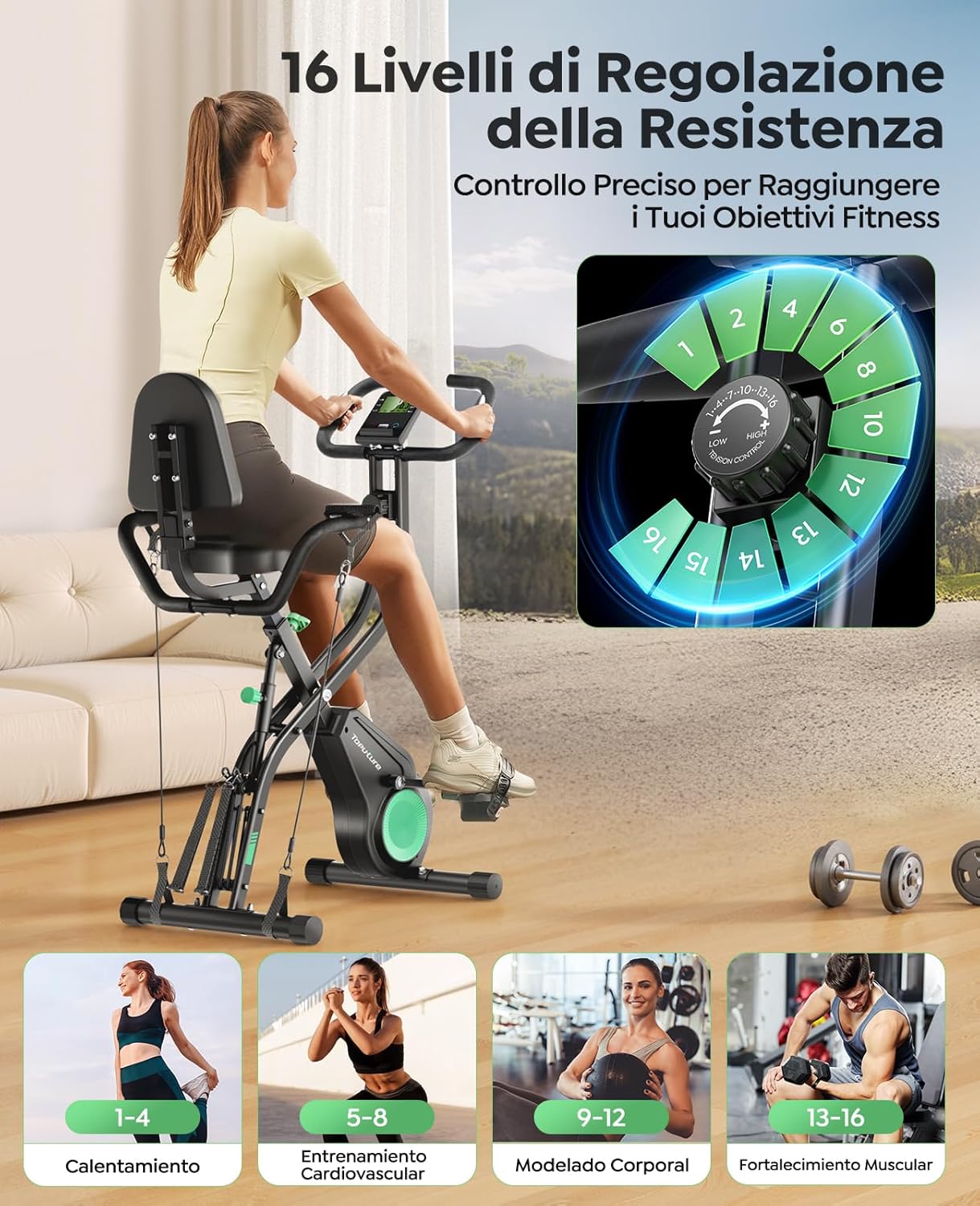
Image: Resistance adjustment knob with 16 levels.
5.3. ЖК мониторду колдонуу
The multi-function LCD monitor displays real-time workout data to help you track your progress:
- TIME: Учурдагы машыгууңуздун узактыгы.
- ЫЛДАМ: Учурдагы велосипед ылдамдыгы.
- RPM: Мүнөтүнө айлануулар (педалдын каденциясы).
- Дистанция: Учурдагы машыгуу учурунда басып өткөн аралык.
- КАЛОРИЙ: Болжолдуу күйгөн калория.
- ПУЛЬС: Your heart rate, measured by the hand pulse sensors on the handlebars.
- СКАН: Бардык көрсөткүчтөрдү автоматтык түрдө айлантат.
Use the 'MODE' button to select which metric is displayed or to activate the 'SCAN' function. The 'RESET' button clears all workout data. The 'SET' button is used for setting target values (e.g., target time, distance, or calories) if available on your monitor model.
5.4. Колдонмо байланышы
Enhance your training with interactive virtual workouts by connecting your Toputure TEB4 to popular fitness apps via Bluetooth. The bike is compatible with Fitshow, Zwift, and Kinomap.
- Колдонмону жүктөп алуу: Download your preferred fitness app (Fitshow, Zwift, or Kinomap) from your device's app store.
- Bluetooth иштетүү: Смартфонуңузда же планшетиңизде Bluetooth иштетилгенин текшериңиз.
- Түзмөктү жупташтыруу: Open the fitness app and follow the in-app instructions to connect to your Toputure TEB4 Exercise Bike. The bike should appear as a discoverable device.
- Машыгууну баштоо: Once connected, you can enjoy interactive training, track your progress, and participate in virtual routes.

Image: App connectivity for interactive workouts.
5.5. 5-in-1 Multifunctional Workout Modes
The Toputure TEB4 offers five distinct workout modes to target various muscle groups and provide a comprehensive fitness experience:
- Vertical Cycling: Standard upright cycling for cardiovascular fitness.
- Racing Cycling: A more aggressive, forward-leaning posture simulating road cycling.
- Horizontal Cycling: A reclined position with back support, ideal for comfort and lower back relief.
- Кол көнүгүүлөрү: Utilize the integrated resistance bands to perform upper body workouts while seated.
- Бутту чоюу: Use the resistance bands for lower body stretching and flexibility exercises.

Image: Demonstrating the 5-in-1 workout modes.
5.6. Adjusting Seat and Handlebars
For optimal comfort and exercise efficiency, adjust the seat and handlebars to your body height.
- Орундукту жөндөө: The seat can be adjusted to 7 different positions. Loosen the adjustment knob below the seat, slide the seat to the desired height (suitable for users 150-195 cm / 4'11"-6'5"), and tighten the knob securely. The extra-large padded seat and ergonomic backrest ensure comfort during longer sessions.
- Рулду тууралоо: The handlebars can also be adjusted for optimal reach and comfort. Loosen the adjustment knob, set to desired height, and tighten.

Image: Comfortable seat, ergonomic backrest, transport wheels, and anti-slip pedals.
5.7. Бүктөө жана сактоо
The Toputure TEB4 is designed for easy folding and storage, making it ideal for small spaces.
- Рамканы бүктөңүз: Locate the folding knob (often green) on the main frame. Loosen or pull the knob as instructed in the assembly guide to allow the frame to fold.
- Secure in Folded Position: Once folded, ensure the frame is securely locked in its compact position.
- Move and Store: Use the integrated transport wheels on the front stabilizer to easily move the folded bike to your desired storage location.

Image: Folded dimensions and transport wheels for easy storage.
6. Техникалык тейлөө
Велосипедиңиздин коопсуз иштешин жана үзгүлтүксүз техникалык тейлөө анын узак мөөнөттүү иштешин камсыз кылат.
- Тазалоо: Велосипедди жарнама менен сүртүңүзamp терди жана чаңды кетирүү үчүн ар бир колдонуудан кийин чүпүрөк менен сүртүңүз. Абразивдүү тазалагычтардан алыс болуңуз.
- Текшерүү: Бардык болттордун, гайкалардын жана кыймылдуу бөлүктөрүнүн бекемдигин мезгил-мезгили менен текшерип туруңуз. Бош бекиткичтерди бекемдеңиз.
- Майлоо: No specific lubrication is typically required for magnetic resistance bikes, but refer to the detailed assembly guide for any specific recommendations.
- Сактагыч: Велосипедди кургак, салкын жерде күн нурунан жана экстремалдык температурадан алыс сактаңыз.
7. Кыйынчылыктарды
If you encounter any issues with your Toputure TEB4 Exercise Bike, refer to the following common problems and solutions:
| Көйгөй | Мүмкүн себеп | Чечим |
|---|---|---|
| Монитор маалыматтарды көрсөтпөй жатат | Dead batteries; Loose sensor cable; Inactivity | Replace batteries; Check sensor cable connection; Start pedaling to activate. |
| Иш учурунда адаттан тыш ызы-чуу | Loose bolts; Friction from moving parts | Check and tighten all assembly bolts; Ensure no parts are rubbing. |
| Каршылык өзгөрбөйт | Каршылык кабелинин көйгөйү; Ички механизмдин бузулушу | Каршылык кабелинин туура туташтырылганын жана ийилип калбаганын текшериңиз. Эгерде көйгөй чечилбесе, кардарларды колдоо кызматына кайрылыңыз. |
| Велосипед туруксуз сезилет | Тегиз эмес бет; Бош стабилизатор болттору | Ensure the bike is on a level surface. Adjust the leveling caps on the stabilizer bars. Tighten all stabilizer bolts. |
If you cannot resolve the issue using the information above, please contact Toputure customer support for assistance.
8. Техникалык шарттар
- Модель номери: TEB4
- Продукциянын өлчөмдөрү (ачылган): 116 x 21 x 39 см (45.7 x 8.3 x 15.4 дюйм)
- Элемент Салмагы: 19 кг (41.9 фунт)
- Максималдуу Колдонуучу Салмагы: 140 кг (308 фунт)
- Сунушталган колдонуучунун бою: 150-195 cm (4'11"-6'5")
- Материал: Арматураланган болот
- Каршылык көрсөтүү механизми: Магниттик
- Каршылык деңгээли: 16
- Кубат булагы: Pedal-powered (for monitor)
- Өзгөчөлүктөр: 5-in-1 Multifunctional Design, Bluetooth App Connectivity (Fitshow, Zwift, Kinomap), LCD Monitor, Heart Rate Sensors, Foldable Design, Transport Wheels.
9. Кепилдик жана колдоо
The Toputure TEB4 Exercise Bike comes with a 24 айлык кепилдик, which includes free parts replacement. This warranty covers manufacturing defects and ensures your peace of mind.
For any questions, technical assistance, or warranty claims, please contact Toputure customer service. Our dedicated team is ready to assist you.
Байланыш маалыматы: Please refer to the contact details provided on the Toputure official webсайт же сатып алуу документтери.


