Introduction
This manual provides comprehensive instructions for the safe and effective use of your AMPBANK M256 Thermal Camera. The M256 is a compact thermal imager designed for use with Android smartphones, tablets, and PCs, offering a 256x192 IR resolution and a temperature range of -4°F to 842°F (-20°C to 450°C). Please read this manual thoroughly before operating the device.
Коопсуздук маалыматы
Жарааттарды же аппаратты бузууну болтурбоо үчүн ар дайым төмөнкү коопсуздук чараларын сактаңыз:
- Камераны күн же лазер сыяктуу катуу жылуулук булактарына түз багыттабаңыз, анткени бул сенсорго зыян келтириши мүмкүн.
- Аппаратты экстремалдык температурага, нымдуулукка же коррозиялык чөйрөгө тийгизбеңиз.
- Аппаратты түшүрүүдөн же катуу таасирлерден сактаныңыз.
- Use only the provided accessories or those approved by AMPBANK.
- Аппаратты балдар жетпеген жерде сактаңыз.
- Refer to local regulations for proper disposal of electronic devices.
Пакеттин мазмуну
Пакетиңизде бардык буюмдар бар экенин текшериңиз:
- 1 x AMPBANK M256 термикалык камера
- 1 x Multifunctional Adapter Cable (19.7-inch / 50cm USB extension cable)
- 1 x Тазалоочу чүпүрөк
- 1 x Ыкчам Колдонуучу колдонмосу
- 1 x Ташуу сумкасы
- 1 x Packing Box

Сүрөт: Мазмуну AMPBANK M256 Thermal Camera package, including the camera, adapter cable, cleaning cloth, quick user guide, carrying bag, and packing box.
Продукт бүттүview
The AMPBANK M256 is a compact, plug-and-play thermal imaging camera designed to extend the capabilities of your Android smartphone or PC. It features a USB-C connector for direct attachment to compatible devices.

Сүрөт: алдыңкы view -ныкы AMPBANK M256 Thermal Camera, showing its compact green and black design with a USB-C connector.
Негизги өзгөчөлүктөрү:
- Жогорку чечим: Так жылуулук сүрөттөрү үчүн 256x192 IR чечилиши.
- Кең температура диапазону: -4°Fден 842°Fге чейин (-20°Cден 450°Cге чейин).
- Төмөн энергия керектөө: Operates efficiently at 0.35W.
- Компакт жана көчмө: Weighs only 30g, easily fits in a pocket.
- Ар тараптуу байланыш: Compatible with Android smartphones/tablets and PCs via USB-C.
Жайгашуу
1. App Installation (Android)
- Locate the "ThermCam" application on the Google Play Store.
- Download and install the application on your Android smartphone or tablet.
- Ensure your device supports OTG (On-The-Go) functionality for external device connection.

Image: Screenshot showing the ThermCam app available on Google Play, indicating where to download the required software for the thermal camera.
2. Аппаратты туташтыруу
- For direct connection: Plug the USB-C connector of the M256 thermal camera directly into the USB-C port of your Android smartphone or tablet.
- For extended connection: Use the provided 19.7-inch (50cm) USB extension cable. Connect one end to your smartphone/tablet and the other end to the M256 camera. This offers greater flexibility during use.
- Once connected, open the "ThermCam" app. The app should automatically detect the camera and display the thermal image.

Image: A hand holding a smartphone with the AMPBANK M256 Thermal Camera connected to its USB-C port, displaying a thermal image on the phone screen.

Сүрөт: The AMPBANK M256 Thermal Camera connected to a laptop and a tablet using the 19.7-inch USB extension cable, demonstrating its versatility.
3. Компьютердик программалык камсыздоону орнотуу
- For PC usage, download the "TCView 2.0" software from the official AMPБАНК webсайт.
- Программалык камсыздоону Windows компьютериңизге орнотуңуз.
- Connect the M256 camera to your PC using the USB-C extension cable.
- Launch the TCView 2.0 software to begin thermal imaging on your PC.
Операция
1. Температураны негизги өлчөө
- Once the app is open and the camera is connected, the thermal image will appear on your screen.
- The app displays real-time temperature readings.
- Adjust the camera's position to focus on the area of interest.

Сүрөт: колдонуп жаткан адам AMPBANK M256 Thermal Camera with a smartphone to inspect a wall, showing the thermal image and temperature readings on the phone screen.
2. Measurement Modes and Color Palettes
- The ThermCam app offers various measurement modes, including чекит, Line, жана Учак, for precise temperature monitoring.
- Select from 10 different color palettes to visualize temperature changes. Different palettes can highlight specific temperature variations more clearly.

Image: A smartphone screen displaying various color palettes and measurement settings within the ThermCam app, demonstrating customization options for thermal imaging.
3. 3D Thermal Analysis
- Utilize the advanced 3D editing features within the app or PC software for detailed temperature analysis from multiple perspectives.
- This feature assists in identifying subtle temperature anomalies and patterns.
4. Smart Alerts
- Configure smart alerts for high and low temperatures. The app will notify you when temperatures exceed or fall below predefined thresholds.
- This is useful for monitoring critical equipment or areas.
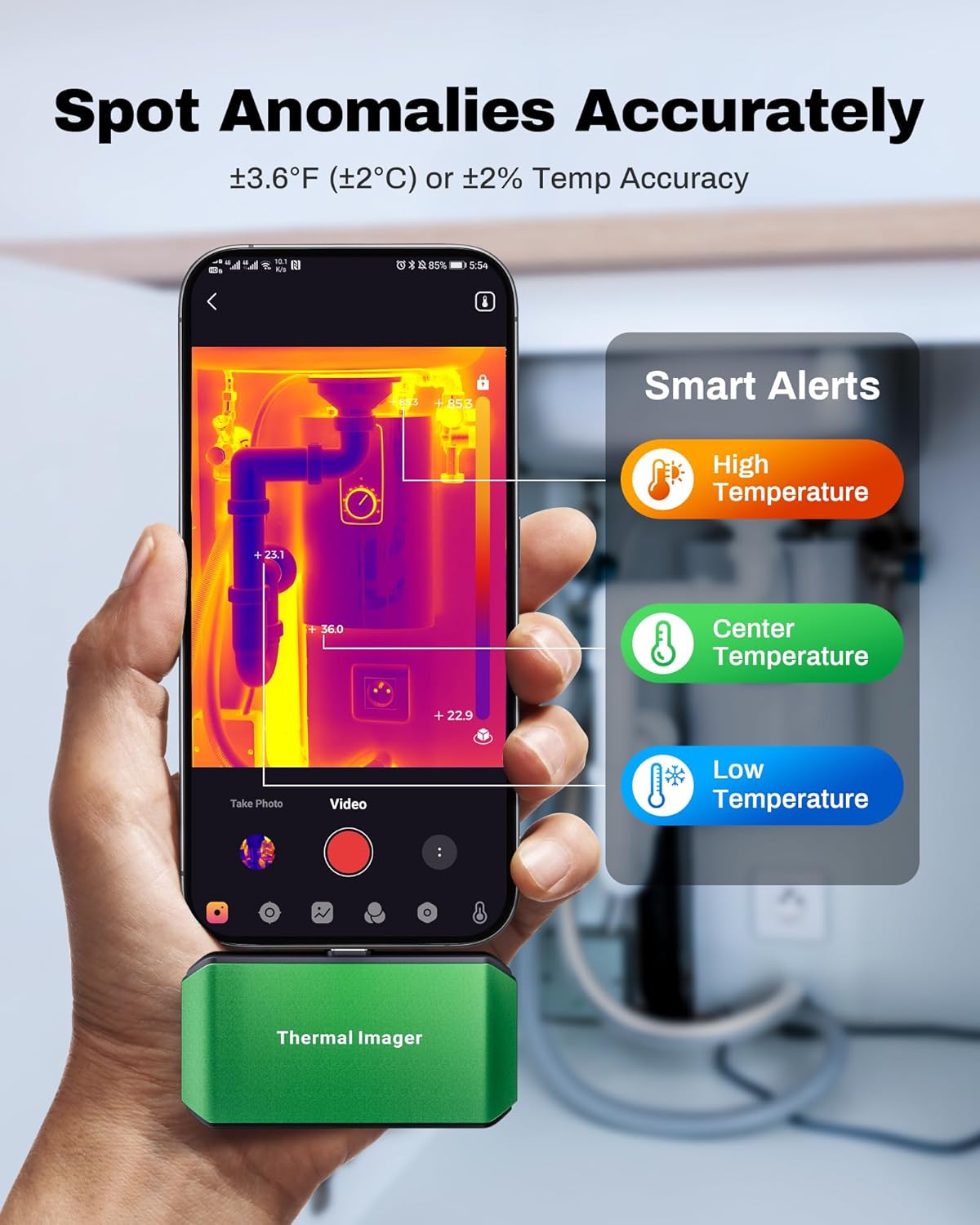
Image: A smartphone screen showing the ThermCam app with "Smart Alerts" for high, center, and low temperatures, indicating the camera's ability to detect anomalies.
5. Сүрөт жана видео тартуу
- Capture still thermal images or record thermal videos directly through the app.
- These captures can be used for documentation, analysis, or sharing.

Image: Screenshots from the ThermCam app demonstrating options for video recording and photo capturing of thermal images.
6. Generating Professional Reports
- The ThermCam app and TCView 2.0 software allow you to generate professional field reports.
- Customize data, add watermarks, and adjust settings for seamless sharing of your thermal analysis.

Image: A smartphone screen displaying the ThermCam app's interface for generating professional reports, including options to customize data and share.
Техникалык тейлөө
- Тазалоо: Use the provided cleaning cloth to gently wipe the camera lens and body. Do not use abrasive cleaners or solvents.
- Сактагыч: When not in use, store the thermal camera in its protective carrying bag to prevent dust and damage. Store in a cool, dry place away from direct sunlight.
- Программалык камсыздоо жаңыртуулары: Regularly check the Google Play Store or AMPБАНК website for updates to the ThermCam app or TCView 2.0 software to ensure optimal performance and access to new features.
Проблемаларды чечүү
| Көйгөй | Мүмкүн себеп | Чечим |
|---|---|---|
| Camera not detected by smartphone/PC. |
|
|
| Температураны туура эмес көрсөткүчтөр. |
|
|
| Колдонмо бузулат же катып калат. |
|
|
Техникалык шарттар
| Өзгөчөлүк | Деталь |
|---|---|
| Модел | M256 |
| IR токтому | 256x192 пиксел |
| Температура диапазону | -4°F – 842°F (-20°C – 450°C) |
| Температуранын тактыгы | ±3.6°F (±2°C) or ±2% |
| Жылуулук сезгичтиги (NETD) | <40мК |
| Жаңыртуу ылдамдыгы | 25Hz |
| Энергияны керектөө | 0.35 Вт |
| Байланыш | USB-C |
| Шайкештик | Android Smartphones/Tablets, Windows PC |
| Өлчөмдөр | 2.8 x 1.65 x 0.55 дюйм (70 x 44 x 14 мм) |
| Салмагы | 30 г (0.07 фунт) |
| Өндүрүүчү | AMPБАНК |

Image: A visual summary of the AMPBANK M256 Thermal Camera's key features and specifications, including resolution, temperature range, and power consumption.
Кепилдик жана колдоо
AMPBANK products are designed for reliability and performance. For warranty information, technical support, or service inquiries, please refer to the official AMPБАНК webсайтка же кардарларды тейлөө бөлүмүнө кайрылыңыз.
Кепилдик дооматтары үчүн сатып алганыңыздын далилин сактап коюңуз.
Онлайн ресурстар: зыярат кылыңыз AMPBANK Store on Amazon кошумча продукт маалымат жана колдоо үчүн.


