1. Орнотуу колдонмосу
This section provides detailed instructions for assembling your FLEXISPOT ErgoX Max Ergonomic Office Chair. Please follow the steps carefully to ensure proper setup and functionality.
1.1 Пакеттен чыгаруу жана компоненттерди идентификациялоо
Carefully unpack all components from the box. Verify that all parts listed in the user manual are present. Assembly tools are included.

Image: All components of the FLEXISPOT ErgoX Max Ergonomic Office Chair laid out on the floor before assembly.
1.2 Чогултуу кадамдары
- Базаны тиркөө: Secure the five-star aluminum base with casters. Ensure casters are firmly inserted.
- Газ көтөргүчтү орнотуу: Insert the gas lift cylinder into the center of the five-star base.
- Отургуч механизмин чогултуу: Берилген бурамалар менен отургучтун механизмин отургуч жаздыкчасынын астыңкы бетине бекитиңиз. Механизмдин алдыңкы бети отургучтун алдыңкы бети менен бир сызыкта экенин текшериңиз.
- Отургучту газ лифтине туташтырыңыз: Этияттык менен монтаждалган отургучту газ лифтинин баллонуна коюңуз.
- Колтуктарды бекитүү: Secure the 5D adjustable armrests to the seat base using the designated screws.
- Арткы таянычты бекитүү: Connect the backrest to the seat mechanism. Ensure all screws are tightened securely.
- Баш тирөөчтү орнотуу: Attach the 4D adjustable headrest to the top of the backrest.
- Install Footrest (Optional): If included, attach the retractable footrest to the designated points on the chair.
Assembly required. Comes with user manual and assembly tools. Do not exceed the maximum weight capacity of 661 lbs. Always follow the assembly instructions carefully.
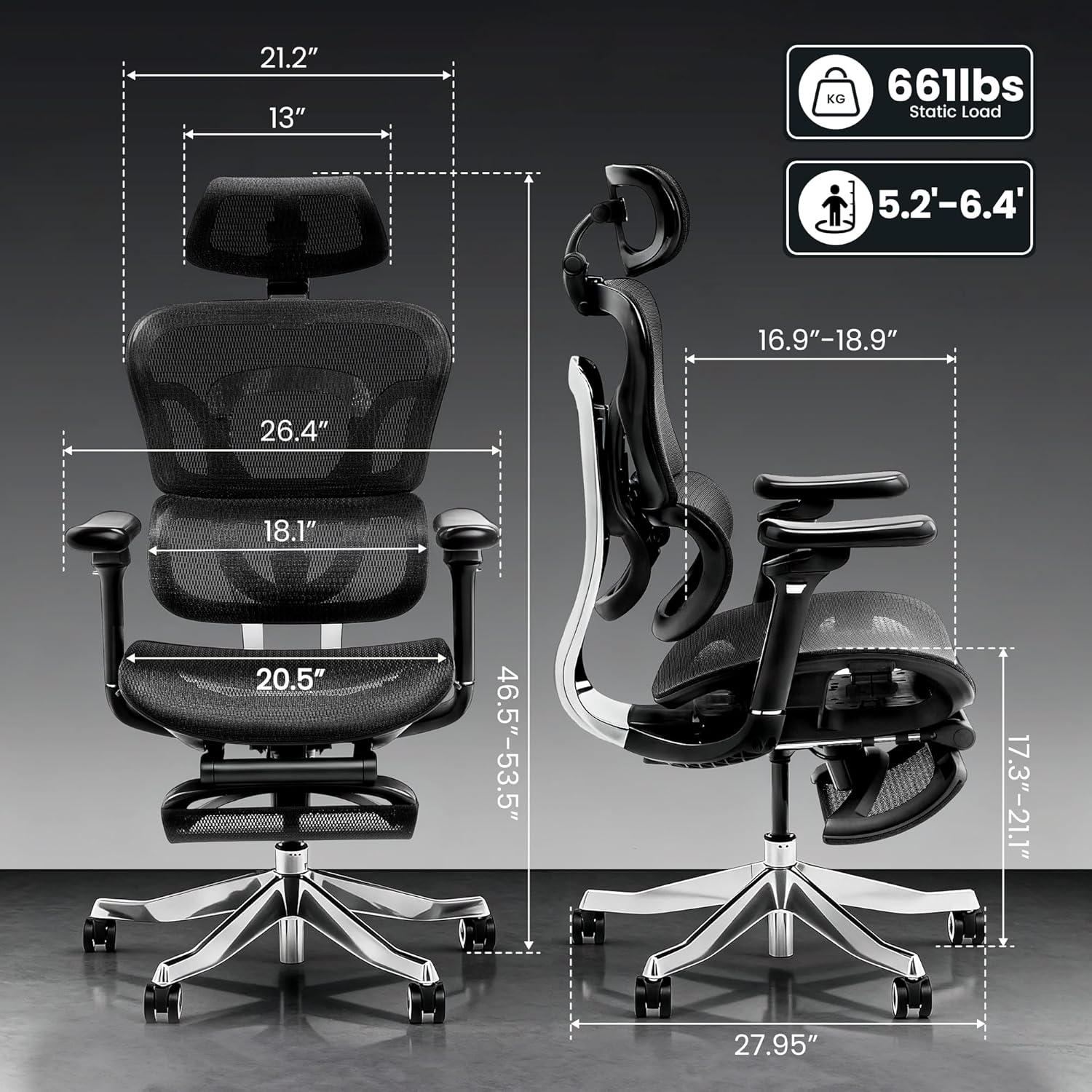
Image: Detailed dimensions of the FLEXISPOT ErgoX Max Ergonomic Office Chair, including height, width, and depth, along with its 661 lbs static load capacity.
2. Иштөө нускамалары
Your ErgoX Max chair offers extensive adjustability to customize your seating experience for optimal comfort and ergonomic support.
2.1 Chair Height Adjustment
- Оң жагындагы, отургучтун астындагы рычагды табыңыз.
- To raise the chair, lift the lever while taking your weight off the seat.
- To lower the chair, lift the lever while remaining seated.
2.2 Recline System
The chair features a 3-level recline system, allowing you to transition from work mode to relax mode.
- Жаталуу бурч: Adjust the recline angle between 104°, 113°, and 123.5° using the lever on the left side.
- Backrest Forward Tilt: The backrest can tilt forward 2-8° for precise back positioning.

Image: Illustration of the 3-level recline system, showing adjustable angles from 104° to 123.5°.
2.3 Колдукту тууралоо
The 5D adjustable PU armrests provide multi-directional support.
- Бийиктигин тууралоо: Press the button on the side of the armrest to raise or lower it.
- Forward/Backward/Pivot: Armrests can slide forward/backward and pivot inward/outward for optimal positioning.

Image: Visual guide demonstrating the multi-directional adjustments of the 5D armrests, including height, forward/backward, and pivot functions.
2.4 Белди колдоону тууралоо
The 4D adaptive lumbar support automatically adjusts to your posture. You can also fine-tune it manually.
- Тереңдикти жөндөө: Use the knob on the side of the backrest to adjust the depth of the lumbar support.
- Бийиктигин тууралоо: The lumbar support can be moved up or down to align with your lower back curve.

Image: Illustration of the 4D adaptive lumbar support, highlighting its pull-out design for precise back positioning and lasting comfort.
2.5 Баш таянгычты тууралоо
The 4D headrest allows for height, angle, and depth customization for neck comfort.
- Бийиктигин тууралоо: Баш тирөөчтү каалаган бийиктикке чейин өйдө же ылдый жылдырыңыз.
- Бурчту тууралоо: Tilt the headrest forward or backward.
- Тереңдикти жөндөө: Adjust the depth to provide optimal neck support.

Image: Visual guide demonstrating the height, angle, and depth customization options for the 4D adjustable headrest.
2.6 Retractable Footrest (Optional)
The optional retractable footrest can be pulled out for a complete reclining and relaxation experience.
- Pull the footrest out from beneath the seat when needed.
- Орун үнөмдөө үчүн колдонулбай турганда кайра түртүп коюңуз.
3. Техникалык тейлөө
Proper maintenance will extend the life and appearance of your ergonomic office chair.
3.1 Тазалоо боюнча нускамалар
- Mesh Components: For the mesh backrest and seat, use dry methods only. A soft brush or vacuum cleaner with a brush attachment can be used to remove dust and debris.
- Рамка жана негиз: Wipe the aluminum alloy frame and base with a soft, dry cloth. Avoid abrasive cleaners.
- Колтуктар: Clean padded armrests with a dry cloth. For stubborn spots, a slightly damp кездемени колдонсо болот, андан кийин дароо кургатуу.
- Avoid contact with liquids directly on mesh or padded surfaces.
3.2 Жалпы кам көрүү
- Regularly check all screws and bolts to ensure they are tight. Re-tighten if necessary.
- Avoid placing heavy objects on the armrests or backrest when not in use.
- Ensure smooth and silent mobility by keeping the electroplated chrome casters clean and free of debris.
4. Кыйынчылыктарды
If you encounter any issues with your chair, refer to the common problems and solutions below.
| Көйгөй | Мүмкүн себеп | Чечим |
|---|---|---|
| Кресло бийиктигин тууралабайт | Газ лифти иштебейт же бузук. | Ensure the height adjustment lever is fully engaged. If issue persists, contact customer support. |
| Стул солкулдап же өзүн туруксуз сезет | Бурамалар бошоп калган же тегиз эмес чогултулган. | Check and tighten all assembly screws, especially those connecting the base and seat mechanism. Ensure the chair is on a flat surface. |
| Backrest does not recline | Recline lock engaged. | Disengage the recline lock lever. If still stuck, ensure no obstruction is preventing movement. |
| Дөңгөлөктөр тегиз жылбайт | Дөңгөлөктөрдөгү же бузулган дөңгөлөктөрдөгү таштандылар. | Clean any hair or debris from the caster wheels. If damaged, consider replacing casters. |
If you cannot resolve the issue using these steps, please contact FLEXISPOT customer support.
5. Продукттун спецификациялары
| Өзгөчөлүк | Деталь |
|---|---|
| Бренд | FLEXISPOT |
| Модель аты | Ergonomic Executive Chair (FLEXISPOT ERGOX MAX) |
| Түс | Обсидиан Кара |
| Материал | Aluminum, Mesh, Nylon |
| Продукциянын өлчөмдөрү | 27.95"D x 27.95"W x 53.5"H |
| Элемент Салмагы | 46 фунт |
| Максималдуу салмак боюнча сунуш | 661 фунт |
| Артка стили | High-back, Mesh |
| Өзгөчөлүктөр | Жөнгө салынуучу баш тирөөч, бийиктигин жөнгө салуу, эргономикалык, колтук тирөөч, белди динамикалык колдоо, эңкейтүү, аркасын колдоо, жөнгө салынуучу чалкалоочу отургуч |
| Жаткан позициясынын саны | 3 |
| UPC | 840460490979 |
6. Кепилдик жана колдоо
FLEXISPOT жогорку сапаттагы өнүмдөрдү жана кардарлардын канааттануусун камсыз кылууга умтулат.
6.1 Продукциянын кепилдиги
This product may be eligible for a 3-Year Protection Plan. Please refer to your purchase documentation for specific warranty details and coverage.
6.2 Кардарларды колдоо
For any questions, troubleshooting assistance, or warranty claims, please contact FLEXISPOT customer support. Contact information can typically be found on the manufacturer's webсайт же сатып алуу дүмүрчөгү.


