1. Киришүү
This manual provides detailed instructions for the assembly, operation, and maintenance of your FLEXISPOT CyberX 71-Inch RGB LED Electric Gaming Standing Desk. Please read this manual thoroughly before use to ensure proper function and safety. Keep this manual for future reference.
2. Коопсуздук маалыматы
- Колдонуудан мурун бардык компоненттердин бекем бекитилишин текшериңиз.
- 352 фунттан (160 кг) ашпаңыз.
- Балдарды жана үй жаныбарларын бийиктикти тууралоодо столдон алыс кармаңыз.
- Avoid placing liquids directly on the desk surface without a cup holder to prevent spills and potential damage to electronics.
- Үстөлдүн электрдик компоненттерин бөлүктөргө бөлбөңүз же өзгөртпөңүз. Тейлөө үчүн кардарларды колдоо кызматына кайрылыңыз.
- Ensure power cables are properly managed to prevent tripping hazards or damage.
3. Пакеттин мазмуну
Чогултууну баштоодон мурун бардык тетиктердин бар экенин текшериңиз. Эгерде кандайдыр бир тетиктер жок болсо же бузулуп калса, кардарларды колдоо кызматына кайрылыңыз.
- Иш такта (1)
- Desk Legs with Dual Motors (2)
- Кайчылаш тилке/рамка компоненттери
- Gamepad-Style Joystick Controller (1)
- Кубаттуу адаптер жана кабелдер
- Кабель организатор (1)
- Кубок ээси (1)
- Rotating Headphone Stand (1)
- Монтаждоо жабдыктары (бурамалар, шаймандар)

4. Орнотуу жана чогултуу
Assembly is straightforward and typically takes approximately 45 minutes. It is recommended to have assistance due to the weight of the components.
4.1 Рамка монтажы
- Бардык компоненттерди таңгактан чыгарып, аларды таза, тегиз бетке жаткызыңыз.
- Attach the crossbar components to the desk legs using the provided hardware. Ensure all screws are tightened securely.
- Connect the motor cables to the main control hub.
4.2 Иш столунун тиркемеси
- Carefully place the desktop upside down on a soft, protective surface.
- Position the assembled frame onto the desktop, aligning the pre-drilled holes.
- Secure the desktop to the frame using the provided screws. Ensure the cable management tray and control box are properly positioned before fully tightening the desktop.
4.3 Аксессуарларды орнотуу
- Attach the cup holder and rotating headphone stand to the desired locations on the desktop edges.
- Install the cable organizer and cable management tray underneath the desktop.
- Connect the RGB LED strips to the designated ports on the control hub.

4.4 Assembly Video Reference
For a visual guide on the assembly process, refer to the following video:
5. Иштөө нускамалары
5.1 Бийиктигин тууралоо
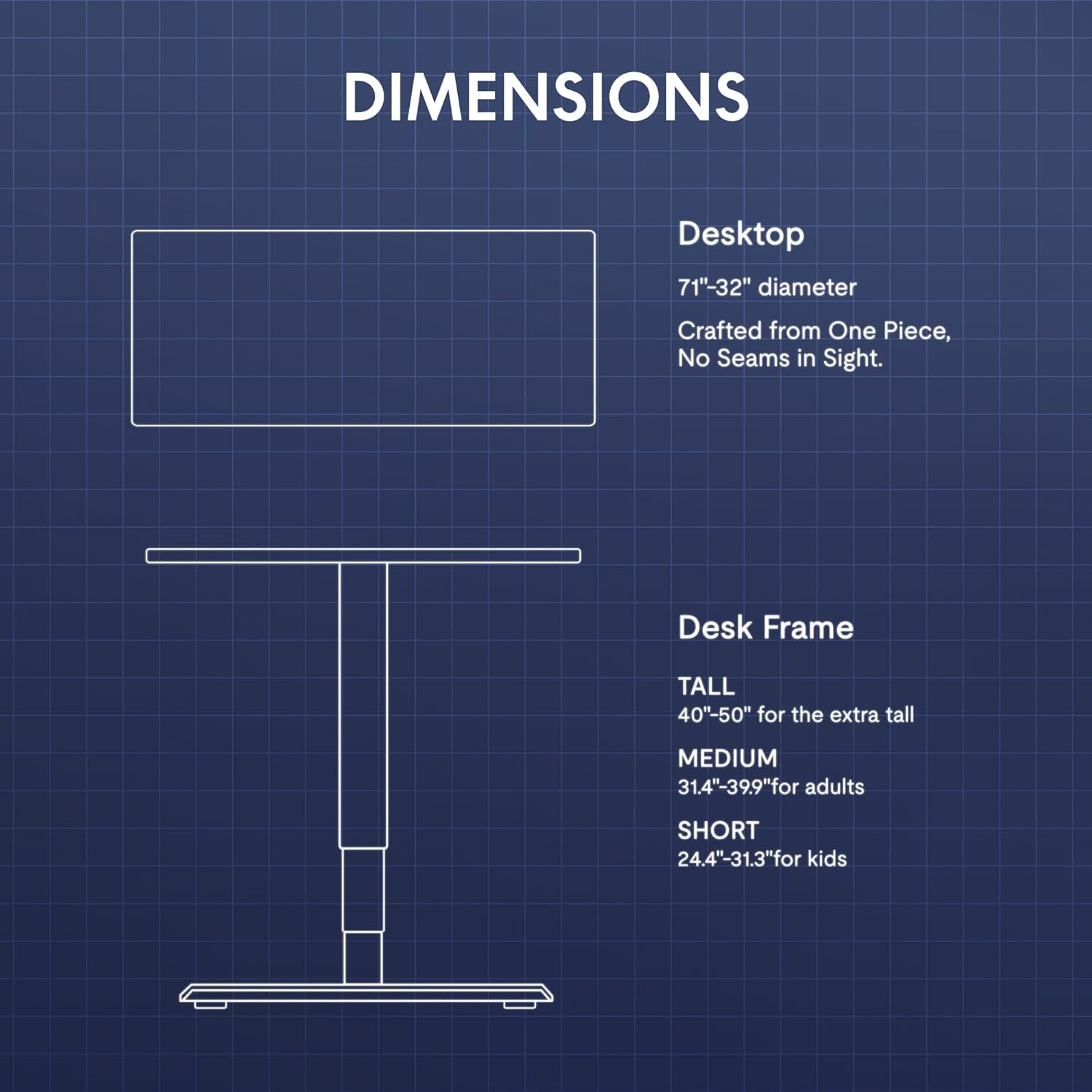
The desk features a gamepad-style joystick controller for intuitive height adjustment. The 3-stage legs allow for a lifting range from 24.4 inches to 50 inches.
- Бийиктикти жөндөө: Use the joystick to move the desk up or down. The LED display will show the current height.
- Эстутум алдын ала орнотуулары: The controller includes three memory presets (1, 2, 3). To save a height, adjust the desk to the desired level, press the 'M' button, then press the desired preset number (1, 2, or 3). To recall a saved height, simply press the corresponding preset number.

5.2 RGB LED жарыктандыруу
The desk features integrated 3-sided RGB LED strips to enhance your workspace ambiance.
- Түстөрдү өзгөртүү: Use the left/right controls on the joystick to cycle through various RGB lighting colors and effects.

5.3 Video Demonstrating Operation
Observe the desk's operation, including height adjustment and RGB lighting, in the following video:
6. Features Overview
- Immersive RGB LED Lighting: Integrated 3-sided RGB LED strips provide dynamic lighting.
- Gamepad-Style Joystick Controller: Features an LED display with multi-color RGB lighting and 3 memory presets for height adjustment.
- Dual Motor Powerful Lift: Crafted with aerospace-grade steel and dual motors, supporting up to 352 lbs with smooth, quiet height adjustments.
- Extended 3-Stage Height Range: 24.4"–50" lifting range for superior stability and accommodation of various user heights.
- Carbon Fiber Texture Desktop: A durable and aesthetically pleasing бети.
- Интегралдык кабелдик башкаруу: Includes a cable organizer and a cable management tray to keep wires tidy.
- Ыңгайлуу аксессуарлар: Features a removable cup holder and a rotating headphone stand.

7. Техникалык тейлөө
- Тазалоо: Иш тактасынын бетин жумшак менен сүртүңүз, гamp кездеме. Абразивдүү тазалагычтардан же катуу химиялык заттардан алыс болуңуз.
- Текшерүү: Бардык бурамалар жана туташуулар бекем экенин текшерүү үчүн мезгил-мезгили менен текшерип туруңуз.
- Кабелдик башкаруу: Regularly inspect cables for wear or damage and ensure they are neatly organized to prevent interference with desk movement.
8. Кыйынчылыктарды
| Көйгөй | Мүмкүн себеп | Чечим |
|---|---|---|
| Иш стол кыймылдабайт | Электр кабели үзүлдү; Ашыкча жүктөлдү; Мотордо ката кетти | Check power connections; Reduce weight on desk; Unplug for 10 seconds and replug. |
| Бир калыпта эмес бийиктикти жөнгө салуу | Бөгөт; Сенсор көйгөйү | Clear any obstructions; Perform a reset (refer to controller instructions). |
| RGB жарыктары иштебейт | RGB cable disconnected; Controller issue | Check RGB cable connections to the control hub; Ensure controller is powered. |
Эгерде көйгөйлөр чечилбесе, кардарларды колдоо кызматына кайрылыңыз.
9. Техникалык шарттар
| Өзгөчөлүк | Деталь |
|---|---|
| Бренд | FLEXISPOT |
| Модел | CyberX |
| Иш тактанын өлчөмдөрү | 71"W x 32"D |
| Бийиктик диапазону | 24.4" - 50" |
| Жүктөө жөндөмдүүлүгү | 352 фунтка чейин |
| Мотор түрү | Dual Motor, 3-Stage Буттар |
| Өзгөчөлүктөр | RGB LED Lighting, Gamepad-Style Joystick Controller, Memory Presets, Cable Management, Cup Holder, Headphone Stand |
| Материал | Wood (Top), Metal (Base) |
| Түс | Ак рамка + Ак топ |
| Ассамблея талап кылынат | Ооба |
10. Кепилдик жана колдоо
The FLEXISPOT CyberX desk comes with a 5-year coverage on the frame and motors, and a 3-year protection on electronics and the controller. This warranty covers manufacturing defects and ensures reliable operation under normal use.
For technical support, warranty claims, or any inquiries, please contact FLEXISPOT customer service through their official webпродукт сатылып алынган сайт же сатуучу.


