1. Киришүү
This manual provides detailed instructions for the installation, operation, and maintenance of the Lilytech ZL-7903A Automatic Temperature and Humidity Incubator Controller. The ZL-7903A is a multifunctional PID controller designed for precise environmental management in incubators, ensuring optimal conditions for various applications. It integrates temperature control, humidity control, egg turning, ventilation, and alarm functions.
2. Продукт бүтүп калдыview
The ZL-7903A controller features a clear digital display and intuitive button interface for easy programming and monitoring. It comes equipped with a ZL-SHr05J temperature and humidity sensor for accurate environmental readings.

2.1-сүрөт: The ZL-7903A controller unit shown alongside the ZL-SHr05J combined temperature and humidity sensor. The controller features a digital display and control buttons.

2.2-сүрөт: The ZL-7903A controller with its sensor cable and a protective cover for the sensor element. This image illustrates the complete package including the wiring.

2.3-сүрөт: А деталдуу view of the ZL-7903A controller's digital display, showing current temperature (14.8°C) and humidity (64.3%), along with set points (37.8°C, 50%) and a countdown timer.
3. Техникалык шарттар
- Модел: ZL-7903A
- Киргизүү көлөмүtage: 100-240Vac
- Башкаруу түрү: PID (Proportional-Integral-Derivative) for Temperature and Humidity
- Дисплей түрү: Санарип
- Сенсор: ZL-SHr05J (Combined Temperature and Humidity Sensor)
- Max Measuring Temperature: 70°C - 99°C
- Стиль: Камтылган
- Сенсор кабелинин узундугу: 2 метр
- Функциялары: Temperature Control, Humidity Control, Egg Turning, Ventilation, Illumination, Alarms, Door Switch Input
4. Орнотуу жана орнотуу
The ZL-7903A is designed for embedded installation. Ensure proper ventilation around the unit when mounting. All wiring should be performed by a qualified professional to prevent electrical hazards and ensure correct functionality.
4.1 Электр өткөргүч схемасы
Refer to the following diagrams for correct electrical connections. The controller requires a 100-240Vac power input. Connect all external components such as heaters, fans, egg-turning motors, and sensors according to the specified terminals.
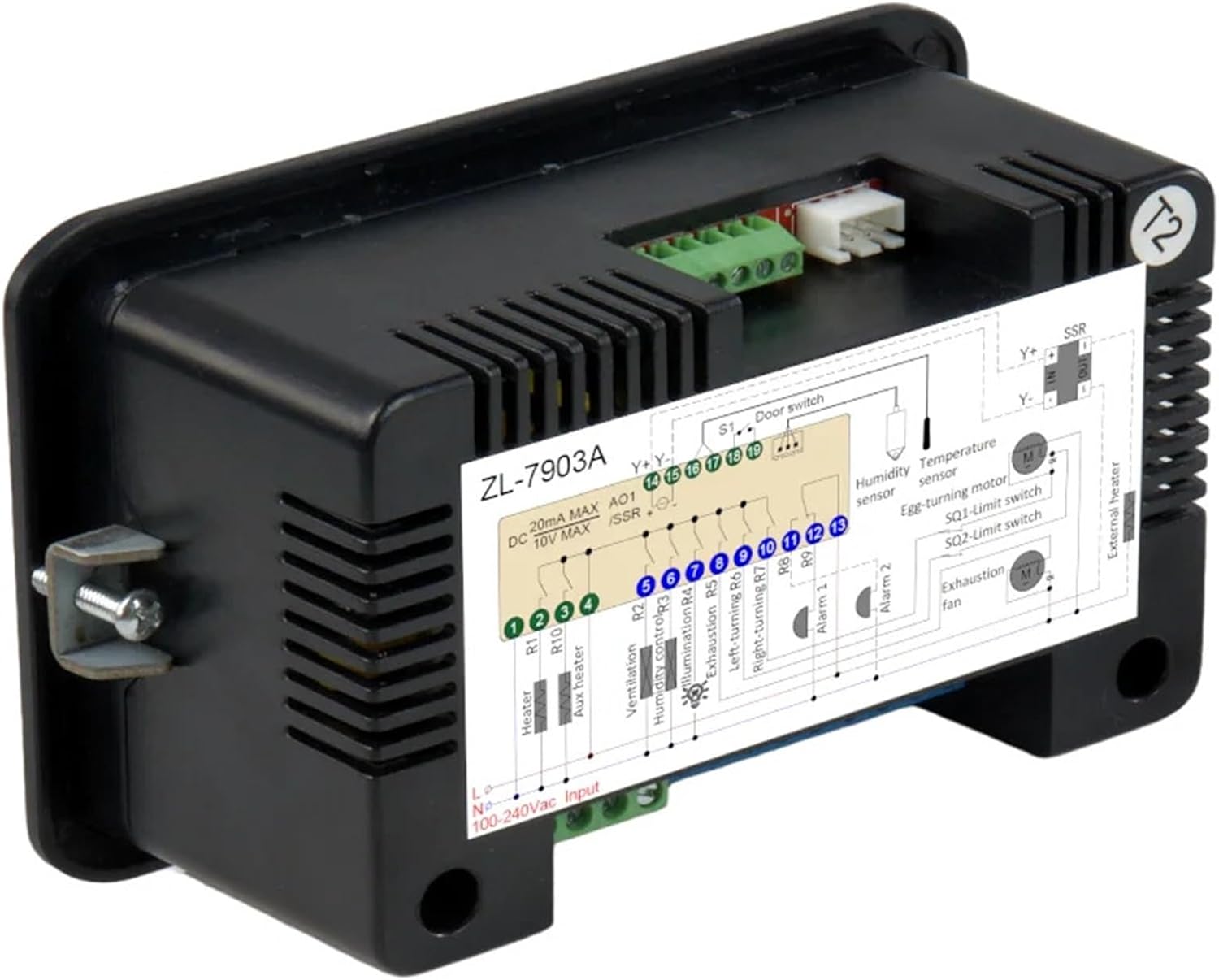
4.1-сүрөт: Арткы view of the ZL-7903A controller, showing the terminal block and an integrated wiring diagram for various connections including power, sensors, and output devices.

4.2-сүрөт: A detailed schematic of the ZL-7903A wiring. This diagram illustrates connections for 100-240Vac input, heater (R1, R10), auxiliary heater, ventilation (R2), humidity control (R3), illumination (R4), egg turning (R5, R6, R7), alarms (R8, R9), door switch (S1), humidity sensor, temperature sensor, SSR, egg-turning motor, and exhaustion fan.
4.2 Sensor Connection
The ZL-SHr05J sensor connects to the dedicated sensor port. Ensure the connector is securely seated. The sensor provides both temperature and humidity readings to the controller.

4.3-сүрөт: Comparison of ZL-SHr05J (green label) and ZL-SHr05P (red label) sensors. The ZL-SHr05J is included with this model and features VCC (5V), GND, and SDA connections.
5. Операция
The ZL-7903A controller features a user-friendly interface with dedicated buttons for various functions:
- Кубат баскычы: Агрегатты күйгүзөт же өчүрөт.
- Орнотуу баскычы: Параметрлерди орнотуу режимине кирет.
- Өйдө/төмөн жебелер: Adjusts values or navigates menus.
- Fn (Function) Button: Accesses additional functions or confirms selections.
Detailed programming instructions for setting temperature, humidity, egg-turning intervals, ventilation cycles, and alarm thresholds are provided in the full user manual (not included here). Consult the manufacturer's comprehensive guide for specific parameter adjustments.
6. Техникалык тейлөө
To ensure the longevity and accuracy of your ZL-7903A controller:
- Тазалоо: Дисплейди сүртүңүз жана вasinжумшак, кургак чүпүрөк менен сүртүңүз. Абразивдүү тазалоочу каражаттардан же эриткичтерден алыс болуңуз.
- Сенсорго кам көрүү: Keep the temperature and humidity sensor clean and free from dust or debris. Do not immerse the sensor in liquids.
- Экологиялык шарттар: Operate the controller within its specified environmental limits (temperature, humidity) to prevent damage.
7. Кыйынчылыктарды
If you encounter issues with your ZL-7903A controller, consider the following common troubleshooting steps:
- Кубат жок: Check the power supply connection and ensure the unit is properly plugged into a 100-240Vac source.
- Туура эмес окуулар: Verify that the ZL-SHr05J sensor is correctly connected and free from obstructions or damage.
- Outputs Not Activating: Check wiring for heaters, fans, and motors. Ensure set points are correctly configured and not in an alarm state.
- Дисплей каталары: Refer to the full user manual for specific error codes and their meanings.
Туруктуу маселелер үчүн кардарларды колдоо кызматына же квалификациялуу техникке кайрылыңыз.
8. Кепилдик жана колдоо
Warranty information for the Lilytech ZL-7903A controller is typically provided by the seller or manufacturer at the time of purchase. Please retain your proof of purchase for warranty claims.
For technical support, product inquiries, or to obtain a complete version of the user manual, please contact the manufacturer or your authorized distributor.


