1. Киришүү
Welcome to the OUKITEL C68 SIM-Free Smartphone user manual. This guide provides essential information for setting up, operating, and maintaining your new device. The OUKITEL C68 is designed to offer a seamless and powerful smartphone experience with its large display, robust performance, and advanced camera capabilities.
This device features a 7.2-inch 120Hz display, an octa-core processor, 24GB RAM (including virtual memory), 256GB internal storage expandable up to 2TB, a 6000mAh battery with 18W fast charging, and a 64MP main camera. It runs on Android 15 and supports global SIM-free connectivity, NFC, GPS, and various security features like face and fingerprint recognition.
2. Кутуда эмне бар
Please check the contents of your OUKITEL C68 package. If any items are missing or damaged, please contact your retailer.
- OUKITEL C68 Smartphone Body
- Смартфондун корпусу
- 18W тез кубаттагыч
- Type-C кабели
- SIM чыгаруучу пин
- Instruction Manual (Japanese Version)
- Quick Start Guide

Image: The OUKITEL C68 retail box contents, showing the smartphone, a protective case, an 18W fast charger, a Type-C cable, a SIM ejector pin, and documentation.
3. Орнотуу
3.1. SIM картаны орнотуу
Your OUKITEL C68 supports dual SIM cards (Nano+Nano) or one Nano SIM and one microSD card for expanded storage. Ensure the device is powered off before inserting or removing SIM/microSD cards.
- Түзмөгүңүздүн капталындагы SIM карта салгычын табыңыз.
- Insert the provided SIM ejector pin into the small hole next to the tray and press firmly until the tray pops out.
- Place your Nano SIM card(s) and/or microSD card into the designated slots on the tray. Ensure they are correctly oriented.
- Аспаптын ичине лотокту чыкылдагыча этияттык менен түртүңүз.
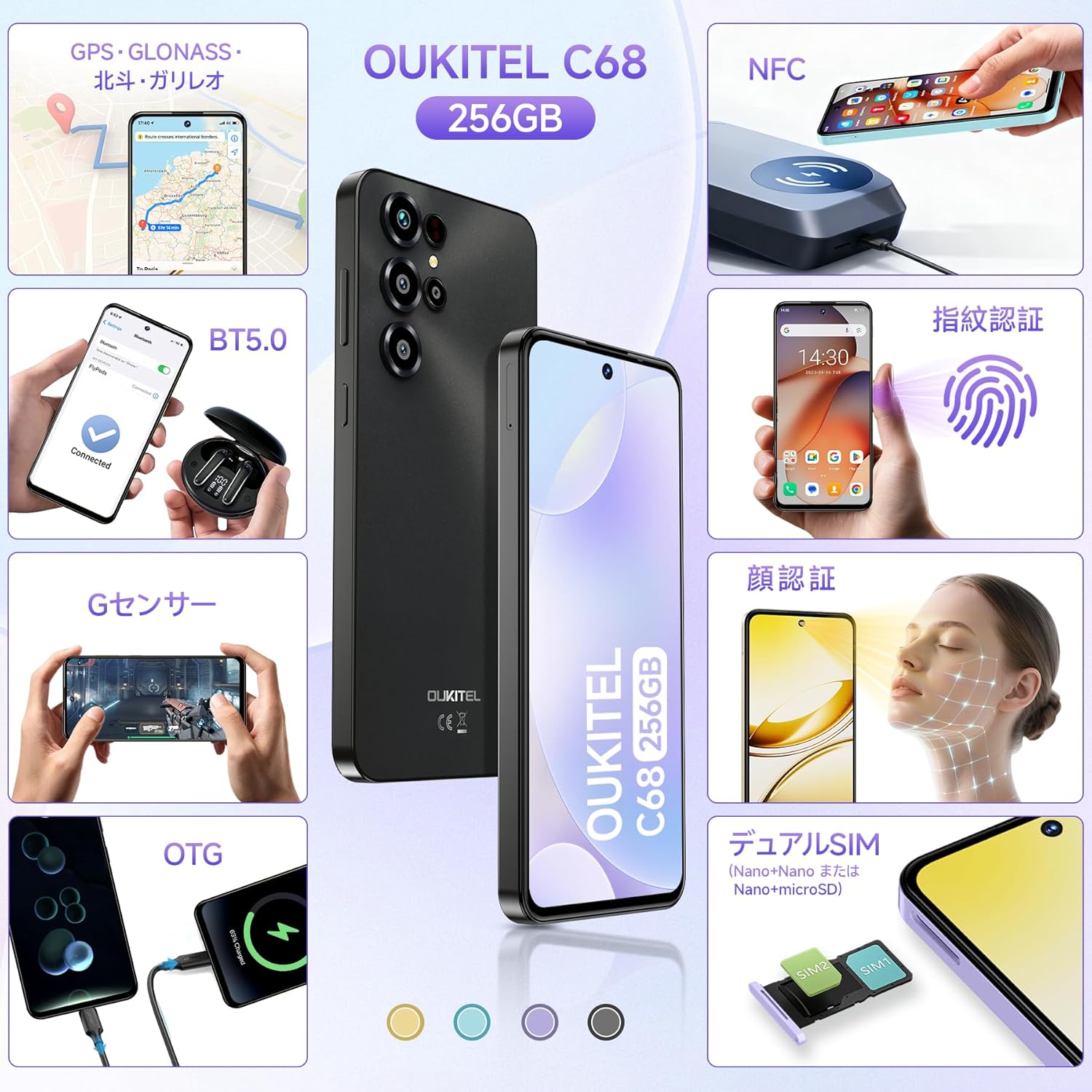
Image: An illustration demonstrating the correct placement of dual Nano SIM cards or a Nano SIM card and a microSD card into the OUKITEL C68's SIM tray.
3.2. Баштапкы күйгүзүү жана орнотуу
Түзмөгүңүздү биринчи жолу күйгүзүү үчүн:
- OUKITEL логотиби чыкканга чейин аппараттын капталында жайгашкан Кубат баскычын басып, кармап туруңуз.
- Баштапкы орнотууну аяктоо үчүн экрандагы көрсөтмөлөрдү аткарыңыз, анын ичинде тилди тандоо, Wi-Fi'га туташуу, Google аккаунтуңузду орнотуу жана коопсуздук функцияларын конфигурациялоо.

Image: The OUKITEL C68 displaying the Android 15 operating system with various application icons and a map interface, illustrating the user experience.
4. Аппаратыңызды иштетүү
4.1. Дисплей
The OUKITEL C68 features a large 7.2-inch display with a 120Hz refresh rate, providing smooth visuals and an immersive viewing experience. It offers 500 nits of brightness and a resolution of 720x1560 pixels, supporting 16.7 million colors.

Image: The OUKITEL C68 smartphone displaying a dynamic racing game, highlighting its 7.2-inch screen and 120Hz refresh rate for smooth visuals.
4.2. Performance
Equipped with a high-performance octa-core processor, the OUKITEL C68 handles daily tasks and demanding applications smoothly. It comes with 24GB of RAM (including 12GB of virtual memory) and 256GB of internal storage. Storage can be expanded up to 2TB using a microSD card, allowing ampколдонмолор, сүрөттөр жана видеолор үчүн бош орун.

Image: The OUKITEL C68 displaying multiple applications and media content, emphasizing its 24GB RAM and 256GB ROM for efficient multitasking and storage.
4.3. Батарея
The device is powered by a large 6000mAh battery, providing extended usage time. Under normal conditions, the battery can last for over 2 days. It supports 18W fast charging for quick power replenishment. Additionally, the OTG function allows the phone to act as a power bank to charge other devices like earphones or smartwatches.
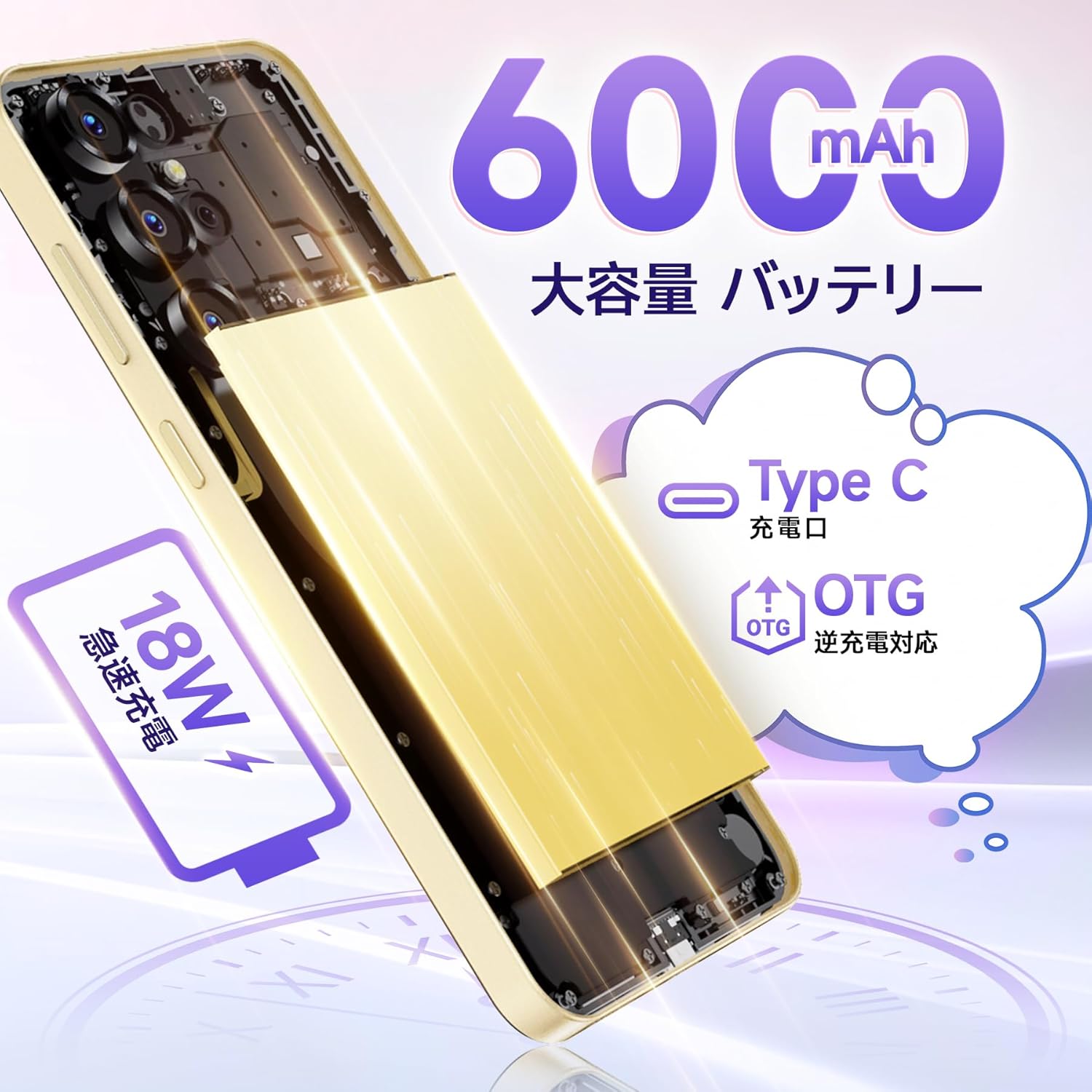
Image: An internal diagram of the OUKITEL C68, illustrating its 6000mAh large capacity battery and support for 18W fast charging and OTG reverse charging via its Type-C port.
4.4. Камера
Capture high-quality photos and videos with the OUKITEL C68's multi-camera system. It features a 64MP main camera and an 8MP front camera. AI image processing ensures faithful reproduction of subjects, while AI beauty mode enhances natural skin tones. Other shooting modes include Night mode for low-light conditions, HDR mode for balanced exposure in challenging lighting, and a Manual mode for fine-tuned settings. The device also supports 1080p video recording.
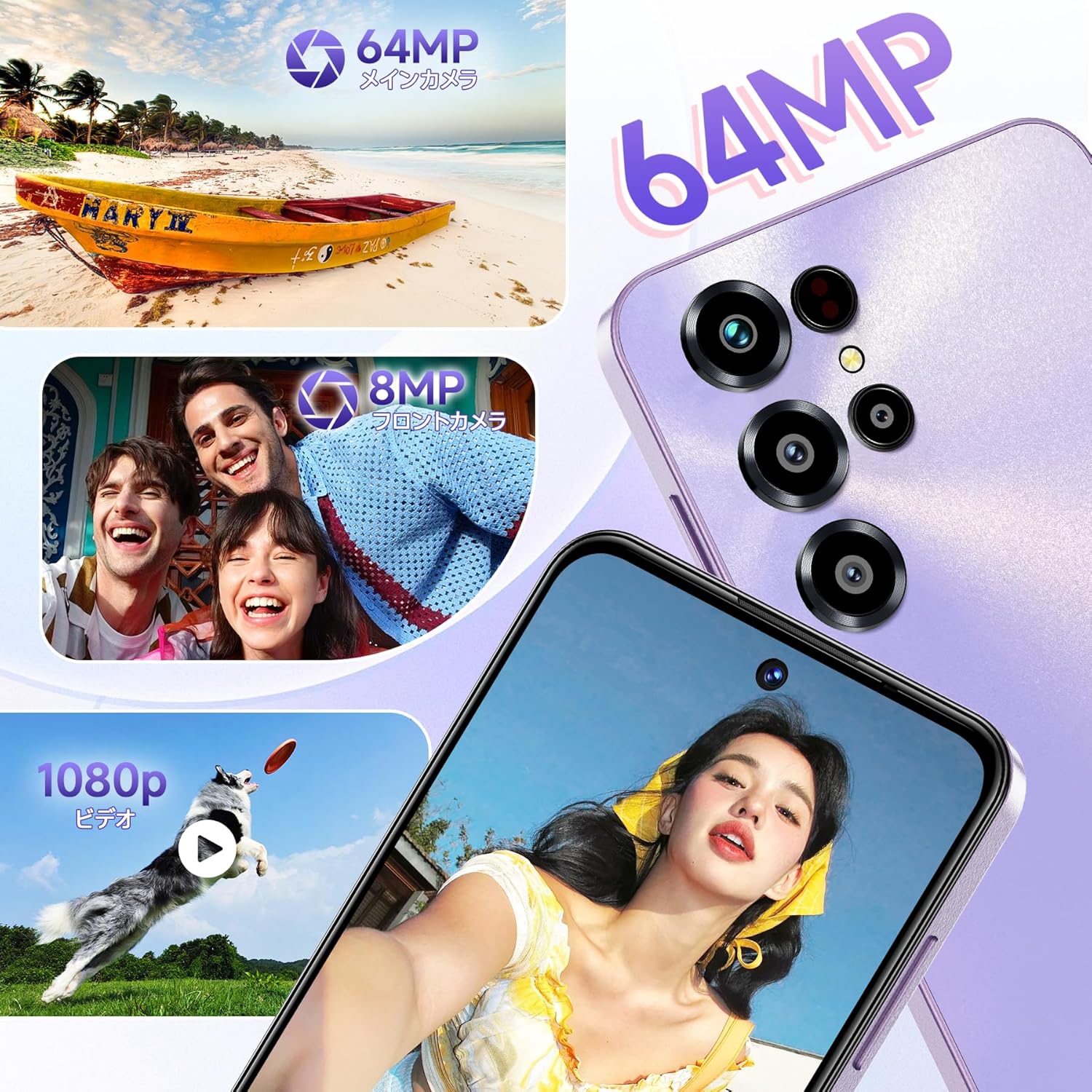
Сүрөт: Коллаж көрсөтүүasing the OUKITEL C68's camera capabilities, featuring a 64MP main camera, an 8MP front camera capturing smiling faces, and a dog catching a frisbee in a 1080p video frame.
4.5. Байланыш жана коопсуздук
The OUKITEL C68 is a global SIM-free model, compatible with major carriers. It supports Wi-Fi 5GHz for high-speed internet, NFC for electronic payments and transit cards (note: Felica is not supported), and high-precision GPS (GPS, GLONASS, BeiDou, Galileo) for accurate location tracking. For security, the device incorporates a side-mounted fingerprint sensor and face recognition technology, balancing convenience and safety.

Image: A visual representation of the OUKITEL C68's features, including GPS navigation, G-sensor for gaming, dual SIM card slots, NFC for contactless payments, face recognition, and fingerprint recognition.
5. Техникалык тейлөө
To ensure the longevity and optimal performance of your OUKITEL C68, follow these maintenance guidelines:
- Тазалоо: Түзмөктүн экранын жана корпусун тазалоо үчүн жумшак, мамыксыз чүпүрөктү колдонуңуз. Катуу химиялык заттарды же абразивдүү материалдарды колдонуудан алыс болуңуз.
- Программалык камсыздоо жаңыртуулары: Regularly check for and install system updates to benefit from the latest features, security patches, and performance improvements. Go to Settings > System > System update.
- Батареяга кам көрүү: Avoid exposing the device to extreme temperatures. Do not let the battery completely drain frequently. For long-term storage, charge the battery to around 50%.
- Сактагычты башкаруу: Мезгил-мезгили менен ачык-айкын керексиз fileсактагыч мейкиндигин бошотуп, түзмөктүн ылдамдыгын кармап туруу үчүн колдонмолорду колдонуңуз.
6. Кыйынчылыктарды
If you encounter issues with your OUKITEL C68, try the following solutions:
- Түзмөк жооп бербейт: Кайра күйгүзүүгө мажбурлоо үчүн кубат баскычын 10-15 секунд басып туруңуз.
- Батареянын бат түгөнүп калышы: Check background app usage in Settings > Battery. Reduce screen brightness and disable unnecessary features like Wi-Fi, Bluetooth, or GPS when not in use.
- Тармакка туташуу маселелери: Ensure your SIM card is correctly inserted. Try toggling Airplane mode on and off. Check your network settings or contact your service provider.
- Колдонмолор бузулуп/тоңуп жатат: Clear the cache and data of the problematic app in Settings > Apps. If the issue persists, uninstall and reinstall the app.
- Жай аткаруу: Close unused apps, clear cache, and ensure sufficient storage space. Consider a factory reset as a last resort (backup your data first).
7. Техникалык шарттар
Below are the detailed specifications for the OUKITEL C68 smartphone:
| Өзгөчөлүк | Спецификация |
|---|---|
| Screen Size | 7.2 дюйм |
| Батарея сыйымдуулугу | 6000 мАч |
| Үзгүлтүксүз колдонуу убактысы | 2 күн |
| Шайкеш операторлор | Docomo, Au, SoftBank, Rakuten Mobile, etc. |
| Түс | Blue (variant specific) |
| Батарея камтылган | Ооба |
| Батареяны колдонуу | Ооба |
| Бренд аты | OUKITEL |
| Өндүрүүчү | OUKITEL |
| Продукт моделинин номери | C68 |
| Чыгарылган жылы | 2025 |
| Камтылган аксессуарлар | Smartphone body |
| Шайкеш OS | Android 15 |
| Башка функциялар | Манжа изин таануу |
| Байланыш технологиясы | 4G |
| Өлчөмү | 24GB+256GB |
| Дисплей түрү | HD+ |
| Продукциянын өлчөмдөрү | 0.9 x 8.5 x 5 см; 450 г |
| Орнотулган RAM өлчөмү | 24 ГБ |
| Эстутум сактоо сыйымдуулугу | 256 ГБ |
8. Расмий продукт Video
Көрүү үчүн бул видеону көрүңүзview of the OUKITEL C68 smartphone's design and features in action.
Видео: Кыскача жарнамалык роликasing the OUKITEL C68 smartphone's design, camera capabilities, and user interface in various urban settings.
9. Кепилдик жана колдоо
Your OUKITEL C68 smartphone comes with a one-year quality guarantee. The product has obtained the technical compliance mark for wireless devices, PSE, and GMS certifications.
Колдоо кызматы менен байланышуу:
- You can contact the seller directly through your Amazon account: Go to 'Order History', select the relevant order, and click 'Contact Seller'.
- Alternatively, visit the OUKITEL JP store page on Amazon and click 'Ask a question' in the upper right corner to send an email.
Customer support aims to respond within 24 hours on weekdays and within 48-72 hours on weekends and manufacturer-specified holidays.


