Introduction
This manual provides essential information for setting up, operating, and maintaining your Acer Nitro V 16 AI Gaming Laptop. Please read this manual thoroughly to ensure optimal performance and longevity of your device.

Сүрөт: алдыңкы view of the Acer Nitro V 16 AI Gaming Laptop, showcasing анын дисплейи жана клавиатурасы.
Жайгашуу
Кутуда эмне бар
Кутучаны ачканда, бардык компоненттердин бар экендигин текшериңиз:
- Acer Nitro V 16 AI Gaming Laptop
- Кубат адаптери/заряддагыч
- iCarp Type-C 3-in-1 Hub (USB 3.0, HDTV 4K Output, Type-C PD)

Image: The included iCarp Type-C 3-in-1 Hub, providing additional connectivity options.
Баштапкы күйгүзүү
- Connect the power adapter to the laptop's DC-in jack and a power outlet.
- Ноутбуктун капкагын ачыңыз.
- Ноутбукту иштетүү үчүн кубат баскычын басыңыз.
- Windows 11 Home'ду баштапкы орнотууну аяктоо үчүн экрандагы нускамаларды аткарыңыз.
Байланыш
The Acer Nitro V 16 AI offers a comprehensive selection of ports for various peripherals and external devices.
- USB-A 3.2: Three ports for connecting standard USB devices.
- USB-C 4: One port for high-speed data transfer and display output.
- HDMI2.1: Тышкы дисплейлерге же телевизорлорго туташтыруу үчүн.
- RJ45 Гигабит Ethernet: Зымдуу тармак туташуусу үчүн.
- Гарнитура уясы: Аудио киргизүү/чыгаруу үчүн.
- MicroSD картасынын уячасы: Сактагычты кеңейтүү же эстутум карталарынан маалыматтарды өткөрүү үчүн.
- Кенсингтон кулпусу: Физикалык коопсуздук үчүн.

Сүрөт: сол жагы view of the laptop detailing the various input/output ports.
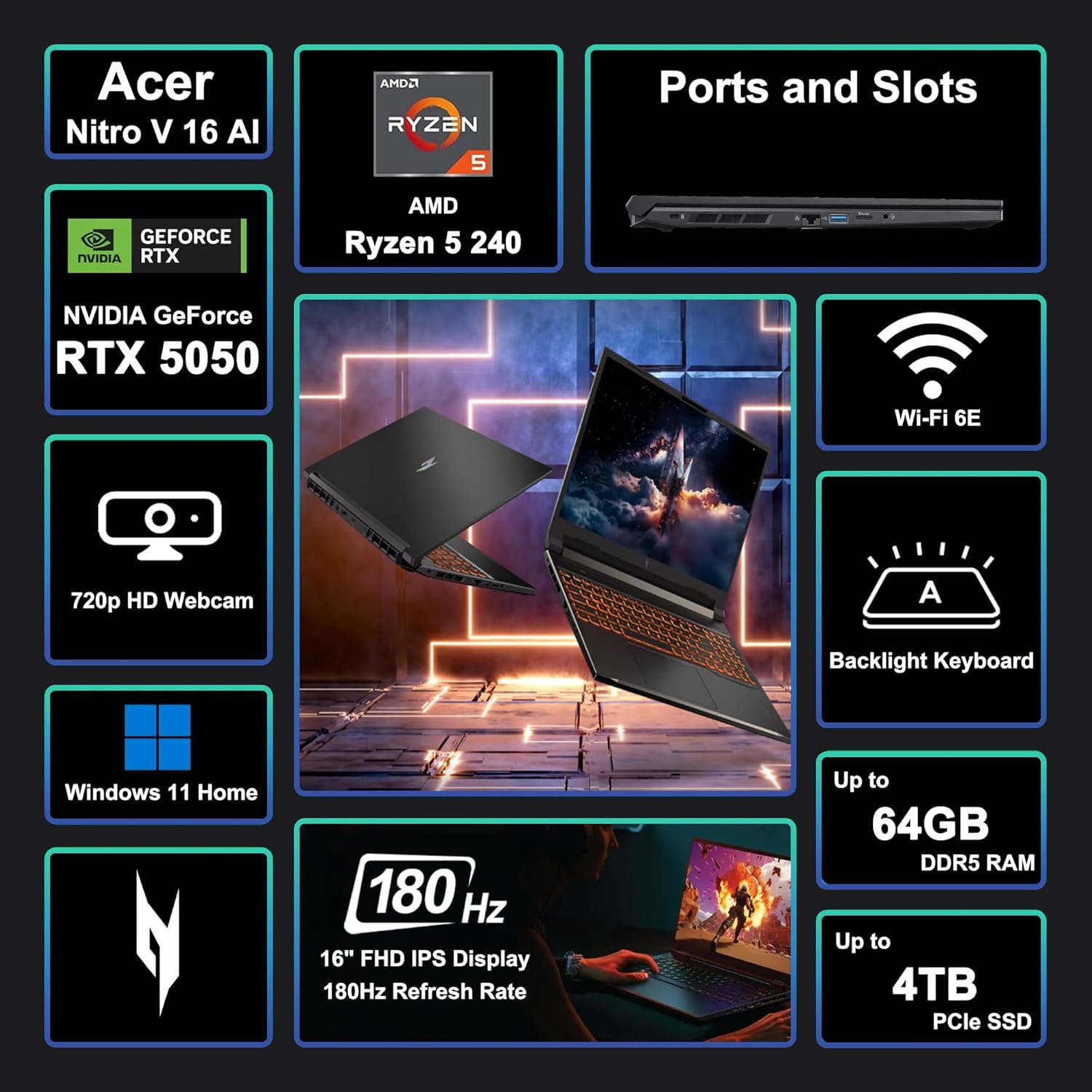
Image: A visual summary of key features and specifications of the Acer Nitro V 16 AI.
Ноутбугуңузду иштетүү
Дисплей өзгөчөлүктөрү
The laptop features a 16-inch WUXGA (1920 x 1200) IPS display with a 180Hz refresh rate, providing smooth visuals for gaming and other demanding applications.

Image: Visual representation of the difference between 60Hz and 180Hz refresh rates, highlighting smoother motion at higher rates.
Баскычтоп жана сенсордук такта
The integrated keyboard is backlit, enhancing visibility in low-light conditions. The touchpad provides precise navigation and supports multi-touch gestures.

Image: Close-up of the backlit keyboard, showing key layout and illumination.
Performance Overview
The Acer Nitro V 16 AI is equipped with an AMD Zen 4 Hexa-Core Ryzen 5 240 Processor and a dedicated NVIDIA GeForce RTX 5050 8GB Graphic card, alongside 32GB of RAM and a 1TB SSD, ensuring robust performance for gaming, content creation, and multitasking.

Image: Details of the AMD Ryzen 5 240 processor, highlighting its core count, threads, cache, and clock speed.

Image: Information about the NVIDIA GeForce RTX 5050 GPU, emphasizing its capabilities for gaming and creative tasks.
Муздатуу системасы
The laptop incorporates an advanced cooling system designed to maintain optimal temperatures during intensive use, preventing thermal throttling and ensuring consistent performance.
Батареянын иштөө мөөнөтү
The 76Wh battery provides several hours of usage depending on the workload. For prolonged high-performance tasks like gaming or video editing, it is recommended to keep the laptop connected to the power adapter.
Техникалык тейлөө
- Тазалоо: Экранды жана сыртты тазалоо үчүн жумшак, түксүз чүпүрөктү колдонуңуз. Катуу химиялык заттардан алыс болуңуз.
- Программалык камсыздоо жаңыртуулары: Коопсуздукту жана майнаптуулукту камсыз кылуу үчүн операциялык тутумуңузду жана драйверлериңизди үзгүлтүксүз жаңыртыңыз.
- Вентиляция: Ensure the laptop's vents are clear and unobstructed to prevent overheating.
- Батареяга кам көрүү: Батареяны бат-баттан толук кубаттап калуудан алыс болуңуз. Узак мөөнөттүү сактоо үчүн, батареяны болжол менен 50-60% га чейин заряддаңыз.
Проблемаларды чечүү
- Кубат жок: Кубат адаптери бекем туташып турганын жана розетка иштеп турганын текшериңиз.
- Дисплей маселелери: Check external monitor connections if applicable. Update graphics drivers.
- Performance Lag: Close unnecessary applications. Check for background processes consuming resources. Ensure proper ventilation.
- Туташуу көйгөйлөрү: For Wi-Fi, restart your router and the laptop. For wired connections, check the Ethernet cable.
Техникалык шарттар
| Өзгөчөлүк | Деталь |
|---|---|
| Бренд | acer |
| Модель аты | Acer Nitro V 16 AI |
| Screen Size | 16 дюйм |
| Screen Resolution | 1920 x 1200 пиксел (WUXGA) |
| Жаңыртуу ылдамдыгы | 180Hz |
| Процессор | AMD Zen 4 Hexa-Core Ryzen 5 240 (4.3 GHz base, up to 5GHz boost) |
| RAM | 32 ГБ DDR5 |
| Сактагыч | 1TB SSD |
| Графикалык сопроцессор | NVIDIA GeForce RTX 5050 8 ГБ |
| Операция системасы | Windows 11 Home |
| Зымсыз түрү | Wi-Fi 6E (802.11ax) |
| Порттар | 3x USB-A 3.2, 1x USB-C 4, 1x HDMI 2.1, 1x RJ45, Headset Jack, MicroSD Card Reader |
| Батарея | 76Wh |
| Элемент Салмагы | 5.38 фунт |
| Продукциянын өлчөмдөрү (LxWxH) | 10.9 x 14.2 x 0.96 дюйм |

Image: Physical dimensions and weight of the Acer Nitro V 16 AI laptop.
Кепилдик жана колдоо
Кепилдик маалыматы жана техникалык колдоо үчүн продуктуңузга кошулган документтерди караңыз же расмий Acer колдоо бөлүмүнө баш багыңыз webсайт. Коргоо пландары кеңейтилген камтуу үчүн жеткиликтүү болушу мүмкүн.


