1. Киришүү
The Zebra ZQ220 Plus is a versatile mobile thermal printer designed for on-the-go professionals. This portable device offers reliable, high-quality receipt and label printing capabilities, making it suitable for various applications including retail, hospitality, and field services. Featuring Bluetooth 5.0 connectivity and a durable design, the ZQ220 Plus ensures efficient operation in diverse working environments. Its thermal printing technology eliminates the need for ink or toner, simplifying maintenance.
2. Коопсуздук маалыматы
- Read all instructions before operating the printer.
- Do not expose the printer to extreme temperatures, direct sunlight, or high humidity.
- Use only Zebra-approved accessories and power sources.
- Avoid dropping the printer or subjecting it to severe impacts.
- Принтерди суудан жана башка суюктуктардан алыс кармаңыз.
- Принтерди өзүңүз чечүүгө же оңдоого аракет кылбаңыз. Квалификациялуу тейлөө кызматкерлерине кайрылыңыз.
3. Пакеттин мазмуну
Пакетте бардык буюмдар бар экенин текшериңиз:
- Zebra ZQ220 Plus Mobile Thermal Printer
- Заряддалуучу батарея
- USB заряддоо кабели
- Quick Start Guide
- Sample Thermal Paper Roll
4. Продукт бүтүп калдыview
Familiarize yourself with the components of your ZQ220 Plus printer.

Сүрөт 4.1: Алдыңкы View of the ZQ220 Plus Printer
This image displays the front of the ZQ220 Plus printer, highlighting its compact design. The top panel features an LCD display and three control buttons: Power, Settings, and Connectivity. The paper output slot is visible below the control panel.
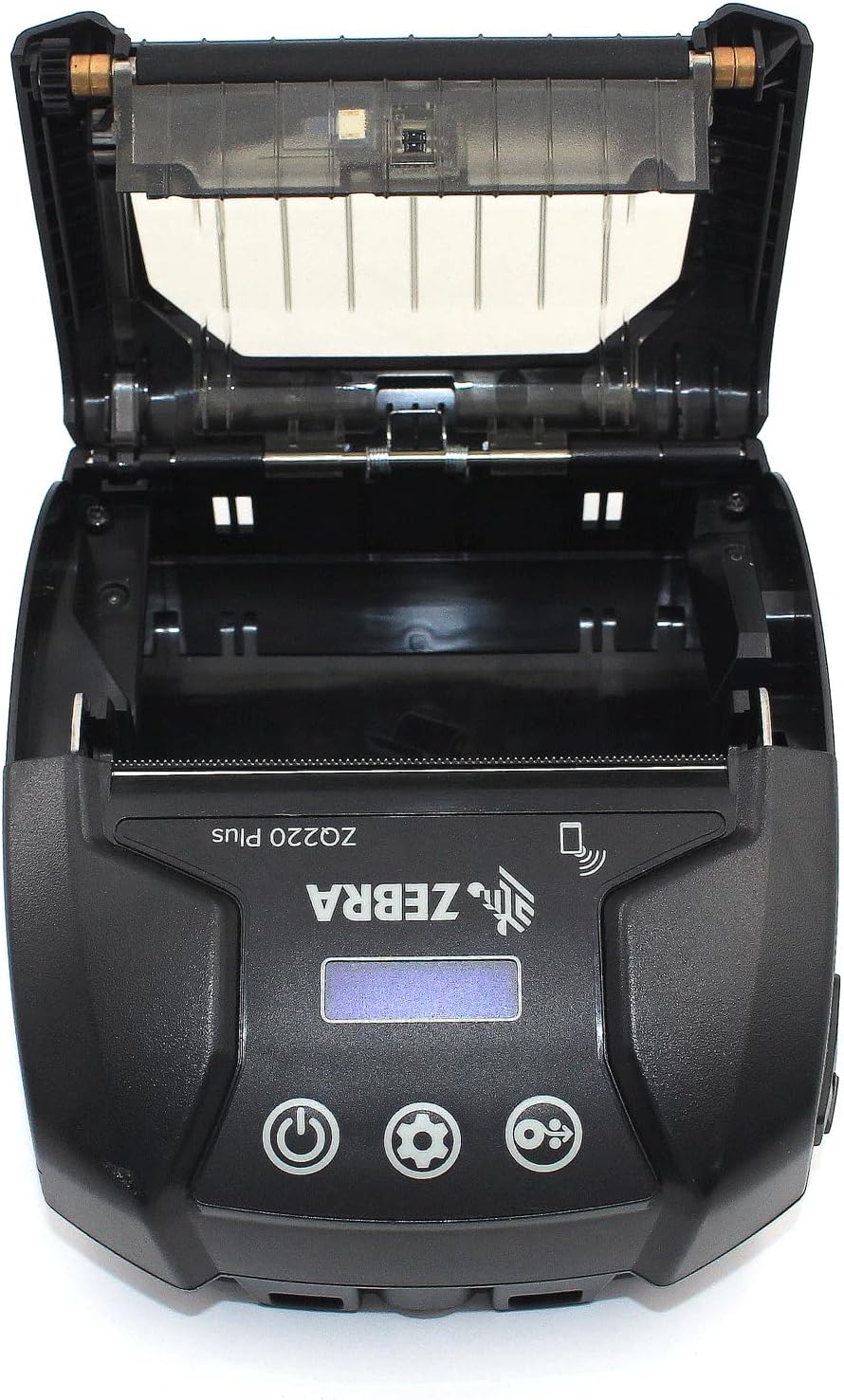
Figure 4.2: Media Compartment Open
This image shows the printer with its top cover open, providing access to the media compartment. The thermal printhead is visible, along with the spindle for loading paper rolls. This view is essential for understanding how to load printing media.

Figure 4.3: Media Roll Insertion
This image demonstrates the media loading process. The side view with the cover open clearly shows how a roll of thermal paper is placed into the printer's media bay, ensuring correct alignment for printing.
5. Орнотуу
5.1. Батареяны орнотуу
- Принтер өчүрүлгөнүн текшериңиз.
- Locate the battery compartment cover on the back or bottom of the printer.
- Open the cover and insert the rechargeable battery, ensuring the contacts align correctly.
- Батарея уясынын капкагын бекем жабыңыз.
5.2. Loading Print Media
- Open the media compartment cover (refer to Figure 4.2).
- Place the thermal paper roll into the compartment with the leading edge feeding from the bottom of the roll.
- Pull a small amount of paper past the printhead.
- Close the media compartment cover firmly until it latches.
5.3. Баштапкы күйгүзүү жана заряддоо
- Connect the USB charging cable to the printer and a power source (e.g., USB wall adapter, vehicle USB port).
- Allow the battery to fully charge before first use. The charging indicator light will show the status.
- Press and hold the Power button until the printer powers on. The LCD display will illuminate.
6. Принтерди иштетүү
6.1. Bluetooth Жупташтыруу
- Ensure the printer is powered on and within range of your host device (smartphone, tablet, etc.).
- On your host device, navigate to the Bluetooth settings and enable Bluetooth.
- Издөө available devices. The printer will appear as 'ZQ220 Plus' or a similar identifier.
- Select the printer from the list to initiate pairing. If prompted, enter the default PIN (usually '0000' or '1234').
- Once paired, the Bluetooth icon on the printer's display will indicate a successful connection.
6.2. Басып чыгаруу
- Ensure the printer is paired with your host device and has sufficient media loaded.
- Open your printing application (e.g., ZLabel Designer Mobile App for Android or iOS, or other compatible software).
- Select the ZQ220 Plus as your target printer within the application.
- Initiate the print command from your application. The printer will begin printing the document or label.
6.3. USB кубаттоо
The ZQ220 Plus supports simple USB charging. Connect the printer to any standard USB power source using the provided USB cable. This allows for convenient charging in vehicles or from portable power banks.
7. Техникалык тейлөө
7.1. Принтерди тазалоо
- Сырткы: Принтердин сыртын жумшак менен сүртүңүз, damp кездеме. Катуу химиялык заттарды же абразивдүү тазалагычтарды колдонбоңуз.
- Басма башчысы: Periodically clean the thermal printhead using a printhead cleaning pen or a cotton swab lightly dampened with isopropyl alcohol. Ensure the printer is off and cool before cleaning. Allow to dry completely before use.
- Тасма ролик: Clean the platen roller with a lint-free cloth dampened with isopropyl alcohol to remove paper dust or adhesive residue.
7.2. Сактоо
When not in use for extended periods, store the printer in a cool, dry place, away from direct sunlight and extreme temperatures. Remove the battery if storing for several months to prevent discharge or damage.
8. Кыйынчылыктарды
| Көйгөй | Мүмкүн себеп | Чечим |
|---|---|---|
| Принтер күйбөйт | Батареясы аз же түгөнгөн Improperly installed battery | Батареяны заряддаңыз Батареяны туура орнотуңуз |
| Басып чыгаруу жок | No paper loaded Кагаз туура эмес жүктөлгөн Printhead dirty or damaged | Load thermal paper Reload paper correctly Басып чыгаруу башын тазалаңыз |
| Басып чыгаруу сапаты начар | Dirty printhead Батарея аз Туура эмес медиа түрү | Басып чыгаруу башын тазалаңыз Батареяны заряддаңыз Ensure correct thermal media is used |
| Bluetooth аркылуу туташуу мүмкүн эмес | Түзмөктө Bluetooth иштетилген эмес Printer not in pairing mode диапазондон тышкары | Enable Bluetooth on host device Ensure printer is discoverable Move device closer to printer |
| Printer stops during operation | Батарея аз Кагаз тыгылышы Ашыкча ысып кетүү | Батареяны заряддаңыз Clear any paper jam Allow printer to cool down |
9. Техникалык шарттар
| Өзгөчөлүк | Спецификация |
|---|---|
| Модель аты | ZQ220 PLUS |
| Басма технологиясы | Түз жылуулук |
| Print Resolution | 203 DPI (Дюймге чекиттер) |
| Макс басып чыгаруу ылдамдыгы (монохромдуу) | 20 промилле |
| Supported Media Widths | 80 mm (3.14 in), 76.2 mm (3 in), 58 mm (2.28 in) |
| Байланыш | Bluetooth 5.0, USB |
| Батарея сыйымдуулугу | 2500 мАч |
| Эс | 8 MB |
| Туруктуулук рейтинги | IP54 (resistance to dust and liquids) |
| Продукциянын өлчөмдөрү (D x W x Y) | 3.15" x 2.25" x 3" |
| Элемент Салмагы | 4 унция (0.25 фунт) |
| Камтылган компоненттер | Printer, Battery, USB Cable |
10. Кепилдик жана колдоо
10.1. Кепилдик маалыматы
The Zebra ZQ220 Plus Mobile Thermal Printer comes with a Чектелген Өндүрүүчүнүн Кепилдиги. Please refer to the warranty card included with your product or visit the official Zebra webкамтууга, узактыгына жана доо жол-жоболоруна байланыштуу толук шарттар жана шарттар үчүн сайт.
10.2. Техникалык колдоо
For technical assistance, troubleshooting beyond this manual, or service inquiries, please contact Zebra customer support. Contact information can typically be found on the official Zebra webсайтында же продукт документациясында.


