1. Киришүү
Thank you for choosing the Tukio TX02 Apple MFi Certified Air Tracker Tags. These Bluetooth trackers are designed to help you locate your valuable items quickly and efficiently using the Apple Find My network. This manual provides essential information for setup, operation, maintenance, and troubleshooting to ensure optimal performance of your device.

Image: The Tukio Smart Tracker Tag highlighting its core features: Worldwide Tracking, One-Click Search, MFi Certification, and Lost Reminder.
2. Пакеттин мазмуну
Төмөндө тизмеленген нерселердин баары пакетиңизге камтылганын текшериңиз:
- 4 x Tukio TX02 Tracker Tags
- 4 x Protective Silicone Cases
- 4 x ачкыч шакекчелер
- 4 x Lanyards
- 1 x User Manual
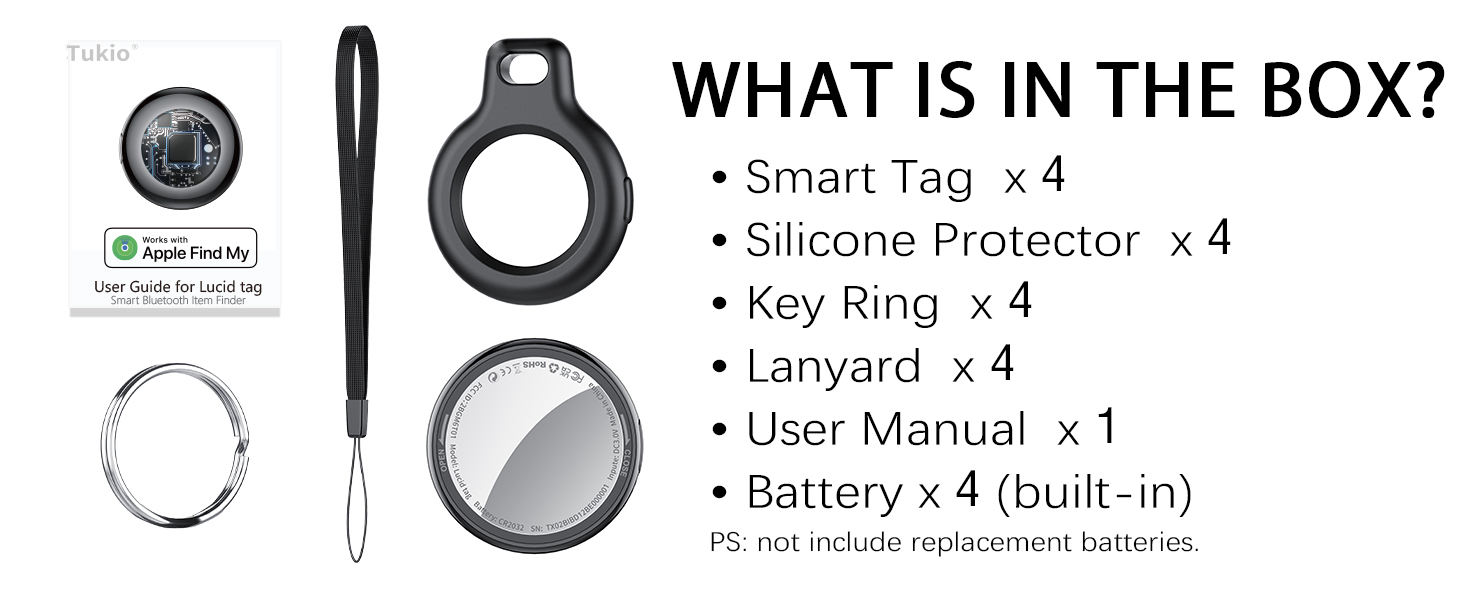
Image: Visual representation of the package contents, including the tracker tags, silicone cases, key rings, lanyards, and user manual.
3. Орнотуу
The Tukio TX02 Tracker Tags are designed for easy integration with your iOS devices. Follow these steps to set up your tags:
3.1 Күйгүзүү жана жупташтыруу
- Ensure Bluetooth is Active: iPhone же iPad'иңизде ачыңыз Орнотуулар app and ensure Bluetooth is turned on.
- Менин колдонмомду табуу: Launch the pre-installed Find My iOS түзмөгүңүздөгү колдонмо.
- Жаңы нерсе кошуу: дегенге өтүңүз Items tab within the Find My app. Tap the + (plus) sign and select Башка нерсе кошуу.
- Трекерди иштетүү: Press and hold the function button on the side of the Tukio TX02 Tracker Tag for 2 seconds until you hear a beep. This activates the tracker for pairing.
- Туташуу: Place the tracker tag close to your iPhone. The Find My app will detect the "Lucid tag". Tap Туташуу and follow the on-screen prompts to name your item and assign an emoji. Tap Улантуу until setup is finished.

Image: Step-by-step visual instructions for connecting your Tukio TX02 tracker tag to your iPhone via the Apple Find My app.
Video: An official video from Tukio-Store demonstrating how to connect the Lucid Tag Bluetooth Tracker with Apple Find My.
3.2 Трекерди тиркөө
Use the provided protective silicone cases, key rings, and lanyards to securely attach your Tukio TX02 Tracker Tags to various items:
- Ачкычтар: Use a key ring to attach the tracker to your key set.
- Bags/Luggage: Insert the tracker into a silicone case and use the lanyard or key ring to secure it to zippers or handles.
- Капчыктар: The compact design allows the tracker to fit discreetly into most wallet compartments.

Сүрөт: Мисamples of how to attach the Tukio tracker tags to everyday items like backpacks, luggage, keys, and handbags.
4. Иштөө нускамалары
Once your Tukio TX02 Tracker Tags are set up, you can utilize various features within the Apple Find My app to locate your items.
4.1 Locating Nearby Items (Within 200 feet)
If your item is within Bluetooth range (approximately 200 feet), you can:
- Үн ойнотуу: Open the Find My app, select your item, and tap Үн ойнотуу. The tracker will emit an 80-100dB beep to help you pinpoint its location.
- Сириден сура: Simply say "Hey Siri, where are my [item name]?" to have Siri help you locate the item.

Image: The Find My app interface showing options to play a sound or get directions to a nearby item.
4.2 Locating Far Away Items (Beyond 200 feet)
When your item is outside Bluetooth range, the Apple Find My network, composed of hundreds of millions of Apple devices worldwide, can help locate it. The app will display the last known location of your item on a map.
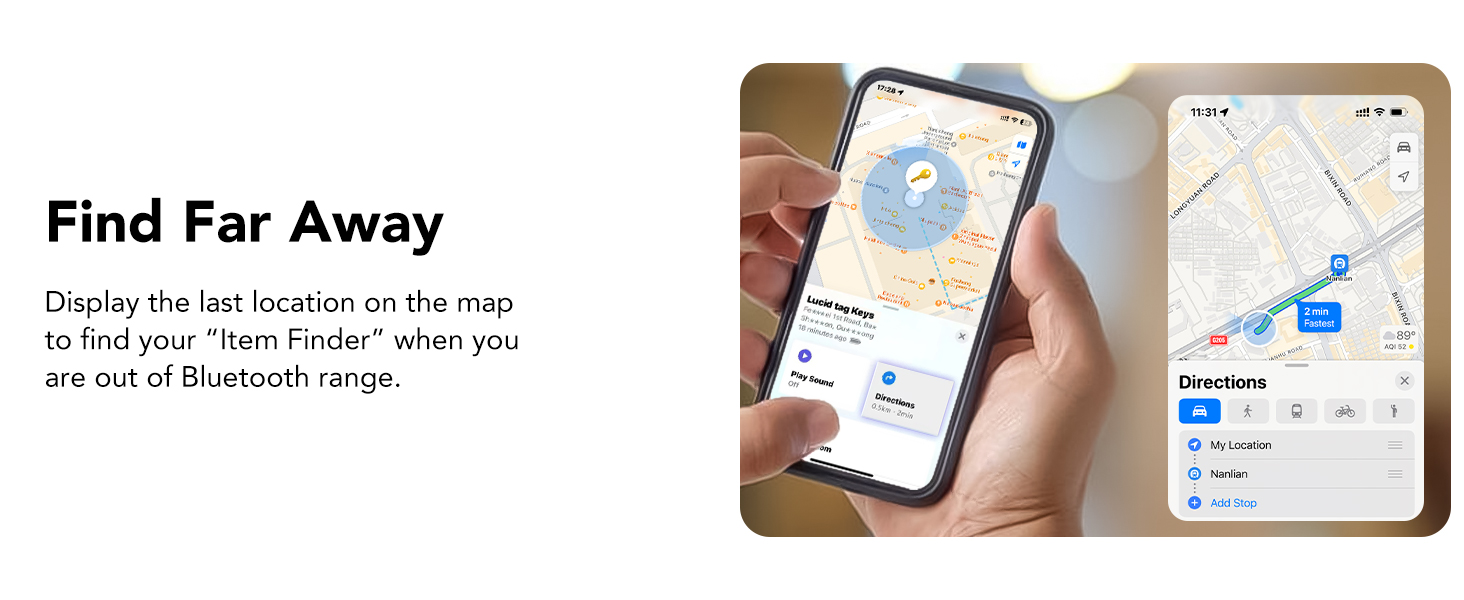
Image: The Find My app displaying the last known location of a tracker tag on a map, useful when the item is far away.
4.3 Left-Behind Remind and Lost Mode
- Left-Behind Remind: Your iOS device will send you a notification if your tracker tag goes out of Bluetooth range, showing its last known location.
- Жоголгон режим: If an item is truly lost, you can activate Жоголгон режим in the Find My app. This allows anyone who finds your tag to securely access your contact information (if you've provided it) by tapping their Apple device to the tag, helping them return your item.

Image: A notification on an iPhone indicating that a Tukio tracker tag has been left behind.

Image: The 'Lost Mode' interface in the Find My app, allowing users to enable contact information sharing for a lost tracker tag.
4.4 Sharing Items (iOS 17+)
With iOS 17 or later, you can share the location of your tracker tags with up to 5 other individuals in the Find My app. This is ideal for items used by multiple family members or friends. Both parties must be using iOS 17/iPadOS 17/macOS 14 or above.
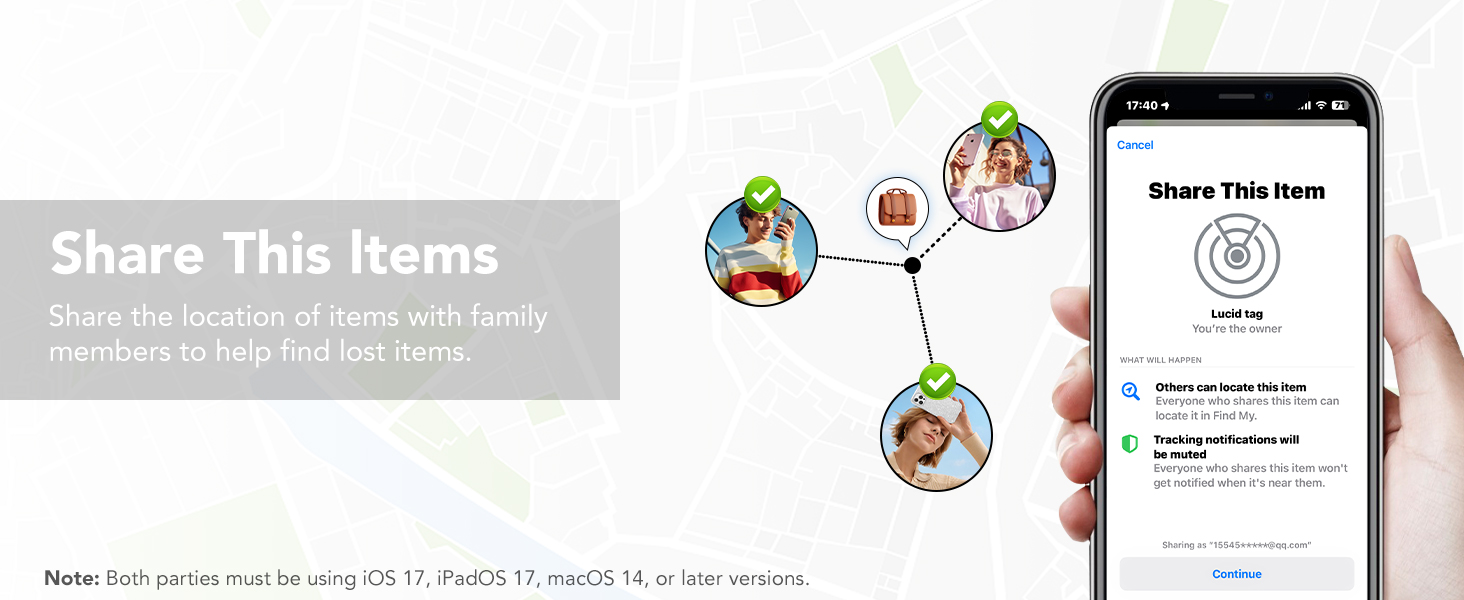
Image: The 'Share This Item' feature in the Find My app, illustrating how to share the location of a tracker tag башкалар менен.
5. Техникалык тейлөө
5.1 Батареяны алмаштыруу
Each Tukio TX02 Tracker Tag uses one CR2032 3V coin cell battery, which provides up to 1 year of uninterrupted use. The Find My app will notify you when the battery is low. To replace the battery:
- Hold the back cover with both thumbs and turn it counter-clockwise to open.
- Эски CR2032 батареясын алып салыңыз.
- Insert a new CR2032 battery with the positive (+) side facing up, ensuring the battery logo is facing up and the '+' sign is aligned with the power port.
- Locate the notch on the back cover, align it with the position on the left, then close the cover and turn it clockwise to secure.

Image: Visual instructions detailing the four steps to easily replace the CR2032 battery in your tracker tag.
Video: An official video from Tukio-Store demonstrating the process of replacing the battery in a Lucid Tag.
5.2 Waterproof and Dustproof
The Tukio TX02 Tracker Tags have an IP67 rating, meaning they can withstand immersion in water up to 3 feet (1 meter) for 30 minutes. This makes them suitable for outdoor activities and provides protection against dust and splashes. However, prolonged submersion or exposure to high-pressure water is not recommended.
6. Кыйынчылыктарды
Жалпы маселелер жана аларды чечүү үчүн төмөнкү таблицага кайрылыңыз:
| Функционалдык | Операция | Эскертүү обону | Эскертүү |
|---|---|---|---|
| Күйгүзүү | баскычын 2 секунд басып туруңуз | Бип | |
| Power Off абалы | Press and hold button for approximately 6 seconds | Bip-bip-bip | You will hear three consecutive beeps. |
| Pairing Successful Status | After app connection is successful | Beep, Beep, Beep, Beep, Beep, Beep, Beep, Beep, Beep, Beep, Beep, Beep | The device will "beep, beep" twice. It rings twelve times in total, then stops playing the sound. |
| Temporarily Disable the Alarm Sound | Tap "Play Sound" on the app to activate the alarm. Tap "Stop Sound" on the app to pause the alarm. Press and hold the button for 2 seconds to pause the alarm sound. | Бип | The "beep" is rather abrupt and follows immediately after the sound of the alarm being played. It requires careful listening to detect. |
| Элементти алып салуу | Removing items will trigger an audible alert. | Бип, Бип, Бип | After removing the device, it will not automatically power off and will remain in pairing mode. If no pairing occurs within 2 minutes, it will automatically power off. |
| Калыбына келтирүү | Press and hold the button continuously until you hear "beep, beep, beep, beep, beep, beep". Then continue holding the button for another 5 seconds until you hear a long beep. The total hold time is approximately 15 seconds. | Beep, Beep, Beep, Beep, Beep, Beep----- | Unable to play sounds, etc. (prompt will appear). Requires reconnecting and pairing. Must remove the item and reconnect. |
| Жоголгон режим | Press and hold for 5 seconds. You will hear two consecutive "beep, beep" sounds. | Бип, Бип | Lost Mode Status: When the locator is nearby, Lost Mode cannot send contact information. This feature is only available for items that are lost and not located near you. |
| Stop sharing location (Power off) | Press and hold for 6 seconds. You will hear three consecutive beeps: "beep, beep, beep, beep, beep". | Бип, Бип, Бип | You will hear three consecutive beeps: "beep, beep, beep, beep, beep". Stop sharing your location. |
7. Техникалык шарттар
- Модель номери: TX02
- Өлчөмдөрү: Узундугу 1.26" x Туурасы 1.26" x Т 0.36" (32мм x 32мм x 8.5мм)
- Салмагы: 0.988 ounces (approx. 7g per tag)
- Байланыш: Bluetooth 5.3
- Батарея: 1 x CR2032 3V coin cell battery (included, replaceable)
- Батареянын иштөө мөөнөтү: 1 жылга чейин
- Суу өткөрбөйт рейтинги: IP67 (up to 3 feet for 30 minutes)
- Үн деңгээли: 80-100 дБ
- Bluetooth диапазону: Up to 55-60 meters (180-196 feet) in open areas
- Материал: Пластик, Поликарбонат (PC)
- Шайкештик: iOS devices only (iPhone, iPad, Mac with Find My app)
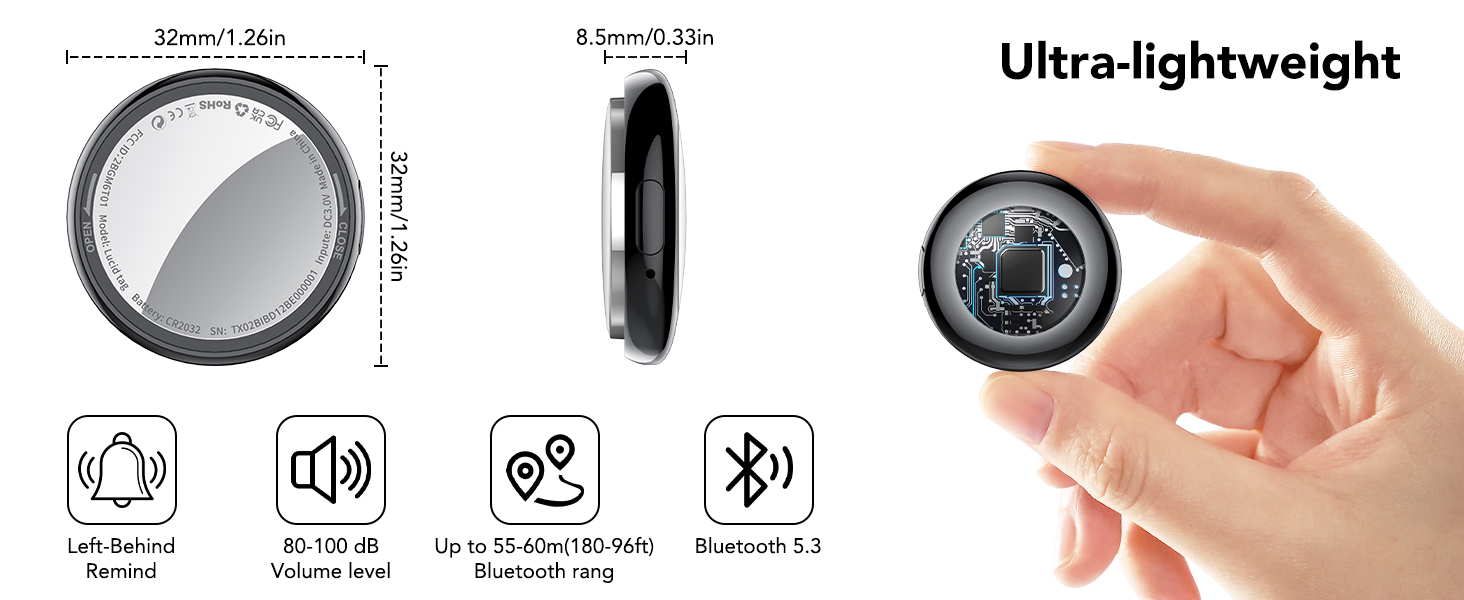
Image: Key specifications and dimensions of the ultra-lightweight Tukio TX02 tracker tag.
8. Кепилдик жана колдоо
8.1 Кепилдик маалыматы
Tukio TX02 Air Tracker Tags менен кел 2 жылдык кепилдик сатып алынган күндөн тартып өндүрүш кемчиликтерин жабуу. Кепилдик дооматтары үчүн сатып алганыңыздын далилин сактап коюңуз.
8.2 Кардарларды колдоо
Our dedicated after-sales team is always available to assist you with any questions or issues you may encounter. For prompt assistance, please follow these steps:
- Go to your order page on Amazon.
- Find the order number for your Tukio TX02 Air Tracker Tags.
- Contact the seller directly through the Amazon platform.
We are committed to providing friendly and efficient customer service.


