1. Киришүү
This manual provides detailed instructions for the safe and efficient use of your Sharper Image Automatic Cat Feeder Wireless, Model SI005-4IP. This feeder is designed to provide scheduled meals for your pet, accommodating various food types including wet and dry, and includes features for food freshness and pet safety.
2. Коопсуздук маалыматы
- Шайманды колдонуудан мурун бардык нускамаларды окуп чыгыңыз.
- Do not immerse the electronic components of the feeder in water.
- Keep the feeder away from children and pets when not in use or during cleaning.
- Use only the specified charging cable (Type-C) and a 5V 1~2A adapter/outlet.
- Тамактандыргычтын туруктуу, тегиз бетке коюлганын текшериңиз.
- Тамактандыргычты үй жаныбарларын тамактандыруудан башка максаттарда колдонбоңуз.
- Regularly inspect the feeder for any damage. Discontinue use if damaged.
3. Пакеттин мазмуну
Пакетте бардык буюмдар бар экенин текшериңиз:
- Smart 6-Meal Auto Feeder unit
- 4 Ice Packs
- Rechargeable 3600mAh Battery (pre-installed)
- USB-C кубаттоочу кабели (адаптер кошулган эмес)
- Instruction Manual

Image: Contents of the Sharper Image Automatic Cat Feeder package, including the feeder unit, ice packs, and charging cable.
4. Продукт бүтүп калдыview
The Sharper Image Automatic Cat Feeder consists of several key components designed for ease of use and pet safety.
- Негизги блок: Houses the electronic controls, battery, and motor.
- Тамак-аш лоток: Features 6 separate compartments for different meals or food types.
- Жогорку мукабасы: Secures the food tray and provides access to the current meal.
- Муз пакеттери: Placed beneath the food tray to keep wet food fresh.
- ЖК дисплей жана башкаруу панели: For setting time and programming meals.
- Paw-Safe Sensor: Detects pet interaction to prevent injury during rotation.
Сүрөт: Жогорку view of the automatic cat feeder showing the six food compartments and the central control panel.
5. Орнотуу
5.1 Бергичти кубаттоо
The feeder has a built-in rechargeable battery. Before first use, fully charge the device.
- Connect the provided USB-C charging cable to the feeder's charging port.
- Connect the other end of the cable to a 5V 1~2A USB adapter or outlet (not included).
- The low battery indicator on the display will show charging status.
- A full charge takes approximately 4.5 hours and provides up to 40 days of use.

Image: Close-up of the feeder's display showing a low battery indicator and charging instructions.
5.2 Бергичти чогултуу
The feeder components are designed for easy assembly.
- Ensure the feeder is clean and dry before assembly.
- Place the frozen ice packs into the designated slots in the base of the feeder. These help keep wet food fresh for extended periods.
- Align the food tray with the central mechanism and place it onto the base. Ensure it sits securely.
- Place the top cover onto the feeder, aligning the opening with the current meal compartment. Press down gently until it clicks into place.

Image: The automatic cat feeder disassembled, showing the base, ice packs, food tray, and top cover, ready for assembly.

Image: Close-up of the ice packs designed to fit into the feeder's base to maintain food freshness.
5.3 Filling the Food Tray
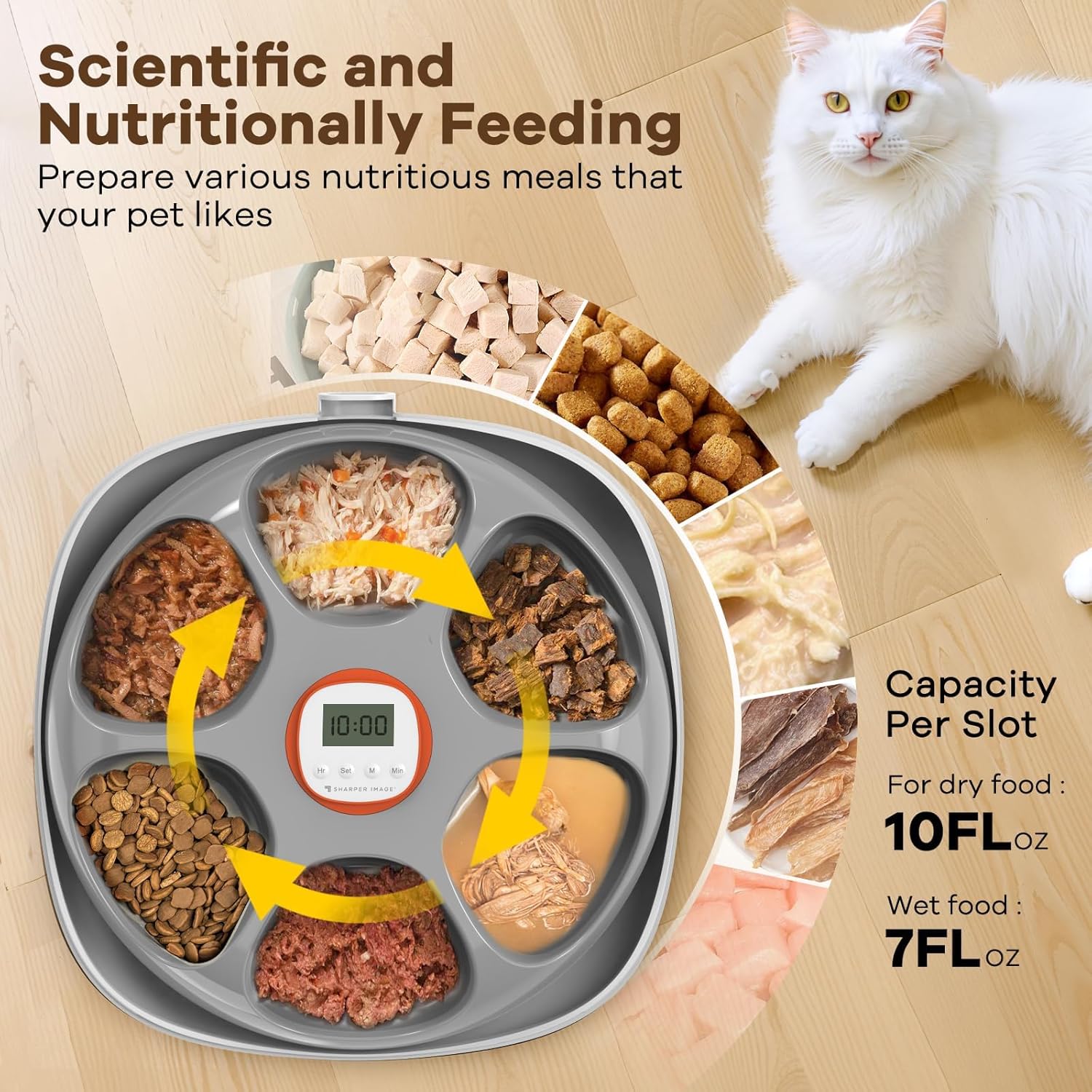
The feeder has 6 compartments. Each compartment can hold approximately 10 FL OZ of dry food or 7 FL OZ of wet food.
- Fill each compartment with the desired amount of wet, moist, dry food, or snacks.
- Ensure food does not overfill the compartments, which could obstruct the rotation mechanism.

Image: The automatic cat feeder with its compartments filled with different types of pet food, including wet and dry options.
6. Иштөө нускамалары
6.1 Unlocking the Feeder
Before programming, the control panel must be unlocked.
- Simultaneously press and hold the "Hr" and "Min" buttons for a few seconds until the display unlocks.
- The display will show the current time or a default setting.

Image: A hand demonstrating how to unlock the feeder by simultaneously pressing the "Hr" and "Min" buttons on the control panel.
6.2 Учурдагы убакытты орнотуу
- Ensure the feeder is unlocked.
- Press the "Set" button once. The hour digits will flash.
- Use the "Hr" button to adjust the hour.
- Press "Set" again. The minute digits will flash.
- Use the "Min" button to adjust the minutes.
- Press "Set" a third time to confirm the current time.
6.3 Programming Feeding Schedules
The feeder allows for up to 6 scheduled meals per day, plus one immediate feeding option.
- After setting the current time, press "Set" again. The display will show "1" (for meal 1) and the hour digits will flash.
- Use the "Hr" and "Min" buttons to set the desired time for the first meal.
- Press "Set" to save the time for meal 1 and move to meal 2.
- Repeat for up to 5 additional meals. If fewer than 6 meals are needed, simply stop pressing "Set" after programming the last desired meal.
- The feeder will automatically save the settings and return to the current time display.
- The feeder has a memory function, so settings are retained even after power off or battery depletion.

Image: The feeder's digital display showing multiple programmed meal times, indicating scheduled feeding.
6.4 Immediate Feeding
To dispense an immediate meal:
- Press the "M" button once. The feeder will rotate to the next available food compartment.
6.5 Paw-Safe Feature
The feeder is equipped with an auto-reverse safety feature to protect your pet.
- If a pet's paw obstructs the rotating tray, the feeder will detect resistance and automatically reverse direction to prevent injury.

Image: An illustration demonstrating the feeder's auto-reverse safety feature, showing the tray reversing if a pet's paw is detected.
7. Техникалык тейлөө
7.1 Бергичти тазалоо
Үзгүлтүксүз тазалоо гигиенаны камсыз кылат жана фидериңиздин иштөө мөөнөтүн узартат.
- Remove the top cover and food tray.
- The food tray and top cover are easily removable and can be rinsed under running water with mild soap.
- Маанилүү: Do not get the main unit (electronic components) wet. Wipe it clean with a damp кездеме гана.
- Кайра монтаждоодон мурун бардык бөлүктөрү толугу менен кургатылганын текшериңиз.

Image: The food tray and top cover of the automatic cat feeder being rinsed under running water in a sink, demonstrating ease of cleaning.
7.2 Ice Pack Usage
To maximize food freshness, especially for wet or moist foods:
- Freeze the ice packs for at least 6-8 hours before use.
- Place the frozen ice packs in the designated slots beneath the food tray.
- The ice packs can keep food fresh for up to 24 hours, depending on ambient temperature.
- It is recommended to have a spare set of ice packs for continuous use.
8. Кыйынчылыктарды
| Көйгөй | Мүмкүн себеп | Чечим |
|---|---|---|
| Feeder does not turn on. | Батарея түгөнүп калды. | Charge the feeder using the USB-C cable and a 5V 1~2A adapter. |
| Feeder does not rotate. |
|
|
| Food is not fresh. | Ice packs not frozen or not used. | Ensure ice packs are fully frozen and correctly placed before filling with wet food. Replace ice packs regularly. |
| Display is unresponsive. | Башкаруу панели кулпуланган. | Unlock by pressing "Hr" and "Min" simultaneously. |
9. Техникалык шарттар
- Модель номери: SI005-4IP
- Өлчөмдөрү: 14.5 x 13.6 x 5 дюйм
- Элемент Салмагы: 4.4 фунт
- Материал: Пластик
- Батарея: 1 литий-иондук батарейка (кошулган)
- Заряддоо киргизүү: 5V 1~2A (USB-C cable included, adapter not included)
- Number of Meals: Күнүнө 6ге чейин
- Food Capacity per Slot: Approx. 10 FL OZ (dry food), 7 FL OZ (wet food)
- Муз пакеттери: 4 included, keeps food fresh for 6-8 hours (frozen), up to 24 hours (in feeder)
- Өзгөчөлүктөр: Paw-safe design, programmable timer, memory function, low battery indicator.
10. Кепилдик жана колдоо
For warranty information or technical support, please refer to the contact details provided with your purchase or visit the official Sharper Image webсайт. Кепилдик дооматтар үчүн сатып алганыңыздын далилин сактаңыз.


