Introduction
This manual provides detailed instructions for the proper use and maintenance of your LAUNCH X431 V+ PRO 5.0 diagnostic tool. This device is designed for professional vehicle diagnostics, offering advanced features such as ECU coding, bidirectional control, and extensive maintenance services across a wide range of vehicle brands. Please read this manual thoroughly before operating the device to ensure optimal performance and safety.
Орнотуу жана баштапкы колдонуу
1. Кутудан чыгаруу жана Компонентти идентификациялоо
Carefully unpack all components from the protective case. Verify that all items listed in the complete kit are present.
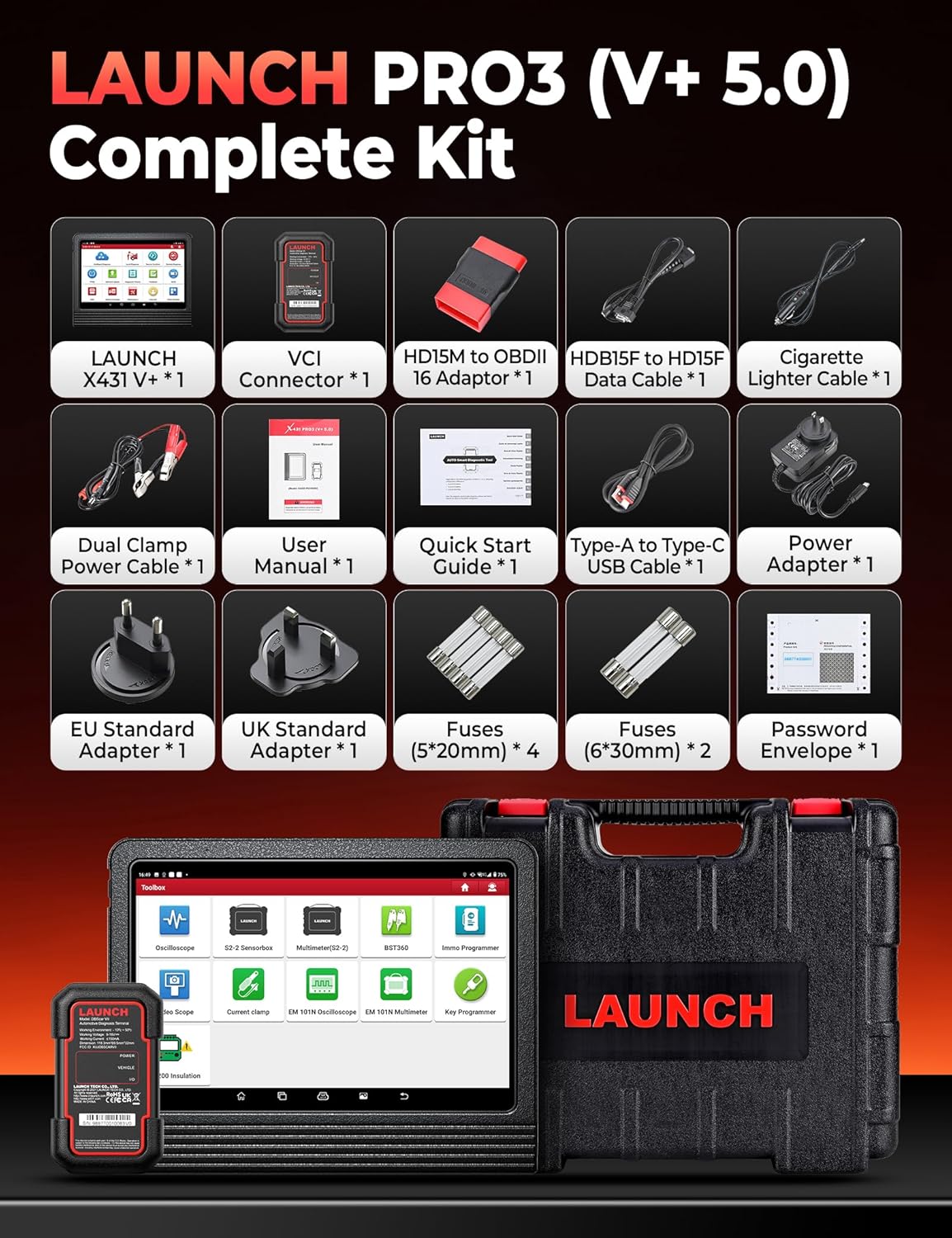
Image: The complete kit includes the LAUNCH X431 V+ unit, VCI Connector, various adapters, cables, power accessories, fuses, user manual, quick start guide, and password envelope, all housed in a protective case.
- Негизги блок: LAUNCH X431 V+ tablet.
- VCI Connector: DBSCar VII diagnostic connector.
- Адаптерлер: Various OBDII and specific vehicle adapters.
- Кабелдер: USB cable, power cables.
- Кубаттуу адаптер: For charging the main unit.
- Документтер: User Manual, Quick Start Guide, Password Envelope.
2. Баштапкы күйгүзүү жана конфигурация
Connect the power adapter to the main unit and a power outlet. Press and hold the power button to turn on the device. Follow the on-screen prompts to complete the initial setup, including language selection, Wi-Fi connection, and account registration.

Image: This image details the hardware specifications of the device, including its 2.0GHz 4-Core CPU, Android 10.0 operating system, 10.1-inch screen, 4GB RAM + 64GB ROM, 8MP+5MP cameras, 2.4GHz/5GHz Wi-Fi, and 6300mAh battery.
3. Connecting the DBSCar VII Connector
The DBSCar VII connector supports the CAN-FD protocol, expanding vehicle compatibility. Plug the DBSCar VII connector into the vehicle's OBD-II port, typically located under the dashboard. Ensure a secure connection. The connector will establish a Bluetooth connection with the main unit automatically or can be paired manually via the device's settings.
Иштөө нускамалары
1. Бардык системалык диагностика
The device performs OE-level diagnostics across all available vehicle systems. This includes reading and clearing diagnostic trouble codes (DTCs), viewing 12-in-1 live data streams, accessing freeze frame data, and retrieving ECU information.

Image: This image illustrates the Topology Mapping feature, which systematically displays the communication structure between vehicle modules. It also highlights All System Diagnostics capabilities, including Read/Clear Codes, 12-IN-1 Live Data, Freeze Frame Data, ECU Information, and AutoVIN & Scan for automatic VIN retrieval and system scanning.
- Топологиялык карта түзүү: Systematically displays the communication structure between vehicle modules for a clear overview.
- AutoVIN жана AutoScan: Automatically retrieves vehicle identification number (VIN) and scans all systems for quick diagnosis.
- Коддорду окуу/тазалоо: Identify and erase diagnostic trouble codes from various vehicle systems.
- Жандуу маалыматтар: View real-time data streams from sensors and components.
- Кадр дайындарын тоңдуруп коюу: DTC коюлганда сенсордун маанилеринин сүрөтүн тартыңыз.
2. ЭБУ коддоо
ECU coding allows for component replacement adaptation and vehicle customization. It supports both online and offline coding for various brands.

Image: This image differentiates between Online Coding and Offline Coding. Online Coding involves cloud server data and automatic instructions for a simpler procedure. Offline Coding allows manual steps, detailed control, and more complete customization adjustments.
- Онлайн коддоо: Utilizes cloud server data for automatic instructions, simplifying the coding process. Supported for brands like BMW, VW, Audi, Skoda, Seat.
- Оффлайн коддоо: Provides manual control over each coding step, offering more detailed customization.
- Ыңгайлаштыруу: Adjust vehicle parameters such as disabling seat belt chimes or customizing mirror folding behavior.
- Жетектөөчү функциялар: Provides OE-level instructions for simplified diagnostic procedures on supported vehicles (VW, Audi, Skoda, Seat).
3. Эки багыттуу башкаруу (активдүү тесттер)
Perform active tests to send commands to vehicle systems and components, verifying their operational status without using the vehicle's controls. This helps in quickly pinpointing faulty areas.
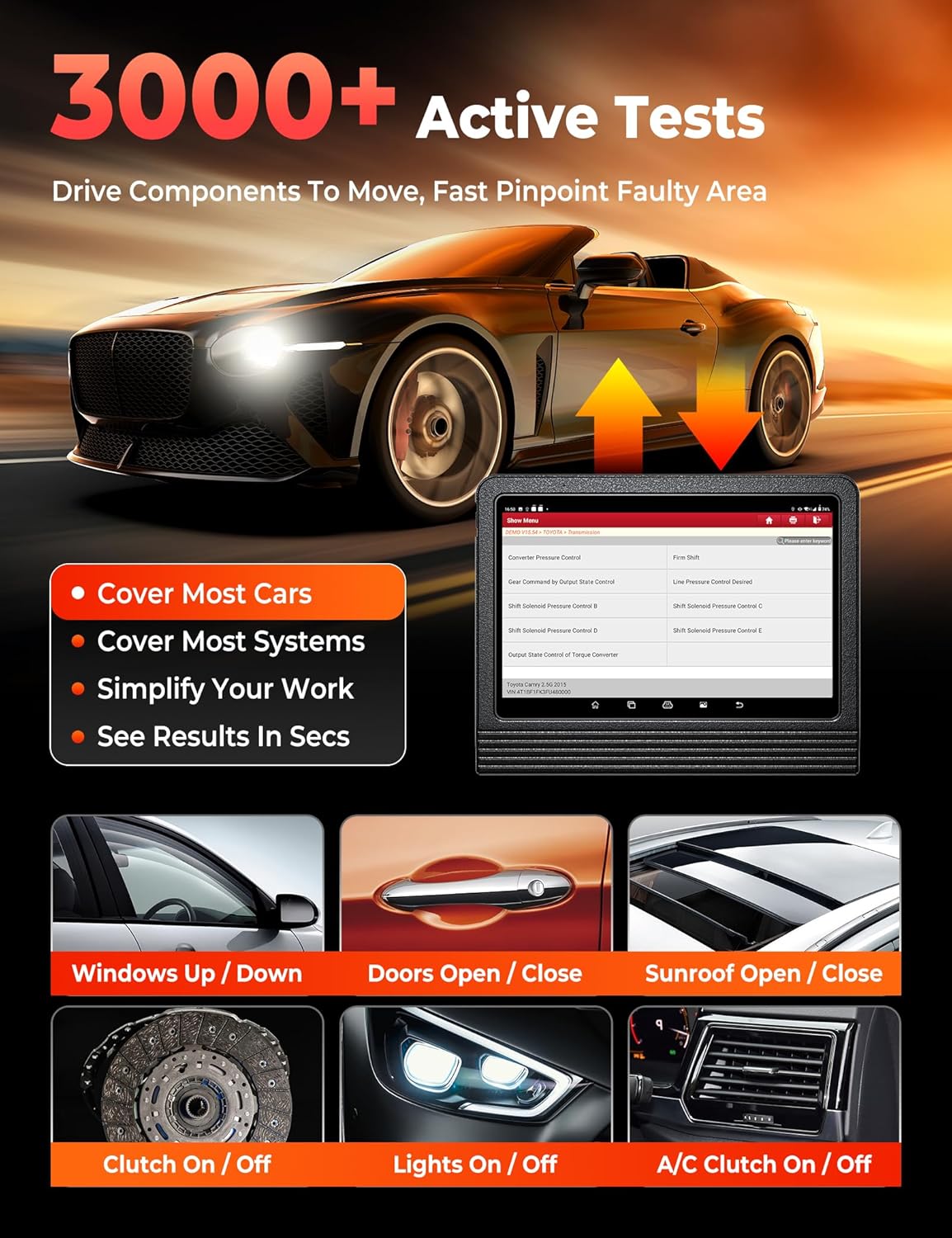
Image: This image demonstrates the 3000+ Active Tests feature, which allows the user to drive components to move and quickly pinpoint faulty areas. Examples include controlling windows, doors, sunroof, clutch, lights, and A/C.
4. Автоунааны камтуу
The tool supports over 200,000 vehicle models from 1984-2025 across American, Asian, and European markets. It includes support for FCA AutoAuth for SGW-equipped vehicles (Chrysler, Dodge, Jeep, Alfa Romeo, Fiat) and CAN-FD protocol for newer GM vehicles.

Image: This image highlights the extensive 200+ Brands Coverage of the LAUNCH X431 V+ PRO 5.0, including American (Chevrolet, Chrysler, Ford, Buick, Cadillac, Dodge, GM, Hummer, Jeep, Lincoln, Brazil-Fiat), European (BMW, Jaguar, LandRover, Volvo, Abarth, Alfa Romeo, Audi, Bentley, Bugatti, Citroen, Dacia), Asian (Toyota, Honda, Nissan, Hyundai, Kia, Acura, Daihatsu, Infiniti, Isuzu, Lexus, Mazda, Mitsubishi, Nissan GTR, Scion), and Australian (AU-Ford, Holden) vehicles. It also notes support for FCA SGW, CAN-FD & DoIP (with adapter), and no IP limitation.
Тейлөө кызматтары
The LAUNCH X431 V+ PRO 5.0 offers over 55 maintenance and reset services, with more than 100 advanced functions available within the diagnostic software.

Image: This image showcases the 55+ Hot Maintenance Services offered by the LAUNCH X431 V+ PRO 5.0, including Oil Reset, ABS Bleed, Electronic Parking Brake (EPB), Steering Angle Sensor (SAS), Supplemental Restraint System (SRS), Injector Coding, Tire Pressure Monitoring System (TPMS), Clutch Adaptation, Coolant Bleed, Seat Calibration, Headlamp Reset, and Air/Fuel Ratio (A/F) Reset, among over 100 additional functions.
- Майды калыбына келтирүү: Май алмашкандан кийин майдын иштөө тутумун баштапкы абалга келтириңиз.
- SAS баштапкы абалга келтирүү: Рулдун бурчу сенсорун калибрлөө.
- EPB баштапкы абалга келтирүү: Reset the electronic parking brake pads after replacement.
- TPMS баштапкы абалга келтирүү: Program new TPMS sensors or perform sensor relearn procedures.
- BMS баштапкы абалга келтирүү: Register new battery replacement.
- ETS Reset: Perform electronic throttle position reset.
- Transmission Adaptation: Reset transmission adaptive learning values.
- ABS кан агуу: ABS тормозунун кан чыгаруу процедураларын аткарыңыз.
- AFS баштапкы абалга келтирүү: Reset the adaptive front lighting system.
- Инжектор коддоо: Жаңы инжектор номерлерин ЭБУга коддоңуз.
- AdBlue баштапкы абалга келтирүү: Reset the AdBlue system after urea replacement/refill.
- NOx сенсорун баштапкы абалга келтирүү: Reset the NOx sensor after fault repair/catalyst replacement.
Advanced Functions and Add-on Modules
The LAUNCH X431 V+ PRO 5.0 supports various optional add-on modules to expand its capabilities.
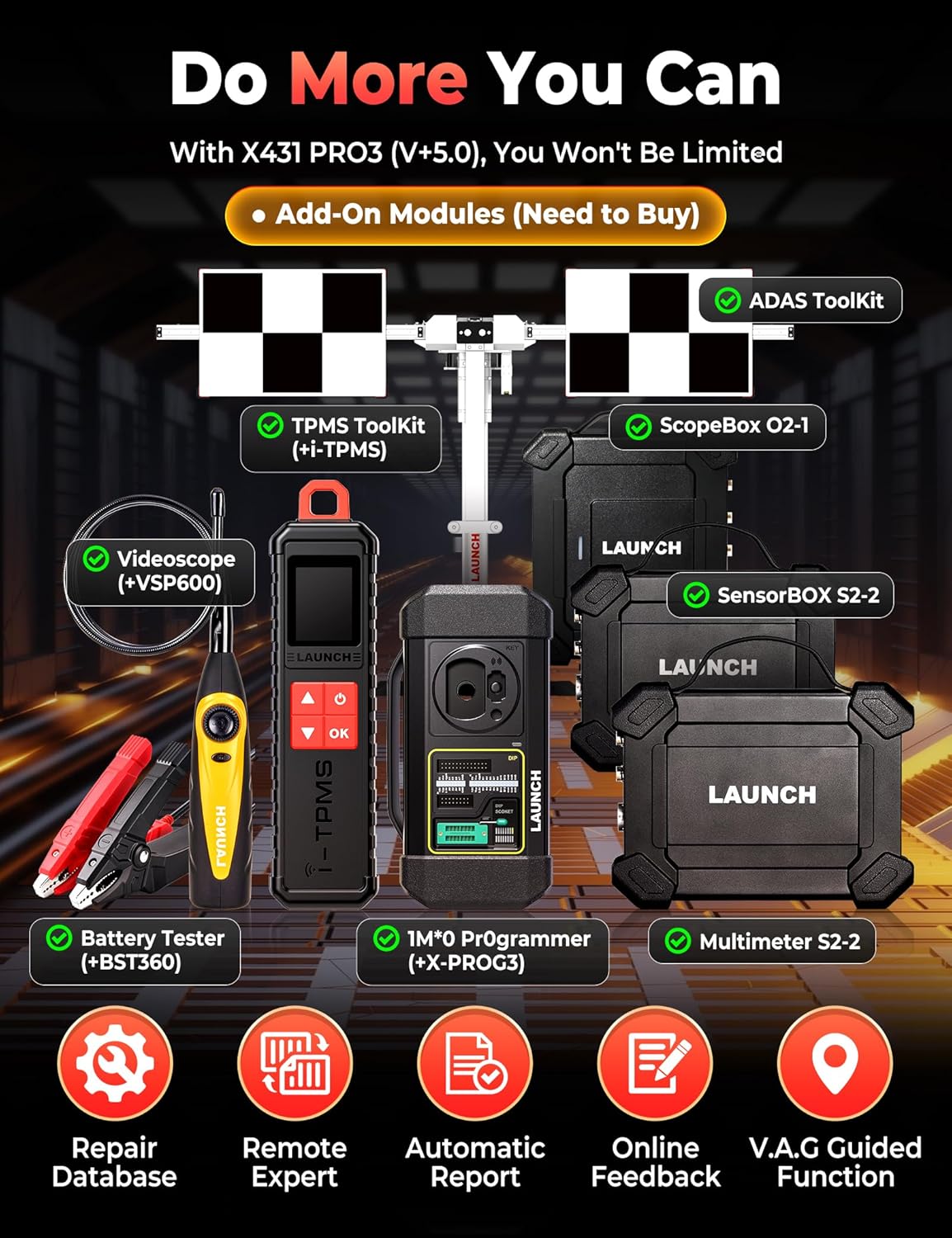
Image: This image displays various add-on modules that can be purchased separately to enhance the LAUNCH X431 V+ PRO 5.0's functionality. These include the ADAS Toolkit, TPMS Toolkit (with i-TPMS), ScopeBox O2-1, Videoscope (VSP600), Battery Tester (BST360), IMMO Programmer (X-PROG3), and Multimeter S2-2.
- ADAS Tool: For Advanced Driver-Assistance Systems calibration.
- TPMS Tool (X431 TSGUN): For comprehensive TPMS services.
- Battery Tester (BST360): For battery health analysis.
- Videoscope (VSP600): For visual inspection of hard-to-reach areas.
- IMMO Programmer (X-PROG3): For advanced immobilizer functions.
- ScopeBox: For waveform analysis.
- SensorBOX: For sensor simulation and testing.
Проблемаларды чечүү
If you encounter issues with your LAUNCH X431 V+ PRO 5.0, refer to the following common troubleshooting steps:
- Түзмөк күйбөй жатат: Түзмөктүн толук заряддалганын же кубат адаптерине туташтырылганын текшериңиз. Кубат баскычынын туура иштешин текшериңиз.
- Унаа менен байланыш жок: Verify the DBSCar VII connector is securely plugged into the vehicle's OBD-II port. Ensure the vehicle's ignition is on. Check the Bluetooth connection between the main unit and the VCI connector.
- Software Freezes/Crashes: Restart the application or the device. Ensure the software is updated to the latest version. Clear cache if necessary.
- Диагностикалык каталар: Confirm the correct vehicle make, model, and year are selected. Ensure all cables and connectors are secure.
- Жай аткаруу: Close unnecessary applications running in the background. Ensure sufficient storage space is available.
For persistent issues, consult the official LAUNCH support resources or contact customer service.
Техникалык шарттар
| Өзгөчөлүк | Деталь |
|---|---|
| Бренд | ИШКЕ АЛУУ |
| Модел | X431 V+ |
| Элемент Салмагы | 4.94 килограмм |
| Пакеттин өлчөмдөрү | 42.9 x 39.7 x 17.6 см |
| Операция системасы | Android 10.0 |
| Screen Size | 10.1 дюйм |
| Процессор | 2.0 GHz 4-Core |
| RAM + ROM | 4 ГБ + 64 ГБ |
| Батарея | 6300 мАч |
| Power Source | Батарея менен иштейт |
| Automotive Fit түрү | Унаанын өзгөчө ылайыктуулугу |
| UPC | 810139303558 |
Кепилдик маалымат
The LAUNCH X431 V+ PRO 5.0 diagnostic tool typically comes with a manufacturer's warranty. Please refer to the warranty card included in your product packaging or visit the official LAUNCH webдеталдуу кепилдик шарттары жана шарттары үчүн сайт. Кепилдик дооматтар үчүн сатып алганыңыздын далилин сактаңыз.
Кардарларды колдоо
For technical assistance, product inquiries, or support, please contact LAUNCH customer service through their official website or the contact information provided in your product documentation. Regular software updates are available to enhance functionality and vehicle coverage; ensure your device is connected to Wi-Fi to receive these updates.


