1. Киришүү
Welcome to the user manual for your new Motorola G57 Power 5G smartphone. This guide provides essential information to help you set up, operate, maintain, and troubleshoot your device. Please read this manual thoroughly to ensure optimal performance and longevity of your smartphone.
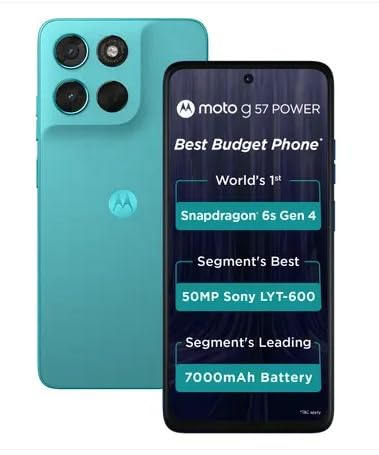
Сүрөт 1.1: Алдыңкы жана арткы view of the Motorola G57 Power 5G.
2. Орнотуу
2.1 кутудан чыгаруу
Пакетти ачкандан кийин, бардык компоненттер бар экенин текшериңиз:
- Motorola G57 Power 5G смартфону
- Заряддагыч (аймакка жараша өзгөрүшү мүмкүн)
- USB кабели
- SIM лоток чыгаруучу курал
- Quick Start Guide
2.2 SIM картаны орнотуу
- Түзмөгүңүздүн капталындагы SIM салгычты табыңыз.
- SIM лоток чыгаруучу куралды лотоктун жанындагы кичинекей тешикке салып, лоток чыгып кеткенче акырын басыңыз.
- Place your Nano-SIM card(s) and/or microSD card (if supported) into the tray with the gold contacts facing down. Ensure they are correctly seated.
- Табаны телефондун ичине кылдаттык менен кайра кыстарыңыз.
2.3 Баштапкы күйгүзүү жана орнотуу
- Motorola логотиби пайда болгонго чейин Кубат баскычын басып, кармап туруңуз.
- Тилиңизди тандоо, Wi-Fi тармагына туташуу жана Google каттоо эсебиңиз менен кирүү үчүн экрандагы көрсөтмөлөрдү аткарыңыз.
- You will be guided through setting up security features like fingerprint unlock or face unlock, and data transfer from an old device.
3. Аппаратыңызды иштетүү
3.1 Дисплей жана навигация
The Motorola G57 Power 5G features a 6.72-inch FHD+ display with a 120Hz refresh rate for smooth visuals and up to 1050 nits peak brightness for clear outdoor visibility. Navigation is primarily through Android's intuitive gesture system or traditional on-screen buttons, configurable in settings.
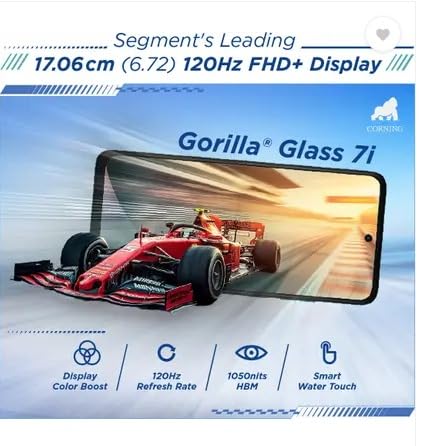
Image 3.1: The Motorola G57 Power 5G's 120Hz FHD+ display.
3.2 Камераны колдонуу
Сиздин аппаратыңыз ар тараптуу камера системасы менен жабдылган:
- Негизги камера: 50MP LYT-600 sensor for high-resolution photos.
- Ультра кең камера: Кеңири көрүнүштөрдү тартуу үчүн 8 мегапиксел.
- Алдыңкы камера: 8 МП селфи жана видео чалуулар үчүн.
Utilize the camera app to switch between modes (Photo, Portrait, Video, Pro, etc.), adjust settings, and apply filters. The integrated moto ai features enhance image processing for improved results.

Image 3.2: Rear camera module of the Motorola G57 Power 5G.
3.3 Батареяны башкаруу
The Motorola G57 Power 5G features a large 7000mAh silicon carbon battery, designed for extended usage. It supports 33W TurboPower fast charging. To optimize battery life:
- Экран жарыктыгын тууралаңыз.
- Disable unused connectivity features (Wi-Fi, Bluetooth, GPS).
- Фондук колдонмолорду жабуу.
- Utilize battery saver modes.
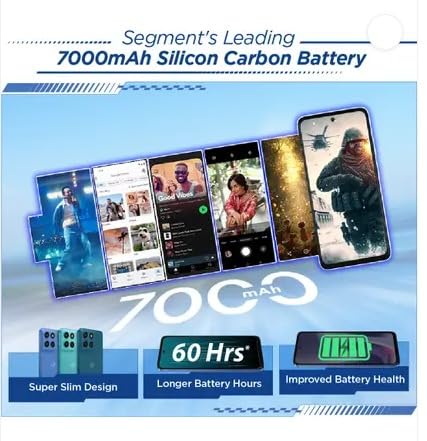
Image 3.3: Visual representation of the 7000mAh battery.
3.4 Байланыш
Your device supports 5G cellular networks for high-speed data. It also includes Bluetooth for connecting to accessories and Wi-Fi for internet access. Manage these connections through the Quick Settings panel or the Settings app.
3.5 Программалык камсыздоо жана жаңыртуулар
The Motorola G57 Power 5G runs on Android 16, with a promised upgrade to Android 17 and three years of security updates. Regularly check for and install software updates to ensure your device has the latest features and security patches. Navigate to Орнотуулар> Система> Тутум жаңыртуулары.
4. Техникалык тейлөө
4.1 Аппаратыңызды тазалоо
To clean your phone, use a soft, lint-free cloth. Avoid abrasive materials or harsh chemicals. For the screen, a screen cleaner specifically designed for electronics can be used. Ensure no liquids enter ports.
4.2 Программалык камсыздоону тейлөө
- Regularly update your operating system and applications.
- Clear cache and data for apps that consume excessive storage.
- Perform periodic backups of your important data.
4.3 Сактагычты башкаруу
The device comes with 128GB of internal storage. To manage storage effectively:
- Керексиз жок кылуу fileлар жана колдонмолор.
- Move photos and videos to cloud storage or an external device.
- Utilize the 'Files' app or 'Storage' section in settings to identify and manage large files.
5. Кыйынчылыктарды
5.1 Жалпы маселелер жана чечимдер
- Түзмөк күйбөй жатат: Батарея заряддалганын текшериңиз. Кубаттоочу түзүлүшкө жок дегенде 15 мүнөт туташтырып, андан кийин күйгүзүп көрүңүз.
- Колдонмолор бузулуп же катып жатат: Close the app and reopen it. If the issue persists, clear the app's cache and data (Settings > Apps > [App Name] > Storage > Clear cache/Clear data).
- Тармактык байланыштын начардыгы: Check if airplane mode is off. Restart your device. Verify your SIM card is properly inserted.
- Жай аткаруу: Close background apps, clear storage, and restart your device.
5.2 Заводдук абалга кайтаруу
A factory reset will erase all data from your phone and restore it to its original factory settings. This can resolve persistent software issues but should be used as a last resort after backing up all important data.
- барыңыз Орнотуулар > Система > Параметрлерди кайра орнотуу.
- Тандоо Бардык дайындарды өчүрүү (дескриптке кайтаруу).
- Чечимиңизди ырастап, суралса, PIN/сырсөзүңүздү киргизиңиз.
6. Техникалык шарттар
| Өзгөчөлүк | Спецификация |
|---|---|
| Модел | Motorola G57 Power 5G |
| Операция системасы | Android 16 (Android 17кө жаңыртылат) |
| Процессор | Snapdragon 6s Gen 4 |
| RAM | 8 ГБ LPDDR4X |
| Ички сактагыч | 128 ГБ UFS 2.2 |
| Дисплей | 6.72-inch FHD+ LCD, 120Hz refresh rate, up to 1050 nits brightness |
| Арткы камера | 50MP LYT-600 (Main) + 8MP (Ultrawide) |
| Алдыңкы камера | 8MP |
| Батарея | 7000mAh Silicon Carbon, 33W TurboPower charging |
| Байланыш | 5G, Bluetooth, Wi-Fi |
| Өлчөмдөрү (L x W x Y) | 16.62 x 7.65 x 0.86 см |
| Салмагы | 210.6 г |
| Туруктуу | IP64 dust and splash resistance, MIL-STD 810H tested |
7. Коопсуздук жана ченемдик маалымат
Please refer to the separate safety and regulatory guide included with your device for important information regarding safe usage, disposal, and compliance with local regulations. Always use approved accessories to prevent damage or injury.
8. Кепилдик жана колдоо
Your Motorola G57 Power 5G comes with a limited warranty. For detailed warranty terms, conditions, and to register your product, please visit the official Motorola support website. For technical assistance or service, contact Motorola customer support.
Көбүрөөк маалымат жана колдоо булактарын таба аласыз Amazonдагы Motorola дүкөнү.


