1. Киришүү
This manual provides essential information for the safe and efficient operation of your Panasonic TH-55PX735DX 55-inch 4K Ultra HD Smart LED TV. Please read these instructions thoroughly before using the television and retain them for future reference.
The Panasonic TH-55PX735DX is a 55-inch 4K Ultra HD Smart LED TV designed to enhance your home entertainment experience. It features a bezel-less display and a High Bright Panel, delivering vibrant colors, deep contrast, and sharp detail. The television supports HDR10+ and Dolby Vision for optimized visuals and Dolby Atmos for immersive audio. It integrates smart TV functionalities with Google TV, offering access to various streaming applications and connectivity options including Bluetooth and Dual-Band WiFi.
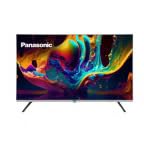
Сүрөт 1.1: Алдыңкы view of the Panasonic TH-55PX735DX Smart LED TV. This image displays the television's bezel-less design and its screen displaying vibrant colors.
2. Коопсуздук боюнча маанилүү маалымат
Зыяндын алдын алуу жана коопсуз иштетүү үчүн төмөнкү коопсуздук чараларын сактаңыз:
- Кубат булагы: Connect the TV only to an AC 230V, 50/60Hz power supply.
- Вентиляция: Телевизордун айланасында жетиштүү желдетүүнү камсыз кылыңыз. Вентиляция тешиктерин жаап албаңыз.
- Суу жана ным: Телевизорду жамгырга же нымга тийгизбеңиз. Сыналгыга суюктук толтурулган нерселерди койбоңуз.
- Тазалоо: Тазалоодон мурун сыналгыдан ажыратыңыз. Жумшак, кургак чүпүрөктү колдонуңуз. Суюк тазалагычтардан алыс болуңуз.
- Жайгашкан жери: Place the TV on a stable, level surface or mount it securely to a wall according to instructions.
- Тейлөө: Телевизорду өзүңүз тейлөөгө аракет кылбаңыз. Бардык тейлөөлөрдү квалификациялуу тейлөө кызматкерлерине тапшырыңыз.
3. Кутуда эмне бар
Сиздин пакетте төмөнкү компоненттердин бардыгы камтылганын текшериңиз:
- 1 LED TV (Panasonic TH-55PX735DX)
- 1 столдун үстүнкү стенд
- 1 Колдонуучунун колдонмосу (бул документ)
- 1 Кепилдик картасы
- 1 Алыстан башкаруу
- 2 AAA батарейка (алыстан башкаруу үчүн)
4. Орнотуу колдонмосу
4.1 Attaching the Table Top Stand
- Телевизордун экранын кылдаттык менен ылдый каратып жумшак, тегиз жерге коюңуз.
- Стол үстүндөгү стендди телевизордун астыңкы жагындагы бекитүүчү тешиктер менен тегиздеңиз.
- Берилген бурамалар менен стендди бекитиңиз. Стенд бекем бекитилгенин текшериңиз.
Alternatively, for wall mounting, consult a professional installer and refer to the wall mount kit's instructions.
4.2 Тышкы түзмөктөрдү туташтыруу
Your TV offers various connectivity options. Refer to the back panel for port locations.
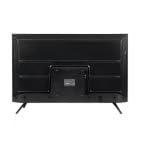
Сүрөт 4.1: Арткы view of the Panasonic TH-55PX735DX Smart LED TV, illustrating the location of various input and output ports.
- HDMI: Connect Blu-ray players, gaming consoles, or set-top boxes using HDMI cables. The TV supports multiple HDMI inputs.
- USB: Медиа ойнотуу үчүн USB сактагыч түзмөктөрдү туташтырыңыз.
- Антенна/кабель: Антеннаңызды же кабелдик телевидениеңизди туташтырыңыз.
- Күч: Электр шнурду сыналгыга, андан кийин розеткага туташтырыңыз.
4.3 Алгачкы күйгүзүү жана тармакты орнотуу
- Телевизорду розеткага сайыңыз.
- Пульттун же сыналгыдагы кубат баскычын басыңыз.
- Follow the on-screen instructions to select your language, country, and perform initial channel scanning.
- Connect to your Wi-Fi network by selecting your network name and entering the password. The TV supports Dual-Band WiFi.
- Log in with your Google account to access Google TV features and apps.
5. Сыналгыңызды иштетүү
5.1 Алыстан башкаруу функциялары
The included remote control provides intuitive navigation. Insert the two AAA batteries into the remote control, observing polarity.
- Кубат баскычы: Телевизорду күйгүзөт же өчүрөт.
- Навигация аянтчасы: Use the arrow keys to navigate menus and the OK button to confirm selections.
- Көлөм +/-: Үн деңгээлин тууралайт.
- Канал +/-: Телеканалдарды өзгөртөт.
- Үй баскычы: Google TV башкы экранына жетет.
- Киргизүү баскычы: Киргизүү булактарын тандайт (HDMI, USB ж.б.).
- Колдонмо баскычтары: Dedicated buttons for popular streaming services like Netflix, Prime Video, YouTube, and JioCinema.
5.2 Акылдуу телевизордун функциялары (Google TV)
Your Panasonic TH-55PX735DX runs on Google TV, providing a personalized entertainment experience.
- Колдонмого мүмкүндүк алуу: Download and stream content from a wide range of applications available on the Google Play Store.
- Үн менен башкаруу: Use the built-in Google Assistant (via remote control microphone) to search for content, control smart home devices, and get information.
- Мазмун боюнча сунуштар: Google TV learns your preferences and suggests movies, shows, and live TV from your subscriptions.
5.3 Сүрөт жана үн орнотуулары
Сиздин оптималдаштыруу viewсыналгынын орнотуулар менюсу аркылуу угуу жана угуу тажрыйбасы.
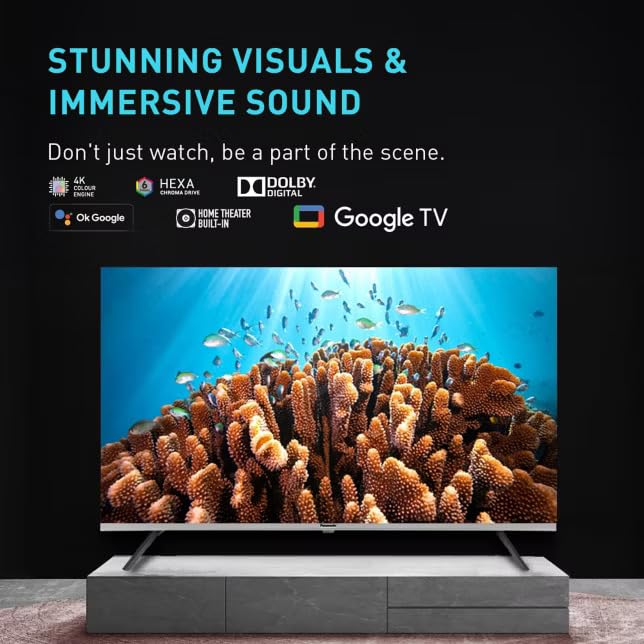
5.1-сүрөт: Телевидениенин экранындагы көрсөтүүasing its capability for stunning visuals and immersive sound, highlighting features like 4K Hexa Chroma Drive, Dolby Digital, and Google TV integration.
- Сүрөт режимдери: Select from various preset picture modes (e.g., Standard, Vivid, Cinema, Game) or customize settings like brightness, contrast, color, and sharpness. The TV features a High Bright Panel and supports HDR10+ and Dolby Vision for enhanced picture quality.
- Үн режимдери: Choose sound modes (e.g., Standard, Music, Movie, Speech) or adjust equalizer settings. Experience immersive audio with Dolby Atmos support.
- Оюн режими: Activate Game Mode for reduced input lag, ideal for gaming.
5.4 Bluetooth байланышы
Connect Bluetooth-enabled devices such as headphones or soundbars wirelessly to your TV.
- Сыналгынын орнотуулар менюсуна өтүңүз.
- Navigate to 'Remotes & Accessories' or 'Bluetooth Settings'.
- Enable Bluetooth and put your device in pairing mode.
- Түзмөгүңүздү жупташтыруу үчүн сыналгы экранындагы тизмеден тандаңыз.
6. Техникалык тейлөө жана кам көрүү
- Экранды тазалоо: Экранды жумшак, түксүз чүпүрөк менен акырын сүртүңүз. өжөр белгилери үчүн, бир аз гampчүпүрөккө суу же атайын экран тазалагыч (экранга түздөн-түз чачпаңыз).
- Кабинетти тазалоо: Телевизордун шкафын жумшак, кургак чүпүрөк менен сүртүңүз.
- Чаңдандыруу: Ашыкча ысып кетүүнүн алдын алуу үчүн желдетүү тешиктеринен чаңды дайыма сүртүп туруңуз.
- Электр кабели: Электр шнурунун кандайдыр бир бузулууларын мезгил-мезгили менен текшерип туруңуз.
7. Кыйынчылыктарды
Телевизоруңузда көйгөйлөргө туш болсоңуз, төмөнкү жалпы чечимдерди караңыз:
| Көйгөй | Мүмкүн чечим |
|---|---|
| Күч жок | Кубат шнуру телевизорго да, розеткага да бекем сайылганын текшериңиз. Розетка иштеп жатканын текшериңиз. |
| Сүрөт жок, бирок үн бар | Киргизүү булагын текшериңиз. Тышкы түзмөктөр күйгүзүлгөнүн жана туура туташканын текшериңиз. |
| Үн жок, бирок сүрөт бар | Check the volume level. Ensure mute is not activated. Verify audio cables for external devices. |
| Пульт иштебей жатат | AAA батареяларын алмаштырыңыз. Пульт менен телевизордун ортосунда эч кандай тоскоолдуктар жок экенин текшериңиз. |
| Wi-Fi'га туташпай жатат | Ensure your router is on and within range. Re-enter the Wi-Fi password. Restart the TV and router. |
| Smart TV apps not loading | Check your internet connection. Clear the app's cache or reinstall the app. Update the TV's software. |
8. Техникалык шарттар
| Өзгөчөлүк | Спецификация |
|---|---|
| Бренд | Panasonic |
| Модел | TH-55PX735DX |
| Screen Size | 55 Inches (139 Centimetres) |
| Дисплей технологиясы | LED, IPS Panel |
| Резолюция | 4K Ultra HD (3840 x 2160 пиксел) |
| Жаңыртуу ылдамдыгы | 60 Гц |
| HDR колдоо | Dolby Vision, HDR10+ |
| Аудио технологиясы | Dolby Atmos, Built-In Speaker |
| Операция системасы | Google TV |
| Эстутум сактоо сыйымдуулугу | 16 ГБ |
| Байланыш | Bluetooth, HDMI, USB, Wi-Fi (Dual-Band) |
| Өзгөчөлүктөр | Bezel-Less Design, High Bright Panel, Game Mode, Micro Dimming, ALLM |
| Продукциянын өлчөмдөрү (LxWxH) | 123.6 x 6.8 x 71.8 см |
| Элемент Салмагы | 20 кг |
| Тtage | 230 вольт |
| Ватtage | 150 Ватт |
| Модель жылы | 2025 |
9. Кепилдик жана колдоо
9.1 Кепилдик маалыматы
Your Panasonic TH-55PX735DX Smart LED TV comes with a 1 Year Warranty Care from the date of purchase. Please refer to the included Warranty Card for detailed terms and conditions, including coverage and exclusions.
9.2 Кардарларды колдоо
For technical assistance, service requests, or warranty claims, please contact Panasonic customer support. Contact details can be found on the Panasonic official webсайтында же кепилдик картаңызда.
Өндүрүүчү: Panasonic Life Solutions India Private Limited


