1. Киришүү
This manual provides essential information for setting up, operating, and maintaining your Prechen 15.6 Inch Portable Touchscreen Monitor. Featuring a 10-point multi-touch IPS FHD 1080P display with a 60Hz refresh rate, this monitor is designed for versatility and clear visuals. It includes built-in stereo speakers and supports various connectivity options, making it suitable for diverse environments and applications.
2. Кутуда эмне бар
Төмөнкү нерселердин баары пакетиңизге камтылганын текшериңиз:
- Prechen 15.6 Inch Portable Touchscreen Monitor
- HDMI - HDMI кабели
- USB-A - USB-C кабели
- USB-C - USB-C кабели
- Кубаттуу адаптер
- Protective Carry Sleeve
- Колдонуучунун Колдонмосу жана Тез Баштоо Колдонмосу

3. Продукт бүтүп калдыview
3.1 Порттор жана башкаруу каражаттары
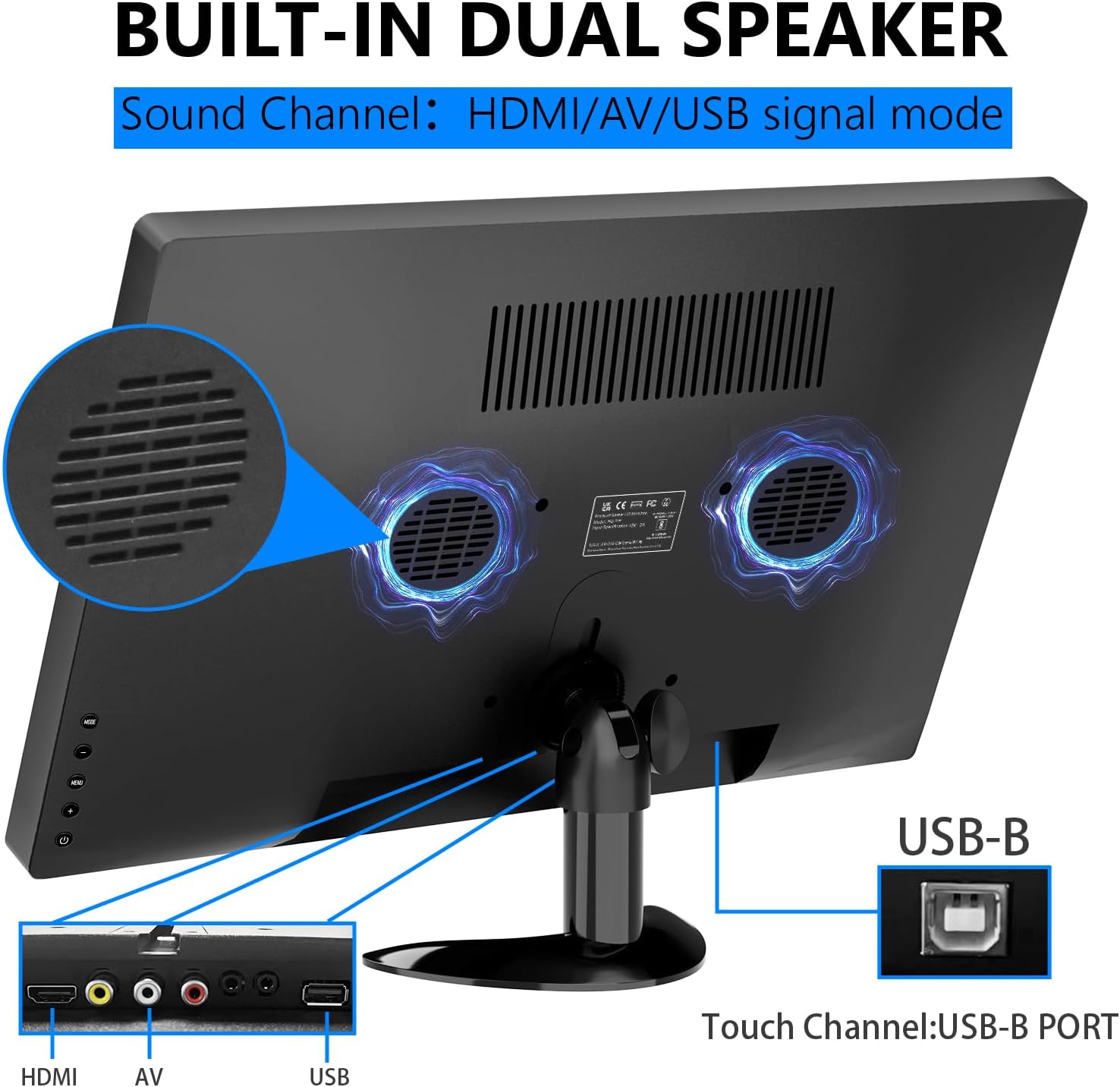
The monitor features various ports and control buttons for connectivity and settings adjustment:
- Туруктуу кубат киргизүү: Тышкы электр менен камсыздоо үчүн.
- VGA киргизүү: For connecting to devices with VGA output.
- HDMI киргизүү: Жогорку сапаттагы видео жана аудио киргизүү үчүн.
- AV киргизүү: For analog video and audio input.
- Микрофон киргизүү: For microphone connection.
- Наушник джек: Наушниктерди же тышкы динамиктерди туташтыруу үчүн.
- USB порт: USB түзмөктөрүн туташтыруу үчүн.
- USB-B порт: Essential for enabling touch functionality when connected to a compatible device.
- Башкаруу баскычтары: For navigating the On-Screen Display (OSD) menu, adjusting brightness, volume, and other settings.

3.2 Жөнгө салынуучу стенд
The monitor features an integrated adjustable stand that allows for up to 180° rotation, providing versatile viewing angles for various uses.

4. Орнотуу
4.1 Кубат туташтыруу
Connect the power adapter to the DC power input on the monitor and plug it into a power outlet. Alternatively, if using a USB-C connection that supports power delivery, the monitor can draw power directly from the connected device.
4.2 Video and Touch Connection
The monitor supports multiple connection methods. For touch functionality, a USB-B connection is required in addition to the video input.
- HDMI туташуу: Connect one end of the HDMI cable to your device and the other end to the HDMI input on the monitor. For touch functionality, also connect the USB-B cable from your device to the USB-B port on the monitor.
- USB-C туташуу: If your device has a full-featured USB-C port (supporting video, audio, and power delivery), connect the USB-C to USB-C cable directly from your device to one of the USB-C ports on the monitor. This single cable can provide video, audio, power, and touch functionality.
- VGA/AV Connection: Connect the appropriate VGA or AV cable from your device to the monitor. For touch functionality, a separate USB-B connection from your device to the monitor is required.

4.3 Compatibility Notes for Touch Function
The touch function is compatible with Windows and Chromebook systems. However, it is туура келбейт төмөнкү түзмөктөр менен:
- PS3/4/5
- Nintendo Switch
- Xbox консолдору
- Steam Deck
- Fire TV Stick
- Fire TV Cube
- Some Apple products

5. Мониторду иштетүү
5.1 Күйгүзүү/өчүрүү
Мониторду күйгүзүү же өчүрүү үчүн анын капталында жайгашкан кубат баскычын басыңыз. Монитор иштеп турганда кубат индикаторунун жарыгы күйөт.
5.2 Экрандагы дисплей (OSD) менюсу
Use the control buttons to navigate the OSD menu. Here you can adjust various settings:
- Жарыктык жана контраст: Adjust display luminosity and contrast levels.
- Көлөмү: Control the output level of the built-in stereo speakers.
- Киргизүү булагы: Select between HDMI, USB-C, VGA, or AV inputs.
- Түс эффекти: Choose from various color modes to optimize your viewтажрыйбасы.
- Тил: Select your preferred language for the OSD menu.
- Системанын жөндөөлөрү: Access advanced display and power management options.
5.3 Сенсордук экран жаңсоолору
The 10-point multi-touch display supports intuitive gestures for navigation and interaction:
- таптаңыз: Single tap to select items or activate functions.
- Эки жолу таптоо: Double tap to open fileлар же тиркемелер.
- Сүйрөө: Touch and drag to move items or scroll through content.
- Чоңойтуу/кичирейтүү: Чоңойтуу же кичирейтүү үчүн эки манжа менен чымчылоо жаңсоосун колдонуңуз.
- Айлантуу: Use a two-finger twist gesture to rotate images or objects.
- Серпүү: Swipe across the screen to navigate between pages or applications.

5.4 Орнотулган динамиктер
The monitor is equipped with integrated dual stereo speakers, providing audio output without the need for external devices. Volume can be adjusted via the control buttons or the OSD menu.
6. Монтаждоо параметрлери
In addition to the adjustable stand, the monitor supports VESA 75x75mm wall mounting for fixed installations in offices, homes, or kiosks.

7. Техникалык шарттар
| Өзгөчөлүк | Деталь |
|---|---|
| Продукциянын өлчөмдөрү | 14.17 x 1.18 x 9.05 дюйм |
| Элемент Салмагы | 4.2 фунт |
| Screen Size | 15.6 дюйм |
| Резолюция | 1920 x 1080 пиксел (FHD 1080p) |
| Аспект катышы | 16:9 |
| Сүрөттүн жарыктыгы | 300 Кандела |
| Screen Surface Description | Жылтырак |
| Жалпы USB порттору | 1 (USB-B for touch) |
| Өндүрүүчү | Shenzhen Kenowa Electronics Co., LTD |
8. Кыйынчылыктарды
- Дисплей жок: Ensure the monitor is powered on and all video cables (HDMI, USB-C, VGA, AV) are securely connected to both the monitor and your source device. Try different cables or ports if available.
- Тийүү функциясы иштебейт: Verify that the USB-B cable is correctly connected from your device to the monitor. Confirm your device's operating system (Windows/Chromebook) is compatible with the touch function. Note that gaming consoles and some Apple products do not support touch.
- Үн жок: Check the monitor's volume settings via the OSD menu. Ensure your audio source is correctly selected and that any external headphones/speakers are properly connected to the earphone jack.
- Touch Screen Effect Displayed on Main Screen (Windows): If the touch effect is incorrectly displayed on your main laptop screen instead of the portable monitor, you may need to calibrate the touch screen. Access the 'Control Panel' -> 'Hardware and Sound' -> 'Tablet PC Settings'. In the 'Display Options', select 'InnoView' (or the corresponding name for your portable monitor) and then click 'Setup'. Follow the on-screen prompts to tap the portable monitor to identify it as the touchscreen.
9. Техникалык тейлөө
- Экранды тазалоо: Экранды акырын сүртүү үчүн жумшак, түксүз чүпүрөктү колдонуңуз. өжөр тактар үчүн, бир аз гampen the cloth with water or a screen-cleaning solution. Avoid using harsh chemicals, abrasive cleaners, or alcohol-based solutions.
- Жалпы тазалоо: Wipe the exterior of the monitor with a soft, dry cloth. Keep vents clear of dust and debris to ensure proper airflow.
- Сактагыч: When not in use or during travel, store the monitor in its protective carry sleeve to prevent scratches and damage.
10. Кепилдик жана колдоо
For warranty information, technical support, or service inquiries, please refer to the documentation included in your product package or contact Prechen customer service directly. Keep your purchase receipt for warranty claims.


