1. Киришүү
This manual provides essential information for the safe and efficient installation, operation, and maintenance of the ZPOIUOIU ZUKED-320-7.5KW Variable Frequency Drive (VFD). This VFD is designed to control the speed of 3-phase AC motors by varying the frequency and voltage of the power supplied to the motor. Please read this manual thoroughly before installation and operation to ensure proper use and to prevent damage to the equipment or injury to personnel.
2. Коопсуздук маалыматы
ЭСКЕРТҮҮ: Improper installation or operation can lead to serious injury or death. Always follow safety precautions.
- Ensure all power is disconnected before installation, wiring, or maintenance. Wait at least 10 minutes after power-off for capacitors to discharge.
- Бул жабдууларды квалификациялуу персонал гана орнотуп, иштетип жана тейлөөсү керек.
- Электр шоктун алдын алуу үчүн туура жерге туташтыруу зарыл.
- Do not mount the inverter on a combustible surface.
- Protect the VFD from moisture, dust, corrosive gases, and direct sunlight.
- Киргизилген томду ырастооtage matches the VFD's specifications (220V or 380V as applicable).
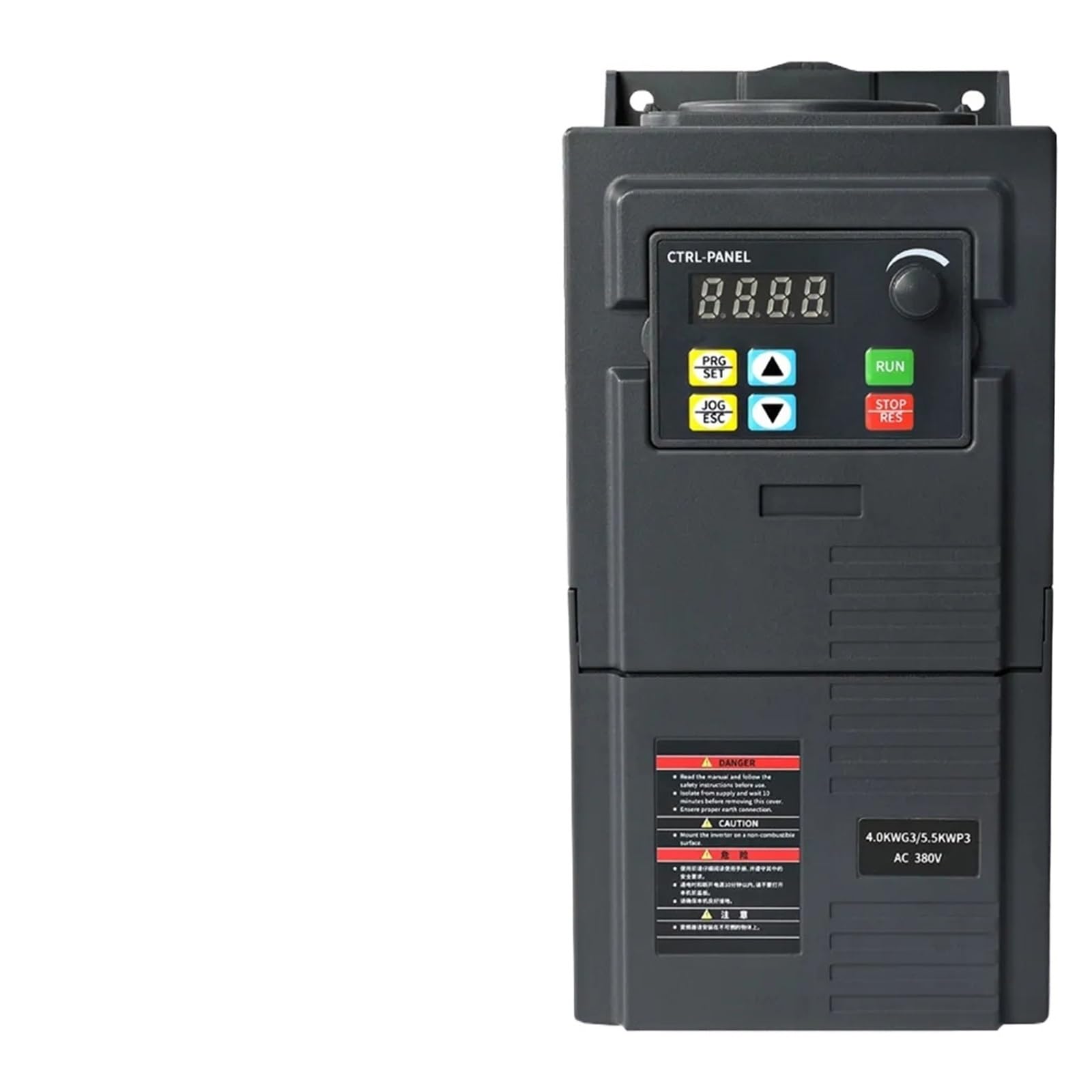
Сүрөт 2.1: Алдыңкы view of the VFD with control panel and visible safety warnings. Note the DANGER and CAUTION labels on the lower left side of the unit, emphasizing the importance of reading safety instructions before use.
3. Продукт бүтүп калдыview
The ZUKED-320-7.5KW VFD features a user-friendly control panel and robust terminal connections for various industrial applications.
3.1 Башкаруу панели
The control panel provides access to operational controls and display functions.
- Дисплей экраны: Shows operational status, frequency, voltage, учурдагы жана ката коддору.
- PRG/SET Button: Used to enter programming mode and confirm parameter settings.
- JOG/ESC Button: Used for jog operation and to exit programming menus.
- RUN баскычы: Мотордун иштешин баштайт.
- STOP/RES Button: Мотордун иштешин токтотот жана бузулуу шарттарын баштапкы абалга келтирет.
- Өйдө/төмөн жебелер: Navigate menus and adjust parameter values.
- Ротари баскычы: For fine adjustment of frequency or other parameters.

Figure 3.1: Close-up of the VFD's control panel, highlighting the display, function buttons (PRG/SET, JOG/ESC, RUN, STOP/RES), arrow keys, and rotary knob for user interaction.
3.2 Терминалдык байланыштар
The VFD features various terminals for power input, motor output, control signals, and grounding.

3.2-сүрөт: Жогорку view of the VFD, illustrating the terminal block where power, motor, and control wiring connections are made.

3.3-сүрөт: Төмөнкү view of the VFD, revealing internal components such as capacitors and mounting brackets for secure installation.
4. Орнотуу жана зымдар
Proper installation and wiring are critical for the VFD's performance and safety. Refer to the wiring diagram below.

Figure 4.1: Detailed wiring diagram for the VFD, showing connections for 1-phase/3-phase AC220V input, 3-phase AC380V input, motor output (U, V, W), grounding (PE), and various control terminals (X1-X5, GND, AVI, 10V, ACI, A0, TA, TB, TC).
4.1 Terminal Description and Function
| Терминал | Функция | Орнотуу жана сүрөттөмө |
|---|---|---|
| Р, С, Т | Power supply of AC Drive | 380V model: connect to R, S, T terminals. 220V model: connect to R, S or R, T terminals (determined by the label on the terminal). An air switch should be used as the overcurrent protection device. |
| У, В, В | AC drive output, connected to the motor | To reduce leakage current, the motor connecting cable should not exceed 30m. |
| PE | Жерге туташтыруу | The AC drive should be well grounded. |
| X1 | Digital input X1 | Set via parameter F5.02, factory default is FWD. |
| X2 | Digital input X2 | Set via parameter F5.03, factory default is REV. |
| X3 | Digital input X3 | Set via parameter F5.04, factory default is set to Multi-Speed Step 1. |
| X4 | Digital input X4 | Set via parameter F5.05, factory default is set to Multi-Speed Step 2. |
| X5 | Digital input X5 | Set via parameter F5.06, factory default is set to external reset signal. |
| GND | Common port of signal | Zero potential of input/output signal. |
| AVI | 0-10V signal input | 0-10V. |
| 10V | Frequency set potentiometer power supply | +10V, max. 10mA. |
| ACI | 4-20mA аналогдук киргизүү | 4-20мА. |
| A0 | Аналогдук чыгуу сигналы | Set via parameter F6.10. |
| TA, TB, TC | Реле чыгаруу | Contact capacity: AC 250V/3A, DC 24V/2A. Set via parameter F5.07. |
5. Иштөө нускамалары
After successful installation and wiring, the VFD can be operated using the control panel or external control signals.
- Күйгүзүү: Apply power to the VFD. The display should illuminate.
- Параметр орнотуу: Use the PRG/SET button to enter programming mode. Navigate through parameters using the arrow keys and adjust values with the rotary knob or arrow keys. Press PRG/SET to confirm. Refer to the full programming manual for detailed parameter descriptions.
- Баштоо/Токтоо: Press the RUN button to start the motor. Press the STOP/RES button to stop the motor.
- Ылдамдыкты жөндөө: Adjust the motor speed by changing the frequency. This can be done via the control panel's rotary knob (if configured), or through external analog inputs (AVI, ACI) or digital inputs (X1-X5) if programmed for speed control.
- Jog Operation: Use the JOG/ESC button for momentary motor operation at a preset jog frequency.
6. Техникалык тейлөө
Regular maintenance ensures the longevity and reliable operation of your VFD.
- Тазалоо: Periodically clean the VFD's exterior and cooling fins to prevent dust accumulation, which can hinder heat dissipation. Use a soft, dry cloth. Do not use liquid cleaners.
- Текшерүү: Regularly inspect wiring connections for tightness and signs of wear or damage. Check for any unusual noises or odors during operation.
- Экологиялык шарттар: Ensure the operating environment remains within specified temperature and humidity ranges. Avoid exposure to direct sunlight, corrosive gases, and excessive vibration.
- Fan Check: Verify that the cooling fan operates freely and is not obstructed.
7. Кыйынчылыктарды
Бул бөлүмдө кеңири таралган көйгөйлөр боюнча көрсөтмөлөр берилген. Татаал көйгөйлөр үчүн техникалык колдоо кызматына кайрылыңыз.
| Көйгөй | Мүмкүн себеп | Чечим |
|---|---|---|
| VFD күйбөйт | Киргизүү кубаты жок; Сактагыч күйүп кеткен; Зымдар туура эмес туташтырылган. | Check power supply; Inspect fuses; Verify input wiring (R, S, T). |
| Мотор иштебейт | Incorrect motor wiring (U, V, W); VFD in stop mode; Fault condition; Incorrect parameter settings. | Check motor connections; Press RUN; Check display for error codes and reset; Verify FWD/REV parameters (F5.02, F5.03). |
| Motor runs erratically or at wrong speed | Incorrect frequency setting; Analog input issue; Motor parameters incorrect. | Adjust frequency; Check AVI/ACI connections and signal; Verify motor parameters (e.g., rated frequency, voltagжана). |
| VFD ката кодун көрсөтөт | Ашыкча токtage, undervolvoltage, overload, etc. | Note the error code and consult the full VFD manual for specific remedies. Address the underlying cause (e.g., motor overload, unstable power). Press STOP/RES to clear. |
8. Техникалык шарттар
| Өзгөчөлүк | Деталь |
|---|---|
| Модел | ZUKED-320-7.5KW |
| Киргизүү көлөмүtage | 220V / 380V (3-phase, specific model dependent) |
| Output Voltage | 3-phase, 0-380V (matching input voltage) |
| Номиналдуу кубаттуулук | 7.5КВт |
| Жыштык диапазону | 0-999Hz (typical, check specific model parameters) |
| Башкаруу режими | V/F control, Vector control (check specific model capabilities) |
| Аналогдук киргизүү | AVI (0-10V), ACI (4-20mA) |
| Digital Inputs | X1, X2, X3, X4, X5 (programmable functions) |
| Relay Output | TA, TB, TC (AC 250V/3A, DC 24V/2A) |
| Пакеттин өлчөмдөрү | 0.39 x 0.39 x 0.39 inches (Note: This dimension seems incorrect for a VFD and likely refers to packaging for a small component. Refer to actual product dimensions for accurate information.) |
| Элемент Салмагы | 7.1 ounces (Note: This weight seems incorrect for a 7.5KW VFD. Refer to actual product weight for accurate information.) |
| Өндүрүүчү | ZPOIUOIU |
Note: The package dimensions and item weight provided in the source data appear to be placeholder values and may not accurately reflect the physical size and weight of a 7.5KW Variable Frequency Drive. Please consult the product packaging or manufacturer's official documentation for precise specifications.
9. Кепилдик жана колдоо
For warranty information, please refer to the documentation provided with your purchase or contact the seller directly. Technical support can be obtained through the manufacturer or authorized distributors. Always provide your product model number (ZUKED-320-7.5KW) and purchase details when seeking support.
Кошумча жардам алуу үчүн, сураныч, баш багыңыз ZPOIUOIU brand page on Amazon же жеткирүүчүңүз менен байланышыңыз.


