1. Киришүү
Thank you for choosing the SANSUI 24 inch Smart WebOS TV. This manual provides essential information for setting up, operating, and maintaining your new television. Please read this manual thoroughly before using the product to ensure proper and safe operation. Keep this manual for future reference.

Image: The SANSUI 24 inch Smart WebOS TV integrated into a modern living space, displaying a vibrant gaming scene. This illustrates the TV's capability for entertainment and its sleek design.
2. Продукт бүтүп калдыview
Негизги өзгөчөлүктөрү
- Дисплей: 24 inch 720P LED VA Panel (1366x768 resolution) with 200 Nits brightness and 1200:1 contrast ratio. Features Dolby Video and 178° viewбурчтар.
- Акылдуу платформа: WebOS hub for access to popular streaming services like Netflix, Prime Video, Hulu, Disney+, and HBO Max.
- Байланыш: Airplay support for screen mirroring, Bluetooth 5.2, Wi-Fi, 3 HDMI 1.4 ports, 2 USB 2.0 ports, Audio Video port, RJ45 Ethernet port, TV Tuner (ATSC), and RF Antenna Input.
- Аудио: Immersive Dolby Atmos Stereo Sound with dual 8W cinematic speakers and 5 sound Equalizers.
- Дизайн: Compact 4-Side Bezel-Less Design with a twin footing stand.
- Процессор: Powered by a 1.4GHz ARM Cortex A55*4 CPU and Mali-G31 MP2 GPU, with 1GB DDR RAM and 8GB eMMC Flash storage for smooth performance.
- Smart Home интеграциясы: Apple HomeKit менен шайкеш келет.
- Кошумча өзгөчөлүктөр: Parental control, Wide Viewбурч.

Image: A visual summary of the SANSUI Smart WebOS TV's core features, highlighting its smart capabilities, display brightness, internal hardware, audio technology, and connectivity options.
Кутуда эмне бар
- SANSUI 24 inch Smart WebOS TV
- Алыстан башкаруу
- Алыскы Батарейкалар
- Twin Footing Stand
- Колдонуучунун Колдонмосу (бул документ)
- Электр кабели
- Wall-mount Bracket (optional, may be sold separately or included depending on package)

Image: This diagram illustrates the physical dimensions of the 24-inch SANSUI TV and lists the accessories typically included in the product package, such as the remote control, batteries, user manual, stand, and wall-mount bracket.
3. Орнотуу
3.1 Пакеттен чыгаруу жана жайгаштыруу
- Carefully remove the TV from its packaging. Retain the packaging materials for potential future transport or service.
- Place the TV on a stable, flat surface or mount it on a wall using a compatible VESA 100x100mm wall mount bracket (sold separately). Ensure adequate ventilation around the TV.
- If using the stand, attach the twin footing stands securely to the bottom of the TV using the provided screws.
3.2 Кубатты туташтыруу
- Кубат кабелин телевизордун кубат киргизүү портуна туташтырыңыз.
- Электр кабелинин экинчи учун ылайыктуу электр розеткасына сайыңыз.
3.3 Тышкы түзмөктөрдү туташтыруу
Сиздин SANSUI TV ар кандай туташуу параметрлерин сунуштайт:
- HDMI: Use HDMI cables to connect devices such as Blu-ray players, gaming consoles, or set-top boxes to the HDMI 1.4 ports (x3).
- USB: Insert USB drives into the USB 2.0 ports (x2) to play media files.
- RF антенна: Connect a coaxial cable from your antenna or cable TV wall outlet to the RF Antenna Input for over-the-air or cable channels.
- AV ичинде: Use an AV cable to connect older devices.
- RJ45: Зымдуу интернет байланышы үчүн Ethernet кабелин туташтырыңыз.
- Оптикалык аудио чыгаруу: Жакшыртылган аудио үчүн тышкы үн системасына же саундбарга туташыңыз.
- Наушник: Жеке угуу үчүн гарнитураны туташтырыңыз.

Сүрөт: деталдуу view of the TV's side panel, labeling each port for USB, RF Antenna, HDMI, Earphone, AV IN, RJ45, and Optical Audio Output, indicating their functions for connecting various devices.
3.4 Баштапкы күйгүзүү жана орнотуу устасы
- Пульттагы же сыналгыдагы кубат баскычын басыңыз.
- Follow the on-screen instructions of the setup wizard to select your language, country, and connect to your Wi-Fi network.
- Agree to the WebOS terms and conditions to access smart features.
- Perform a channel scan if you have connected an antenna.
4. Иштөө нускамалары
4.1 Алыстан башкаруу функциялары
The remote control allows you to navigate the TV's features. Familiarize yourself with the buttons:
- Күч: Телевизорду күйгүзөт/өчөт.
- Сан баскычтары: Түздөн-түз канал тандоо.
- Киргизүү: Киргизүү булактарын (HDMI, USB, AV ж.б.) тандайт.
- Навигация тактасы (өйдө/төмөн/сол/оң/ОК): Менюларды багыттоо жана тандоолорду ырастоо.
- Артка: Мурунку экранга кайтат.
- Үй: кире алат WebOS Hub.
- Үнүн жогорулатуу/төмөндөтүү: Үн көлөмүн тууралайт.
- Канал өйдө/төмөн: Каналдарды өзгөртөт.
- Streaming Shortcuts: Dedicated buttons for popular apps like Netflix, Prime Video, Disney+, etc.
- Ыкчам жетүү: Displays the quick access edit screen.
- Гид: Displays the channel guide (if available).

Image: A visual guide to the SANSUI TV remote control, detailing the layout and function of each button for easy navigation and control of the television's features.
4.2 Колдонуу WebOS Hub
басыңыз Үй button on your remote to access the WebOS Hub. From here, you can:
- Launch pre-installed streaming applications (Netflix, YouTube, Prime Video, etc.).
- Access connected input sources.
- Телевизордун жөндөөлөрүн башкарыңыз.
- Browse and install new apps from the content store.

Image: A clear display of the WebOS Hub интерфейси, showcasing a selection of popular streaming applications available for direct access, emphasizing the TV's smart capabilities.
4.3 Airplay and Screen Mirroring
The TV supports Apple Airplay for effortless screen mirroring from your compatible Apple devices (iPhone, iPad, Mac). Ensure your device and the TV are connected to the same Wi-Fi network. Select the Airplay option on your device and choose your SANSUI TV from the list.
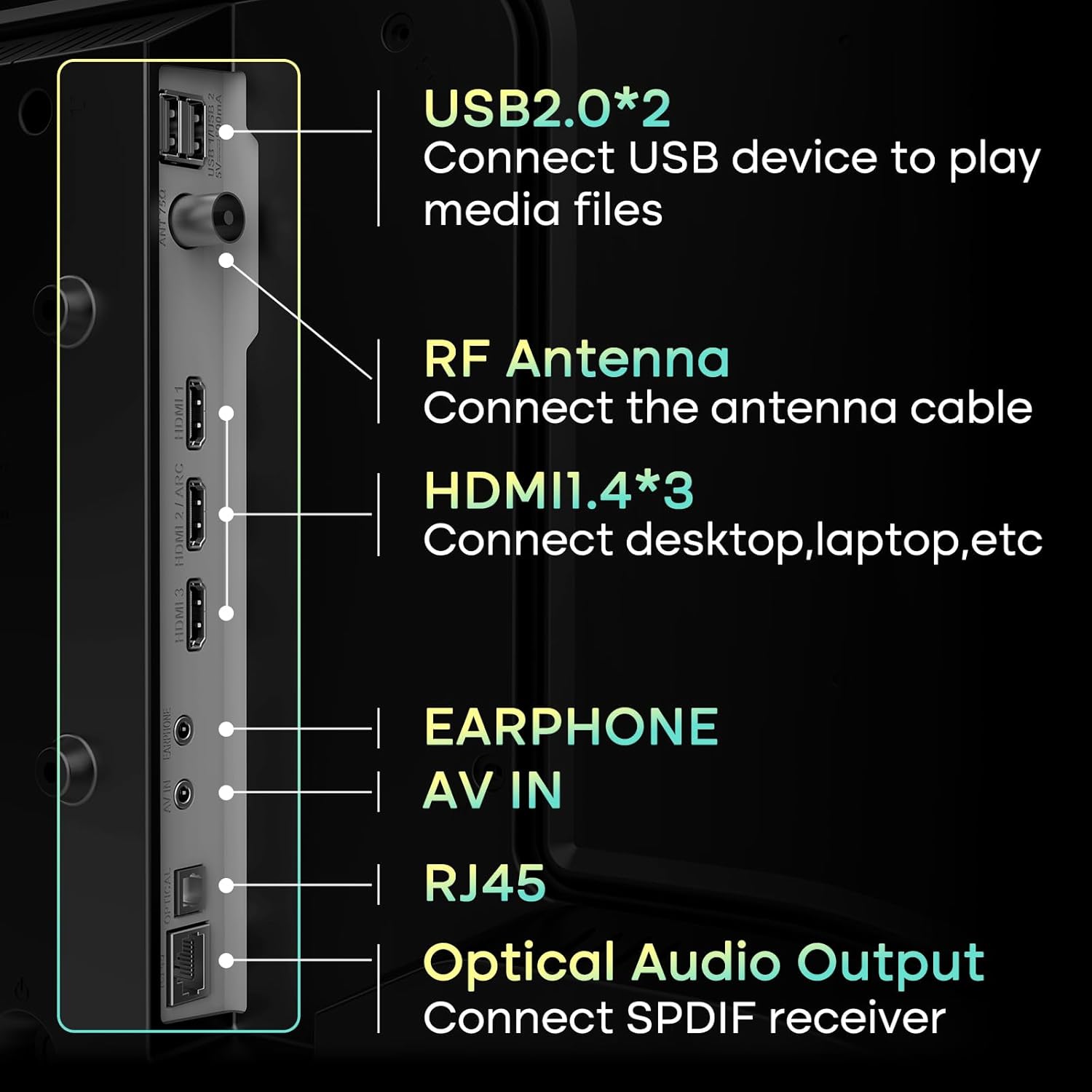
Image: This image illustrates the Airplay feature, showing a smartphone's content being wirelessly mirrored onto the SANSUI TV, highlighting its convenience for sharing media.
4.4 Bluetooth байланышы
Connect Bluetooth 5.2 compatible devices such as headphones, soundbars, or game controllers to your TV for a wireless experience. Navigate to the TV's settings menu, select Bluetooth, and pair your device.

Image: This visual demonstrates the TV's Bluetooth 5.2 capabilities and its 2*8W speakers, showing a user connecting a smartphone to the TV for audio playback, enhancing the sound experience.
4.5 Сүрөт жана үн орнотуулары
Access the TV's settings menu to customize picture and sound to your preference. Options include:
- Сүрөт режимдери: Standard, Vivid, Sports, Movie, Game, Energy Saving.
- Жарыктык, контраст, түс, тактык: Fine-tune display quality.
- Үн режимдери: Standard, Music, Cinema, Sports, Game.
- Мадам: Аудио жыштыктарды тууралаңыз.

Image: A screenshot of the TV's picture settings menu, demonstrating the various customizable options available to users for optimizing their viewing experience, such as different picture modes.
4.6 Ата-энелик көзөмөл
Utilize the parental control features to restrict access to certain channels or content based on ratings. This helps ensure a safe viewing environment for children. Access these settings through the TV's main menu.
5. Техникалык тейлөө
5.1 Телевизорду тазалоо
- Экран: Экранды жумшак, кургак, түксүз чүпүрөк менен акырын сүртүңүз. өжөр белгилери үчүн, жеңил гampчүпүрөккө суу же атайын экран тазалоочу каражат. Катуу химиялык заттардан же абразивдүү материалдардан алыс болуңуз.
- Дене: Телевизордун алкагын сүртүңүз жана жумшак, кургак чүпүрөк менен туруңуз.
- Вентиляция: Ашыкча ысып кетүүнүн алдын алуу үчүн телевизордун артындагы желдетүү тешиктери жабылбагандыгын текшериңиз.
5.2 Программалык камсыздоо жаңыртуулары
Your SANSUI TV may receive software updates to improve performance and add new features. It is recommended to enable automatic updates or periodically check for updates in the TV's settings menu to ensure optimal functionality.
6. Кыйынчылыктарды
Телевизоруңузда көйгөйлөргө туш болсоңуз, төмөнкү жалпы чечимдерди караңыз:
| Көйгөй | Мүмкүн чечим |
|---|---|
| Күч жок | Check if the power cable is securely connected to both the TV and the electrical outlet. Ensure the outlet is working. Try pressing the power button on the TV itself. |
| Сүрөт жок, бирок үн бар | Киргизүү булагын текшериңиз. Туташкан түзмөктүн күйүп турганын жана туура иштеп жатканын текшериңиз. Башка HDMI кабелин же портун колдонуп көрүңүз. |
| Үн жок, бирок сүрөт бар | Check the volume level and ensure the TV is not muted. Verify audio output settings (e.g., internal speakers vs. external sound system). Check audio cables for external devices. |
| Пульт иштебей жатат | Пульттагы батарейкаларды алмаштырыңыз. Пульт менен сыналгынын IR сенсорунун ортосунда эч кандай тоскоолдуктар жок экенин текшериңиз. |
| Wi-Fi'га туташпай жатат | Ensure your Wi-Fi router is on and working. Re-enter the Wi-Fi password carefully. Try restarting both the TV and your router. Move the TV closer to the router if possible. |
| Smart apps not loading or slow | Check your internet connection speed. Close and reopen the app. Clear the app's cache (if available in settings). Restart the TV. |
7. Техникалык шарттар
| Өзгөчөлүк | Деталь |
|---|---|
| Бренд | САНСУИ |
| Модель номери | ES-24VA1-CA-1 / ES-24VA1-US-1 |
| Screen Size | 24 дюйм |
| Дисплей технологиясы | LED VA Panel |
| Резолюция | 768p (1366x768) |
| Жаңыртуу ылдамдыгы | 60Hz |
| Жарыктык | 200 Nits |
| Контраст катышы | 1200:1 |
| Viewбурч | 178° |
| Операция системасы | WebOS Hub |
| Процессор | 1.4GHz ARM Cortex A55*4 CPU |
| GPU | Мали-G31 MP2 |
| RAM | 1 ГБ DDR |
| Сактагыч | 8 ГБ eMMC Flash |
| Аудио чыгаруу | 2 x 8W Speakers, Dolby Atmos Stereo Sound |
| Байланыш | Wi-Fi, Bluetooth 5.2, 3x HDMI 1.4, 2x USB 2.0, 1x AV In, 1x RJ45, 1x RF Antenna, 1x Optical Audio Out, 1x Earphone |
| Продукциянын өлчөмдөрү (D x W x Y) | 4.72 x 16.14 x 24.41 дюйм (стенд менен) |
| Элемент Салмагы | 7.09 фунт |
| VESA тоосуна шайкеш келет | 100x100мм |
8. Кепилдик жана колдоо
8.1 Кепилдик маалыматы
SANSUI products are manufactured to high-quality standards and are warranted against manufacturing defects. Please refer to the warranty card included with your product for specific terms, conditions, and duration of the warranty. Keep your purchase receipt as proof of purchase.
8.2 Кардарларды колдоо
For technical assistance, troubleshooting beyond this manual, or warranty claims, please contact SANSUI customer support. You can typically find contact information (phone number, email, or website) on the product packaging, the warranty card, or by visiting the official SANSUI webсайт.
When contacting support, please have your TV model number (ES-24VA1) and purchase information readily available.


