1. Introduction and Overview
The SINOTIMER TM922 is a versatile dual-channel programmable digital timer switch designed for precise control of electrical equipment. It features two independent relay outputs, allowing simultaneous control of two separate devices or systems. With up to 8 ON/OFF programs per day and 15 combinations per week, this timer provides flexible scheduling options. Its accurate-to-the-second control ensures reliable operation according to preset programs, cycling weekly or daily from one second to 168 hours. Programs are saved by a battery backup in case of power failure, and the replaceable battery ensures long-term usage. The device is designed for DIN standard 35mm mounting, making it easy to install in DB boxes.
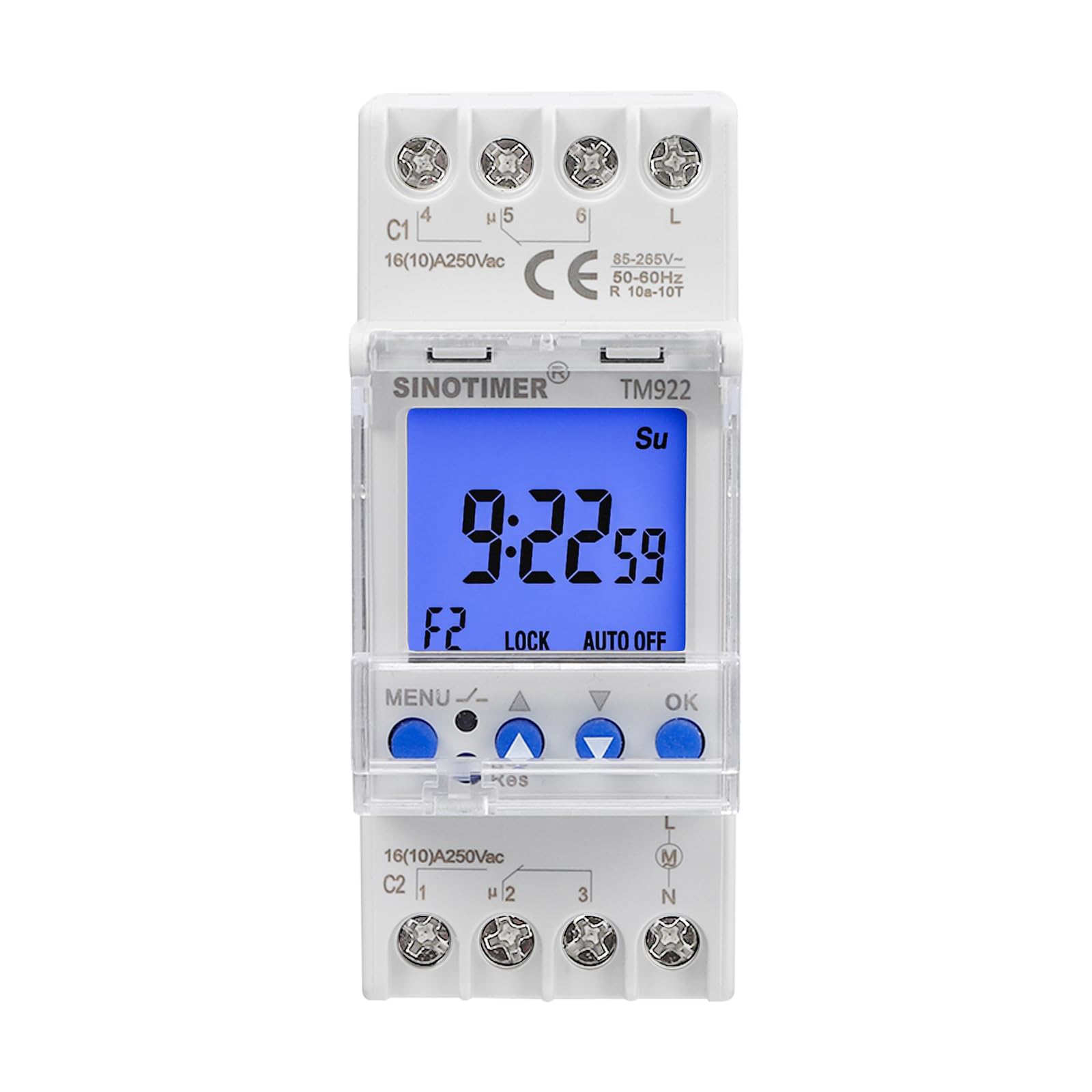
Сүрөт 1: Алдыңкы view of the SINOTIMER TM922 Digital Timer Switch.
2. Коопсуздук маалыматы
Please read all instructions carefully before installation and operation. Incorrect installation or use can lead to electric shock, fire, or damage to the device. Ensure power is disconnected before any wiring or maintenance. This device should be installed by a qualified electrician in accordance with local electrical codes. Do not expose the device to moisture or extreme temperatures. Keep out of reach of children.
3. Продукциянын өзгөчөлүктөрү
- Dual Independent Relays: Two separate 16A outputs for controlling two distinct devices.
- Программалануучу графиктер: Up to 8 ON/OFF programs per day, with 15 weekly combinations.
- Precise Timing: Accurate to the second, with cycles from 1 second to 168 hours.
- Эстутумдун камдык көчүрмөсү: Built-in battery saves programs during power outages.
- Алмаштылуучу батарея: Ensures long product life.
- DIN темир жол орнотуу: Standard 35mm design for easy installation in electrical panels.
- Чоң LCD дисплей: Clear blue backlight for easy readability.

Figure 2: Close-up of the TM922's LCD display and control buttons.
4. Пакеттин мазмуну
- SINOTIMER TM922 Digital Timer Switch
- One screwdriver
- Колдонуучунун Колдонмосу (бул документ)
5. Техникалык шарттар
| Атрибут | Нарк |
|---|---|
| Продукциянын өлчөмдөрү | 3.54 x 1.42 x 2.68 дюйм |
| Элемент Салмагы | 5.9 унция |
| Киргизүү көлөмүtage | 85-265VAC |
| Чыгуу релеси | Two independent 16A outputs |
| Материал | Пластик |
| Түс | Ак |
| Орнотуулардын саны | 23 (programs) |
6. Орнотуу жана орнотуу
6.1 DIN темир жолду орнотуу
The TM922 is designed for standard 35mm DIN rail mounting. To install, align the timer with the DIN rail and press firmly until it clicks into place. Ensure it is securely fastened.

3-сүрөт: Каптал view DIN рельсин орнотуу механизмин көрсөтүү.
6.2 Электр өткөргүч схемасы
ЭСКЕРТҮҮ: Disconnect all power before wiring. Wiring should be performed by a qualified professional.
The TM922 features terminals for power input (L, N) and two independent relay outputs (C1, C2). Each output has common (C), normally open (NO), and normally closed (NC) contacts. Refer to the labels on the device for precise terminal identification.
- Кубат киргизүү: Connect your 85-265VAC power supply to the 'L' (Live) and 'N' (Neutral) terminals.
- Channel 1 Output (C1): Connect your first load to the C1 terminals. For normally open operation, connect the load between the common (C1-4) and normally open (C1-5) terminals. For normally closed operation, connect between common (C1-4) and normally closed (C1-6) terminals.
- Channel 2 Output (C2): Connect your second load to the C2 terminals. For normally open operation, connect the load between the common (C2-1) and normally open (C2-2) terminals. For normally closed operation, connect between common (C2-1) and normally closed (C2-3) terminals.

Figure 4: Wiring terminals for power input and dual relay outputs.
7. Иштөө нускамалары
7.1 Баскыч функциялары

Figure 5: Control button functions for the TM922.
- МЕНЮ: Unlock/Lock buttons, Enter program settings.
- ▲ (Өйдө жебе): Increase value, Navigate up.
- ▼ (Төмөн карай жебе): Decrease value, Navigate down.
- OK: Select, Confirm settings.
- Кайра коюу (баштапкы абалга келтирүү): Channel selection, Sleep mode, Remove programs. (Requires a pointed object like a pen or the provided screwdriver).
7.2 Locking/Unlocking the Timer
To prevent accidental changes, the timer can be locked. Press and hold the МЕНЮ button for more than 3 seconds to lock or unlock the timer. The 'LOCK' indicator on the display will show the current status.
7.3 Учурдагы убакытты орнотуу
- Ensure the timer is unlocked.
- басыңыз OK button repeatedly to cycle through and select the minute, hour, second, and day of the week.
- колдонуу ▲ жана ▼ buttons to adjust the selected number.
- Басыңыз OK ар бир жөндөөнү ырастоо үчүн.
7.4 Manual Control (Working Status)
To manually override the programmed settings for a channel, press the МЕНЮ жана ▲ buttons together. This will cycle the working status through: ON, ON AUTO, OFF, AUTO OFF. The current status will be displayed (e.g., F1 ON, F2 OFF).
7.5 Switching Channels (F1/F2)
To switch between Channel 1 (F1) and Channel 2 (F2) for programming or manual control, press the recessed Res button using a pointed object. The display will show 'F1' or 'F2' to indicate the active channel.
7.6 КҮЙГҮЗҮҮ/ӨЧҮРҮҮ ЦИКЛДЕРИН ПРОГРАММАЛОО
The TM922 supports up to 8 ON/OFF programs for each channel (F1 and F2), totaling 16 ON/OFF events per channel. Each program can be set for specific days of the week.
- Ensure the timer is unlocked.
- Select the desired channel (F1 or F2) by pressing the Res баскычы.
- басыңыз МЕНЮ button to enter the program setting mode. The display will show '1 ON' (for the first ON program).
- Басыңыз OK to select the time setting for '1 ON'. Use ▲ жана ▼ to adjust the hour, minute, and second. Press OK ар бир жөнгө салуудан кийин.
- After setting the time, you can select the days of the week for this program. Use ▲ жана ▼ to cycle through various day combinations (e.g., Mo Tu We Th Fr Sa Su, Mo-Fr, Sa Su, etc.). Press OK ырастоо үчүн.
- The display will then show '1 OFF'. Repeat steps 4 and 5 to set the OFF time and days for the first program.
- Басууну улантыңыз МЕНЮ to cycle through '2 ON', '2 OFF', up to '8 ON', '8 OFF' for the current channel, setting each as needed.
- Once all programs are set, press and hold МЕНЮ to exit programming mode and return to the main clock display.
Video 1: Official SINOTIMER guide on setting up the TM922's channels and programs.
8. Техникалык тейлөө
8.1 Батареяны алмаштыруу
The TM922 uses a replaceable battery to maintain program settings during power outages. If the display becomes dim or settings are frequently lost, the battery may need replacement. Refer to the device's internal compartment for battery type and replacement instructions. Ensure power is disconnected before replacing the battery.
8.2 Тазалоо
Clean the device with a soft, dry cloth. Do not use abrasive cleaners or solvents, as these can damage the casing же дисплей.
9. Кыйынчылыктарды
- Таймер которулбай жатат:
- Check if the timer is in 'AUTO ON' or 'AUTO OFF' mode. Use manual control to switch to 'AUTO ON' for programmed operation.
- Verify that the ON/OFF programs are correctly set for the desired times and days.
- Ensure the device is receiving power.
- Жөндөөлөр өчүрүлгөндөн кийин жоголдуtage:
- The internal backup battery may be depleted or faulty. Replace the battery.
- Баскычтар жооп бербейт:
- Ensure the timer is unlocked (press and hold MENU for 3 seconds).
- If the 'Res' button is stuck, gently try to release it. Avoid pressing too hard.
- Дисплей күңүрт же бош:
- Электр камсыздоону текшерүү.
- Replace the internal backup battery.
10. Кепилдик жана колдоо
This SINOTIMER product comes with a standard manufacturer's warranty. For specific warranty details, please refer to the documentation included with your purchase or contact SINOTIMER customer support. For technical assistance, troubleshooting, or spare parts, please visit the official SINOTIMER webсайтка же кардарларды тейлөө бөлүмүнө кайрылыңыз. Кепилдик дооматтар үчүн сатып алуу дүмүрчөгүңүздү сактаңыз.
зыярат кылыңыз SINOTIMER дүкөнү көбүрөөк маалымат алуу үчүн.


