Introduction
The HAYDEN HY-X7 Echo Mic is a wireless karaoke system designed for home use, featuring two UHF handheld microphones and support for one external microphone. This system allows for a customizable singing experience with independent volume controls for each microphone. It offers versatile connectivity options, including Optical, AUX, and Bluetooth, enabling connection to Smart TVs, phones, tablets, or laptops. Audio output can be directed through a soundbar, home theater system, or external speakers. The microphones operate on AA batteries (not included), and the receiver is powered by a 5V 2A USB-C cable adapter (included). The HY-X7 is suitable for home karaoke, parties, and small events.
Пакеттин мазмуну
Төмөндө тизмеленген нерселердин баары пакетиңизге камтылганын текшериңиз:
- 2 x Metal Handheld Microphones
- 1 x Metal Receiver Unit
- 2 x Optical Cables
- 1 x AUX to AUX Cable
- 1 x AUX to RCA Cable
- 1 x RCA to RCA Cable
- 1 x 5W USB Adapter
- 1 x Type-A to Type-C USB Cable
- 2 x Silicone Microphone Sleeves
- 1 x User Manual
Продукт бүттүview
Familiarize yourself with the components and controls of your HAYDEN HY-X7 Wireless Karaoke System.

Сүрөт: Front and back panels of the HY-X7 receiver. The front panel shows controls for microphone volume, echo, and music. The back panel features various input/output ports.

Сүрөт: Close-up of the receiver's front panel, highlighting the 6.35mm microphone jack, wired microphone volume, wireless microphone A volume (VOL.A), wireless microphone B volume (VOL.B), echo adjustment, music adjustment, and power switch.
Receiver Controls and Ports:
- Микрофон (6.35 мм уяча): Тышкы зымдуу микрофонду туташтыруу үчүн.
- MIC/VOL: Adjusts the volume for the external wired microphone.
- ТОМ. А: Adjusts the volume for Wireless Microphone A.
- B-ТОМ: Adjusts the volume for Wireless Microphone B.
- ЭХО: Controls the echo effect level for all microphones.
- МУЗЫКА: Adjusts the volume of the background music.
- КҮЧ: Ресивер үчүн күйгүзүү/өчүрүү баскычы.
- DC 5V IN: Power input for the receiver (USB-C).
- AUX IN: 3.5mm audio input for connecting external devices.
- AUX OUT: 3.5mm audio output to connect to speakers/ampөмүрлүү.
- ОПТИКАЛЫК: Optical audio input for connecting to a TV or other optical source.
- ОПТИКАЛЫК ЧЫГЫШ: Optical audio output to connect to a soundbar or ampөмүрлүү.
- КОРУТУНДУ: Combined audio output.
- ANT.A / ANT.B: Antennas for wireless microphone reception.
Орнотуу колдонмосу
1. Powering the System
- Алуучу: Connect the included Type-A to Type-C USB cable to the "DC 5V IN" port on the receiver and plug the other end into the 5W USB adapter. Plug the adapter into a power outlet.
- Зымсыз микрофондор: Each handheld microphone requires 2 AA batteries (not included). Open the battery compartment at the bottom of the microphone and insert the batteries, observing correct polarity.
2. Аудио тутумуңузга туташуу
The HY-X7 offers multiple ways to connect to your TV and audio output devices. Before connecting, ensure your TV's audio output format is set to 'PCM' mode. Refer to your TV's settings menu (often under 'Expert Settings' or 'Sound Output') to make this adjustment.
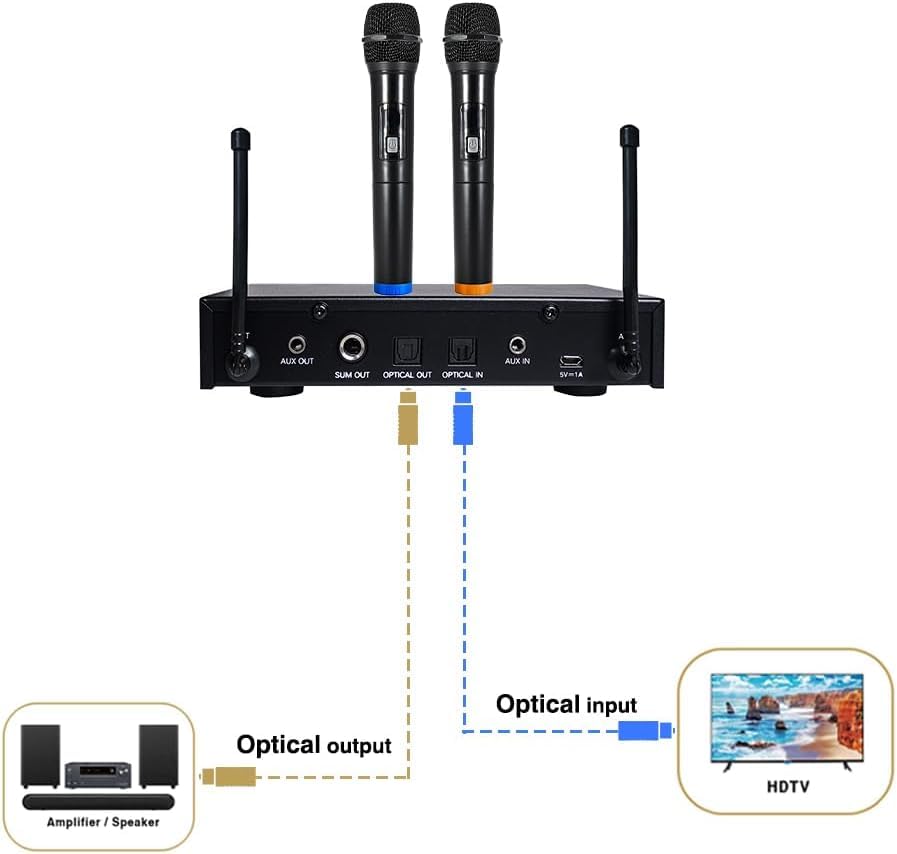
Сүрөт: Connection Diagram 1: Optical Connection. Illustrates connecting the TV's optical output to the receiver's optical input, and the receiver's optical output to an ampкөтөргүч же спикер системасы.
Option A: Optical Connection (Recommended for Smart TVs/Soundbars)
- Connect one end of an Optical cable to the Оптикалык чыгаруу port on your Smart TV.
- Connect the other end of the same Optical cable to the OPTICAL IN port on the HY-X7 receiver.
- Connect a second Optical cable from the ОПТИКАЛЫК ЧЫГУУ port on the HY-X7 receiver to the Optical Input port on your soundbar, home theater system, or ampөмүрлүү.
- Ensure your TV's audio output is set to 'PCM' mode for proper sound transmission.
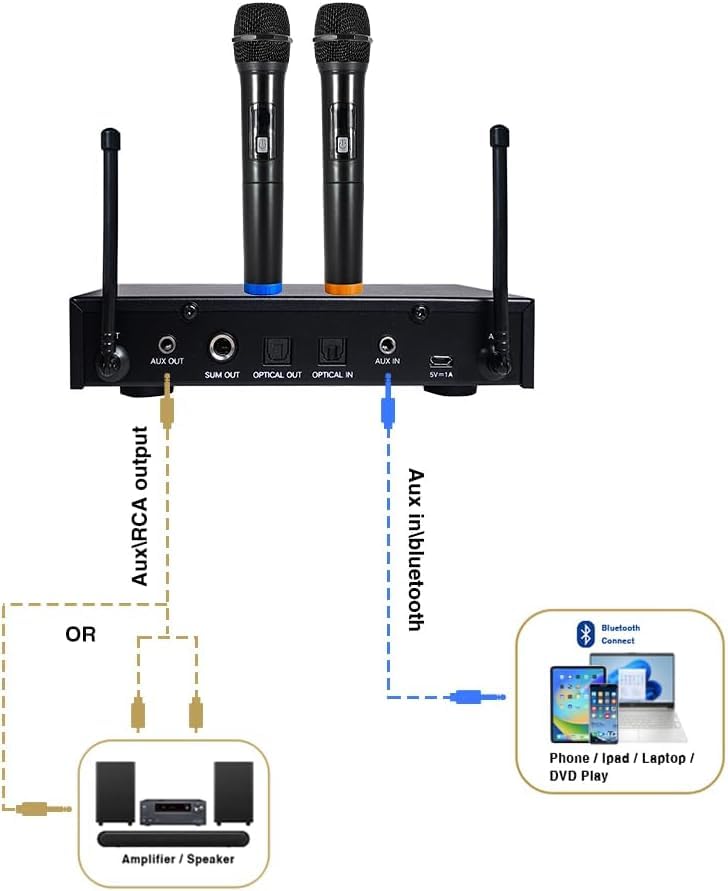
Сүрөт: Connection Diagram 2: AUX/RCA and Bluetooth Connection. Shows connecting a mobile device via Bluetooth to the receiver, and the receiver's AUX/RCA output to an amplifier or speaker system. Also depicts connecting a TV's AUX output to the receiver's AUX input.
Option B: AUX/RCA Connection
- For TV Audio Input: Connect the included AUX cable from your TV's 3.5mm Audio Out (Headphone Jack) to the AUX IN port on the HY-X7 receiver.
- For Audio Output to Speakers: Connect the included AUX to RCA cable or RCA to RCA cable from the AUX OUT or СУМ port on the HY-X7 receiver to the corresponding RCA input ports on your ampкөтөргүч же спикер системасы.
Option C: Bluetooth Connection (for Mobile Devices)
- Ensure the HY-X7 receiver is powered on.
- Смартфонуңузда, планшетиңизде же ноутбукуңузда Bluetooth'ду иштетиңиз жана жеткиликтүү түзмөктөрдү издеңиз.
- Select "HY-X7" from the list of devices to pair.
- Once connected, audio from your mobile device will be routed through the HY-X7 receiver. Ensure the receiver's output is connected to your speakers as described in Option B.
3. Микрофонду орнотуу
- Turn on the wireless microphones by pressing their power buttons. The microphones will automatically pair with the receiver. The RF-AF indicators on the receiver will light up when connected.
- If using an external wired microphone, plug its 6.35mm jack into the "MIC" port on the receiver.
Иштөө нускамалары
1. Adjusting Volumes
- Зымсыз микрофондор: Use the "VOL.A" and "VOL.B" knobs on the receiver to adjust the volume of each wireless microphone independently.
- Зымдуу микрофон: Use the "MIC/VOL" knob to adjust the volume of the external wired microphone.
- Фондук музыка: Use the "MUSIC" knob to adjust the volume of the audio source (from TV, Bluetooth device, or AUX input).
2. Applying Echo Effect
- Turn the "ECHO" knob on the receiver to increase or decrease the echo effect applied to all microphones.
3. Көп түзмөктүн байланышы
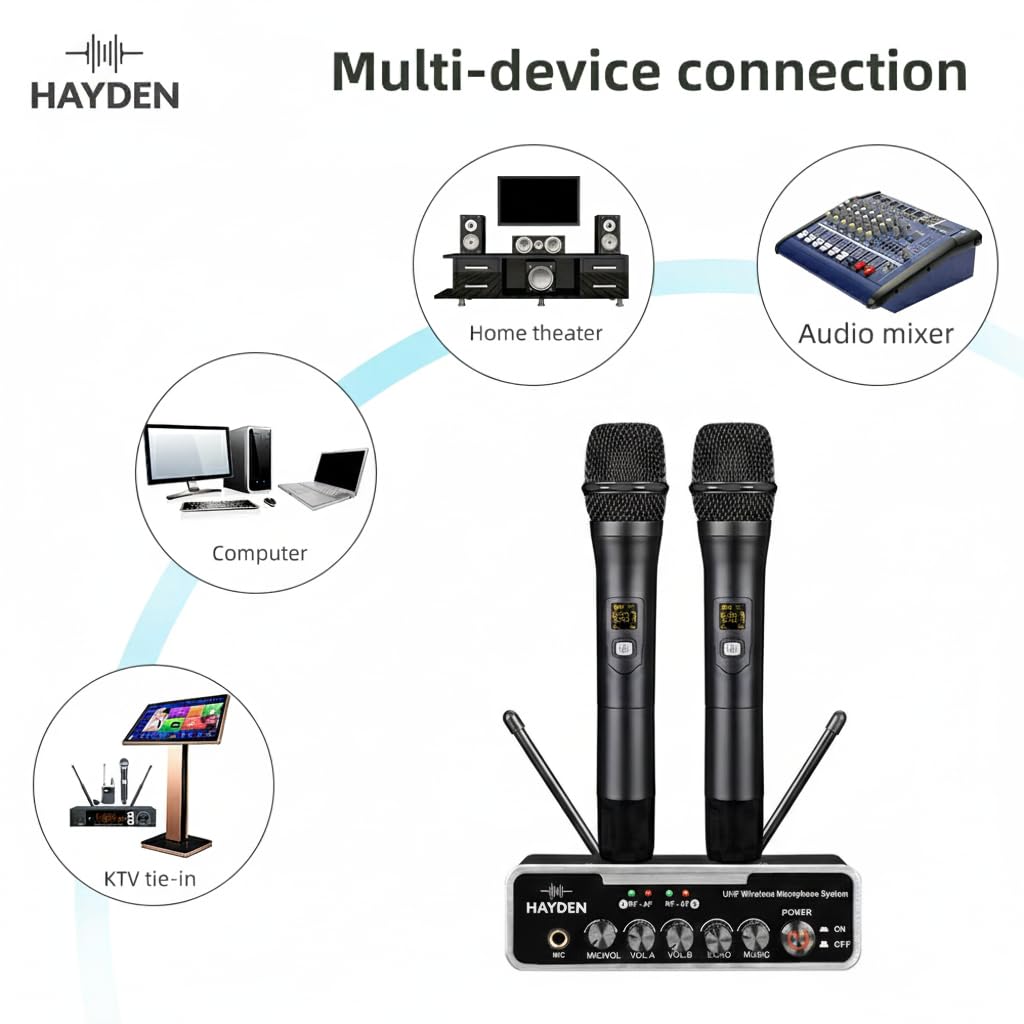
Сүрөт: Multi-device connection diagram. Illustrates the versatility of the HY-X7 system, showing connections to a home theater, audio mixer, computer, and a KTV setup, emphasizing its adaptability for various audio environments.
The HY-X7 system is designed for flexible integration with various audio setups, including home theaters, audio mixers, computers, and dedicated KTV systems. Use the appropriate input/output ports (Optical, AUX, Bluetooth) to connect your desired devices.
Техникалык тейлөө
- Тазалоо: Кабыл алгычты жана микрофондорду жумшак, кургак чүпүрөк менен сүртүңүз. Суюк тазалоочу каражаттарды же абразивдүү материалдарды колдонбоңуз.
- Сактагыч: Колдонбогондо системаны түз күн нурунан жана экстремалдык температурадан алыс салкын, кургак жерде сактаңыз.
- Батареяны алмаштыруу: Replace AA batteries in the microphones when the low battery indicator appears or audio quality degrades. Remove batteries if the microphones will not be used for an extended period to prevent leakage.
- Кабельге кам көрүү: Handle all cables gently to prevent damage. Avoid sharp bends or kinks.
Проблемаларды чечүү
| Көйгөй | Мүмкүн себеп | Чечим |
|---|---|---|
| Микрофондордон үн чыкпайт. |
|
|
| No background music. |
|
|
| Начар үн сапаты же тоскоолдук. |
|
|
Техникалык шарттар
| Өзгөчөлүк | Деталь |
|---|---|
| Бренд | HAYDEN |
| Модел | HY-X7 |
| Продукциянын өлчөмдөрү | 14 x 10 x 6 см (Кабыл алгыч) |
| Элемент Салмагы | 1.35 kg (Total) |
| Микрофон түрү | UHF Wireless, Dynamic Microphone Core |
| Зымсыз жыштык | 720–800 MHz (Carrier Frequency) |
| Жыштыктын туруктуулугу | 0.002% |
| Байланыш технологиясы | Auxiliary, Bluetooth, Optical (Toslink), UHF |
| Шайкеш түзмөктөр | External Speakers, Home Theater, Karaoke Machine, PA System, Audio Mixer, Amplifier, Smart TV, Smartphone |
| Өзгөчөлүктөр | Adjustable Echo Effect, Bluetooth Connection, Optical/AUX Connectivity for Soundbars/TVs |
| Микрофондун кубат булагы | AA батарейкалар (киргизилген эмес) |
| Кабылдагычтын кубат булагы | 5V 2A USB-C (Adapter and cable included) |
| Келип чыккан өлкө | Кытай |
Кепилдик жана колдоо
For warranty information or technical support, please contact HAYDEN AUDIO directly. The manufacturer and importer details are provided below:
- Өндүрүүчү / Импорттоочу: Hayden Audio, WZ-30/B2, Prithvi Park, Tilak Nagar, New Delhi-110018
- Телефон: 9212347774
Кепилдик дооматтары үчүн сатып алуу дүмүрчөгүңүздү сактап коюңуз.


