1. Киришүү
This manual provides detailed instructions for the LAUNCH Creader Elite V3.0 OBD2 Scanner, a professional diagnostic tool designed specifically for Land Rover and Jaguar vehicles. It covers device setup, operational procedures for various diagnostic and service functions, software updates, and troubleshooting tips. Please read this manual thoroughly before operating the device to ensure correct usage and optimal performance.
2. Продукт бүтүп калдыview
2.1. Кутуда эмне бар
- 1 * LAUNCH Creader Elite V3.0 OBD2 Scanner for JLR
- 1 * OBD2 диагностикалык кабели
- 1 * Ыкчам баштоо колдонмосу
- 1 * Колдонуучунун колдонмосу
2.2. Негизги өзгөчөлүктөрү
The LAUNCH Creader Elite V3.0 offers a comprehensive suite of features for vehicle diagnostics and maintenance:
- Өркүндөтүлгөн аппараттык камсыздоо: Features Android 8.1 operating system, 32GB ROM, 3000mAh battery, and 2.4&5GHz dual-band Wi-Fi for improved performance.
- DoIP Protocol Support: Supports the new DoIP protocol for Land Rover & Jaguar models manufactured after 2017 (requires an adapter).
- Full Systems Diagnostics: Provides in-depth scanning for all available vehicle modules, including engine, transmission, ABS, SRS, and more.
- Эки багыттуу башкаруу (активдүү тест): Allows control of vehicle components and systems for active testing, such as windows, mirrors, wipers, and horn.
- Comprehensive Service Functions: Includes Oil Reset, Electronic Parking Brake (EPB) Reset, Battery Management System (BMS) Reset, Steering Angle Sensor (SAS) Calibration, Injector Coding, Throttle Relearn, Height Calibration, Transmission Adaptation, Crankshaft/Camshaft Relearn, Sunroof Calibration, and more.
- 4-бирде түз эфирдеги маалымат агымы: Displays real-time data from multiple sensors simultaneously in a graphical format, with recording and playback capabilities.
- Smart Diagnostic Functions: Features Auto VIN for automatic vehicle identification, DTC Lookup for code explanations, and the ability to generate and share diagnostic reports.
- Толук OBD2 функциялары: Supports all 10 OBD2 test modes for universal vehicle compatibility (post-1996 models).
- Өмүр бою акысыз жаңыртуулар: Provides lifetime free software updates specifically for Land Rover and Jaguar vehicle brands.
2.3. Device Comparison
The Creader Elite V3.0 offers significant upgrades over previous versions:

Image: Comparison of Creader Elite V3.0, V2.0, and V1.0, highlighting V3.0's superior features like DoIP, Android 8.1, 32GB memory, and 2.4&5GHz WiFi.
2.4. Физикалык мүнөздөмө
The device features a durable orange casing with a 4-inch touchscreen display. The back of the device includes product identification details such as the model number, FCC ID, and serial number.
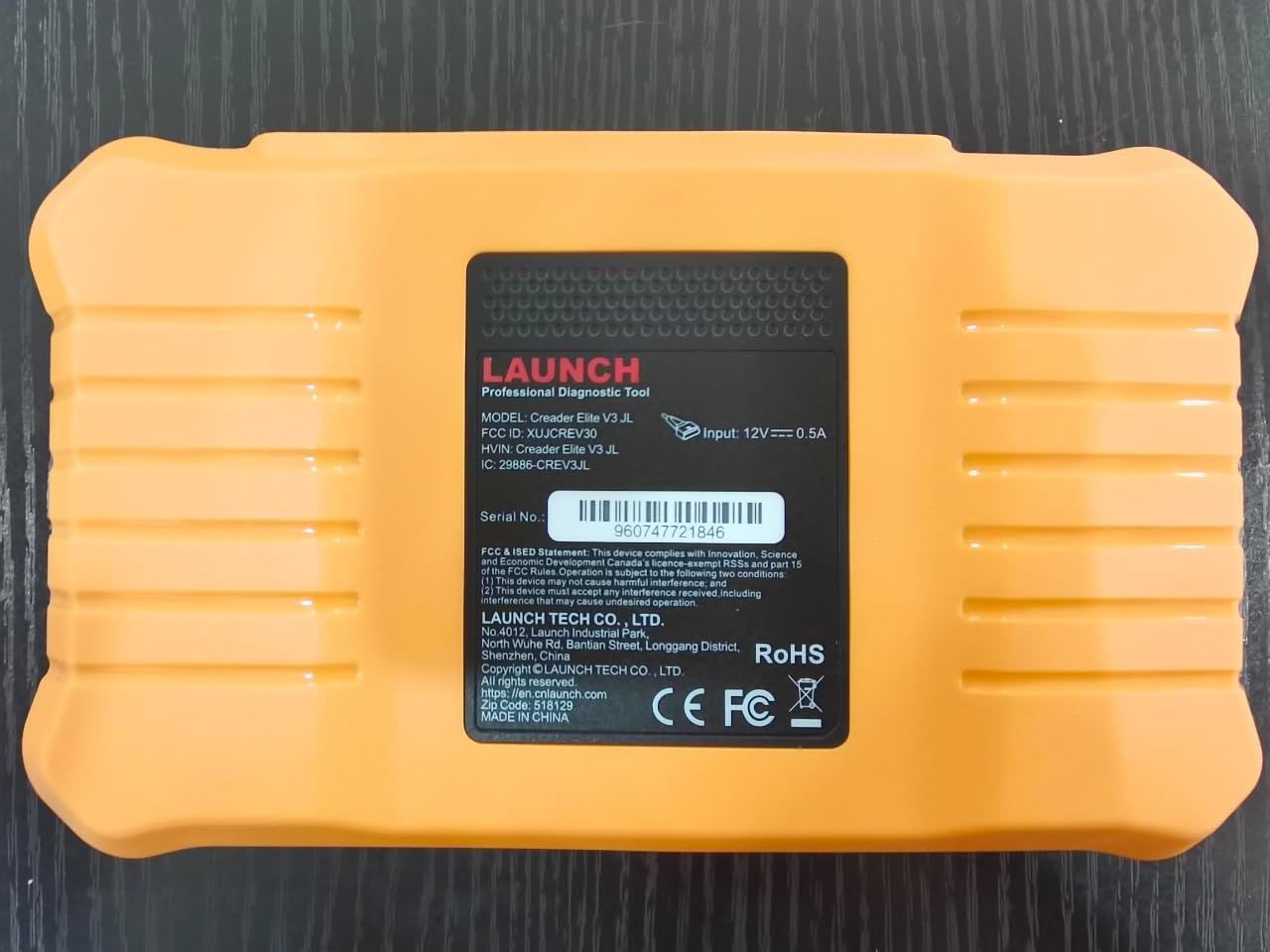
Сүрөт: Арткы view of the LAUNCH Creader Elite V3.0, displaying the model number, FCC ID, and serial number (e.g., 960747721846).
3. Орнотуу
3.1. Баштапкы күйгүзүү
- Аппараттын толук заряддалганын же кубат булагына туташтырылганын текшериңиз.
- Экран жарык кылганга чейин кубат баскычын басып, кармап туруңуз.
- Каалаган тилди жана аймакты тандоо үчүн экрандагы көрсөтмөлөрдү аткарыңыз.
3.2. Wi-Fi туташуусу
- Негизги менюдан, төмөнкүгө өтүңүз Орнотуулар.
- Тандоо Wi-Fi жана аны күйгүзүңүз.
- Тизмеден каалаган Wi-Fi тармагын тандап, суралса, сырсөздү киргизиңиз.
- Confirm the connection. A stable internet connection is required for software updates and online resources.
3.3. Каттоо жана активдештирүү
Upon first use or after a factory reset, you may be prompted to register your device. Follow the on-screen instructions to create an account or log in. This step is crucial for accessing software updates and technical support.
4. Иштөө нускамалары
4.1. Унаага туташуу
- Locate the vehicle's OBD2 diagnostic port, typically under the dashboard on the driver's side.
- Унаанын от алдыруу системасы күйүп турганын текшериңиз ON position (engine off or running, depending on the test).
- Connect the OBD2 diagnostic cable to the vehicle's OBD2 port and to the LAUNCH Creader Elite V3.0 device.
- The device will automatically power on or prompt you to do so.
4.2. Full Systems Diagnostics
This function allows you to scan all available electronic control units (ECUs) in the vehicle.

Image: Display showing OE-level all system diagnostics, including Auto VIN, fault codes, 4-in-1 live data, and MIL reset.
- Негизги менюдан тандаңыз Жергиликтүү диагностика.
- Choose the vehicle brand (Land Rover or Jaguar).
- Тандоо Авто издөө or Кол менен тандоо. Auto Search (Auto VIN) will attempt to automatically identify the vehicle.
- Once the vehicle is identified, select Ден соолук отчету or Системаны сканерлөө to perform a comprehensive scan of all modules.
- Review the diagnostic trouble codes (DTCs) and ECU information. You can then choose to clear codes if necessary.
4.3. Кызматтын функциялары
The Creader Elite V3.0 provides numerous maintenance and reset services. Access these functions via Diagnose > Brand > System Selection > Special Function.

Сүрөт: бүттүview of various service functions including Oil Reset, Brake Reset, SAS Calibration, Start-Stop Reset, TPMS Reset, Injector Coding, Battery Reset, ABS Bleeding, Seat Calibration, and Height Calibration.
Common services include:
- Майды калыбына келтирүү: Resets the engine oil life system.
- EPB баштапкы абалга келтирүү: Resets the electronic parking brake after replacement.
- SAS калибрлөө: Рул бурчу сенсорду калибрлейт.
- Инжектор коддоо: Codes new injector numbers into the ECU.
- Дроссельди кайра үйрөнүү: Дроссельдин корпусунун абалын кайрадан үйрөнөт.
- Бийиктик калибрлөө: Calibrates the vehicle's suspension height.
- Батареяны баштапкы абалга келтирүү: Registers a new battery replacement.
- ABS кан агуу: ABS тормозунун кан чыгаруу процедураларын аткарат.
Note: The availability of specific service functions may vary depending on the vehicle model and year. Always check compatibility before performing a service.
4.4. Bi-Directional Control (Active Tests)
Active tests allow you to send commands to vehicle systems and components to verify their functionality.

Image: Depicts bi-directional active tests, showing the device sending commands to vehicle actuators like wipers, windows, clutch, and injectors to check their status.
- Navigate to the desired vehicle system within the diagnostic menu.
- Тандоо Active Test or Эки багыттуу башкаруу.
- Choose the specific component or system you wish to test (e.g., 'Wiper Test', 'Window Test', 'Horn Test').
- Компоненттин реакциясын активдештирүү жана байкоо үчүн экрандагы көрсөтмөлөрдү аткарыңыз.
4.5. Толук OBD2 функциялары
For universal vehicle diagnostics (all OBD2 compliant vehicles after 1996), use the OBD II меню опциясы.
- Окуу коддору: Retrieves generic (P0, P2, P3, U0) and manufacturer specific (P1, P3, U1) codes.
- Таза коддор: Clears diagnostic trouble codes and turns off the Malfunction Indicator Light (MIL).
- Жандуу маалыматтар: Унаанын сенсорлорунан реалдуу убакыт режиминде маалымат агымын көрсөтөт.
- I/M даярдыгы: Чыгарылыштарга байланыштуу мониторлордун даярдыгын текшерет.
- Фреймди тоңдуруу: Displays a snapshot of operating conditions at the time of an emission-related fault.
- O2 сенсор тести: O2 сенсор монитордун тестинин жыйынтыктарын чыгарат.
- Борттогу мониторду сыноо (6-режим): Чыгарууларга байланыштуу кыймылдаткычтын компоненттери жана системалары боюнча жыйынтыктарды алат.
- EVAP системасын сыноо (8-режим): Буулануучу эмиссияны көзөмөлдөө системасын сыноодон өткөрөт.
- Унаа жөнүндө маалымат: Унаанын идентификациялык номерин (VIN), калибрлөө IDсин (CALID) жана калибрлөөнү текшерүү номерин (CVN) алат.
4.6. Real-Time Monitoring and Data Stream
Monitor various vehicle parameters in real-time to diagnose intermittent issues or verify repairs.

Image: Real-time monitoring screen showing battery voltage, transmission oil temperature, coolant temperature, and vehicle speed, with a detailed 4-in-1 data stream graph below.
- Диагностикалык менюдан тандаңыз Live Data.
- Choose the parameters you wish to monitor.
- The device can display up to four data streams simultaneously in a graphical format.
- колдонуу Жаздыруу жана Ойнотуу functions to capture and review data for later analysis.
4.7. Smart Diagnostic Features
The device includes features to streamline the diagnostic process:
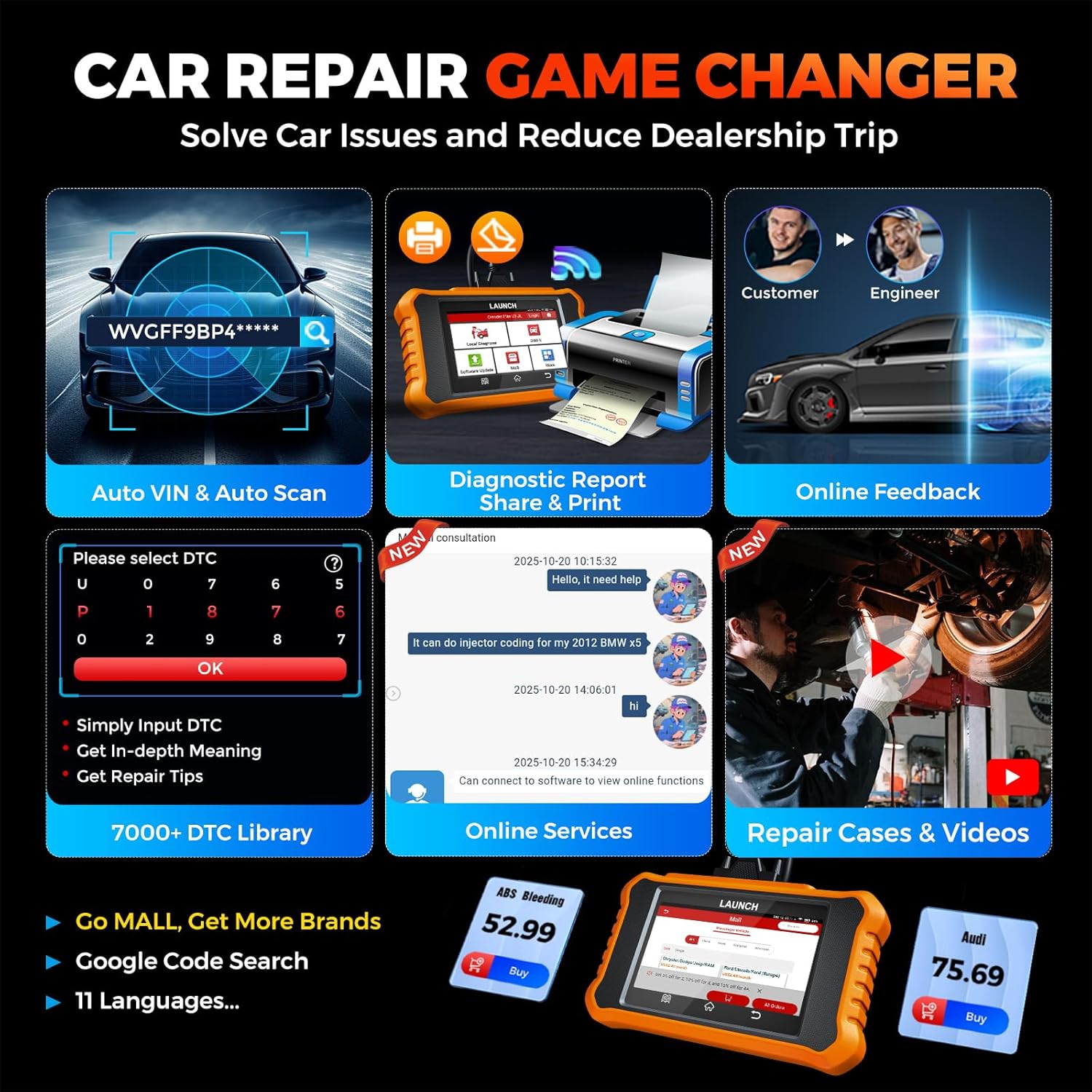
Image: Smart diagnostic features such as Auto VIN, diagnostic report generation and printing, online feedback, 7000+ DTC library, and access to online services.
- Автоматтык VIN: Automatically identifies vehicle information (year, make, model) for quicker diagnostics.
- DTC издөө: Provides detailed explanations for diagnostic trouble codes.
- Диагностикалык отчет: Generates a professional diagnostic report that can be shared or printed.
- Онлайн пикир: Allows users to submit feedback or issues directly to technical support.
5. Maintenance & Updates
5.1. Программалык камсыздоону жаңыртуу
The LAUNCH Creader Elite V3.0 offers lifetime free software updates for Land Rover and Jaguar brands.
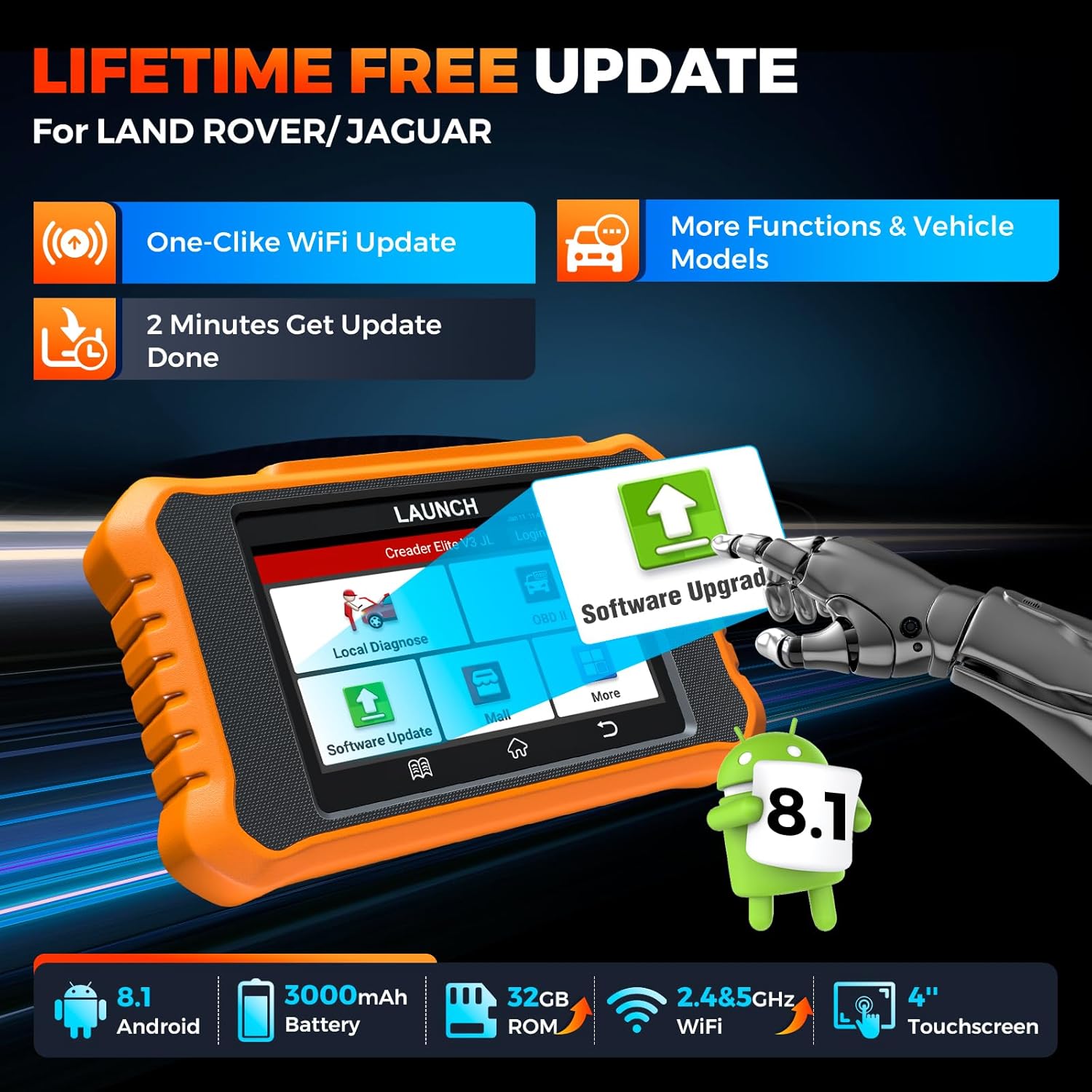
Image: Device screen illustrating the one-click Wi-Fi update process, emphasizing lifetime free updates for Land Rover/Jaguar and the ability to get more functions and vehicle models.
- Түзмөктүн туруктуу Wi-Fi тармагына туташканын текшериңиз.
- Негизги менюдан тандаңыз Программалык камсыздоону жаңыртуу.
- Түзмөк жеткиликтүү жаңыртууларды текшерет.
- Select the updates you wish to install and follow the on-screen prompts. Updates typically take a few minutes.
5.2. Expanding Vehicle Coverage (Mall)
If you require diagnostic capabilities for other vehicle brands beyond Land Rover and Jaguar, you can purchase additional software packages from the Соода борбору application on the device. Please note that software purchased from the Mall is typically valid for one year and may require re-purchase after expiry.
5.3. Түзмөккө кам көрүү
- Аппаратты чаңдан жана нымдан таза, таза кармаңыз.
- Аппаратты жерге түшүрүүдөн же катуу таасирлерден сактаныңыз.
- Аппаратты колдонбогондо салкын, кургак жерде сактаңыз.
- Берилген заряддоо кабелин жана аксессуарларды гана колдонуңуз.
6. Шайкештик
The LAUNCH Creader Elite V3.0 is primarily designed for:

Image: Device interface showing diagnostic options for Land Rover (Defender, Discovery, Range Rover, Evoque) and Jaguar (E-Pace, F-Pace, F-Type, S-Type, X-Type, XE, XF, XJ, XK) models, with a note on DoIP protocol for models after 2017.
- Landrover: Compatible with models such as Defender, Discovery, Discovery Sport, Range Rover, Range Rover Evoque, etc.
- Ягуар: Compatible with models such as E-Pace, F-Pace, F-Type, S-Type, X-Type, XE, XF, XJ, XK, etc.
- DoIP протоколу: Supports Land Rover & Jaguar models after 2017, requiring a separate DoIP adapter.
- Universal OBD2: Fully compatible with all OBD2 compliant vehicles manufactured after 1996 for basic OBD2 functions.
For specific vehicle compatibility, it is recommended to contact technical support via obdbox21@163.com.
7. Техникалык шарттар
| Модел | LAUNCH Creader Elite 3.0-JL |
| Операция системасы | Android 8.1 |
| Screen Size | 4 дюйм |
| Ички сактагыч (ROM) | 32 ГБ |
| Батарея сыйымдуулугу | 3000mAh |
| Wi-Fi | 2.4 жана 5 ГГц кош диапазондуу |
| Power Source | Батарея менен иштейт |
| Элемент Салмагы | 1.49 фунт |
| Пакеттин өлчөмдөрү | 8 x 7.5 x 1.5 дюйм |
| Automotive Fit түрү | Universal Fit (for OBD2 functions) |
8. Кыйынчылыктарды
8.1. Түзмөк күйбөй жатат
- Check battery level. Connect the device to a charger and allow it to charge for at least 30 minutes.
- Кубат баскычынын туура басылып жана кармалып турганын текшериңиз.
- If connected to the vehicle, ensure the vehicle's ignition is on and the OBD2 cable is securely connected.
8.2. Communication Error with Vehicle
- Verify the OBD2 cable is securely connected to both the device and the vehicle's port.
- Унаанын от алдыруу системасы күйүп турганын текшериңиз ON позиция.
- Confirm that the vehicle is OBD2 compliant (generally 1996 and newer for US vehicles).
- Try a different OBD2 compliant vehicle to rule out a vehicle-specific issue.
- Ensure the correct vehicle brand software is installed and up to date.
8.3. Software Update Failure
- Check your Wi-Fi connection for stability and signal strength.
- Ensure the device has sufficient battery charge or is connected to power during the update process.
- Verify that there is enough free storage space on the device.
- Restart the device and attempt the update again.
8.4. Inaccurate Readings or Functions Not Working
- Ensure the vehicle's make, model, and year are correctly identified by the device.
- Verify that the specific function is supported for your vehicle model and year. Refer to the compatibility section or contact support.
- Түзмөктүн программалык камсыздоосу толугу менен жаңыртылганын текшериңиз.
9. Кепилдик жана колдоо
9.1. Кепилдик маалыматы
The LAUNCH Creader Elite V3.0 comes with an Extended 60-Day Return & Replacement policy and a 5-Year Quality Backup. Please retain your proof of purchase for warranty claims.
9.2. Техникалык колдоо
For any technical assistance, questions, or compatibility inquiries, please contact our support team:
- Электрондук почта: obdbox21@163.com
- Our support team is available 24/7/365.
Note: Please direct all support inquiries to the provided email address. Do not contact LAUNCH Tech USA for support related to this specific product.


