1. Киришүү
This manual provides comprehensive instructions for the setup, operation, and maintenance of your GOBOULT Mustang Racer Smart Watch. Please read this manual thoroughly before using the device to ensure proper functionality and to maximize your user experience. Keep this manual for future reference.
2. Кутуда эмне бар
Пакетте бардык буюмдар бар экенин текшериңиз:
- GOBOULT Mustang Racer Smart Watch
- Заряддоо кабели
- Колдонуучунун Колдонмосу (бул документ)
- Кепилдик картасы
3. Продукт бүтүп калдыview
Familiarize yourself with the key components of your GOBOULT Mustang Racer Smart Watch.
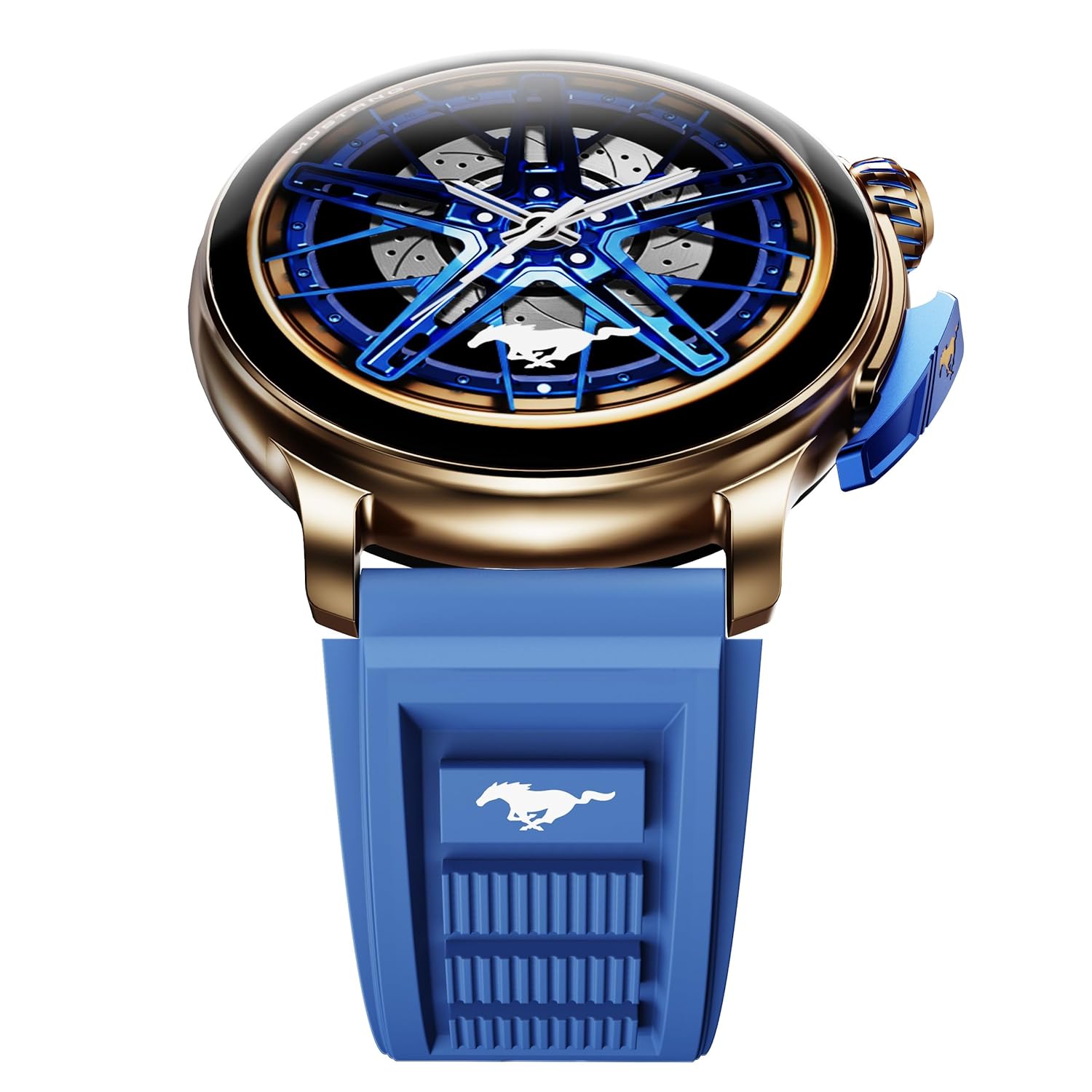
Image: The GOBOULT Mustang Racer Smart Watch, showcasing its 1.43-inch AMOLED display and overall design.
Display and Bezel
The watch features a 1.43-inch AMOLED display with 500 Nits brightness for clear visibility. The functional rotating bezel allows for intuitive navigation through menus and features.

Сүрөт: деталдуу view of the smartwatch's 1.43-inch AMOLED display and the rotating bezel, highlighting its design and brightness.
Buttons and Crown
The watch includes a rotating tyre-tread crown for navigation and selection, along with a functional paddle shifter button for quick access to features.

Image: The smartwatch featuring its functional paddle shifter and rotating crown, designed for enhanced control.
4. Орнотуу
4.1. Акылдуу саатты кубаттоо
Before initial use, fully charge your smartwatch. Connect the magnetic charging cable to the charging pins on the back of the watch and plug the USB end into a compatible power adapter (not included) or a computer's USB port. The watch will display a charging indicator. A full charge takes approximately 120 minutes.
4.2. Күйгүзүү / Өчүрүү
- Күйгүзүү: Press and hold the main power button (crown) for a few seconds until the GOBOULT logo appears.
- Өчүрүү: From the watch face, swipe down to access quick settings, or navigate to the settings menu. Select "Power Off" and confirm. Alternatively, press and hold the main power button until the power-off option appears.
4.3. Смартфонуңуз менен жупташуу
To unlock all features, pair your GOBOULT Mustang Racer Smart Watch with the companion app on your smartphone via Bluetooth.
- Download the official GOBOULT app from your smartphone's app store (iOS App Store or Google Play Store).
- Смартфонуңузда Bluetooth иштетилгенин текшериңиз.
- GOBOULT колдонмосун ачып, аккаунт түзүү же кирүү үчүн экрандагы көрсөтмөлөрдү аткарыңыз.
- In the app, select "Add Device" or similar option.
- Select "GOBOULT Mustang Racer" from the list of available devices.
- Смартфонуңузда да, акылдуу саатыңызда да жупташтыруу өтүнүчүн ырастаңыз.
Жупташтырылгандан кийин, саат маалыматтар телефонуңуз менен шайкештештирилет жана сиз жөндөөлөрдү колдонмо аркылуу ыңгайлаштыра аласыз.

Image: The smartwatch highlighting its Bluetooth V5.3 connectivity for quick syncing and IP67 water resistance.
5. Иштөө нускамалары
5.1. Навигация
- Өйдө/Төмөн/Солго/Оңго серпүү: Navigate through menus, notifications, and quick access panels.
- таптаңыз: Бир нерсени тандаңыз же аракетти ырастаңыз.
- Rotating Bezel/Crown: Rotate to scroll through lists or adjust settings. Press to select or return to the home screen.
- Paddle Shifter Button: Customizable shortcut for frequently used functions (e.g., sports modes).
5.2. Bluetooth чалуу
With integrated speaker and microphone, you can make and receive calls directly from your wrist after pairing with your smartphone.
- Саатыңыз телефонуңузга Bluetooth аркылуу туташып турганын текшериңиз.
- Чалуу үчүн: Саатыңыздагы терүүчү же байланыштар тизмесине кириңиз.
- To receive a call: An incoming call notification will appear on your watch. Tap to answer or decline.
5.3. Watch Faces
Customize your watch's appearance with over 150 watch faces, including exclusive Mustang designs. Long-press the watch face to change it, or use the companion app for more options.

Сүрөт: Акылдуу сааттардын көргөзмөсүasing multiple watch face options, including exclusive Mustang designs.
5.4. Спорт режимдери
The watch supports over 120 sports modes to track your physical activities. Access sports modes from the main menu or via the paddle shifter shortcut (if configured).
- Select your desired sport.
- Start the activity. The watch will record metrics such as duration, calories burned, and heart rate.
- End the activity to save data. Review your performance in the app.

Image: The smartwatch displaying a sports tracking interface, indicating its capability to monitor various physical activities.
5.5. Ден соолуктун мониторинги
The GOBOULT Mustang Racer Smart Watch provides comprehensive health tracking features:
- 24x7 жүрөктүн кагышын өлчөгүч: Үзгүлтүксүз жүрөктүн кагышын көзөмөлдөйт.
- SpO2 кандын кычкылтек менен каныккандыгын өлчөгүч: Кандагы кычкылтектин деңгээлин өлчөйт.
- Уйкунун мониторинги: Analyzes sleep patterns (deep sleep, light sleep, awake time).
- Стресс мониторинги: Стресс деңгээлиңиз боюнча түшүнүктөрдү берет.
- Кан басымы: (Note: Smartwatch blood pressure measurements are for reference only and should not be used for medical diagnosis.)
Access these features from the watch's health menu or view detailed reports in the companion app.

Сүрөт: ички view of the smartwatch highlighting its health tracking sensors, with text indicating features like heart rate, SpO2, sleep, and stress monitoring.
5.6. AI үн жардамчысы
Activate the AI Voice Assistant on your watch to perform tasks, set reminders, or get information using voice commands. Ensure your watch is connected to your phone for this feature to function.
5.7. Акылдуу эскертмелер
Receive notifications for calls, messages, and app alerts directly on your watch. Manage notification settings through the GOBOULT app.
5.8. Always On Display
The Always On Display feature allows the time and essential information to remain visible on the screen without needing to raise your wrist or press a button. This feature can be enabled or disabled in the watch settings to manage battery consumption.

Image: The smartwatch displaying the time and a car image, illustrating the Always On Display functionality.
6. Өзгөчөлүктөрү жана мүнөздөмөлөрү
Негизги өзгөчөлүктөрү:
- 1.43" AMOLED Display with 500 Nits Brightness
- Bluetooth Calling (BT V5.3)
- Rotating Bezel for intuitive control
- 150+ Watch Faces, including exclusive Mustang designs
- AI үн жардамчысы
- Health Monitoring: SpO2, Heart Rate, Sleep, Stress, Blood Pressure
- 120+ Спорт режимдери
- IP67 сууга туруктуу
- Up to 7-day battery runtime with fast charging
Техникалык мүнөздөмөлөрү:
| Бренд | GOBOULT |
| Модель номери | GOBOULT Mustang Racer |
| Дисплей өлчөмү | 1.43 дюйм |
| Зымсыз түрү | Bluetooth V5.3 |
| Батареяны заряддоо убактысы | 120 мүнөт |
| Батареянын энергия мазмуну | 1.11 Ватт саат |
| Суу каршылык | IP67 |
| Элемент Салмагы | 55 г |
| Келип чыккан өлкө | Кытай |
7. Техникалык тейлөө
7.1. Акылдуу саатыңызды тазалоо
Үзгүлтүксүз тазалоо сааттын көрүнүшүн жана иштөөсүн сактоого жардам берет:
- Экранды жана денени жумшак, түксүз чүпүрөк менен сүртүңүз.
- өжөр тактар үчүн, бир аз гampчүпүрөктү суу менен. Катуу химиялык заттарды же абразивдүү материалдарды колдонуудан алыс болуңуз.
- Clean the charging contacts periodically with a dry cloth to ensure proper charging.
7.2. Сууга туруктуулук (IP67)
The GOBOULT Mustang Racer Smart Watch is IP67 water resistant, meaning it can withstand immersion in up to 1 meter of fresh water for up to 30 minutes. It is suitable for daily use and light splashes. However, it is not recommended for swimming, showering with hot water, or diving. Avoid exposure to saltwater or chemicals, as this may damage the device.
7.3. Батареяга кам көрүү
- Батареяны бат-баттан толук кубаттап калуудан алыс болуңуз.
- Саатты узак убакытка колдонбогондо салкын, кургак жерде сактаңыз.
- Берилген заряддоо кабелин гана колдонуңуз.
8. Кыйынчылыктарды
| Көйгөй | Мүмкүн чечим |
|---|---|
| Саат күйбөйт. | Саат толук заряддалганын текшериңиз. Аны заряддагычка кеминде 30 мүнөт туташтырыңыз. |
| Смартфон менен жупташтыруу мүмкүн эмес. |
|
| Туура эмес ден соолук маалыматы. |
|
| Батареянын иштөө мөөнөтү кыска. |
|
9. Кепилдик жана колдоо
Your GOBOULT Mustang Racer Smart Watch comes with a warranty as specified on the included Warranty Card. Please refer to the card for details regarding warranty period, coverage, and terms and conditions.
For technical support, product inquiries, or warranty claims, please contact GOBOULT customer service through the contact information provided on your Warranty Card or visit the official GOBOULT webсайт.
Камтылган компоненттер: Charging Cable, Mustang Racer Apex Blue Smart watch, User Manual, Warranty Card


