Introduction
The Fermax 3305 Videophone System is a color video door entry monitor designed for residential use. It allows communication with the outdoor panel, door opening, and visual identification of visitors via its built-in 3.5-inch TFT screen. This system integrates modern design with functional features, offering a reliable and elegant solution for home security and communication.
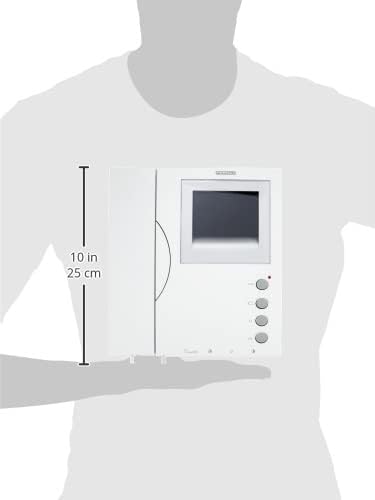
1-сүрөт: The Fermax 3305 monitor held in hand, illustrating its compact and ergonomic design for easy handling and installation.
Constructed from high-impact ABS plastic with a textured finish, the monitor is easy to clean and offers enhanced resistance to sunlight due to its ultraviolet protection. The system utilizes VDS technology for simplified installation, requiring no dedicated house call wires. It supports various wiring configurations, including UTP CAT5, 5-wire, or 3-wire plus coaxial for video, making it suitable for both new installations and replacements of existing analog systems.
Коопсуздук маалыматы
- Орнотуудан же тейлөөдөн мурун ар дайым электр кубатын ажыратыңыз.
- Орнотуу жергиликтүү электр эрежелерине ылайык квалификациялуу кызматкерлер тарабынан аткарылышы керек.
- Аппаратты ашыкча нымдуулукка же экстремалдык температурага дуушар кылбаңыз.
- Use only specified power sources and wiring types.
- Avoid placing the monitor in direct sunlight or near heat sources to prevent damage.
- Do not attempt to open or repair the unit yourself. Refer to authorized service personnel.
Пакеттин мазмуну
Пакетте бардык буюмдар бар экенин текшериңиз:
- Fermax 3305 Videophone Monitor
- Телефон
- Кронштейн орнотуу
- Орнотуу бурамалары жана дубал сайгычтары
- Колдонуучунун Колдонмосу (бул документ)
Note: Ensure the mounting bracket is included in your package. If missing, contact your supplier.
Орнотуу жана орнотуу
The Fermax 3305 monitor uses the VDS system for simplified wiring. For optimal performance, adhere to the recommended wiring configurations.
Зымдар диаграммасы

2-сүрөт: Арткы view of the Fermax 3305 monitor, illustrating the wiring terminals and connections. This view is crucial for understanding how to connect the system's power, audio, and video lines.
VDS System Wiring:
- Аудио: 3-wire bus.
- Видео: UTP CAT5 / 5-wire / 3-wire + Coaxial (video).
- Maximum distance from first access to last home: 200 meters.
For new installations, UTP CAT5 cable is recommended. For replacing existing analog systems, the Fermax 3305 can often utilize the existing wiring, though system capacity and distance may vary based on the quality and type of existing cables.
Мониторду орнотуу
- Choose a suitable location on an interior wall, away from direct sunlight or heat sources.
- Берилген бурамалар жана дубал тыгындарын колдонуп, бекитүүчү кронштейнди дубалга бекитиңиз. Анын тегиз экенин текшериңиз.
- Connect the necessary wiring (power, audio, video) to the terminals on the back of the monitor as shown in Figure 2.
- Мониторду орнотуу кронштейнине этияттык менен тегиздеп, ал бекем чыкылдаган үн чыкканга чейин ордуна жылдырыңыз.
Иштөө нускамалары
The Fermax 3305 monitor is designed for intuitive operation. Familiarize yourself with the main components and controls.
Monitor Overview

3-сүрөт: Фронт view of the Fermax 3305 monitor, showing the 3.5-inch TFT screen, handset, and control buttons. This is the primary interface for user interaction.

4-сүрөт: Деталдаштырылган view of the control buttons on the Fermax 3305 monitor, including the door release, camera activation, and function buttons (F1, F2).
Негизги функциялар
- Чалуу кабыл алуу: When a visitor presses the call button on the outdoor panel, the monitor will ring and display the visitor's image on the 3.5-inch TFT screen. Lift the handset to communicate.
- Two Selectable Ring Tones: The monitor offers two distinct ring tones. Refer to the programming section for how to select your preferred tone.
- эшикти бошотуу: басыңыз key icon button (usually the top button, see Figure 4) to open the door. A voice synthesizer will announce: "The door is open, please close the door behind you."
- Viewing the Outdoor Panel: басыңыз camera icon button (second from top, see Figure 4) to activate the camera on the outdoor panel and view the entrance area without a call.
- Private Communication: All communications are private, ensuring data protection.
- Ring Tone Volume Adjustment: Adjust the volume of the ring tone to your preference using the dedicated control (refer to the manual for exact location, often a small dial or button on the side/bottom).
- Функция баскычтары (F1, F2): These buttons (third and fourth from top, see Figure 4) can be programmed for additional functions, such as activating a second door release, turning on lights, or other auxiliary controls, depending on your system configuration.
Программалоо
The home terminals require simple programming from the outdoor panel. This programming assigns a unique call code to each monitor or telephone unit in the system.
For detailed programming instructions, refer to the outdoor panel's user manual or consult a qualified installer.
Техникалык тейлөө
- Тазалоо: Use a soft, dry cloth to clean the monitor's surface. For stubborn marks, a slightly damp cloth with mild, non-abrasive cleaner can be used. Avoid harsh chemicals or abrasive materials.
- Чаң топтоо: Regularly dust the screen and buttons to ensure clear visibility and proper function.
- Курчап турган чөйрөнү коргоо: The monitor is designed with UV protection, but prolonged exposure to direct sunlight should still be avoided to maximize its lifespan.
Проблемаларды чечүү
| Көйгөй | Мүмкүн себеп | Чечим |
|---|---|---|
| Экранда сүрөт жок. |
|
|
| Байланыш учурунда үн жок. |
|
|
| Эшик иштебей жатат. |
|
|
| Monitor does not ring. |
|
|
Техникалык шарттар
| Өзгөчөлүк | Деталь |
|---|---|
| Бренд | FERMAX |
| Модель номери | 3305 |
| Screen Size | 3.5 Inches (TFT) |
| Түс | Ак |
| Материал | Акрилонитрил бутадиен стирол (ABS) |
| Өлчөмдөрү (L x W x Y) | 6 x 20.3 x 22 сантиметр |
| Салмагы | 207 грамм |
| Power Source | Электр кабели |
| Шайкеш түзмөктөр | PSTN (traditional telephone network) |
| Системанын түрү | Digital (VDS System) |
| Wiring (Audio) | 3 сымдуу автобус |
| Wiring (Video) | UTP CAT5 / 5-wire / 3-wire + Coaxial (video) |
| Макс. Дистанция | 200 meters (from first access to last home) |
| Өзгөчөлүктөр | Two selectable ring tones, Ring tone volume adjustment, Private communication, Voice synthesizer for door release. |
Кепилдик жана колдоо
For warranty information and technical support, please refer to the official FERMAX webсайтка кайрылыңыз же жергиликтүү дистрибьютериңиз менен байланышыңыз. Сатып алуу квитанциясын кепилдик дооматтары үчүн сатып алуунун далили катары сактаңыз.
Spare parts availability information is not available from the manufacturer at this time. Software updates are also not specified.


