1. Киришүү
This user manual provides essential information for the proper installation, operation, and maintenance of your Fermax F03311 LOFT Intercom System. Please read these instructions carefully before beginning installation or use to ensure optimal performance and safety. Keep this manual for future reference.
2. Продукт бүтүп калдыview
The Fermax F03311 LOFT is an advanced intercom system designed for clear audio and video communication within residential or commercial buildings. It features a sleek design and robust functionality for managing access and communication at your entrance.
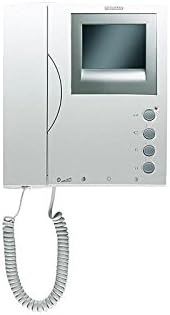
Сүрөт 2.1: Алдыңкы view of the Fermax F03311 LOFT Intercom System, showing the handset, screen, and control buttons.
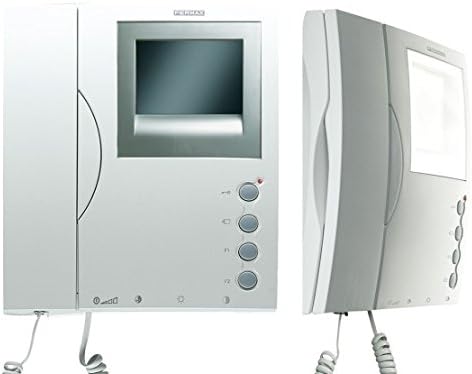
2.2-сүрөт: алдыңкы жана каптал views of the Fermax F03311 LOFT Intercom System, highlighting its compact design.
Негизги өзгөчөлүктөрү:
- Аудио тутум: 3-wire bus connection for reliable audio transmission.
- Видео системасы: Supports UTP CAT5, 5-wire, or 3-wire + coax for video signal.
- Максималдуу аралык: Up to 200 meters from the first entrance panel to the last dwelling unit.
3. Орнотуу жана орнотуу
Installation of the Fermax F03311 LOFT Intercom System requires basic electrical knowledge. It is recommended that installation be performed by a qualified technician to ensure correct wiring and safe operation.
3.1 Коопсуздук чаралары
- Always disconnect power to the installation area before beginning any wiring work.
- Кыска туташуунун алдын алуу үчүн бардык туташуулардын коопсуз жана изоляцияланганын текшериңиз.
- Жергиликтүү электр эрежелерин жана эрежелерин сактаңыз.
3.2 Электр зымдары боюнча нускамалар
- Аудио туташуусу: Connect the intercom unit using a 3-wire bus system. Refer to the wiring diagram provided with your specific installation kit for exact terminal assignments.
- Видео туташуу: For video functionality, use UTP CAT5 cable, a 5-wire system, or a 3-wire system combined with a coaxial cable. Ensure proper shielding and termination for video signals.
- Кубат туташуу: Connect the unit to a suitable wired electrical power source as specified in the technical documentation.
- Монтаждоо: The unit is designed for tabletop mounting. Secure it firmly in the desired location.
The system supports a maximum distance of 200 meters between the outdoor entrance panel and the furthest indoor unit. Ensure cable lengths do not exceed this limit for optimal performance.
4. Иштөө нускамалары
The Fermax F03311 LOFT Intercom System is designed for user-friendly operation.
4.1 Чакырууга жооп берүү
- When a visitor presses the call button at the entrance panel, your intercom unit will ring.
- Lift the handset to establish audio communication with the visitor.
- If your unit has a screen, the video feed from the entrance panel will automatically display.
4.2 Эшикти ачуу
- During an active call, press the door release button (typically marked with a key icon) on your intercom unit to unlock the entrance door.
- Эшик кыска убакытка ачык бойдон калат, бул коноктун кирүүсүнө мүмкүндүк берет.
4.3 Үндү тууралоо
- Some models may feature volume control buttons. Refer to the specific controls on your unit to adjust the speaker and ringer volume.
5. Техникалык тейлөө
Regular maintenance ensures the longevity and optimal performance of your Fermax F03311 LOFT Intercom System.
5.1 Тазалоо
- Use a soft, dry cloth to clean the exterior surfaces of the intercom unit.
- өжөр белгилери үчүн, бир аз гampen the cloth with water. Avoid using abrasive cleaners, solvents, or harsh chemicals, as these can damage the finish.
- Do not spray cleaning liquids directly onto the unit.
5.2 Жалпы кам көрүү
- Аппаратты экстремалдык температурага, түз күн нуруна узак убакытка же жогорку нымдуулукка дуушар кылуудан алыс болуңуз.
- Ensure the handset is properly seated in its cradle when not in use.
6. Кыйынчылыктарды
If you encounter issues with your Fermax F03311 LOFT Intercom System, refer to the following common problems and solutions:
6.1 Аудио жок же аудио сапаты начар
- Күчтү текшерүү: Ensure the unit is receiving power.
- Зымдарды текшерүү: Verify that the 3-wire audio bus connections are secure and correctly wired at both the indoor unit and the outdoor panel.
- Үндүн жөндөөлөрү: Adjust the volume controls on your unit, if available.
6.2 No Video or Poor Video Quality
- Күчтү текшерүү: Түзмөктүн күйгүзүлгөнүн ырастаңыз.
- Зымдарды текшерүү: Inspect the video wiring (UTP CAT5, 5-wire, or 3-wire + coax) for loose connections, damage, or incorrect polarity.
- Кабелдин узундугу: Ensure the cable length does not exceed the maximum recommended distance of 200 meters.
6.3 Эшик ачылбай жатат
- Активдүү чалуу: Ensure you are in an active call with the visitor before pressing the door release button.
- Зымдар: Check the wiring to the door strike or electric lock for proper connection and functionality.
- Power to Lock: Verify that the door lock mechanism is receiving power.
If these steps do not resolve the issue, contact Fermax customer support or a qualified technician.
7. Техникалык шарттар
| Өзгөчөлүк | Деталь |
|---|---|
| Өндүрүүчү | Fermax |
| Бөлүмдүн номери | F03311 |
| Элемент моделинин номери | LOFT |
| Продукциянын өлчөмдөрү | 20 x 6 x 22 см |
| Продукт Салмагы | 800 г |
| Power Source | Электр зымдары |
| Монтаж түрү | Столдун үстү |
| Динамик түрү | Outdoor (referring to the system's outdoor component) |
| Динамиктердин максималдуу чыгаруу күчү | 25 Ватт |
| Камтылган компоненттер | 1x FERMAX LOFT Intercom (black/white, 3311) |
| Батареялар керекпи? | Жок |
| Батареялар камтылганбы? | Жок |
| Өлчөө системасы | Метрик |
| Дата биринчи жеткиликтүү | 15-январь, 2020-жыл |
8. Кепилдик жана колдоо
For information regarding warranty coverage, technical support, or service, please refer to the documentation provided with your purchase or visit the official Fermax webсайт. Кардарларды тейлөө кызматынын байланыш маалыматтарын, адатта, ал жерден тапса болот.


