1. Киришүү
This manual provides essential information for the proper installation, operation, and maintenance of the Fermax UP-dose S8, model 8858. Please read these instructions carefully before beginning installation to ensure safe and correct usage. This product is designed to serve as an inset box for Fermax intercom and access control systems.
2. Продукт бүтүп калдыview
The Fermax UP-dose S8 (model 8858) is an aluminum inset box designed for flush mounting components of Fermax intercom and access control systems. It provides a secure and aesthetically integrated housing for electrical installations within walls.
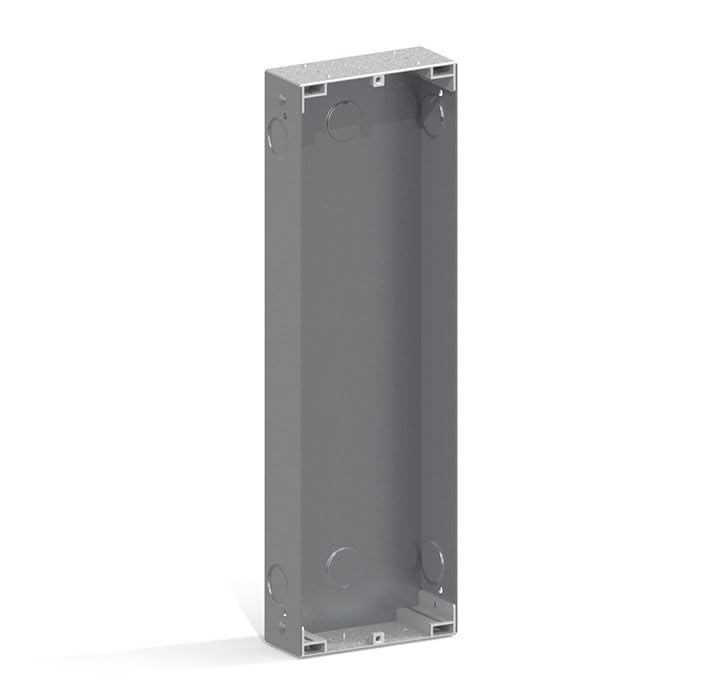
Сүрөттүн сүрөттөлүшү: This image displays the Fermax UP-dose S8, 8858 inset box. It is a rectangular, grey-colored aluminum enclosure, viewed from an angled perspective, showing its open interior. The box is designed for flush mounting, featuring pre-punched circular knockouts on its side walls for cable entry and internal brackets for securing components.
3. Коопсуздук маалыматы
Орнотуу жана колдонуу учурунда төмөнкү коопсуздук чараларын сактаңыз:
- Квалификациялуу кадрларды: Орнотуу жергиликтүү электр эрежелерине жана эрежелерине ылайык квалификациялуу кызматкерлер тарабынан аткарылышы керек.
- Электр энергиясын өчүрүү: Always disconnect power to the installation area before beginning any work on the product or connected components.
- Экологиялык шарттар: Do not expose the product to extreme temperatures, high humidity, or corrosive environments.
- Коопсуз байланыштар: Ensure all electrical connections are secure, properly insulated, and comply with safety standards.
- Продукцияны өзгөртүү: Do not modify the product in any way, as this may void the warranty and create safety hazards.
4. Орнотуу
4.1. Керектүү куралдар
- Бурагыч топтому
- Wire strippers (if connecting internal components)
- Drill and appropriate bits (for wall preparation)
- Деңгээл
- Өлчөө лентасы
- Wall cutting tool (e.g., drywall saw)
4.2. Монтаждоо боюнча нускамалар
- Дубалдын ачылышын даярдоо: Carefully create an opening in the wall that precisely matches the dimensions of the UP-dose S8 box. The required dimensions are approximately 115 mm (Width) x 375 mm (Height) x 45 mm (Depth). Ensure the opening is clean and free of any debris.
- Маршруттук кабелдер: Route all necessary electrical cables for the intercom or access control components through the designated pre-punched knockouts located on the sides of the UP-dose S8 box.
- Insert the Box: Gently insert the Fermax UP-dose S8 box into the prepared wall opening. Verify that the box sits flush with the wall surface and is perfectly level using a spirit level.
- Secure the Box: Use appropriate fasteners (e.g., screws, wall anchors – not included) to firmly secure the box within the wall opening. The internal brackets can be utilized for additional structural support or for mounting internal components.
- Туташуу компоненттери: Once the box is securely mounted, proceed with connecting the Fermax intercom or access control components inside the box. Follow the specific installation and wiring instructions provided with those individual components.
- Акыркы текшерүү: Before restoring power to the circuit, perform a thorough check to ensure all connections are correct, secure, and properly insulated.
5. Операция
The Fermax UP-dose S8 is a passive housing unit and does not possess any inherent operational controls or functions. Its primary purpose is to provide a protective and integrated enclosure for active Fermax intercom or access control system components. For operational instructions, please refer to the specific user manual of the Fermax device installed within this box.
6. Техникалык тейлөө
The Fermax UP-dose S8 requires minimal maintenance due to its robust aluminum construction.
- Тазалоо: Periodically clean the visible surfaces of the box with a soft, dry, or slightly damp кездеме. Абразивдүү тазалоочу каражаттарды, эриткичтерди же катуу химиялык заттарды колдонуудан алыс болуңуз, анткени алар капталга зыян келтириши мүмкүн.
- Текшерүү: Annually inspect the box for any signs of physical damage, such as dents or corrosion, or loose mounting. Address any identified issues promptly to maintain the integrity of the installation.
- Component Access: If access to internal components is necessary for maintenance or repair, ensure that the power supply to the entire system is disconnected before opening the enclosure.
7. Кыйынчылыктарды
As a passive enclosure, the UP-dose S8 itself is not prone to functional malfunctions. Most issues will be related to the installation or the active components housed within it.
- Көйгөй: Intercom or access control components are not functioning correctly after installation.
- Чечим: Verify that the power supply to the entire system is active. Check all wiring connections to the components inside the box for correctness and security. Refer to the specific troubleshooting guide for the Fermax device installed within the UP-dose S8.
- Көйгөй: The UP-dose S8 box feels loose or unstable within the wall opening.
- Чечим: Ensure the wall opening was cut to the precise dimensions. Re-secure the box using appropriate fasteners and ensure they are tightened sufficiently. If necessary, use additional shims or mounting compound for a tighter fit.
- Көйгөй: Visible physical damage (e.g., dents, cracks) to the UP-dose S8 box.
- Чечим: If the damage is significant, it may compromise the protection offered to the internal components. Consider replacing the box to ensure the longevity and safety of your system.
8. Техникалык шарттар
| Менчик | Нарк |
|---|---|
| Бренд | FERMAX |
| Модел | 8858 |
| Бөлүмдүн номери | 8424299088587 |
| Өлчөмдөрү (W x Y x D) | 115 мм x 375 мм x 45 мм |
| Материал | Алюминий |
| Салмагы | Approximately 450 g (0.45 kg) |
| Кубат булагынын түрү | Hand-powered (Passive enclosure) |
| Элементтин пакетинин саны | 1 |
| Батареялар талап кылынат | Жок |
9. Кепилдик жана колдоо
For detailed warranty information, technical assistance, or customer support regarding your Fermax UP-dose S8, please refer to the official Fermax website or contact your authorized Fermax dealer. It is recommended to retain your purchase receipt as proof of purchase for warranty claims.
For general inquiries and product information, please visit the official Fermax webсайт: www.fermax.com


