1. Киришүү
This manual provides detailed instructions for the installation, operation, and maintenance of your Fermax VDS Color Video Intercom Kit Veo, model FER9411. Please read this manual carefully before attempting to install or operate the system to ensure proper function and safety. This kit is designed for a single-line video door entry system, offering enhanced security and convenience for your home or office.
2. Коопсуздук маалыматы
Травматизмди же буюмга зыян келтирбөө үчүн ар дайым төмөнкү коопсуздук чараларын сактаңыз:
- Электр коопсуздугу: Installation must be performed by a qualified electrician and in compliance with local electrical codes. Disconnect power before installation or maintenance.
- Экологиялык шарттар: Do not expose the outdoor panel to extreme temperatures, direct sunlight for prolonged periods, or excessive moisture. Ensure proper sealing during installation.
- Колдонуу компоненттери: Handle all components with care. Avoid dropping or subjecting them to strong impacts.
- Тазалоо: Тазалоо үчүн жумшак, кургак чүпүрөктү колдонуңуз. Абразивдүү тазалагычтарды же эриткичтерди колдонбоңуз.
3. Продукциянын компоненттери
The Fermax VDS Color Video Intercom Kit Veo (Model FER9411) typically includes the following components:
- 48505 CITY VDS 1/L Plate: Outdoor panel (S1: 130x128 mm) with integrated box (ref. 8948). Box measurements: 115x114x45 mm.
- 9401 VEO VDS 4.3 Monitor: Indoor monitor unit with a 4.3-inch display.
- 9402 VEO VDS Monitor Connector: Required connector for the indoor monitor.
- 4810 Электр менен камсыздоо: 18Vcc/1.5A - 12Vca/1.5A power supply unit (DIN10).

3.1-сүрөт: Packaging of the Fermax VDS Color Video Intercom Kit Veo. This image shows the complete kit as it is supplied, including the outdoor panel, indoor monitor, and power supply.
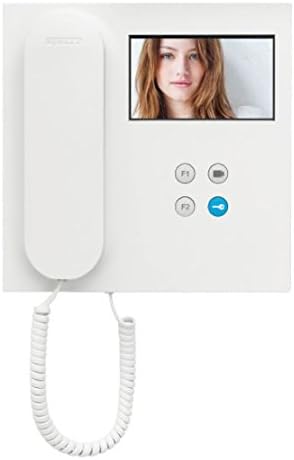
3.2-сүрөт: The Fermax VEO VDS 4.3 Monitor. This is the indoor unit featuring a 4.3-inch color display and control buttons for communication and door release.

3.3-сүрөт: The Fermax CITY VDS Outdoor Panel. This unit is installed at the entrance, featuring a camera, microphone, speaker, and call button for visitors.

3.4-сүрөт: The Fermax 4810 Power Supply. This component provides the necessary power to the entire video intercom system.
4. Орнотуу жана орнотуу
Installation of the Fermax VDS Color Video Intercom Kit requires careful attention to wiring and component placement. It is highly recommended that installation be carried out by a professional electrician.
4.1. Электр схемасы
Refer to the detailed wiring diagram provided in the separate installation guide for specific connections. The VDS system uses a simplified wiring scheme, typically requiring fewer wires compared to conventional systems.
4.2. Outdoor Panel Installation
- Choose a suitable location at your entrance, ensuring clear visibility for the camera and accessibility for visitors.
- Mount the integrated box (ref. 8948) securely into the wall.
- Connect the necessary VDS wires to the terminals on the 48505 CITY VDS plate.
- Secure the 48505 CITY VDS plate to the integrated box.
4.3. Үйдүн ичиндеги мониторду орнотуу
- Select a convenient indoor location for the 9401 VEO VDS 4.3 Monitor, typically near the main entrance or in a central area.
- Mount the 9402 VEO VDS Monitor Connector to the wall.
- Connect the VDS wires from the main system to the monitor connector.
- Attach the 9401 VEO VDS 4.3 Monitor to its connector.
4.4. Электр кубатын кошуу
- Install the 4810 Power Supply in a suitable electrical enclosure, typically on a DIN rail.
- Connect the main power input (230V AC) to the power supply.
- Connect the VDS system's power lines to the output terminals of the power supply.
- Электр кубатын калыбына келтирүүдөн мурун бардык туташууларды текшериңиз.
5. Иштөө нускамалары
Once installed and powered, the Fermax VDS Color Video Intercom Kit is ready for use.
5.1. Чакырууну кабыл алуу
- Конок тышкы панелдеги чакыруу баскычын басканда, ички монитор шыңгырап, зыяратчынын сүрөтүн көрсөтөт.
- To answer the call, lift the handset or press the talk button on the monitor.
- To end the call, replace the handset or press the talk button again.
5.2. Эшикти ачуу
During a conversation, press the door release button (often marked with a key icon) on the indoor monitor to unlock the entrance door.
5.3. Monitor Functions
- Өзүн-өзү активдештирүү: Some models allow manual activation of the outdoor panel camera to view the entrance area without a call. Refer to your monitor's specific controls.
- Intercommunication: If multiple monitors are installed, intercommunication between them may be possible. Consult the monitor's specific manual for details.
6. Техникалык тейлөө
Видеодомофон системаңыздын узак мөөнөттүү иштешин жана оптималдуу иштешин үзгүлтүксүз техникалык тейлөө камсыз кылат.
- Тазалоо: Clean the outdoor panel camera lens and the indoor monitor screen periodically with a soft, damp кездеме. Катуу химиялык заттардан алыс болуңуз.
- Текшерүү: Periodically check all visible wiring and connections for signs of wear or damage.
- Курчап турган чөйрөнү коргоо: Ensure the outdoor panel remains protected from direct water spray and extreme weather conditions.
7. Кыйынчылыктарды
If you encounter issues with your Fermax VDS Color Video Intercom Kit, refer to the following common problems and solutions:
| Көйгөй | Мүмкүн себеп | Чечим |
|---|---|---|
| Монитордо сүрөт жок | No power to the system; faulty wiring; camera issue. | Check power supply (4810) and connections. Verify camera wiring. |
| No sound during call | Microphone/speaker faulty; wiring issue. | Check audio connections between outdoor panel and monitor. |
| Эшик иштебей жатат | Faulty door lock mechanism; wiring to lock; monitor button issue. | Inspect door lock and its wiring. Test the door release button. |
| Monitor not ringing | Ringer volume off; faulty call button on outdoor panel; wiring issue. | Check monitor settings. Test outdoor call button. Verify wiring. |
Бул чечимдерге аракет кылгандан кийин көйгөйлөр чечилбесе, квалификациялуу техникалык колдоо бөлүмүнө кайрылыңыз.
8. Техникалык шарттар
Technical specifications for the Fermax VDS Color Video Intercom Kit Veo (Model FER9411):
- Бренд: FERMAX
- Модел: FER9411
- Бөлүмдүн номери: FER9411
- Дисплей өлчөмү: 4.3 Inches (Monitor)
- Электр камсыздоо: 18Vcc/1.5A - 12Vca/1.5A (Model 4810)
- Outdoor Panel Dimensions (S1): 130x128 мм
- Integrated Box Dimensions: 115x114x45 мм
- Бирдиктердин саны: 1 (for single-line system)
- Батареялар талап кылынат: Жок
- Пакет Салмагы: Болжол менен 2.34 кг
- Пакеттин өлчөмдөрү: 24 x 23.6 x 12.8 см
9. Кепилдик жана колдоо
For warranty information and technical support, please refer to the documentation provided with your purchase or visit the official Fermax webсайт. Кепилдик дооматтар үчүн сатып алганыңыздын далилин сактаңыз.
Өндүрүүчү: Fermax
Кардарларды колдоо: Please contact your local distributor or the Fermax customer service for assistance with product issues or technical inquiries.


