Introduction
The J5create JCC157 USB-C to HDMI 2.1 8K Cable is designed to provide high-quality video and audio transmission from your USB-C enabled device to an HDMI display. Supporting resolutions up to 8K, this cable is ideal for gaming, professional presentations, and high-definition media consumption. It features a unique RGB indicator light, enhancing your setup's aesthetics and providing visual feedback.

1-сүрөт: The J5create JCC157 USB-C to HDMI 2.1 8K Cable, showcasing its sleek design and RGB indicator.
Өзгөчөлүктөрү
- 8K резолюцияны колдоо: Experience stunning visuals with support for resolutions up to 8K, ensuring crisp and clear images.
- USB-C to HDMI 2.1: Connects modern USB-C devices to HDMI 2.1 compatible displays for high-bandwidth video and audio.
- Кеңири шайкештик: Fully compatible with Windows, MacOS, and Chrome OS operating systems.
- RGB индикатор жарыгы: Features an integrated RGB light, providing visual flair and status indication, especially suited for gaming setups.
- Plug and Play: No drivers required for most operating systems, allowing for easy setup and immediate use.
- Ар тараптуу дисплей режимдери: Supports both Extended and Mirror display modes for various productivity and entertainment needs.

2-сүрөт: The RGB indicator light on the JCC157 cable, capable of displaying various colors.
Орнотуу нускамалары
- USB-C учун туташтырыңыз: Insert the USB-C connector of the JCC157 cable into a compatible USB-C port on your source device (e.g., laptop, computer). Ensure the port supports video output (DisplayPort Alternate Mode).
- HDMI учун туташтырыңыз: Insert the HDMI connector of the JCC157 cable into an available HDMI input port on your display device (e.g., monitor, TV, projector).
- Түзмөктөрдү күйгүзүү: Булак түзмөгүңүз жана дисплей түзмөгүңүз күйгүзүлгөнүн текшериңиз.
- Киргизүүнү тандоо: On your display device, select the correct HDMI input source that the cable is connected to.
- Байланышты текшерүү: The RGB indicator light on the cable will illuminate, indicating a successful connection and active signal. Your display should show the output from your source device.

3-сүрөт: Жакын план view of the JCC157 cable's connectors and the illuminated RGB indicator, demonstrating a ready state.
Иштөө нускамалары
Once connected, your operating system will typically detect the external display automatically. You can configure the display settings to suit your needs.
- Кеңейтилген режим: This mode allows you to extend your desktop across multiple screens, providing more workspace. To enable, go to your operating system's display settings and select "Extend these displays."
- Mirror Mode (Duplicate Mode): This mode duplicates your primary display onto the external monitor, showing the same content on both screens. To enable, go to your operating system's display settings and select "Duplicate these displays."

4-сүрөт: Visual representation of Extended Mode (left) and Mirror Mode (right) display configurations, illustrating how the JCC157 cable facilitates both.
The RGB indicator light will remain illuminated when a signal is active. Its color may vary based on the device's status or specific J5create software settings, if applicable.
Техникалык тейлөө
To ensure the longevity and optimal performance of your J5create JCC157 cable, follow these maintenance guidelines:
- Этияттык менен мамиле кылуу: Avoid bending the cable sharply or pulling it by the cord. Always grasp the connector ends when plugging or unplugging.
- Тазалыкты сактоо: Кабель менен туташтыргычтарды жумшак, кургак чүпүрөк менен акырын сүртүңүз. Суюк тазалоочу каражаттарды же абразивдүү материалдарды колдонбоңуз.
- Туура сактоо: Колдонулбай турганда, кабелди бош ороп, салкын, кургак жерде, күн нуру түз тийбеген жана өтө жогорку температурадан алыс сактаңыз.
- Нымдуулуктан качыңыз: Do not expose the cable to water or high humidity, as this can damage the internal components.
Проблемаларды чечүү
| Көйгөй | Мүмкүн себеп | Чечим |
|---|---|---|
| Монитордо дисплей жок. |
|
|
| Төмөн чечилиш же дисплейдин жымыңдашы. |
|
|
| RGB indicator not lighting up. |
|
|
Техникалык шарттар
| Өзгөчөлүк | Деталь |
|---|---|
| Модель номери | JCC157-1N |
| Туташтыргыч түрү | USB-C Male to HDMI 2.1 Male |
| Max Resolution Support | Up to 8K (7680x4320) |
| Кабелдин узундугу | 1.8 метр (6 фут) |
| Шайкеш операциялык системалар | Windows, MacOS, Chrome OS |
| Өзгөчөлүктөр | RGB көрсөткүч жарыгы |
| Шайкеш түзмөктөр | Computer, Laptop |
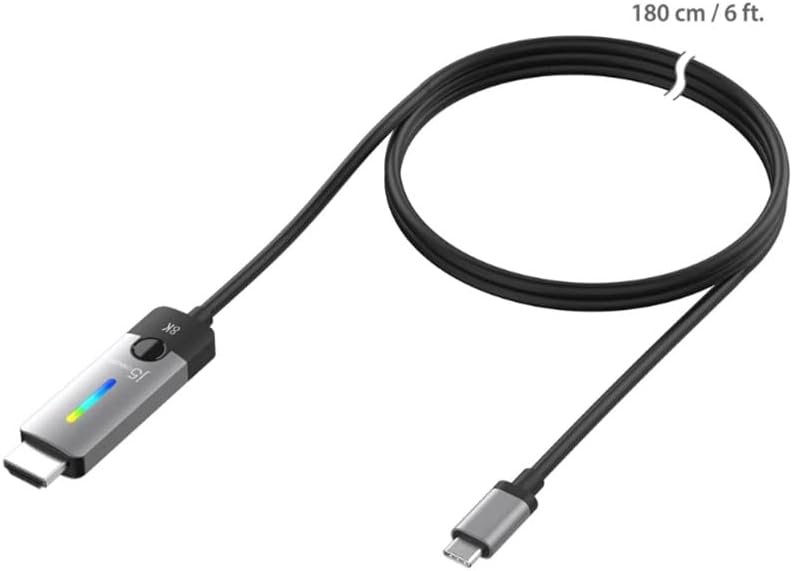
5-сүрөт: The JCC157 cable, illustrating its 180 cm (6 ft) length.
Кепилдик жана колдоо
For warranty information and technical support, please refer to the documentation included with your purchase or visit the official j5create webсайт. Кепилдиктин шарттары аймакка жана сатуучуга жараша өзгөрүшү мүмкүн.
Өндүрүүчү: J5CREATE


