1. Киришүү
This manual provides essential instructions for the safe and effective operation of your HIKMICRO B01S Thermal Camera. Please read this manual thoroughly before using the device and retain it for future reference. The HIKMICRO B01S is a handheld thermal imaging camera designed for various applications, including home inspection, electrical maintenance, and mechanical fault detection.
2. Коопсуздук маалыматы
Жабдууга зыян келтирбөө жана жаракат алуунун алдын алуу үчүн төмөнкү коопсуздук чараларын сактаңыз:
- Do not point the camera directly at intense heat sources such as the sun or lasers, as this may damage the thermal sensor.
- Аппаратты кургак кармаңыз. Аны жамгырга же нымга тийгизбеңиз.
- Operate the camera within the specified temperature and humidity ranges.
- Use only the charger and accessories provided or approved by HIKMICRO.
- Түзмөктү бөлүктөргө бөлүүгө же өзгөртүүгө аракет кылбаңыз. Оңдоо иштерин ыйгарым укуктуу кызматкерлер гана жүргүзүшү керек.
- Баштапкы колдонуудан мурун батареянын толук заряддалганын текшериңиз.
3. Орнотуу
3.1 Пакеттин мазмуну
Пакетиңизде бардык буюмдар бар экенин текшериңиз:
- HIKMICRO B01S Thermal Camera
- 2-in-1 USB C to USB A and USB C Cable
- Carrying Case with Shoulder Strap
- Билек боо
- User Manual
- Калибрлөө картасы

Figure 3.1: Included items in the HIKMICRO B01S Thermal Camera package.
3.2 Түзмөк бүттүview
Familiarize yourself with the physical components of the HIKMICRO B01S Thermal Camera.

Сүрөт 3.2: Алдыңкы view of the HIKMICRO B01S Thermal Camera and included accessories.

Figure 3.3: The 3.2-inch LCD screen provides a clear display for thermal imaging.
3.3 Initial Power-Up and Charging
- Батареяны заряддоо: Connect the camera to a power source using the provided USB-C cable. The charging indicator will illuminate. A full charge supports approximately 6 hours of continuous operation.
- Күйгүзүү/өчүрүү: Press and hold the power button until the screen illuminates to power on. Repeat the action to power off.
- Билек боонун тиркемеси: Attach the wrist strap to the designated loop on the camera for secure handling.
- Tripod орнотуу: The camera features a standard tripod mount for stable, scheduled captures. This is useful for monitoring temperature changes over time in a fixed location.

Figure 3.4: The camera can be mounted on a tripod for stable, continuous monitoring.
4. Иштөө нускамалары
4.1 Негизги термикалык сүрөт
The HIKMICRO B01S provides clear thermal imagery with a 25Hz refresh rate for smooth viewing.
- Viewing Live Image: Once powered on, the camera displays a live thermal image on the 3.2-inch LCD screen.
- Сүрөттөрдү тартуу: Press the capture button to save a thermal image to the internal 16GB eMMC flash storage, which can hold over 90,000 images.
- Түс палитралары: The camera supports 6 color palettes to visualize temperature differences. Cycle through these palettes using the dedicated button to find the most suitable display for your inspection.

Figure 4.1: Multiple color palettes are available for different viewing preferences and analysis.
4.2 Температураны өлчөө
The B01S offers precise temperature measurement capabilities:
- Measurement Presets: Utilize automatic Center Spot, Hot Spot, and Cold Spot tracking to quickly identify temperature extremes. Three user-defined spots can also be set for specific areas of interest.
- Температура диапазону: The camera measures temperatures from -20°C to 550°C (-4°F to 1022°F).
- Жөнгө салынуучу Орнотуулар: For improved accuracy, adjust emissivity settings based on the material being inspected and input the distance to the object.
- Жогорку/Төмөн Температура Ойготкуч: Configure the camera to trigger an audio alarm and warning light when temperatures exceed or fall below preset thresholds.
- Level and Span Selection: Switch between automatic and manual level and span adjustments to precisely highlight specific temperature ranges.

Figure 4.2: Instant temperature display with automatic and user-defined spot measurements.

Figure 4.3: High/Low temperature alarm indicators on the display.

Figure 4.4: Adjustable settings for emissivity and temperature range to enhance measurement accuracy.

Figure 4.5: Manual level and span selection for precise temperature visualization.
4.3 Өркүндөтүлгөн функциялар
- SuperIR Image Enhancement: The B01S utilizes HIKMICRO's SuperIR technology to upscale thermal images from 256x192 pixels to 640x480 pixels, providing enhanced detail for analysis.
- SuperScene Detection: This feature, powered by deep learning, automatically detects potential moisture leaks and insulation defects, simplifying inspections.
- Pro Scene Color Alarm: For advanced diagnostics, the Pro Scene Color Alarm provides customized data-driven alerts for thermal anomalies, such as condensation or insulation issues.
- Image Transfer & Auto-Update: Wirelessly transfer images and reports to mobile devices using the HIKMICRO Viewer app (available on Google Play and Apple App Store). The app also facilitates seamless firmware updates.
- Image Analysis & Instant Projection: Use the HIKMICRO Analyzer PC software for comprehensive image analysis, screen projection, real-time monitoring, and 3D plotting.

Figure 4.6: SuperIR technology enhances thermal image resolution for greater detail.

Figure 4.7: SuperScene detection highlights potential water leaks and insulation voids.

Figure 4.8: Pro Scene Color Alarm identifies specific thermal anomalies like condensation.

Figure 4.9: Wireless image transfer and auto-update functionality via the HIKMICRO Viewer колдонмо.
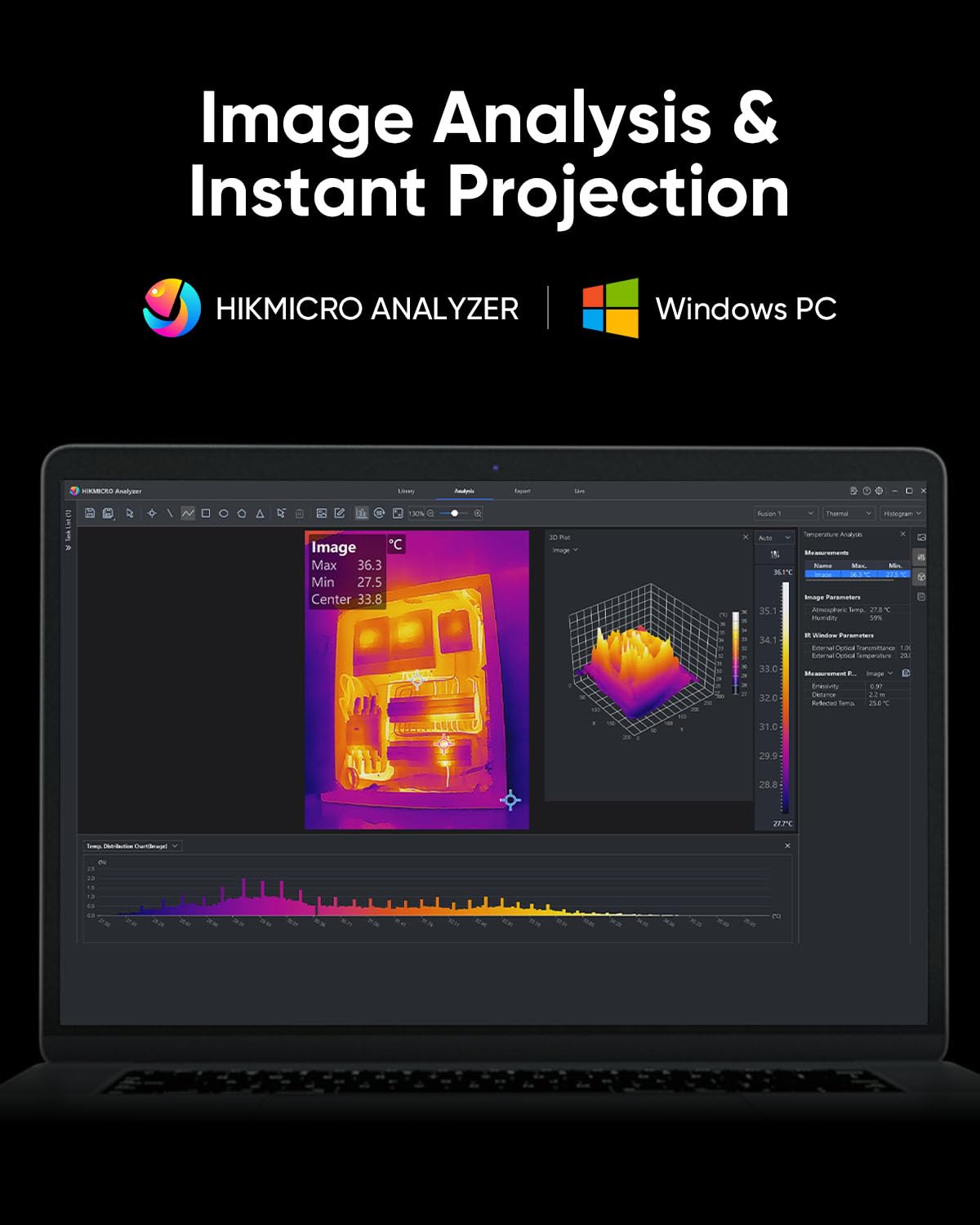
Figure 4.10: HIKMICRO Analyzer PC software for detailed image analysis and projection.
5. Техникалык тейлөө
5.1 Тазалоо
- Камеранын корпусун тазалоо үчүн жумшак, кургак чүпүрөктү колдонуңуз.
- Линза үчүн, чийилип калбашы үчүн, линзаны тазалоочу атайын чүпүрөктү жана эритмени колдонуңуз.
- Абразивдүү тазалагычтарды же эриткичтерди колдонбоңуз.
5.2 Сактоо
- Store the camera in its protective carrying case when not in use.
- Аппаратты салкын, кургак жерде, тике күндүн нурунан жана экстремалдык температурадан алыс сактаңыз.
- If storing for extended periods, ensure the battery is partially charged (around 50%) and recharge it every few months to maintain battery health.
5.3 Узактыгы
The HIKMICRO B01S is designed for durability, featuring an IP54 rating for dust and water resistance and a 2-meter (6.6 ft) drop resistance.

Figure 5.1: The B01S is built to be durable with IP54 protection and 6.6 ft drop resistance.
6. Кыйынчылыктарды
If you encounter issues with your HIKMICRO B01S, refer to the following common problems and solutions:
| Көйгөй | Мүмкүн себеп | Чечим |
|---|---|---|
| Түзмөк күйбөйт | Батареянын аздыгы; Кубат баскычы туура басылган жок | Charge the battery; Press and hold the power button firmly for a few seconds |
| Fuzzy or unclear image | Lens is dirty; Incorrect focus (if applicable); Extreme temperature difference | Clean the lens; Adjust focus (if manual focus is available); Allow camera to acclimate to environment |
| Температураны туура эмес көрсөткүчтөр | Incorrect emissivity setting; Incorrect distance setting; Object outside temperature range | Adjust emissivity for the material; Input correct distance; Ensure object temperature is within camera's range |
| Cannot connect to app/PC software | Wi-Fi/USB connection issue; Outdated app/software; Firewall blocking connection | Ensure Wi-Fi is enabled on camera and device; Check USB cable connection; Update app/software; Temporarily disable firewall |
| Батареянын иштөө мөөнөтү кыска | Battery degradation; Frequent use of power-intensive features | Contact support for battery replacement; Reduce screen brightness or turn off Wi-Fi when not needed |
7. Техникалык шарттар
| Өзгөчөлүк | Спецификация |
|---|---|
| IR токтому | 256 x 192 (49,152 XNUMX пиксель) |
| SuperIR Resolution | 640 x 480 (307,200 XNUMX пиксель) |
| Жылуулук сезгичтиги (NETD) | < 40мК |
| Температура диапазону | -20°Cден 550°Cге чейин (-4°Fтен 1022°Fге чейин) |
| Температуранын тактыгы | ±2°C же ±2% (кайсынысы чоңураак болсо) |
| Жаңыртуу ылдамдыгы | 25Hz |
| Экранды көрсөтүү | 3.2" LCD, 640 x 480 resolution |
| Сактагыч | 16GB eMMC (stores >90,000 images) |
| Байланыш | Wi-Fi, USB-C |
| Батарея түрү | 1 литий-иондук батарейка (кошулган) |
| Батареянын иштөө мөөнөтү | Approx. 6 hours continuous operation |
| IP рейтинги | IP54 |
| Drop Resistance | 2 метр (6.6 фут) |
| Өлчөмдөрү (посылка) | 31.2 x 21.1 x 11.8 см |
| Салмагы (посылка) | 1.08 кг |
| Модель номери | HM-TP52+-3AQF/W-B01S |
| Өндүрүүчү | HIKMICRO |
| Келип чыккан өлкө | Кытай |
8. Кепилдик жана колдоо
HIKMICRO products are covered by a limited warranty. Please refer to the warranty card included in your package for specific terms and conditions. For technical support, service, or warranty claims, please contact HIKMICRO customer service through their official website or the contact information provided on your calibration card.


