1. Киришүү
Thank you for choosing the Nulea M504 Wired Vertical Mouse. This manual provides detailed instructions on how to set up, operate, and maintain your new ergonomic mouse. Designed with a 57-degree natural grip, the M504 aims to reduce arm discomfort and wrist pain, offering a more comfortable computing experience. Please read this manual thoroughly before using the product to ensure optimal performance and longevity.

Figure 1: Nulea M504 Wired Vertical Mouse. This image shows the overall design of the mouse, highlighting its vertical orientation and vibrant RGB lighting along the base.
2. Коопсуздук маалыматы
To ensure safe and proper operation of your Nulea M504 mouse, please observe the following safety guidelines:
- Чычканды сууга же ашыкча нымдуулукка дуушар кылбаңыз.
- Чычканды түшүрүүдөн же катуу соккулардан сактаныңыз.
- Do not attempt to disassemble or repair the mouse yourself. Refer all servicing to qualified personnel.
- Keep the mouse away from extreme temperatures and direct sunlight.
- Use the mouse on a clean, flat surface for optimal performance.
3. Орнотуу
The Nulea M504 is a plug-and-play wired mouse, requiring no additional drivers for most operating systems. Follow these simple steps to set up your mouse:
- Locate an available USB port on your computer (desktop, laptop, or Mac).
- Insert the USB 2.0 connector of the Nulea M504 mouse into the USB port.
- Your operating system will automatically detect and install the necessary drivers. This process usually takes a few seconds.
- Орнотулгандан кийин, чычкан колдонууга даяр.

Figure 2: Connecting the Nulea M504 mouse. This image illustrates the mouse connected to a laptop, demonstrating its plug-and-play simplicity.
4. Иштөө нускамалары
4.1 Баскыч функциялары
The Nulea M504 mouse features several buttons designed for intuitive control and enhanced productivity. Refer to the diagram below for button identification:

Figure 3: Nulea M504 Button Layout. This diagram labels the Left Button, Right Button, DPI Button, Backlit Button, Forward Button, Backward Button, and the 1.8m USB Cable.
- Сол баскыч: Стандарттык сол чыкылдатуу функциясы.
- Оң баскыч: Стандарттык оң баскычты чыкылдатуу функциясы.
- Жылдыруу дөңгөлөгү: Used for scrolling up and down documents or web pages. The metal non-slip scroll wheel offers durable quality.
- DPI баскычы: Чычкандын сезгичтигин (DPI) тууралайт.
- Арткы жарык баскычы: Controls the RGB lighting modes.
- Алга баскычы: Алга карай жылдырат web браузерлер же file изилдөөчүлөр. Note: Not compatible with MAC OS.
- Артка баскычы: Артка карай багыт алат web браузерлер же file изилдөөчүлөр. Note: Not compatible with MAC OS.
Important Note: All buttons on the Nulea M504 mouse are non-programmable.
4.2 DPIди (сезгичтикти) жөндөө
The Nulea M504 offers 4 adjustable DPI levels, allowing you to customize the mouse's responsiveness to suit your tasks, whether it's precise graphic design or fast-paced browsing.
- басыңыз DPI баскычы (айлантуу дөңгөлөгүнүн жанында жайгашкан) жеткиликтүү DPI жөндөөлөрүн карап чыгуу үчүн.
- The DPI levels are: 800, 1200, 2400, and 3200.
- Each press will switch to the next DPI level, indicated by a change in cursor speed.

Figure 4: DPI Adjustment. This image illustrates the four adjustable DPI levels (800, 1200, 2400, 3200) available on the Nulea M504 mouse, allowing users to customize sensitivity.
4.3 RGB жарык режимдери
Enhance your workspace with the Nulea M504's 11 vibrant RGB backlight modes. You can easily switch between different lighting effects to match your mood or setup.
- басыңыз Арткы жарык баскычы (located on the top of the mouse, near the left click button) to cycle through the 11 different RGB lighting modes.
- Continue pressing the button until you find your preferred lighting effect.

Figure 5: RGB Underglow. This image showcases the Nulea M504 mouse with its colorful RGB underglow, illustrating the aesthetic customization options.
4.4 Ergonomic Design and Usage
The Nulea M504 is designed with a 57-degree natural grip angle to promote a more natural hand position, reducing wrist strain and muscle fatigue during extended use. It may take a few days to adapt to the vertical design if you are accustomed to traditional mice.
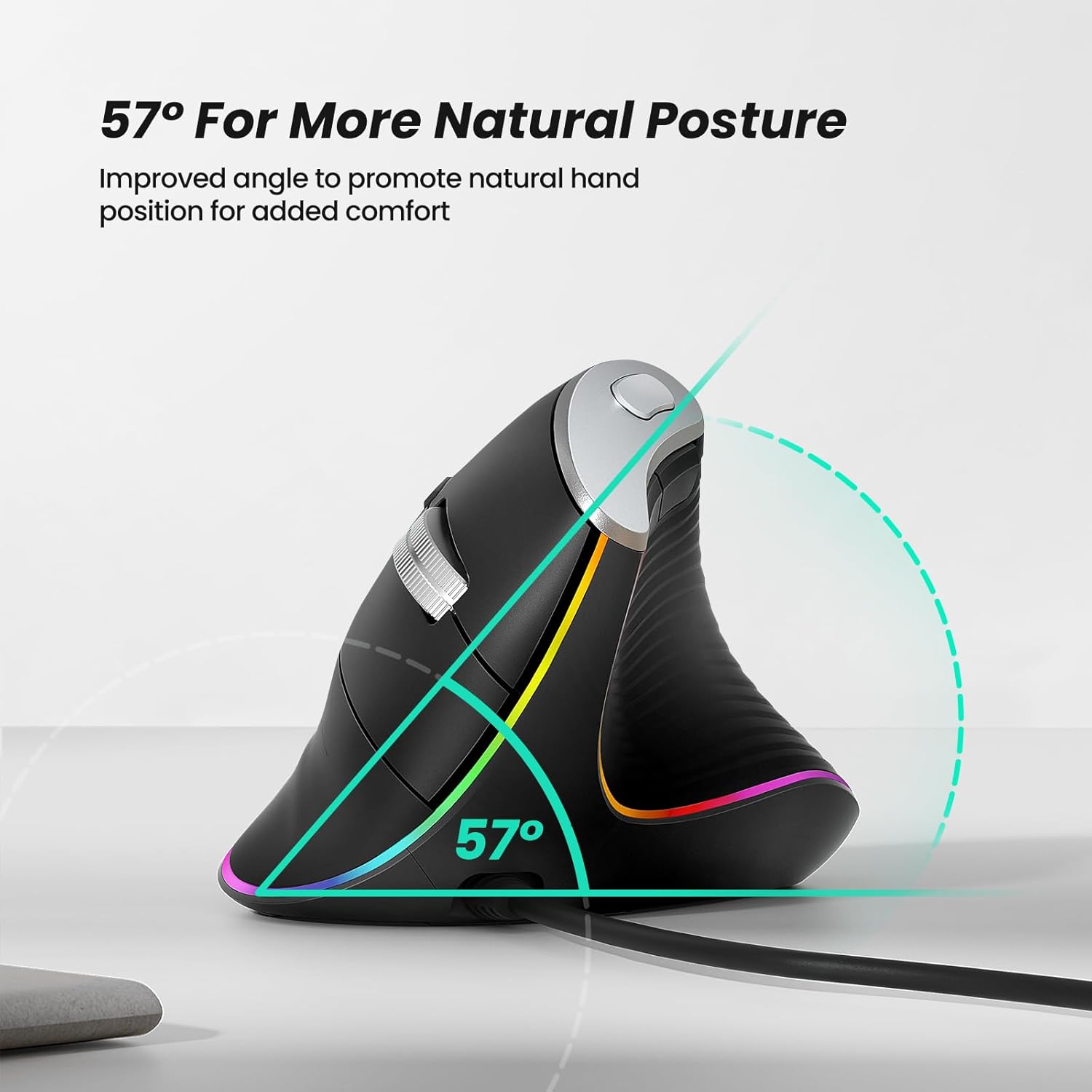
Figure 6: 57° Natural Posture. This diagram highlights the 57-degree angle of the mouse, designed to promote a more natural and comfortable hand position, reducing strain.

Figure 7: Palm Size Recommendation. This chart provides a reference for hand length and palm width, suggesting recommended mouse sizes (S-M) for optimal ergonomic fit.
5. Техникалык тейлөө
To ensure the longevity and optimal performance of your Nulea M504 mouse, follow these simple maintenance tips:
- Тазалоо: Чычкандын бетин сүртүү үчүн жумшак, кургак чүпүрөктү колдонуңуз. өжөр кир үчүн, бир аз гampчүпүрөктү суу же жумшак тазалоо эритмеси менен жууп салыңыз. Катуу химиялык заттарды же абразивдүү материалдарды колдонуудан алыс болуңуз.
- Сенсорго кам көрүү: Periodically clean the optical sensor on the bottom of the mouse with a cotton swab to ensure accurate tracking.
- Кабелдик башкаруу: Зыяндын алдын алуу үчүн USB кабелин курч ийилүүдөн же ашыкча тартуудан алыс болуңуз.
- Сактагыч: When not in use for extended periods, store the mouse in a clean, dry environment away from direct sunlight.
6. Кыйынчылыктарды
If you encounter any issues with your Nulea M504 mouse, please refer to the following common troubleshooting steps:
| Көйгөй | Мүмкүн себеп | Чечим |
|---|---|---|
| Чычкан жооп бербей жатат | USB туташуусу бошоп калган; USB порту иштебей калган; Драйвер көйгөйү. | USB кабелинин бекем сайылганын текшериңиз. Башка USB портун колдонуп көрүңүз. Компьютериңизди өчүрүп-күйгүзүңүз. |
| Курсордун кыймылы туруксуз же секирик | Dirty optical sensor; Unsuitable surface. | Clean the optical sensor on the bottom of the mouse. Use the mouse on a clean, non-reflective mouse pad or surface. |
| DPI жөндөө иштебей жатат | DPI баскычынын иштебей калышы. | Ensure you are pressing the correct button. If the issue persists, contact customer support. |
| Forward/Backward buttons not working on Mac | macOS менен шайкеш келбестик. | This is a known limitation. These buttons are not compatible with MAC OS. |
If the problem persists after trying these solutions, please contact Nulea customer support for further assistance.
7. Техникалык шарттар
Below are the technical specifications for the Nulea M504 Wired Vertical Mouse:
- Бренд: Nulea
- Модел: M504
- Түсү: B-Black
- Байланыш технологиясы: Wired (USB 2.0)
- Кабелдин узундугу: 1.8 метр
- Кыймылды аныктоо технологиясы: Оптикалык
- DPI деңгээли: 800, 1200, 2400, 3200 (Жөнгө салынуучу)
- Өзгөчөлүктөр: Ergonomic Design (57° vertical angle), 11 RGB Backlight Modes, Lightweight
- Шайкештик: Laptop, PC, Desktop (Windows, Linux); Note: Forward/Backward buttons not compatible with MAC OS.
8. Кепилдик жана колдоо
For warranty information and customer support, please refer to the documentation included with your purchase or visit the official Nulea webсайт. Сиз да зыярат кылсаңыз болот Амазонкадагы Nulea дүкөнү көбүрөөк продукт чоо-жайы жана колдоо параметрлери үчүн.
Nulea is committed to providing high-quality products and excellent customer service. If you have any questions or require assistance, please do not hesitate to reach out to their support team.


