Povanje safe fireproof waterproof 60EE

Povanje 5.0 Cuft өрткө каршы коопсуз колдонуучу колдонмосу

Model: safe fireproof waterproof 60EE

Introduction

This user manual provides essential information for the safe and effective operation of your Povanje 5.0 Cuft Fireproof Safe. Please read this manual thoroughly before setup and use, and retain it for future reference.

Коопсуздук маалыматы

Пакеттин мазмуну

Пакетиңизде бардык буюмдар бар экенин текшериңиз:

Image showing the safe's accessories including keys, manual, mounting screws, fireproof bag, lock cover, and mat.

Figure 1: Included Accessories. This image displays the various components that come with your safe, such as the backup keys, user manual, mounting screws, a fireproof and waterproof document bag, a protective cover for the lock, and a mat for the interior.

Жайгашуу

1. Батареяны орнотуу

The digital keypad requires 4 AA batteries (not included). The external battery installation design allows for easy replacement.

  1. Locate the battery compartment on the keypad unit.
  2. Бөлүмдүн капкагын ачыңыз.
  3. Туура полярдуулукту (+/-) камсыз кылуу менен 4 AA батарейкасын салыңыз.
  4. Бөлүмдүн капкагын бекем жабыңыз.
Image showing the external battery compartment of the safe's keypad.

Figure 2: External Battery Compartment. This image illustrates the external battery compartment on the safe's keypad, designed for convenient battery replacement without needing to open the safe.

2. Setting Your Passcode

Your safe comes with a default factory code of "1234#". It is highly recommended to change this immediately.

  1. Open the safe using the default code or emergency key.
  2. Locate the red reset button inside the door, near the hinge.
  3. Press the red reset button. The keypad display will show "SET".
  4. Enter your desired 1-8 digit personal password on the keypad.
  5. Press the "#" key to confirm. The display will show "DONE".
  6. To set a master password (optional): Enter "100" then press the setting button inside the door. Enter the 1-8 digit master password and press "#" to confirm.
Diagram showing steps to set personal and master passcodes for the safe.

Figure 3: Setting Passcode. This diagram illustrates the process of setting both a personal and an optional master password for your safe's electronic keypad.

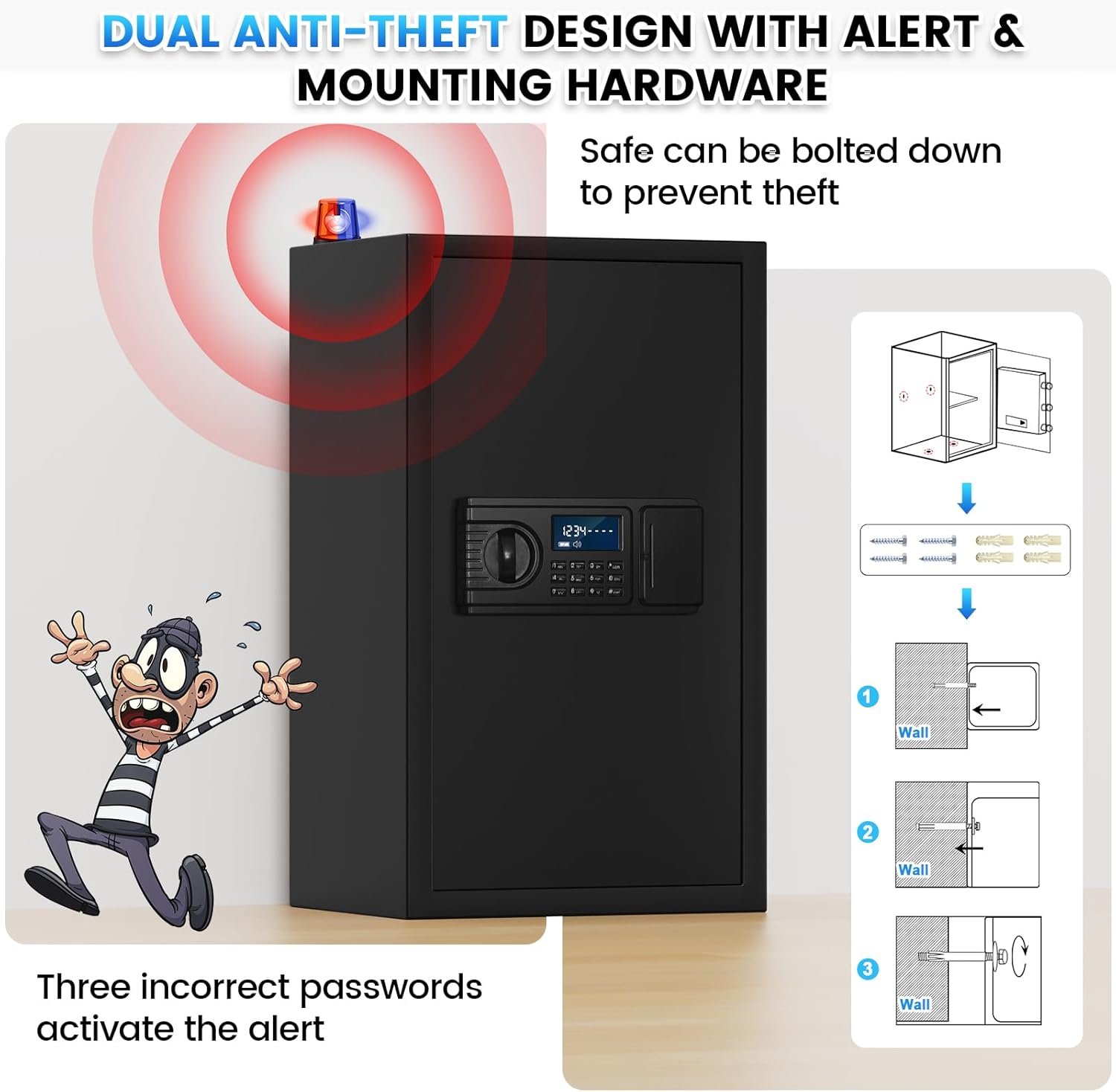
3. Сейфти орнотуу

The safe features pre-drilled holes in the back and bottom for secure mounting to a wall or floor, preventing theft.

  1. Choose a suitable location for your safe.
  2. Mark the drilling points through the pre-drilled holes on the safe's back or bottom.
  3. Тиешелүү бургулоочу учту колдонуп, дубалга же полго тешиктерди бургулаңыз.
  4. Сейфти бургуланган тешиктер менен тегиздеңиз.
  5. Insert the provided mounting screws and anchors, and tighten them securely.
Image showing the safe with an anti-theft alert and a diagram for wall mounting.

Figure 4: Mounting Instructions. This image demonstrates the anti-theft alert system and provides a visual guide for securely mounting the safe to a wall using the pre-drilled holes and included hardware.

Сейфти иштетүү

1. Opening with Personal Code (Daily Use)

  1. Enter your 1-8 digit personal password on the keypad.
  2. Press the "#" key to confirm. The display will show "OPEN".
  3. Turn the knob clockwise to open the safe door.
Image showing two ways to unlock the safe: with emergency keys and with a personal code.

Figure 5: Two Unlock Ways. This image illustrates both the emergency key and personal code methods for opening the safe, highlighting the convenience of the digital keypad for daily use.

2. Opening with Emergency Keys

Use emergency keys if batteries are depleted or you forget your passcode.

  1. Locate the emergency keyhole, usually hidden behind a cover on the keypad unit.
  2. Шашылыш ачкычты салып, сааттын жебесине каршы буруңуз.
  3. Simultaneously turn the knob clockwise to open the safe door.

3. Hidden Code Mode

To prevent others from seeing your entered password, you can activate hidden code mode.

Image detailing the features of the safe's LCD keypad, including hidden password mode.

Figure 6: Keypad Features. This image highlights the large LCD screen, low battery reminder, hidden password function, and keyhole serial number for backup key replacement.

4. Anti-Theft Alert System

The safe is equipped with an anti-theft alarm system for enhanced security.

Video 1: LCD Digital Keypad Fireproof Safe Box Features. This video demonstrates various features of the safe, including the large interior, reinforced lock latches, thickened steel door, one-piece all-steel structure, anti-prying design, wall/floor mounting, large LCD screen, hidden password mode, smart anti-theft alert, and dual opening methods (backup keys and personal code).

Техникалык тейлөө

1. Батареяны алмаштыруу

When the LCD screen displays a low battery reminder, replace the batteries promptly to ensure continuous operation.

2. Тазалоо

Проблемаларды чечүү

КөйгөйМүмкүн себепЧечим
Safe does not open with passcode.Incorrect passcode entered; low batteries.Re-enter passcode carefully. Replace batteries. Use emergency key.
Ойготкуч бир нече аракеттен кийин угулат.Three incorrect passcode entries.The alarm will sound for 1 minute. Remove batteries to stop it immediately. Re-enter correct passcode or use emergency key.
LCD экраны күңүрт же бош.Төмөн же өлүп калган батарейкалар.Бардык 4 АА батарейканы алмаштырыңыз.
Cannot set new passcode.Туура эмес жол-жобо аткарылды.Review "Setting Your Passcode" section carefully and repeat steps. Ensure the reset button is pressed correctly.

Техникалык шарттар

Image showing the large spacious safe box with its dimensions and key features.

Figure 7: Safe Dimensions and Features. This image provides a visual representation of the safe's external dimensions and highlights key features such as the included fireproof bag, weight, video guide availability, and upgraded packaging.

Image comparing the safe's interior with and without removable shelves, showing various items stored.

Figure 8: Removable Shelf Configuration. This image demonstrates the versatility of the safe's interior, showing how items like cash, documents, jewelry, firearms, and passports can be organized with or without the removable shelves.

Кепилдик жана колдоо

Povanje offers comprehensive support for your safe:

Image showing customer support icons and service guarantees.

Figure 9: Customer Support and Guarantees. This image highlights Povanje's commitment to customer satisfaction, including quick response times, money-back guarantees, warranty coverage, and lifetime after-sales support.

Тектеш документтер - safe fireproof waterproof 60EE

Preview Сенсордук экрандын Safe Box Instruction Manual
Сенсордук экран сейф кутусу үчүн комплекстүү нускама колдонмосу, компоненттердин сүрөттөлүшүн, тетиктердин тизмесин, алгачкы колдонууну, батареяны кыстарууну, эшикти ачуу жана жабууну, кош сигнализация тутумун, колдонуучу жана администратордун коддорун, үндү өчүрүү режимин, заводдон баштапкы абалга келтирүүнү жана орнотуу нускамаларын камтыйт.
Preview Сейф кутучасынын колдонуу боюнча колдонмосу: Орнотуу, иштетүү жана орнотуу боюнча колдонмо
Сейф кутучаңызды иштетүү жана орнотуу боюнча кеңири нускама. Алгач ачуу, колдонуучу коддорун орнотуу, сигнализация жөндөөлөрү жана орнотуу процедуралары камтылган. Мүчүлүштүктөрдү оңдоо боюнча кеңештер жана байланыш маалыматы камтылган.
Preview Сейф кутусунун нускамасы - Иштетүү жана орнотуу боюнча колдонмо
Биринчи жолу ачуу, колдонуучунун кодун жөндөө, автоматтык кулпу өзгөчөлүктөрү, техникалык мүнөздөмөлөр жана монтаждоо нускамаларын камтыган Safe Box үчүн комплекстүү колдонмо. Бул үй сейфи менен баалуу нерселериңизди кантип сактоону үйрөнүңүз.
Preview Diosmio коопсуздук кулпусу үчүн сейф кутучасынын колдонуучу колдонмосу
Diosmio коопсуздук кулпусу үчүн сейф кутучасынын кеңири колдонуучу колдонмосу, анда электр мүнөздөмөлөрү, ар кандай моделдер жана өлчөмдөр, аксессуарлар, ачкыч жана сырсөзгө жетүү боюнча деталдуу колдонуу көрсөтмөлөрү, мүчүлүштүктөрдү оңдоо боюнча кеңештер жана көп берилүүчү суроолор камтылган.
Preview Security Lock Box (EE Series) нускамалары жана колдонуучу колдонмосу
Security Lock Box (EE Series) иштетүү жана камсыз кылуу боюнча комплекстүү нускамалар. Бул колдонмо биринчи жолу ачуу, мастер жана жеке коддорду орнотуу, өзгөчө кырдаалга кирүү мүмкүнчүлүгү, бузулууларды жоюу эскертмелери, дубалды жана полду бекитүү ыкмаларын жана таңгактоо аксессуарларынын тизмесин камтыйт.
Preview WASJOYE Safe: Колдонуучунун колдонмосу жана орнотуу колдонмосу
WASJOYE сейфтери үчүн комплекстүү колдонмо, продукт өзгөчөлүктөрүн, иштешин, коопсуздук орнотууларын, көйгөйлөрдү чечүү жана орнотуу ыкмаларын камтыйт. бир нече тилде нускамаларды камтыйт.