Introduction
Thank you for choosing the pTron Bassbuds Senz Open Ear Wireless Earbuds. These earbuds are designed to provide a comfortable and pressure-free listening experience while keeping you aware of your surroundings. Featuring 13mm dynamic drivers, dual HD microphones with AI-ENC for clear calls, Bluetooth v6.0 connectivity, and IPX5 water resistance, the Bassbuds Senz are ideal for various activities. This manual provides detailed instructions for setup, operation, maintenance, and troubleshooting to ensure optimal performance.
Кутуда эмне бар
- pTron Bassbuds Senz Wireless Earbuds
- Заряддоо кутусу
- USB Type-C кубаттоочу кабель
- User Manual
Продукт бүттүview
The pTron Bassbuds Senz feature an open-ear design for comfort and situational awareness, along with a compact charging case.

Image: pTron Bassbuds Senz Open Ear Wireless Earbuds and Charging Case. This image displays the two earbuds and their oval-shaped charging case.

Image: Key features of pTron Bassbuds Senz. This collage highlights SafeBeats Design, Dual HD Mics, 50 Hours Playtime, 13mm Dynamic Drivers, Bluetooth 6.0, LED Battery Indicator, Type-C Charging, and IPX5 Water & Sweat Resistant.

Image: Diagram showing the 13mm dynamic drivers of pTron Bassbuds Senz. This close-up view illustrates the internal components of the earbud's audio driver.

Image: User wearing pTron Bassbuds Senz, highlighting Dual HD Mics for clear calls. A person is shown wearing one earbud, emphasizing its ergonomic fit and microphone placement.

Image: Close-up of pTron Bassbuds Senz charging case with digital LED display and Type-C charging port. This image shows the charging case with its lid open, revealing the earbuds inside and the battery percentage дисплей.
Орнотуу нускамалары
1. Кулакчындарды жана кутуну кубаттоо
Before first use, fully charge the earbuds and charging case. Use the provided USB Type-C cable to connect the charging case to a power source.
- Кубаттоочу кутучадагы санариптик LED дисплей батареянын зарядынын пайызын көрсөтөтtage.
- The earbuds will charge automatically when placed inside the case.
- Толук кубаттоо адатта болжол менен 1.5-2 саатты талап кылат.
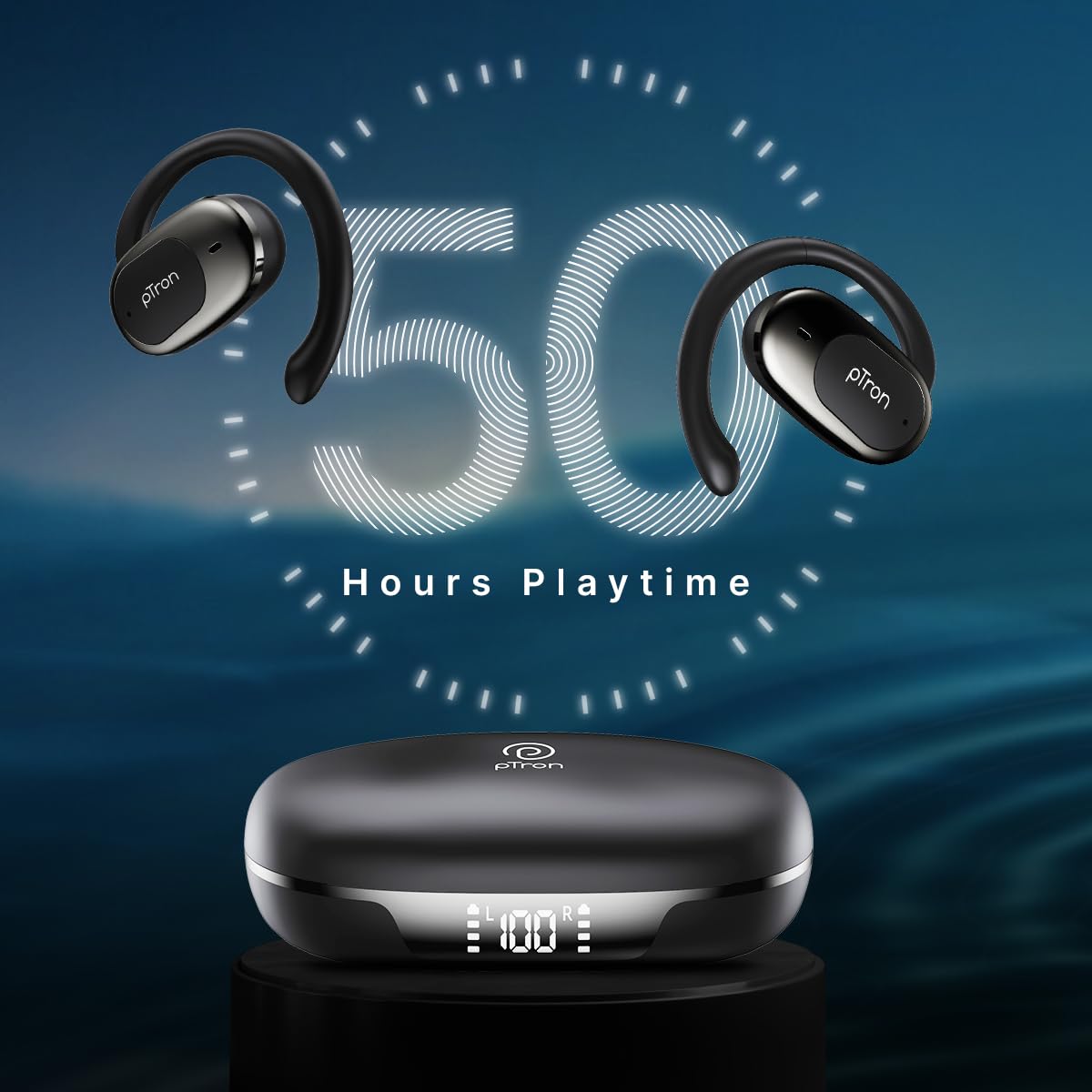
Image: pTron Bassbuds Senz earbuds and charging case, illustrating 50 hours combined playtime. This image visually represents the extended battery life of the product.
2. Bluetooth Жупташтыруу
- Күйгүзүү: Open the charging case. The earbuds will automatically power on and enter pairing mode. You may hear a voice prompt indicating they are ready to pair.
- Bluetooth иштетүү: On your smartphone or device, go to the Bluetooth settings and turn Bluetooth on.
- Түзмөктү тандоо: Look for "pTron OWS" (or similar name) in the list of available devices and select it to connect.
- Ырастоо: Туташкандан кийин, сиз ийгиликтүү жупташтырууну ырастаган үн сигналын угасыз.
- Автоматтык кайра туташуу: Баштапкы жупташтыруудан кийин, түзмөктө Bluetooth иштетилген болсо, кулакчындар кутудан чыгарылганда акыркы жупташтырылган түзмөккө автоматтык түрдө туташат.

Image: Smartphone screen showing Bluetooth pairing with pTron OWS, next to the earbuds and charging case. This image demonstrates the process of connecting the earbuds to a mobile device via Bluetooth.
Иштөө нускамалары
The pTron Bassbuds Senz feature touch controls for easy management of music and calls.
Touch Controls
| Функция | Акция |
|---|---|
| Күйгүзүү | Кубаттоочу кутучаны ачуу |
| Өчүрүү | Place earbuds back into charging case and close lid |
| Музыканы ойнотуу/тындыруу | Кулакчындарды бир жолу таптаңыз |
| Кийинки трек | Оң кулакчынды эки жолу таптаңыз |
| Мурунку трек | Сол кулакчынды эки жолу таптаңыз |
| Чалууга жооп берүү/аяктоо | Single tap on either earbud during an incoming call |
| Чакырууну четке кагуу | Long press on either earbud during an incoming call |
| Үн жардамчысын жандырыңыз | Кулакчындарды үч жолу таптаңыз |
| Үндү көтөрүү | Long press on the Right earbud |
| Үндү төмөндөтүү | Long press on the Left earbud |
Техникалык тейлөө
Тазалоо
- Кулакчындарды жана заряддоо кутусун жумшак, кургак, түксүз чүпүрөк менен дайыма тазалап туруңуз.
- Катуу химиялык заттарды, тазалоочу эриткичтерди же күчтүү жуучу каражаттарды колдонбоңуз.
- Кулакчындардагы жана кутудагы кубаттоо контакттары таза жана калдыктары жок экенин текшериңиз.
Сактагыч
- Кулакчындарды коргоо жана кубаттоо үчүн колдонулбаган учурда кубаттоо кутучасында сактаңыз.
- Өтө жогорку температурада (ысык же суук) же чаңдуу/нымдуу чөйрөдө сактоодон алыс болуңуз.
Батареяга кам көрүү
- Батареянын иштөө мөөнөтүн узартуу үчүн, кулакчындарды жана кубаттоочу кутучаны тез-тезден толугу менен зарядсыздандырбаңыз.
- Түзмөктү тез-тез колдонбосоңуз да, аны үзгүлтүксүз кубаттап туруңуз.

Image: User exercising with pTron Bassbuds Senz, demonstrating IPX5 water and sweat resistance. This image shows the earbuds being used during a workout, highlighting their durability against sweat and splashes.
Проблемаларды чечүү
If you encounter issues with your pTron Bassbuds Senz, refer to the following common solutions:
- Кулакчындар түзмөк менен жупташкан жок:
Ensure both earbuds are charged. Turn off Bluetooth on your device, then turn it back on. Forget "pTron OWS" from your device's Bluetooth list and try pairing again. Make sure the earbuds are in pairing mode (out of the case). - Бир гана кулакчын иштейт:
Place both earbuds back into the charging case, close the lid, wait a few seconds, then open the lid and take them out. This often resets the connection between the two earbuds. If the issue persists, try re-pairing them with your device. - Кулакчындар кубатталбай жатат:
Check if the charging cable is securely connected to both the case and the power source. Ensure the charging contacts on the earbuds and inside the case are clean and free of obstructions. Verify the charging case has sufficient battery. - Көлөмү төмөн же үн сапаты начар:
Adjust the volume on both your device and the earbuds. Ensure the earbuds are properly seated in your ears. Clean any debris from the earbud speakers. - Connectivity issues (disconnections):
Ensure your device is within the 10-meter Bluetooth range. Avoid obstacles between your device and the earbuds. Minimize interference from other wireless devices.
Техникалык шарттар
| Өзгөчөлүк | Деталь |
|---|---|
| Модель аты | Bassbuds Senz |
| Байланыш технологиясы | Зымсыз (Bluetooth v6.0) |
| Bluetooth диапазону | 10 метр |
| Аудио драйвер түрү | 13мм динамикалык драйвер |
| Battery Life (Combined) | 50 саатка чейин |
| Заряддоо порту | USB Type-C |
| Суу каршылык | IPX5 (Сууга туруктуу) |
| Микрофондор | Dual HD Mics with AI-ENC |
| Башкаруу ыкмасы | тийүү |
| Кулак жайгаштыруу | Ачык кулак |
| Материал | Акрилонитрил бутадиен стирол (ABS) |
| Элемент Салмагы | 67 грамм |
| Продукциянын өлчөмдөрү | 9.1 x 5.9 x 3.1 см |
Кепилдик жана колдоо
The pTron Bassbuds Senz comes with a 1-year manufacturer warranty from the date of purchase, covering manufacturing defects only.
Кардарларды колдоо
For any queries, support, or warranty claims, please contact pTron customer care:
- Телефон: 040-67138888
- Электрондук почта: support@ptron.in
- Өндүрүүчү: Palred Electronics Pvt. Ltd., SY.NO. 56, 1ST FLOOR, GUNDLAPOCHAMPALLY VILLAGE, TECH PARK MTP, TSIIC-IALA NACHARAM, HYDERABAD - 500076, TELANGANA, INDIA


